Audibloom
Audibloom is a web-based AI audiobook studio for turning manuscripts into full-cast audiobooks.
What Audibloom is
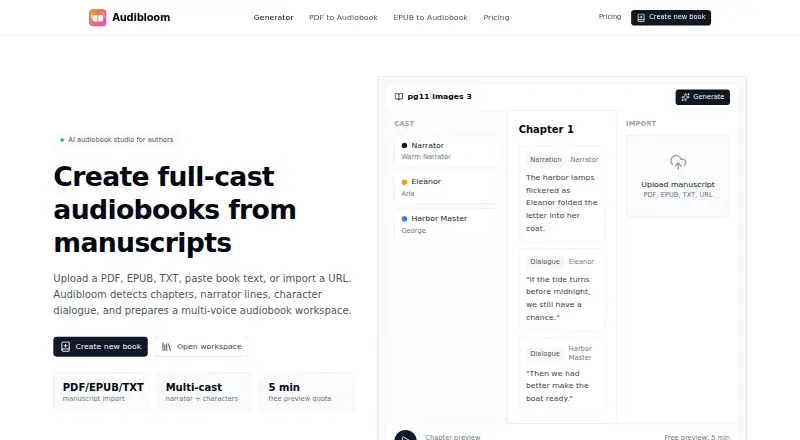
Audibloom is a web-based AI audiobook studio for turning manuscripts into full-cast audiobooks. You can upload PDF, EPUB, or TXT files, paste book text, or import a public URL. It identifies narrator and character dialogue and assigns distinct voices in a multi-voice workspace. Each chapter can be edited and rendered on its own. For PDFs, the parser removes repeated headers, footers, and page numbers, then restores paragraph flow across page breaks. Audibloom reads EPUB 2 and EPUB 3 structures while retaining the source chapter order and table of contents. Exports are currently chapter-level MP3 audio; chaptered M4B packaging is planned. The Free plan includes 5 minutes of generated audio per month and watermarked MP3 downloads. Audibloom is aimed at indie authors, KDP publishers, and small presses.
Good
- Accepts PDF, EPUB, TXT, and public URLs
- Assigns distinct voices to narrator and characters
- Chapters can be edited and rendered independently
- Paid plans include full commercial distribution rights
Watch out
- Free plan limits generated audio to 5 minutes monthly
- Free downloads are watermarked MP3s
- Exports are chapter-level MP3; M4B packaging is only planned
- Paid PDF uploads are limited to 100 MB
Who it suits
It suits indie authors, KDP publishers, and small presses making narrated editions from manuscripts. The chapter-level editing and rendering may suit projects that need separate chapter workflows.
Verdict
Audibloom focuses on manuscript-to-audiobook production, with chapter editing and multi-voice narration. Check the monthly audio limits and current MP3 export format against your project needs.
Plans and prices
From Audibloom's own pricing page, checked 2 Oct 2026.
| Plan | Price | What it gives you |
|---|---|---|
| Free | Free | 5 minutes/month · 6 starter voices · watermarked MP3 · PDF/EPUB/TXT upload · $0 forever |
| Creator | $15 a month | 2 hours/month · 20+ standard voices · no-watermark MP3 · multi-character narration · $15/ month |
| Per-book Pack | $29, paid once | Up to 12 hours/book · MP3 ZIP export · no subscription · no monthly cap · $29/ book |
| Author Pro | $39 a month | 10 hours/month · MP3 ZIP and WAV chapters · voice cloning · pronunciation dictionary · $39/ month |
| Studio | $99 a month | 30 hours/month · 3 cloned voices · 5 parallel books · priority render queue · $99/ month |
The facts
Each one read from Audibloom's own pages, with the date it was checked.
What it does
- Chapter editing
- Each chapter remains editable and renderable independently.checked 2 Oct 2026
- Character casting
- The system detects narrator and character dialogue and assigns distinct voices in a multi-voice workspace.checked 2 Oct 2026
- Commercial rights
- Paid plans provide full commercial distribution rights and let users keep 100% of royalties without revenue share.checked 2 Oct 2026
- Current export
- Audibloom currently exports chapter-level MP3 audio, while chaptered M4B packaging is planned.checked 2 Oct 2026
- EPUB processing
- Audibloom reads EPUB 2 and EPUB 3 structure and preserves the source book's chapter order and table of contents.checked 2 Oct 2026
- Input formats
- Users can upload PDF, EPUB, or TXT files, paste book text, or import a public URL.checked 2 Oct 2026
- Intended users
- Audibloom is built for indie authors, KDP publishers, and small presses.checked 2 Oct 2026
- PDF processing
- The PDF parser strips repeated headers, footers, and page numbers and restores paragraph flow across page breaks.checked 2 Oct 2026
- Support
- Author Pro includes standard email support, while Studio includes a dedicated Slack channel and weekly office hours.checked 2 Oct 2026
- Upload limit
- Paid plans support PDF uploads up to 100 MB.checked 2 Oct 2026
- What it does
- Audibloom is an AI audiobook studio that converts manuscripts into full-cast audiobooks.checked 2 Oct 2026
Money
- Free preview
- The Free plan provides 5 minutes of generated audio per month and watermarked MP3 downloads.checked 2 Oct 2026
The full review of Audibloom
Audibloom is a web app for authors who want to turn a manuscript into a multi-voice audiobook. Its chapter-by-chapter editing and flexible purchase options suit indie publishing workflows; the chief compromise is that current exports are chapter-level MP3s.
Overview
Authors can upload PDF, EPUB, or TXT files, paste text, or import a public URL. Audibloom detects narrator and character dialogue and assigns distinct voices, a practical advantage for dialogue-heavy books that need more than one reading voice. Chapters can be edited and rendered independently, so a revision can stay confined to the affected section.
Import processing is designed around book layouts. For PDFs, it removes repeated headers, footers, and page numbers and restores paragraph flow across page breaks. EPUB 2 and EPUB 3 imports preserve chapter order and the table of contents. Paid plans accept PDF uploads up to 100 MB.
Key features
Voice and chapter control
The multi-voice workspace makes Audibloom more suited to producing character-led books than a basic single-voice conversion tool. Free comes with six starter voices; Creator expands the selection to 20+ standard voices and includes multi-character narration. Author Pro adds voice cloning and a pronunciation dictionary; Studio includes three cloned voices.
Exports and rights
Current exports are MP3s organized by chapter. That works for creators who can use chapter files or package them separately, but anyone who needs a single chaptered M4B file will need another workflow: M4B packaging is planned, not currently available. Author Pro adds WAV chapters, and Per-book Pack provides an MP3 ZIP export. Paid plans include commercial distribution rights, with authors keeping 100% of royalties and no revenue share.
Pricing
The Free plan costs nothing, billed $0 forever. Its 5 minutes of generated audio per month, six starter voices, and watermarked MP3s make it a preview tier, not a realistic route to completing a book.
Creator costs $15 a month, billed $15/ month. It provides 2 hours/month, 20+ standard voices, no-watermark MP3, and multi-character narration. This is the entry paid plan for authors producing shorter titles or testing a workflow, but the monthly quota can constrain longer books.
Per-book Pack costs $29, paid once, billed $29/ book. It includes up to 12 hours/book and MP3 ZIP export, with no subscription or monthly cap. It is the clearest fit for occasional releases; authors producing repeatedly may prefer a monthly plan, while those needing WAV or voice cloning will need Author Pro.
Author Pro costs $39 a month, billed $39/ month, for 10 hours/month, MP3 ZIP and WAV chapters, voice cloning, and a pronunciation dictionary. It suits authors who need those production controls and have recurring projects within the quota. Studio costs $99 a month, billed $99/ month, and raises the allowance to 30 hours/month; it also includes three cloned voices, five parallel books, a priority render queue, a dedicated Slack channel, and weekly office hours. That tier is aimed at small presses or higher-throughput teams. Author Pro includes standard email support.
There is no free trial. Paid tiers are monthly subscriptions except for the one-time Per-book Pack; compare the monthly audio allowance with the length and frequency of your projects before committing.
Platforms
Audibloom runs on the web, making it a fit for browser-based production rather than a dedicated mobile or desktop workflow.
Who it's for
Indie authors, KDP publishers, and small presses are the intended audience. It is strongest for creators who need distinct character voices, book-aware imports, and chapter-level revision. It is less suitable for anyone who requires chaptered M4B output now, or whose monthly production exceeds the chosen plan's allowance.
Pros and cons
Pros
- Detects narrator and character dialogue for distinct voices, which supports full-cast-style narration.
- Independent chapter editing and rendering keep revisions focused instead of requiring a full-book rerender.
- PDF cleanup and EPUB structure preservation address formatting problems common in manuscript imports.
- Paid plans grant commercial distribution rights without taking a share of royalties.
- The one-time Per-book Pack avoids a subscription and has no monthly cap, up to 12 hours per book.
Cons
- Only chapter-level MP3 export is currently available; chaptered M4B packaging remains planned.
- The free tier's five minutes per month and watermarked downloads limit it to previewing.
- Creator's two-hour monthly quota may not cover longer audiobook projects.
- Studio's $99 a month price is a substantial step up for users who need its higher allowance and production support.
Alternatives
Browse AI Audiobook Generators to compare other tools in the category.
- AudioPod AI is another freemium web option, also available on iOS and through an API, with a credits-based free tier for text-to-speech and music.
- Bindery by Infinite Library is a web alternative with a free starting point, including a no-account tryout and watermarked proofs.
- Musely Audiobook Generator offers a web-based free tier with daily text generations and multimedia credits, a different fit for users comparing generation limits.
- StoryVox offers a free account measured in credits and one-time credit packs, an alternative for those who prefer credit purchases.
- AudioBookByMe is a web alternative with a free audiobook conversion each month and a free trial of voice cloning.
- Narrated Novels provides a free monthly character allowance and is also accessible by API.
- BookHive is another web option with a free Writers plan, AI narration, and PDF, EPUB, and TXT support.
- Castory is a web alternative with advertised free use.
Verdict
Audibloom is a strong choice for indie authors and small publishing teams who want multi-character narration, careful manuscript imports, and chapter-level control without giving up royalties. Choose it when MP3 chapter exports and the plan's audio allowance suit your publishing workflow; look elsewhere if chaptered M4B delivery is a requirement.
Getting started
- Open Audibloom on the web.
- Choose the Free plan or a paid plan; paid plans start at $15/mo.
- Upload a PDF, EPUB, or TXT, paste book text, or import a public URL.
- Review the assigned narrator and character voices in the multi-voice workspace.
- Edit chapters and render them independently.
- Download chapter-level MP3 audio; select a paid plan for full commercial distribution rights.
Limits worth knowing
The Free plan provides five minutes of generated audio per month and watermarked MP3 downloads. The current export is chapter-level MP3; chaptered M4B packaging is planned.
Questions
Is Audibloom free?
Yes. The Free plan is billed at $0 forever and provides five minutes of generated audio per month, six starter voices, and watermarked MP3 downloads.
What do paid plans cost?
Creator is $15 per month, Per-book Pack is $29 per book, Author Pro is $39 per month, and Studio is $99 per month.
Is there a free trial?
No. Audibloom's listed pricing says there is no free trial.
What files can I use?
You can upload PDF, EPUB, or TXT files, paste book text, or import a public URL. Paid plans support PDF uploads up to 100 MB.
What audio formats can it export?
Audibloom currently exports chapter-level MP3 audio. Chaptered M4B packaging is planned.
Do paid plans include commercial rights?
Yes. Paid plans provide full commercial distribution rights, and users keep 100% of royalties without revenue share.
Alternatives to Audibloom
- 1

AudioPod AI
Free planiOSWebAPI7.8From $20 a month - 2

BookFoundry
AndroidiOSWebAPI7.6$14.99 one-time - 3

ElevenLabs
Free planWebAPI7.6From $6 a month - 4
Vox9
Free planAndroidiOSWeb7.3Free plan - 5
Narrated Novels
Free planWebAPI7.2From $29 a month - 6

AuthorVoices
Web6.9From $49 a month