Argo CD
Argo CD is a declarative GitOps continuous delivery tool for Kubernetes.
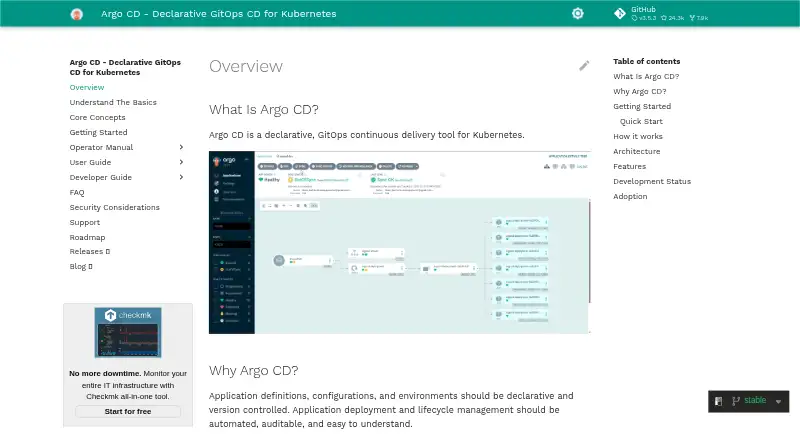
What Argo CD is
Argo CD is a declarative GitOps continuous delivery tool for Kubernetes. It treats Git repositories as the source of truth for desired application state and automates deployment to target environments. The tool compares the running state with the desired state, displays differences, and can synchronize changes automatically or manually. It can deploy applications to multiple clusters and supports Kustomize, Helm, Jsonnet, plain YAML or JSON manifests, and configured custom configuration tools. A web interface shows application activity, while a CLI supports automation and CI integration. Access features include multi-tenancy, role-based controls, and single sign-on integrations such as OIDC, OAuth2, LDAP, SAML 2.0, and several provider options. Argo CD also provides access tokens, audit trails, and Prometheus metrics. Local accounts do not offer advanced features such as groups or login history, so the documentation recommends SSO when those are needed. The project is free and open source, with a self-managed installation. A common multi-tenant setup serves multiple application developer teams and is typically maintained by a platform team; the non-high-availability installation is not recommended for production use.
Good
- Git serves as the source of truth for application state.
- Can deploy to multiple clusters.
- Supports several manifest and configuration formats.
- Offers manual or automatic synchronization.
- Provides a CLI, web UI, audit trails, and metrics.
Watch out
- Local accounts lack groups and login history.
- Non-high-availability installation is not recommended for production.
Who it suits
Argo CD suits platform teams and application developer teams managing Kubernetes deployments from Git. Organizations needing local-account groups or login history should plan to use SSO instead.
Verdict
Argo CD connects Git-managed desired state to Kubernetes deployments, with options for manual or automated synchronization and multi-cluster management. Teams should consider its local-account limitations and production guidance when choosing an installation approach.
Plans and prices
From Argo CD's own pricing page, checked 3 Oct 2026.
| Plan | Price | What it gives you |
|---|---|---|
| Argo CD | Free | Declarative GitOps delivery for Kubernetes · self-managed installation |
The facts
Each one read from Argo CD's own pages, with the date it was checked.
What it does
- Access controls
- It supports multi-tenancy, role-based access control, and single sign-on integrations including OIDC, OAuth2, LDAP, SAML 2.0, GitHub, GitLab, Microsoft, and LinkedIn.checked 3 Oct 2026
- Automation and visibility
- It provides a web UI with real-time application activity, a CLI for automation and CI integration, access tokens, audit trails, and Prometheus metrics.checked 3 Oct 2026
- Cluster management
- It can manage and deploy applications to multiple clusters.checked 3 Oct 2026
- Community support
- The project lists GitHub Discussions, the #argo-cd Slack channel, contributor office hours, and a user community meeting as community channels.checked 3 Oct 2026
- Configuration formats
- It supports Kustomize, Helm, Jsonnet, plain YAML or JSON manifests, and configured custom configuration management tools.checked 3 Oct 2026
- Drift and sync
- It compares live application state with desired state, visualizes differences, and can sync automatically or manually.checked 3 Oct 2026
- Git as source of truth
- It uses Git repositories as the source of truth for desired application state and automates deployment to target environments.checked 3 Oct 2026
- Installation and audience
- The common multi-tenant installation is typically used for multiple application developer teams and maintained by a platform team; the non-high-availability installation is not recommended for production use.checked 3 Oct 2026
- Local account limitation
- Local users do not provide advanced features such as groups or login history; the documentation recommends SSO when those features are needed.checked 3 Oct 2026
- Project status
- The CNCF lists Argo as a graduated project and says it moved to graduated maturity on December 6, 2022.checked 3 Oct 2026
- Security
- The security documentation says Argo CD has undergone internal security reviews and penetration testing to satisfy PCI compliance requirements.checked 3 Oct 2026
- What it does
- Argo CD is a declarative GitOps continuous delivery tool for Kubernetes.checked 3 Oct 2026
The company
- Founded
- 2017checked 23 Sep 2026
The full review of Argo CD
Overview
Argo CD is an open-source GitOps delivery tool for deploying applications to Kubernetes. It is a strong fit for platform teams supporting several developer teams, especially when they want deployments tied to Git and a clear view of cluster state. Its trade-off is self-management: the common multi-tenant setup is maintained by a platform team, and the non-high-availability installation is not recommended for production.
Key features
Argo CD treats Git repositories as the authority for desired application state, then compares that state with what is running. Teams can inspect differences and synchronize manually or automatically. That makes it useful when operators need to see drift and choose how changes reach a cluster; teams looking for a delivery tool beyond Kubernetes should look elsewhere.
Configuration support includes Kustomize, Helm, Jsonnet, plain YAML and JSON manifests, plus configured custom configuration management tools. It can deploy applications to multiple clusters, with approval gates and rollback support. A web UI shows application activity in real time, while a CLI supports automation and CI integration. Access tokens, audit trails and Prometheus metrics support operational oversight.
Multi-tenancy and role-based access control support shared use across teams. SSO integrations include OIDC, OAuth2, LDAP, SAML 2.0, GitHub, GitLab, Microsoft and LinkedIn. Local accounts do not provide advanced features such as groups or login history, so teams that need those controls should use SSO. Argo CD’s security documentation says it has undergone internal reviews and penetration testing to satisfy PCI compliance requirements.
Pricing
Argo CD is open source and self-managed, with the Argo CD plan at no cost. It includes declarative GitOps delivery for Kubernetes. That makes it an option for teams that can operate their own deployment tooling without a software subscription; the cost of running and maintaining the installation remains part of the decision.
Platforms
Argo CD supports API, Linux, macOS, self-hosted, web and Windows platforms. Its deployment targets are Kubernetes clusters, so the broad platform list does not make it a general-purpose deployment system. A non-high-availability installation is not recommended for production; teams planning a production deployment should choose an appropriate installation approach.
Who it's for
The common multi-tenant installation suits a platform team serving multiple application developer teams. It is particularly relevant to organizations that want repository-managed desired state, options for manual or automatic synchronization, and multi-cluster management. It is less suitable for teams without Kubernetes workloads or those unwilling to maintain a self-hosted system.
Community support channels include GitHub Discussions, the #argo-cd Slack channel, contributor office hours and a user community meeting. The CNCF lists Argo as a graduated project, with graduated maturity dating to December 6, 2022.
Pros and cons
- Pros: Git-based desired state and visible drift give teams a practical way to review divergence before synchronizing.
- Pros: Multiple configuration formats, multi-cluster deployment, approval gates and rollback support accommodate varied Kubernetes delivery workflows.
- Pros: Multi-tenancy, RBAC and broad SSO integrations provide controls for shared team use.
- Cons: Self-managed installation places operation and maintenance on the adopting team.
- Cons: Local accounts lack groups and login history, making SSO the better fit when those features matter.
- Cons: The non-high-availability installation is not recommended for production use.
Alternatives
GitOps Tools and Deployment Automation Software provide broader category comparisons. Consider these alternatives when their stated scope or plan structure better matches your deployment setup:
- Flux CD is another free, open-source Kubernetes delivery project for teams comparing Kubernetes-focused options.
- GitOpsHQ offers a free plan capped at one organization, two projects per organization, one user, one API key per user and seven-day audit retention, plus a Pro plan at $29 a month. Choose it when those published plan limits suit your needs.
- PipeCD is a free Apache 2.0-licensed open-source option for teams considering another self-hosted delivery tool.
- Google Config Sync has a free plan included with Google Kubernetes Engine; it requires a GKE-supported cluster version and fleet registration.
- Rancher Fleet is free and runs on an existing Kubernetes cluster, distributed as a Helm chart.
- Sveltos offers an open-source plan listed as free, including core features, GitHub issue management, public documentation and community Slack support.
- Nullstone has a free Individual plan limited to one user, one environment and ten deploys per week on AWS or GCP, with community forum support.
- Carvel kapp-controller is a free, Apache 2.0-licensed open-source option for teams comparing self-hosted tools.
Verdict
Choose Argo CD if your platform team needs Git-managed Kubernetes delivery, drift visibility and control over synchronization across clusters. Its strongest reason to choose it is the combination of inspectable desired state, flexible sync and shared-team controls. Look elsewhere if you need a non-Kubernetes deployment tool or cannot take on self-hosted operations; for production, do not rely on the non-high-availability installation.
Getting started
- Open the Argo CD documentation website
- Prepare a Kubernetes environment for the self-managed installation
- Configure a Git repository as the desired application-state source
- Choose supported manifests or configuration tools such as Helm or Kustomize
- Set synchronization and access-control preferences
- Connect teams through the web interface or CLI
Limits worth knowing
Local users do not provide advanced features such as groups or login history, so SSO is recommended for those requirements. The non-high-availability installation is not recommended for production use.
Questions
How much does Argo CD cost?
Argo CD is free and open source. Its listed plan costs nothing.
What does Argo CD deploy?
It provides declarative continuous delivery for Kubernetes and can deploy applications to multiple Kubernetes clusters.
Is Argo CD self-hosted?
Yes. The listed plan is a self-managed installation.
Which configuration formats are supported?
Argo CD supports Kustomize, Helm, Jsonnet, plain YAML or JSON manifests, and configured custom configuration management tools.
Does Argo CD support single sign-on?
Yes. Integrations include OIDC, OAuth2, LDAP, SAML 2.0, GitHub, GitLab, Microsoft, and LinkedIn.
What is the limitation of local accounts?
Local users do not provide advanced features such as groups or login history. The documentation recommends SSO when those features are needed.
Alternatives to Argo CD
- 1

Portainer
Free planOpen sourceAndroidiOSWebAPI8.6Free plan - 2
Plural
Free planOpen sourceWebAPILinuxmacOS8.2From $450 a month - 3
Nullstone
Free planWebAPILinuxmacOS7.9From $50 a month - 4

PipeCD
Free planOpen sourceWebAPILinuxmacOS7.5Free plan - 5

Pulumi
Free planWebAPILinuxmacOS7.4From $40 a month - 6
Google Config Sync
Free planOpen sourceWebAPILinuxSelf-hosted7.2Free plan