
Arduino IDE
Arduino IDE is a free desktop environment for creating projects with electronic devices that interact with the physical world.
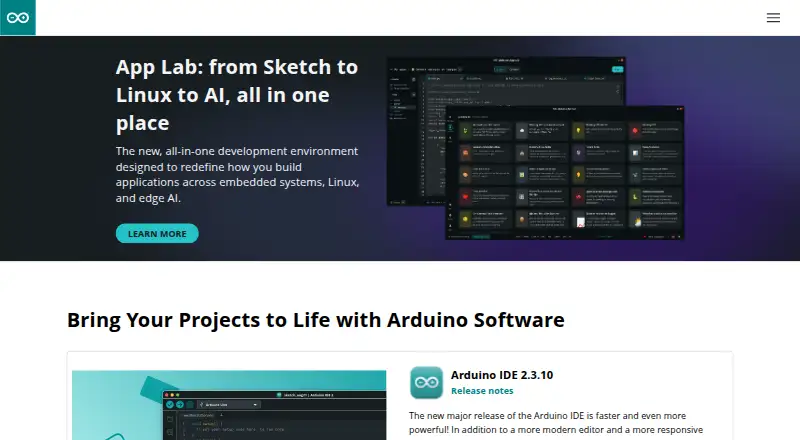
What Arduino IDE is
Arduino IDE is a free desktop environment for creating projects with electronic devices that interact with the physical world. The software page lists Arduino IDE 2.3.10, with downloads for Windows, macOS, and Linux. Its editor includes autocompletion, code navigation, and a live debugger. Documentation covers debugging, the Serial Monitor, and the Serial Plotter. Arduino CLI offers a text-based way to build, compile, and upload sketches, as well as manage libraries and boards. IDE 2 can synchronize sketches with Arduino Cloud through a Remote Sketchbook, according to Arduino documentation. Arduino IDE 2.0 is open source, with source code hosted on GitHub. Listed supported targets include Arduino AVR, megaAVR, SAMD, SAM, Mbed OS Nano, and Mbed OS Portenta. Nightly builds provide previews of incoming releases with updated features and bug fixes. Arduino describes its ecosystem as serving students, makers, and professional developers, and links to documentation, a Help Center, and a support request channel. Its software page says downloads are provided as is and disclaims express and implied warranties.
Good
- Free desktop software
- Available for Windows, macOS, and Linux
- Editor includes autocompletion and code navigation
- Live debugger and serial tools are documented
- Arduino CLI manages boards and libraries
Watch out
- Downloads are provided as is
- Software page disclaims express and implied warranties
- Nightly builds are previews of incoming releases
Who it suits
It suits students, makers, and professional developers creating projects with physical electronic devices. The editor and CLI support both graphical and text-based workflows.
Verdict
Arduino IDE provides an editor, debugger, and CLI tools for building and uploading sketches. It is free and supports three desktop operating systems, but its downloads carry a stated warranty disclaimer.
Plans and prices
From Arduino IDE's own pricing page, checked 15 Oct 2026.
| Plan | Price | What it gives you |
|---|---|---|
| Arduino IDE 2 | Free | Desktop IDE · Windows, macOS and Linux · IDE 2.3.10 shown |
The facts
Each one read from Arduino IDE's own pages, with the date it was checked.
What it does
- API
- Arduino IoT Cloud API offers HTTP endpoints for devices, Things, properties and time series, with JavaScript, Python and Go clients.checked 15 Oct 2026
- Board and library management
- Arduino CLI can build, compile, and upload sketches and manage libraries and boards in a text-based environment.checked 29 Sep 2026
- Board Manager
- Official documentation covers installing board packages through the IDE 2 Board Manager.checked 15 Oct 2026
- CLI integration
- Arduino CLI exposes IDE capabilities such as building, compiling, uploading sketches, and managing boards and libraries from text interfaces.checked 15 Oct 2026
- Cloud integration
- Arduino documentation describes synchronizing sketches between IDE 2 and Arduino Cloud through a Remote Sketchbook.checked 29 Sep 2026
- Cloud synchronization
- IDE 2 can synchronize sketches with Arduino Cloud Remote Sketchbook.checked 15 Oct 2026
- Current version
- The software page lists Arduino IDE 2.3.10.checked 29 Sep 2026
- Debugger
- IDE 2 provides an integrated live debugger; debugging became stable in release 2.3.checked 15 Oct 2026
- Debugging and serial tools
- The IDE documentation includes guides for debugging, the Serial Monitor, and the Serial Plotter.checked 29 Sep 2026
- Documentation depth
- Official IDE documentation includes getting started, installation, uploads, autocomplete, formatting, debugging, certificates, libraries, security, serial tools and shared sketches.checked 15 Oct 2026
- Editor
- IDE 2 includes a modern editor with code autocompletion and code navigation.checked 15 Oct 2026
- Editor features
- Arduino IDE 2 features a modern editor and responsive interface with autocompletion, code navigation, and a live debugger.checked 29 Sep 2026
- Extensibility
- Arduino IDE 2 debugging uses an open framework that lets core maintainers add debugger support for boards.checked 15 Oct 2026
- Funding
- Arduino announced an additional $22 million in 2023, bringing Series B funding to $54 million.checked 15 Oct 2026
- Install formats
- Downloads include Windows executable, macOS disk image, Linux AppImage, portable ZIP archives, Windows MSI and nightly builds.checked 15 Oct 2026
- Intended users
- Arduino describes its ecosystem as serving students, makers, and professional developers.checked 29 Sep 2026
- Library Manager
- IDE 2 has a Library Manager for installing Arduino software libraries.checked 15 Oct 2026
- License
- Arduino IDE 2 source code and executable distributions are licensed under GNU AGPLv3; bundled third-party components use compatible GPLv2, MIT and BSD-3 licenses.checked 15 Oct 2026
- Limit: chart refresh
- A Google Play reviewer reports that dashboard chart data may not update until another time range is selected.checked 15 Oct 2026
- Limit: customer service and hardware complaints
- Trustpilot reviews include reports of slow support, delivery problems, faulty boards and dissatisfaction with product quality or returns.checked 15 Oct 2026
- Limit: missing advanced editor features
- G2 reviewers ask for better autocomplete or AI help, fuller project and header-file navigation, and improved terminal-style debugging.checked 15 Oct 2026
The company
- Company founded
- LinkedIn lists Arduino as founded in 2005.checked 15 Oct 2026
- Company size
- LinkedIn lists Arduino at 51–200 employees.checked 15 Oct 2026
- Headquarters
- Arduino's privacy policy gives its registered office as Via Andrea Appiani 25, Monza, Italy.checked 15 Oct 2026
The full review of Arduino IDE
Overview
Arduino IDE is a desktop development environment for creating software for electronic projects. It is best suited to students, makers and professional developers working with supported Arduino targets. Its appeal is a capable free toolset spanning an editor, debugging, flashing and command-line board management.
IDE 2.3.10 pairs a graphical editor with a live debugger, while Arduino CLI supports text-based workflows for compiling and uploading sketches and managing boards and libraries. That range makes it a practical choice for Arduino development across different working styles; its target list is the key constraint to check before committing.
Key features
Editor and debugging
Autocompletion and code navigation make the editor more useful for moving through a project than a basic text window, and the live debugger helps developers inspect program behavior. Integrated debugging and flashing are supported, with hardware probe support identified as both. Supported targets include Arduino AVR, megaAVR, SAMD, SAM, Mbed OS Nano and Mbed OS Portenta, so users should confirm their board is covered.
Arduino documentation also covers the Serial Monitor and Serial Plotter, giving developers tools to inspect serial output and plot values while working. Nightly builds preview incoming releases and include updated features and bug fixes. They may suit readers who want to follow changes early, while users who prioritize a release build can choose the standard IDE download.
CLI, cloud and source
Arduino CLI provides a text-based way to compile and upload sketches and manage boards and libraries. It is useful for developers who prefer command-line work alongside or instead of the graphical editor. Arduino documentation describes synchronizing sketches between IDE 2 and Arduino Cloud through a Remote Sketchbook, which adds a cloud-connected workflow without changing the IDE's focus on project development.
Arduino IDE 2.0 is open source, with source code hosted on GitHub. Arduino also describes security practices spanning planning through monitoring, including automated static application security testing and secure component analysis. Documentation, a Help Center and a support request channel provide routes for help. Downloads are provided as is, with express and implied warranties disclaimed.
Pricing
Arduino IDE 2: free. The free plan is open source and includes autocompletion, code navigation and a live debugger. It is the natural fit for individuals and teams who want Arduino development tools without a software fee; there is no cheaper tier that removes features, and no paid plan is part of this offer.
Platforms
Arduino IDE 2 is available for Windows, macOS and Linux. The desktop coverage suits users working across the three major desktop operating systems, but it does not extend the IDE itself to web or mobile platforms.
Who it's for
Students and makers can use the editor and debugging tools for projects involving supported boards, while professional developers may value the combination of graphical and CLI workflows. It is a good fit when Arduino AVR, megaAVR, SAMD, SAM, Mbed OS Nano or Mbed OS Portenta targets meet the project need. Readers seeking broad IoT device management should consider a category-specific tool instead: the IDE's documented cloud connection is sketch synchronization, not a device-management offering.
Pros and cons
- Pros: Free access combines autocompletion, code navigation and a live debugger, avoiding a software cost for supported projects.
- Pros: Integrated flashing, board and library management through CLI, and serial tools support multiple parts of the development workflow.
- Pros: Windows, macOS and Linux downloads make it usable across the main desktop platforms.
- Cons: The supported target set is specific; users with boards outside it should verify compatibility before choosing the IDE.
- Cons: Downloads carry an express and implied warranty disclaimer, a material term for users who need warranty-backed software.
Alternatives
For a broader shortlist, browse Embedded Development IDEs, IDE Software, IoT Development Tools or IoT Device Management Platforms.
- Arm Keil MDK is a freemium alternative with a free Community plan for non-commercial use, Keil Studio, Keil μVision and Cortex-M device support; consider it when that stated focus is a better fit.
- PlatformIO IDE is free, with a Community plan offering access to forums and documentation; consider it if that community-support framing suits your workflow.
- e² studio is free with no paid version, though separate compiler packages are not included and may have their own licensing terms or evaluation limits.
- ESP-IDF Extension for VS Code is a free VS Code extension for ESP-IDF; choose it when that extension-based route is the better match.
- MPLAB X IDE is a free desktop IDE supporting most Microchip microcontrollers and digital signal controllers; consider it for that hardware focus.
- Renesas Flexible Software Package is free on any Renesas device, making it an option for users working with that ecosystem.
- Wokwi offers a free Community plan with unlimited simulations, unlimited public projects and Virtual WiFi; consider it when those simulation capabilities fit the need.
- STM32CubeIDE is a free-to-download, proprietary ST application; consider it for a workflow aligned with that offering.
Verdict
Arduino IDE is a strong choice for students, makers and developers building with its supported boards: the free editor brings debugging, flashing and CLI tools together across Windows, macOS and Linux. Look elsewhere if your hardware falls outside its supported targets or you need an IoT device-management platform rather than a project development environment.
Getting started
- Visit https://www.arduino.cc/en/software.
- Choose the download for Windows, macOS, or Linux.
- Install Arduino IDE and use its editor to create sketches.
- Use the live debugger or consult documentation for the Serial Monitor and Serial Plotter.
Questions
How much does Arduino IDE cost?
The Arduino IDE 2 plan is free at no cost.
Which operating systems are supported?
The download page lists Windows, macOS, and Linux.
Is Arduino IDE open source?
Arduino IDE 2.0 is open source, and its source code is hosted on GitHub.
What targets are supported?
Listed targets include Arduino AVR, megaAVR, SAMD, SAM, Mbed OS Nano, and Mbed OS Portenta.
Can it connect to Arduino Cloud?
Arduino documentation describes syncing sketches between IDE 2 and Arduino Cloud through a Remote Sketchbook.
What does Arduino CLI do?
It can build, compile, and upload sketches, and manage boards and libraries in a text-based environment.
Alternatives to Arduino IDE
- 1

Arm Keil MDK
Free planWebAPIExtensionLinux7.9From 82.39 CHF a month - 2

PlatformIO IDE
Free planExtensionLinuxmacOSSelf-hosted7.0Free plan - 3

IAR Embedded Workbench
Free planExtensionLinuxWindows6.9Free plan - 4
CS+
Free planLinuxmacOSWindows6.4Free plan - 5

Eclipse IDE
Free planLinuxmacOSWindows6.4Free plan - 6
MPLAB X IDE
Free planLinuxmacOSWindows6.4Free plan