Anti-Twin
Anti-Twin is a free utility for locating duplicate and similar files.
What Anti-Twin is
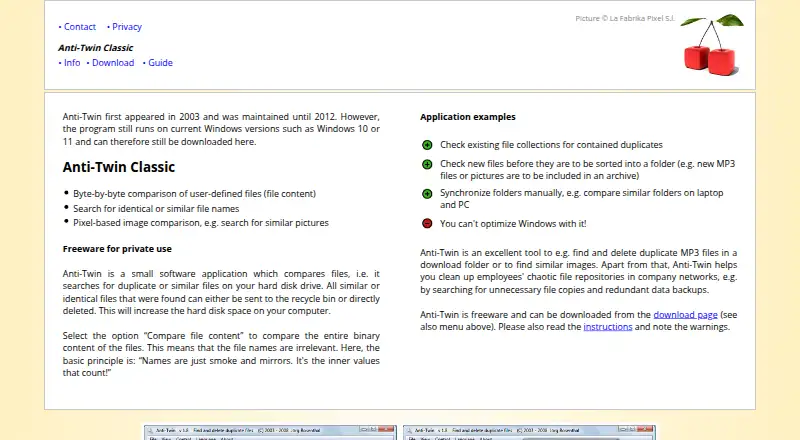
Anti-Twin is a free utility for locating duplicate and similar files. It searches local hard disks, USB flash drives, memory cards, shared network folders, and another chosen folder or path. Matching can use file names, byte-for-byte content checks, binary similarity, or pixel-based image comparison. The image method can identify pictures that are alike even when saved with different compression settings or file formats. Binary searches can be set to a minimum 60% match, although the site says this mode takes considerably longer and is practical for only a few file types. Anti-Twin can automatically select matches and send selected items to the Recycle Bin or delete them. Search results can be exported as an Excel file, including when Excel is not installed; OpenOffice users can use that export as well. Files above 2 GB are excluded from comparisons. The program has no restore function for deleted files, so permanent deletion cannot be reversed through Anti-Twin. It can run on Windows, Linux through Wine, macOS through Wine, and ReactOS, and can be started from a USB memory stick. The project first appeared in 2003 and was maintained until 2012; its site says it still runs on Windows 10 and 11.
Good
- Free for private use
- Scans local, removable, and network locations
- Offers byte, name, binary, and pixel matching
- Can select matches automatically
- Exports results for Excel or OpenOffice
- Portable use from a USB memory stick
Watch out
- Files over 2 GB are excluded
- Deleted files cannot be restored through the program
- Internet and FTP servers are not searchable
- Low-threshold binary scans can take much longer
Who it suits
Anti-Twin suits people cleaning duplicate files from desktop drives, removable media, memory cards, or shared network folders. It is also useful when exact duplicates, similar names, near-identical binary content, or visually similar images need separate matching methods.
Verdict
Pick Anti-Twin for a free utility that combines several duplicate and similarity checks across local, removable, and shared folders. Look elsewhere if you need Internet or FTP scanning, comparisons above 2 GB, or an in-program recovery option for deleted files.
Plans and prices
From Anti-Twin's own pricing page, checked 8 Oct 2026.
| Plan | Price | What it gives you |
|---|---|---|
| Anti-Twin Classic | Free | Free for private use since 2003 · freeware |
The facts
Each one read from Anti-Twin's own pages, with the date it was checked.
What it does
- Deletion recovery
- Anti-Twin has no restore function for deleted files; permanently deleted files cannot be restored through the program.checked 8 Oct 2026
- Export
- Search results can be exported as an Excel file even if Excel is not installed, and the site says OpenOffice users can use the export.checked 8 Oct 2026
- File comparison
- It can compare file content byte by byte and search for identical or similar file names.checked 8 Oct 2026
- File size limit
- Files larger than 2 GB are not included in comparisons.checked 8 Oct 2026
- Folders and networks
- It searches local drives, USB flash disks, memory cards, and shared network folders; it cannot search the Internet or FTP servers.checked 8 Oct 2026
- Image comparison
- Its pixel-based image comparison can find similar pictures, including images saved with different compression rates or file formats.checked 8 Oct 2026
- Maintenance status
- The site says Anti-Twin first appeared in 2003 and was maintained until 2012; it states the program still runs on Windows 10 and 11.checked 8 Oct 2026
- Manual review
- The site advises checking files selected by mass-selection functions before deletion and manually inspecting similar-image results.checked 8 Oct 2026
- Portable use
- The program can be installed on a USB memory stick and started from there.checked 8 Oct 2026
- Purpose
- Anti-Twin searches a hard disk for duplicate or similar files and can send found files to the recycle bin or delete them.checked 8 Oct 2026
- Similarity threshold
- Binary content similarity can be searched with a minimum match as low as 60%, but the site says this takes much longer and is useful for only a few file types.checked 8 Oct 2026
- Supported operating systems
- The download page lists Windows 32-bit and 64-bit and says it also runs via Wine on Linux or Mac, and on ReactOS.checked 8 Oct 2026
The company
- Founded
- 2003checked 28 Sep 2026
The full review of Anti-Twin
Anti-Twin is a no-cost duplicate-file utility that combines exact, name-based, binary-similarity and image checks. It suits people cleaning personal disks, removable media or shared folders who are prepared to review deletion choices themselves. The software is flexible for a freeware tool, but its 2 GB comparison limit and lack of an in-program restore command narrow its safe use.
Overview
First released in 2003, Anti-Twin remains maintained only through 2012, although its site says it still runs on Windows 10 and 11. That long history explains both its straightforward scope and its dated support model. It is aimed at private users who need to locate redundant files rather than a continuously updated storage-management suite.
The program can send selected items to the Recycle Bin or delete them. Recycle Bin handling gives Windows users a chance to recover items through the operating system, but Anti-Twin itself has no restore function; anything permanently deleted cannot be brought back from within the application.
Key features
Anti-Twin offers several ways to define a match. Byte-by-byte content comparison identifies exact duplicates even when filenames differ, while filename searching catches identical or similar names. Pixel-based image comparison can find visually similar pictures when copies use different formats or compression levels. Together, these methods cover more than an exact-hash-only cleaner, particularly for photo collections and renamed documents.
Binary-content similarity can be lowered to a 60% match. The trade-off is substantially longer scanning, and the maker says the method is useful for only a small number of file types. Treat that setting as a focused investigation tool, not a sensible default for a whole drive. Similar-image findings also need visual judgment, and mass-selection functions should be checked before deletion. Automatic selection saves time, but it does not remove the need for a final review.
Search locations include local hard disks, a second folder or path, USB flash drives, memory cards and shared network folders. Anti-Twin does not scan Internet locations or FTP servers. Files over 2 GB are excluded from comparisons, so large video, disk-image and archive collections will not be assessed completely. Results can be exported to an Excel file without Microsoft Excel installed, and OpenOffice users can use that export as well.
Pricing
Anti-Twin Classic — free. This freeware plan is free for private use and has been offered since 2003. It includes the program's duplicate and similarity searches, automatic selection, Recycle Bin or Trash handling, and cross-platform use through the supported download options. There are no paid tiers, seat charges, renewal terms or trial period to weigh. The practical limitations are functional: comparisons stop at 2 GB, Internet and FTP locations are outside its scope, and permanent deletion has no Anti-Twin recovery path.
Platforms
Anti-Twin is listed for Windows in 32-bit and 64-bit editions. The download page says it also runs through Wine on Linux or Mac and on ReactOS, making it usable beyond native Windows installations but with a compatibility layer on Linux and macOS. It can be installed on a USB memory stick and started there, which is useful when cleaning several machines or working from removable storage.
Who it's for
Choose Anti-Twin if you want a free personal utility that can compare exact contents, filenames, binary similarity and pictures across internal, removable and shared network storage. It is particularly suitable for users willing to inspect image matches and automatically selected files before sending anything to the Recycle Bin.
Look elsewhere for Internet or FTP scanning, files larger than 2 GB, or a built-in undelete workflow. Its old maintenance period also makes it a less compelling choice for readers seeking an actively developed product.
Pros and cons
Pros
- Several match strategies: byte-level, filename, binary-similarity and pixel-image comparisons handle different kinds of redundancy.
- Broad storage reach: local disks, USB media, memory cards and shared folders can be included in searches.
- Useful export: Excel-format reports work without Excel and can be used with OpenOffice.
- Portable operation: installation on a USB stick supports work across multiple computers.
Cons
- 2 GB ceiling: larger files never enter comparisons, leaving big-media collections only partially checked.
- No program recovery: permanent deletions cannot be restored by Anti-Twin.
- Manual oversight required: similar images and mass-selected results must be reviewed to avoid removing wanted files.
- No Internet or FTP support: remote cleanup is limited to shared network folders.
- Older maintenance: development is stated to have continued only through 2012.
Alternatives
dupeGuru is a free option for Linux, macOS and Windows when you want a similarly focused duplicate-file finder without Anti-Twin's particular comparison mix.
Czkawka is free on Android as well as desktop Linux, macOS and Windows, and its no-ads positioning suits readers who also need mobile coverage.
Duplicate Files Fixer fits users who want a paid tier: its free version scans unlimited files but removes only 15 duplicates at once before switching to one-at-a-time removal; the full plan is €35.95 a year.
fclones is a free, MIT-licensed command-line utility for readers comfortable working from a terminal.
Folder Size is the Windows choice when folder and file-size analysis, disk-usage charts and local or external-drive scanning matter more than similarity matching; its free tier covers those functions, while Personal costs $24.95 a month as a one-time fee.
jdupes is free, MIT-licensed software centered on exact duplicate matching across Linux, macOS and Windows.
rdfind is a free GPLv2-or-later alternative for readers who prefer that licensing model.
Space Wizard is a freemium cross-platform option whose free tier scans a home drive up to 100 GB per scan; its Pro tier supports two machine activations.
For a broader shortlist, browse Duplicate File Finders.
Verdict
Pick Anti-Twin for a free personal cleanup tool when varied duplicate and image comparisons across local, removable and shared folders are more important than modern maintenance or built-in recovery. Look elsewhere if your library contains files above 2 GB, you need Internet or FTP searches, or permanent deletion must be reversible inside the app.
Getting started
- Open the Anti-Twin website
- Download the Windows version, or use Wine on Linux or Mac
- Install it on the computer or a USB memory stick
- Select the drives, folders, cards, or network paths to scan
- Choose name, content, binary, or image comparison
- Review selected matches before sending them to the Recycle Bin or deleting
Limits worth knowing
Comparisons omit files larger than 2 GB. Anti-Twin has no restore function for deleted files, and its site advises manual checking before mass deletion and for similar-image results.
Questions
Is Anti-Twin free?
Yes. Anti-Twin Classic is free for private use at no cost.
Which systems can run Anti-Twin?
The listed coverage includes Windows, Linux, and macOS. The download page lists Windows 32-bit and 64-bit, and says Wine can be used on Linux or Mac; ReactOS is also mentioned.
Can it compare similar images?
Yes. Pixel-based comparison can find similar pictures, including those saved with different compression rates or file formats.
Where can it search?
It searches local hard disks, USB flash disks, memory cards, shared network folders, and a second folder or path. It cannot search the Internet or FTP servers.
Can deleted files be recovered?
No. Anti-Twin has no restore function, and permanently deleted files cannot be restored through the program.
Alternatives to Anti-Twin
- 1
Czkawka
Free planOpen sourceAndroidAPILinuxmacOS7.4Free plan - 2
Avidemux
Free planOpen sourceWebLinuxmacOSWindows7.3Free plan - 3
DoubleKiller
Free planWindows7.2$19.95 one-time - 4
jdupes
Free planOpen sourceLinuxmacOSWindows7.2Free plan - 5
Duplicate Files Fixer
Free planAndroidmacOSWindows6.8From €35.95 a year - 6
Duplicate Photos Fixer Pro
AndroidiOSmacOSWindows6.7From $39.95 a year