
Allure Report
Allure Report converts test execution data into interactive HTML reports for reviewing unit, API, and end-to-end test results.
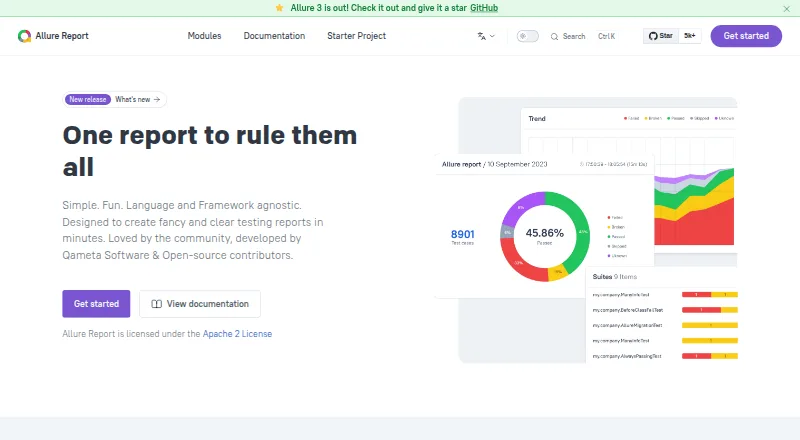
What Allure Report is
Allure Report converts test execution data into interactive HTML reports for reviewing unit, API, and end-to-end test results. Reports can show test steps, attachments, timings, metadata, logs, and screenshots. The tool can identify unstable tests, group flaky failures, and track historical results. Allure 3 adds rerun grouping, reports across multiple environments, real-time reporting, and project-wide quality gates. Its integrations directory lists support for more than 50 testing tools and frameworks; documentation also describes connections to Jenkins, GitHub Actions, Azure DevOps, JetBrains IDEs, and Visual Studio Code. Test collection and report generation can run locally without sending data over a network. Reports are static HTML sites that can be opened in a browser or hosted on a web server. The open-source software is free under the Apache License 2.0. Its separate free Allure Report Storage service can run as a Docker container or Cloudflare Worker. Qameta Software develops the project with open-source community contributions.
Good
- Supports unit, API, and end-to-end test reports.
- Includes flaky-test detection and historical results.
- Reports can include logs, screenshots, and timings.
- Free and licensed under Apache License 2.0.
- Report generation can run locally.
Watch out
- Generated reports are static HTML sites.
- Historical tracking is available, but no other limits are listed.
Who it suits
Allure Report suits automation and manual QA, developers, and project managers who need a visual record of test execution. Its local data flow may also suit teams that prefer report generation without network transfer.
Verdict
Allure Report provides a free way to turn test runs into detailed, shareable HTML reports, with support for flaky-test tracking. Teams should account for reports being static sites rather than an interactive hosted service.
Plans and prices
From Allure Report's own pricing page, checked 14 Oct 2026.
| Plan | Price | What it gives you |
|---|---|---|
| Allure Report | Free | open-source test-report generation · self-hosted/local operation · Allure TestOps is separate paid product |
The facts
Each one read from Allure Report's own pages, with the date it was checked.
What it does
- Allure 3 features
- Allure 3 adds rerun grouping, multiple-environment reports, real-time reporting, and project-wide quality gates.checked 29 Sep 2026
- Architecture
- The product combines framework integrations with an Allure command-line utility that reads structured result files and generates reports.checked 14 Oct 2026
- Attachments
- Test results can include screenshots, logs, videos and other attachments.checked 14 Oct 2026
- CI and IDE integrations
- The documentation lists integrations for Jenkins, GitHub Actions, Azure DevOps, JetBrains IDEs, and Visual Studio Code.checked 29 Sep 2026
- CSV export
- Allure 3 provides a CSV plugin and CLI command for exporting report data to spreadsheets or other analysis tools.checked 14 Oct 2026
- Documentation depth
- The official documentation includes feature references, installation guides, framework integrations, migration guides, configuration, API-oriented examples and deployment guides.checked 14 Oct 2026
- Extensibility
- Allure 3 advanced capabilities are implemented as configurable plugins, and users can install additional npm plugins.checked 14 Oct 2026
- Filtering and sorting
- Users can filter and sort test results to focus on selected failures or categories.checked 14 Oct 2026
- Flaky-test analysis
- The report identifies unstable tests by comparing status changes across runs.checked 14 Oct 2026
- Framework coverage
- The documentation provides setup guides for more than 30 frameworks across JavaScript, Java, Python, .NET and other languages.checked 14 Oct 2026
- Global errors
- Allure 3 can capture process-level output, exit codes and errors through the allure run wrapper.checked 14 Oct 2026
- Gradle requirements
- The Gradle integration requires Gradle 8.11 or newer and Java 17 or newer.checked 14 Oct 2026
- History and retries
- Allure links results from repeated launches, displays prior statuses and shows retry attempts.checked 14 Oct 2026
- Installation systems
- Official installation instructions cover Windows, macOS, Linux and Node.js on any system.checked 14 Oct 2026
- Integrations
- Official integrations cover Azure DevOps, Bamboo, GitHub Actions, Jenkins, TeamCity, Gradle, Maven, JetBrains IDEs and Visual Studio Code.checked 14 Oct 2026
- Intended users
- The site describes use by automation QA, manual QA, developers, and project managers.checked 29 Sep 2026
- Java 3 requirements
- Allure Java 3 requires Java 17 or newer, while its Karate and jOOQ modules require Java 21 or newer.checked 14 Oct 2026
- Licence
- The main Allure Report repository is distributed under the Apache-2.0 licence.checked 14 Oct 2026
- Limit: collaboration
- An independent comparison says Allure Report does not provide real-time collaboration among testers inside the product.checked 14 Oct 2026
- Limit: large suites
- An independent comparison warns that exceptionally large or complex test suites may need additional handling and optimization.checked 14 Oct 2026
- Limit: maintenance
- Independent reviewers say self-hosted deployments require ongoing maintenance, especially for custom steps and labels.checked 14 Oct 2026
The company
- Company listing discrepancy
- SourceForge lists Qameta Software as founded in 2017 and based in the United States.checked 14 Oct 2026
- Company size and origin
- LinkedIn lists Qameta Software as a privately held software-development company founded in 2020 with 11–50 employees and headquarters in Fairfax, Virginia.checked 14 Oct 2026
- Headquarters
- Fairfax, Virginia, United Stateschecked 23 Sep 2026
The full review of Allure Report
Allure Report turns test execution data into browser-ready reports for QA teams and developers who need to understand failures, not just count them. Its open-source reporting and flaky-test tracking make it a strong fit for teams comfortable generating and hosting their own reports.
Overview
Allure Report presents results from unit, API, and end-to-end tests as interactive HTML, with room for steps, attachments, timings, metadata, logs, and screenshots. That depth helps teams trace a failure back to its context, while support for more than 50 testing tools and frameworks makes it adaptable to varied test stacks.
Reports are static websites that open in a browser or can be hosted on a web server. That keeps sharing flexible, but it is not the same as an interactive hosted reporting service. Test collection and report generation can also run locally without sending data over the network, a useful option for teams with strict data-handling needs.
Key features
Failure and stability analysis
Allure can identify unstable tests, categorize flaky failures, and track historical results. Execution trends and failure analysis help teams distinguish recurring instability from isolated breaks; teams wanting rerun grouping, multiple-environment reports, real-time reporting, or project-wide quality gates can look to Allure 3.
Integrations and storage
Framework support ranges from pytest, JUnit, and NUnit to Cypress and Playwright. CI/CD integrations include Azure DevOps, Bamboo, GitHub Actions, Jenkins, and TeamCity, with documentation also covering JetBrains IDEs and Visual Studio Code. Allure Report Storage is a free, Apache-2.0-licensed service deployable as a Docker container or Cloudflare Worker. It adds a self-hosted storage option without changing the static nature of generated reports.
Pricing
Allure Report costs nothing. The Allure Report plan is an open-source test reporting tool under the Apache License 2.0, with self-hosted deployment and no paid tier or free-trial distinction to weigh. That is compelling for teams able to manage report generation and hosting themselves; organizations seeking a managed service should compare hosted alternatives instead.
Platforms
Allure Report supports API, Linux, macOS, self-hosted, web, and Windows environments. Reports themselves are static HTML, so browser access or web-server hosting is the practical sharing path.
Who it's for
Automation QA, manual QA, developers, and project managers can use its reports to inspect test results and their supporting evidence. It is best suited to teams that value detailed failure context, broad framework coverage, and control over where data is processed. Teams that want a hosted, continuously interactive analytics workspace may find the static-site model limiting.
Pros and cons
Pros
- Free, Apache-licensed reporting with self-hosted deployment avoids a per-seat price barrier.
- Steps, logs, screenshots, attachments, and historical flaky-test tracking give teams evidence to investigate failures.
- Broad framework and CI/CD integrations make it usable across many common test workflows.
- Local processing and self-hosted storage give teams options for keeping data in their own environment.
Cons
- Generated reports are static HTML sites, so teams must arrange hosting and should not expect a hosted interactive service.
- Its value depends on a compatible test stack and on teams having a workflow for generating and sharing reports.
Alternatives
For a broader comparison, see Test Analytics Software.
- ReportPortal is another free, self-hosted open-source option, with a free trial and deployment through Docker, Kubernetes, or Google Cloud Marketplace.
- Testspace suits teams seeking project and session quotas with a defined monthly price: its Basic plan is $32 a month for 4 users, 2 private projects, unlimited public projects, and 200 sessions.
- BrowserStack Test Reporting & Analytics may suit teams prioritizing retained test-run history and logs; its free plan keeps test history and assertion failure logs for up to 60 days, video logs for 30 days, and debug logs for 60 days.
- Qualflare is a freemium alternative with a defined entry allowance: Starter is free, billed monthly, for 1 project, 1 active user, 200 test cases, and 100 test reports.
- Trunk Flaky Tests is worth considering when flaky-test tracking is the focus; its free plan allows up to 5 repo committers and 5M test spans per month.
- Flakiness.io is another freemium option for teams comparing flaky-test tools.
- TestBeats offers credit-based monthly plans; Pro 200 is $18 a month for 200 credits, up to 400 test runs, and up to 4,000 test cases.
- Allure TestOps is a paid, web-based alternative from the Allure product family.
Verdict
Choose Allure Report if your team wants detailed, open-source test reports, flaky-test visibility, and control over local processing or self-hosted deployment. Its breadth and zero-price entry are persuasive, but teams that need a managed, interactive reporting service should look elsewhere.
Alternatives to Allure Report
- 1

TestMu AI
Free planAndroidiOSWebAPI8.3From $17 a month - 2

Qualflare
Free planAndroidiOSWebAPI8.2From $16 a month - 3

ReportPortal
Free planOpen sourceWebAPILinuxmacOS8.1From $569 a month - 4
TestBeats
Free planOpen sourceWebAPILinuxmacOS8.1From $18 a month - 5

BuildPulse
Free planWebAPILinuxmacOS7.9Free plan - 6

BrowserStack Test Reporting & Analytics
Free planWebAPIExtensionLinux7.7From $199 a month