AI Photo Editor Cartoonizer
AI Photo Editor Cartoonizer redraws an uploaded photograph as a cartoon while aiming to preserve the subject’s likeness.
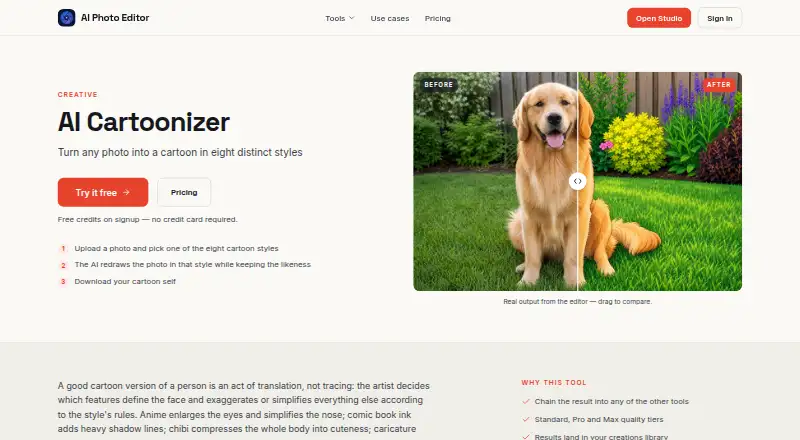
What AI Photo Editor Cartoonizer is
AI Photo Editor Cartoonizer redraws an uploaded photograph as a cartoon while aiming to preserve the subject’s likeness. You upload an image, choose one of eight styles, let the service process it, and download the result. Styles include anime, black-and-white manga line art, American comic book, soft watercolor, chibi, modern flat illustration, playful caricature, and hand-drawn sketch. Full-body photos are redrawn from head to toe, with clothing adapted to the selected look. The service suggests portraits for avatars, stream graphics, stickers, gifts, and pet images. New accounts receive four free credits, enough for one Standard-quality edit without a credit card. Standard, Pro, and Max edits use 4, 12, and 44 credits respectively. Results can be stored, upscaled, sent to other tools, or converted to video. It runs on iOS and the web.
Good
- Eight listed cartoon styles
- Four free credits for new accounts
- Full-body photos include clothing
- Results can be upscaled or animated
- Available on iOS and web
Watch out
- Monthly credits do not roll over
- Uploaded photos are stored in the United States
- Photos may be processed by third-party AI providers
- No text-to-cartoon feature
Who it suits
It suits people making stylized portraits, pet images, avatars, stickers, or stream graphics. It is also useful for users who want cartoon results that can be upscaled or turned into video.
Verdict
AI Photo Editor Cartoonizer offers a straightforward photo-to-cartoon workflow with eight styles and an initial free edit. Credit-based usage, US photo storage, and third-party processing are important considerations.
Plans and prices
From AI Photo Editor Cartoonizer's own pricing page, checked 7 Oct 2026.
| Plan | Price | What it gives you |
|---|---|---|
| Starter | $15 a month | 1,000 credits every month · ≈250 Standard edits monthly · All 48 tools + the Studio canvas · Upscaling and photo-to-video |
| Pro | $30 a month | 2,500 credits every month · ≈625 Standard or 200 Pro edits · All 48 tools + the Studio canvas |
| Studio | $50 a month | 5,000 credits every month · Room for Max-quality and video work · Built for client and volume workflows · All 48 tools + the Studio canvas |
The facts
Each one read from AI Photo Editor Cartoonizer's own pages, with the date it was checked.
What it does
- AI processing
- The privacy policy says uploaded photos and other inputs may be processed by third-party AI providers including OpenAI, Replicate, and Google.checked 7 Oct 2026
- Deletion
- The privacy policy says users may request photo deletion by contacting support, and the pricing FAQ says creations can be deleted from the library at any time.checked 7 Oct 2026
- Facial data
- The privacy policy says the service does not use facial recognition or collect biometric identifiers such as facial geometry maps or faceprints.checked 7 Oct 2026
- How it works
- The workflow is to upload a photo, choose a cartoon style, let the AI redraw it, and download the result.checked 7 Oct 2026
- Paid from
- 15checked 20 Sep 2026
- Photo storage
- The privacy policy says uploaded photographs are stored on Google Cloud Storage servers in the United States and retained while the account is active or as needed to provide the service.checked 7 Oct 2026
- Purpose
- AI Cartoonizer redraws a photo as a cartoon in one of eight styles while aiming to preserve the subject’s likeness.checked 7 Oct 2026
- Related editing
- The result can be chained into other tools, saved in the creations library, upscaled to print size, or turned into video.checked 7 Oct 2026
- Security
- The privacy policy says the company implements security measures but cannot guarantee absolute data security.checked 7 Oct 2026
- Styles
- The eight styles listed are anime, black-and-white manga-style line art, American comic book, soft watercolor illustration, chibi, modern flat illustration, playful caricature, and hand-drawn sketch.checked 7 Oct 2026
- Use cases
- The page suggests using cartoon portraits for avatars, stream graphics, stickers, and gifts, and says pet photos work well.checked 7 Oct 2026
Money
- Credit costs
- Pricing lists Standard edits at 4 credits, Pro at 12, and Max at 44 credits; monthly subscription credits reset each billing cycle and do not roll over.checked 7 Oct 2026
- Free credits
- Each new account starts with 4 free credits, enough to run AI Cartoonizer once at Standard quality, with no credit card required.checked 7 Oct 2026
- Free plan
- Nochecked 20 Sep 2026
Where it runs
- Full-body photos
- The FAQ says full-body shots are redrawn head to toe, with clothing translated into the selected style.checked 7 Oct 2026
The company
- Maker
- The terms identify Kawaii, Inc. as the owner and operator of AI Photo Editor.checked 7 Oct 2026
Alternatives to AI Photo Editor Cartoonizer
- 1

Dreamina
Free planAndroidiOSWebmacOS8.3From $15 a month - 2

Pixelcut
Free planAndroidiOSWebAPI8.3From $8 a month - 3
Cartoonie
Free planAndroidiOSWebmacOS8.0From $49.99 a year - 4

Cartoonize
Free planAndroidiOSWebExtension8.0From $83.88 a year - 5
ImageToCartoon
Free planAndroidiOSWebmacOS8.0From $19.99 a year - 6

GenToon
Free planAndroidiOSWeb7.5From $10 a month