ImageToCartoon
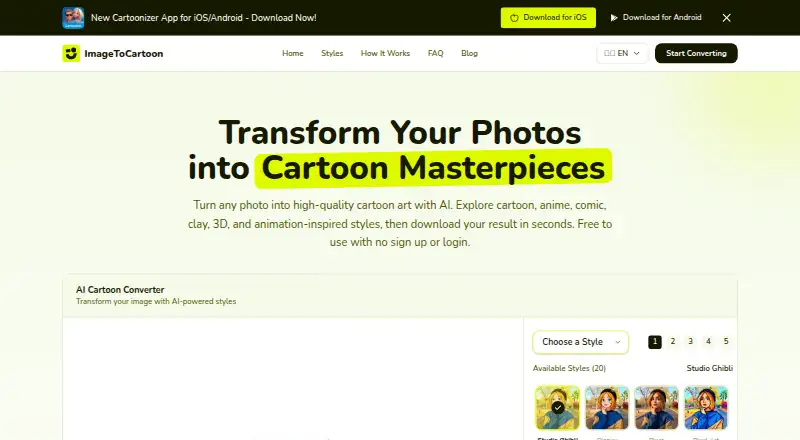
ImageToCartoon uses AI to turn uploaded photos into cartoon, anime, comic, and animation-inspired images.
What ImageToCartoon is
ImageToCartoon uses AI to turn uploaded photos into cartoon, anime, comic, and animation-inspired images. Its library has more than 80 styles, including manga, 3D, watercolor, and clay-style effects. The converter accepts JPG, PNG, and WebP images up to 10MB; users can upload, drag and drop, paste from the clipboard, or provide an image URL. It supports portraits, group photos, full-body pictures, and animal photos. Generated images can be downloaded for avatars, social posts, prints, and creative projects. The public browser converter requires no account, login, payment details, or app installation. The homepage also links to iOS and Android apps. Original uploads and generated results are automatically deleted from the maker's systems within 2 hours. The privacy policy says third-party providers may be used for hosting, analytics, advertising, security, image processing, and storage, and advises against submitting highly confidential, regulated, or sensitive personal images. Generated images may be used for personal or commercial projects if users have rights to the original photo and comply with applicable laws and third-party rights.
Good
- Offers more than 80 image styles.
- Accepts JPG, PNG, and WebP files up to 10MB.
- No account or payment details required for the converter.
- Uploads and results are deleted within 2 hours.
Watch out
- Highly confidential or sensitive images are discouraged.
- Third-party providers may handle image processing and storage.
- Image input is limited to 10MB.
Who it suits
ImageToCartoon suits people who want to turn personal, group, full-body, or animal photos into stylized images. Its browser converter may appeal to users who want to try it without creating an account or installing an app.
Verdict
ImageToCartoon provides a browser-based route to stylized images without registration or payment details. Consider its stated data handling before uploading sensitive photos.
Plans and prices
From ImageToCartoon's own pricing page, checked 15 Oct 2026.
| Plan | Price | What it gives you |
|---|---|---|
| Public converter | Free | No account, login, subscription, credits or payment required |
| Monthly Plan | $6.99 a month | Unlimited access · premium AI features · monthly |
| Monthly Plan | $6.99 a month | Unlimited access · premium AI features · monthly |
| Yearly Plan | $19.99 a year | Best value · premium AI features · yearly |
| Yearly Plan | $24.99 a year | Unlimited access · premium AI features · yearly |
| Lifetime Plan | $29.99, paid once | Permanent access · premium AI features · one-time |
| Lifetime Plan | $49.99, paid once | Permanent access · premium AI features · one-time |
The facts
Each one read from ImageToCartoon's own pages, with the date it was checked.
What it does
- 4× upscaler
- The Android listing advertises an online AI upscaler that can increase resolution up to four times.checked 15 Oct 2026
- AI model
- The homepage labels its quality model as powered by Vheer.checked 15 Oct 2026
- Aspect ratio
- The web interface offers an option to match the input image aspect ratio.checked 15 Oct 2026
- Availability limitation
- The terms reserve the right to update, limit, suspend or discontinue service and provide no uninterrupted or error-free availability guarantee.checked 15 Oct 2026
- Commercial use
- Generated images may be used for personal or commercial projects if users own or have permission to use the original photo and comply with applicable laws and third-party rights.checked 2 Oct 2026
- Content responsibility
- Users must own or have permission for uploaded images and are responsible for reviewing generated results before distribution.checked 15 Oct 2026
- Domain registration
- Gridinsoft reports the domain was registered on September 10, 2021 through NameSilo, with ownership information not publicly available.checked 15 Oct 2026
- File deletion
- Official privacy and terms pages say uploaded originals and generated results are automatically deleted within two hours.checked 15 Oct 2026
- File retention
- Original uploads and generated results are automatically deleted from the maker's systems within 2 hours.checked 2 Oct 2026
- Google Play data disclosure
- Google Play states that the app may share device or other IDs, reports no data collected, and says data is not encrypted or deletable.checked 15 Oct 2026
- Image input
- The converter accepts JPG, PNG, and WebP images up to 10MB; users can upload, drag and drop, paste from the clipboard, or provide an image URL.checked 2 Oct 2026
- Independent criticism
- Scam Detector rated the domain 17.5/100, marked it suspicious and said blacklist engines detected the domain.checked 15 Oct 2026
- Independent trust check
- Gridinsoft gave imagetocartoon.com a 79/100 trust score and reported no major malware or phishing detections at its May 7, 2026 check.checked 15 Oct 2026
- Input formats
- The web converter accepts JPEG, PNG and WebP images, including uploads, pasted images and image URLs.checked 15 Oct 2026
- Limit: demographic rendering
- An Apple reviewer reported unwanted changes to skin tone and hair color in some outputs.checked 15 Oct 2026
- Limit: output quality
- Google Play reviews complain about poor details, incorrect text rendering and results that do not match expectations.checked 15 Oct 2026
- Limit: subscription reliability
- An Apple App Store review said the app did not work even after purchasing a plan.checked 15 Oct 2026
- Limit: upload failures
- Google Play reviews report purchases followed by the app remaining stuck on the upload screen and failing to convert images.checked 15 Oct 2026
- Local history
- The mobile app says processing history is saved locally on the device.checked 15 Oct 2026
Where it runs
- Android app features
- The Android app combines photo-to-cartoon conversion, an AI cartoon maker, anime creator, art filters and an image upscaler.checked 15 Oct 2026
- Android processing speed
- Google Play says most cartoon results are produced in about 10–20 seconds with one-tap conversion.checked 15 Oct 2026
- Apple requirements
- The Apple listing requires iOS 16.6 or later, iPadOS 16.6 or later, macOS 13.5 or later and visionOS 1.0 or later.checked 15 Oct 2026
The company
- Headquarters
- Hong Kongchecked 28 Sep 2026
- Maker publication
- The associated ImageToCartoon blog describes itself as an independent publication launched in May 2023 by ZhuoReKeJi.checked 15 Oct 2026
The full review of ImageToCartoon
ImageToCartoon is an AI photo converter that turns pictures into cartoon, anime, comic and animation-inspired images. It is best for people who want a quick browser-based creative result without opening an account. Its breadth of styles and input options make it convenient for casual projects, but its own privacy guidance rules it out for sensitive photos.
Overview
The converter accepts JPG, PNG and WebP images up to 10MB. You can upload a file, drag and drop it, paste from the clipboard or provide an image URL. It supports portraits, group photos, full-body images and animal photos, then lets you download the result for an avatar, social post, print or other creative project. The range of subjects makes it more flexible than a portrait-only tool, while the 10MB cap may require resizing larger source files.
Generated images can be used for personal or commercial projects if you own or have permission to use the original photo and follow applicable laws and third-party rights. Commercial use is therefore possible, but it does not remove the need to clear rights to the source image.
Key features
80-plus styles
The library spans anime, manga, 3D, watercolor, clay-style and comic-inspired treatments. That gives users several directions to try within one converter, making it a good fit for exploring different looks for social or personal creative work. It is still focused on transforming photos, so choose a different kind of tool if your priority is a workflow beyond photo-to-cartoon conversion.
Browser access without registration
The public converter requires no registration, login or payment details, and the browser version needs no app installation. The homepage also links to iOS and Android apps, while the listed platforms include macOS and web. This combination suits users who want to start in a browser or prefer a mobile app, though no additional app-specific capabilities are established.
Uploads and privacy
Original uploads and generated results are automatically deleted from the maker's systems within two hours. The privacy policy describes administrative, technical and organizational safeguards, and says third-party providers may be used for hosting, analytics, advertising, security, image processing and storage. It advises against uploading highly confidential, regulated or sensitive personal images. The deletion window may suit ordinary creative use, but it should not be treated as a reason to submit sensitive material.
Pricing
The Public converter costs nothing. There is no account, subscription, credit balance or payment required, so it is suitable for someone who wants to make images without committing to a paid plan. The stated 10MB upload limit is the principal constraint given for the converter; no paid tier or quota is described.
Platforms
ImageToCartoon is listed for Android, iOS, macOS and web. Its browser converter works without app installation, and the homepage links to iOS and Android downloads.
Who it's for
Choose ImageToCartoon for fast, account-free photo stylization across a broad range of subjects and visual treatments. It also accommodates commercial projects when you have the necessary rights to the source photo. It is not a sensible choice for highly confidential or sensitive images, and users with files above 10MB will need to reduce them before conversion.
Pros and cons
Pros
- More than 80 styles cover a range from anime and manga to watercolor and clay-style effects, giving users several looks to explore.
- Multiple input methods and support for portraits, groups, full-body photos and animals make it usable beyond single-subject headshots.
- The public converter is free and requires no account, subscription, credits or payment details.
- Commercial use is permitted when the user has rights to the original photo and follows relevant laws and third-party rights.
Cons
- Uploads are capped at 10MB, which may exclude larger source images unless they are resized.
- The privacy policy advises against sensitive uploads, and third-party providers may participate in processing and storage despite the two-hour deletion window.
Alternatives
- Cartoonie is another freemium option across Android, iOS, macOS, web and Windows. Its free web preview is limited to one protected preview; full-resolution access and more creations require a 10-credit pack, so it is less suited to repeated free use.
- Cartoonize offers a free Basic plan with essential effects and features without registration, plus a Pro Annual Plan at $6.99 a year. Consider it if you want its stated essential effects or a paid annual option.
- GenToon has a free plan with 150 credits per month and 20 characters, with paid plans starting at $10 a month for 800 credits and 20 characters. Choose it if that credit-and-character allowance better matches your needs.
- Pixelcut is a freemium choice for Android, iOS, API and web, with limited background removal and upscale plus free exports without a watermark. Pick it when those image-editing functions matter more than ImageToCartoon's stated style library.
- myComics.ai provides a free tier with 30 credits and three art styles, as well as a printed comic book option from 9.99 USD once. It is a fit if you want a printed comic-book product rather than a general photo-conversion result.
- Pict.AI offers free web access with two uses per tool per IP address before further use directs users to its mobile app. Consider it if that per-tool web allowance and app route suit your usage.
- Toolster Cartoonizer is free, with unlimited use, no sign-up, no watermark and support for JPG, PNG or WebP files up to 20MB. Its higher stated file-size limit and unlimited use make it worth choosing for larger files or repeated conversions.
- AI Photo Cartoonizer is a web-only freemium option with a free plan, per-IP rate limits, no sign-up and uploads up to 2MB.
- AI Cartoon Generators is a category list for comparing options.
Verdict
ImageToCartoon is a strong fit for anyone who wants a free, account-free browser converter with a wide range of styles and flexible photo input. Its ease of access is the main reason to choose it; the 10MB limit and explicit warning against sensitive uploads are the clearest reasons to look elsewhere.
Getting started
- Open https://imagetocartoon.com/ in a browser; the converter needs no app installation.
- Upload, drag and drop, paste, or provide the URL of a JPG, PNG, or WebP image up to 10MB.
- Choose a style from the library of more than 80 options.
- Download the generated image for your intended use.
- Alternatively, use the homepage links to download the iOS or Android app.
Questions
Is ImageToCartoon free?
Yes. The public converter costs $0 and does not require a subscription, credits, or payment.
Do I need to create an account?
No. The public browser converter does not require registration or login.
What file types and image sizes does it accept?
It accepts JPG, PNG, and WebP images up to 10MB.
Which devices can use ImageToCartoon?
The listed platforms are Android, iOS, macOS, and web. The homepage links to Android and iOS app downloads, and the browser converter needs no app installation.
What happens to uploaded photos?
Original uploads and generated results are automatically deleted from the maker's systems within two hours. The privacy policy says third-party providers may be used for several services and advises against uploading highly confidential, regulated, or sensitive personal images.
Can generated images be used commercially?
Yes, if you own or have permission to use the original photo and comply with applicable laws and third-party rights.
Alternatives to ImageToCartoon
- 1

Dreamina
Free planAndroidiOSWebmacOS8.3From $15 a month - 2

Pixelcut
Free planAndroidiOSWebAPI8.3From $8 a month - 3
Cartoonie
Free planAndroidiOSWebmacOS8.0From $49.99 a year - 4

Cartoonize
Free planAndroidiOSWebExtension8.0From $83.88 a year - 5
GenToon
Free planAndroidiOSWeb7.5From $10 a month - 6
myComics.ai
Free planAndroidiOSWeb7.1$9.99 one-time