Everything Xiaomi is reader-supported. When you buy through links on our site, we may earn an affiliate commission. As an Amazon Associate I earn from qualifying purchases. Learn more
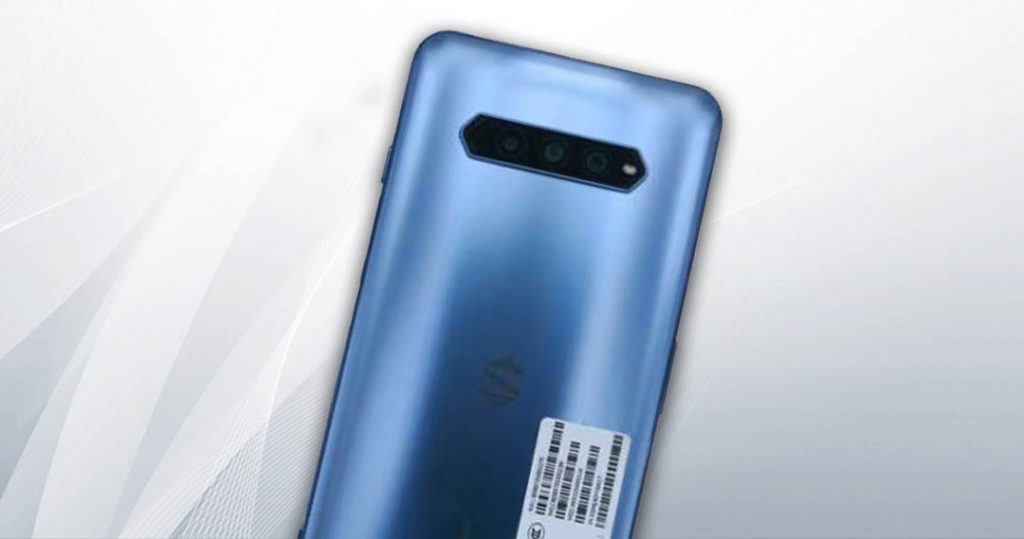
Black Shark, a brand that has spun out of Xiaomi announced the launch date for the Black Shark 4 series smartphones. The Black Shark 4 and the Black Shark 4 Pro will be launched on March 23.
One of the phones was recently spotted on the Chinese certification website TENAA. The Black Shark 4 will sport a 6.67-inch FHD+ AMOLED 120Hz refresh rate screen. As per the leaks, it will be powered by the Qualcomm Snapdragon 870 SoC and will run on Android 11 out-of-the-box. There will be a 4,720mAh battery with support for 65w fast charging.
As an Amazon Associate I earn from qualifying purchases.
Free tools Windows power users keep installed
One-click scans. No signup required.

As for the Black Shark 4 Pro, the phone will sport a similar screen but will be powered by the Snapdragon 888 processor and could pack a 108MP main sensor on the back while the vanilla Black Shark 4 will have a 64MP main sensor. One extra thing the Pro model has is the support for 120W fast charging which Black Shark has already confirmed.

There is a 4,500mAh battery with 120W fast charging that can charge the phone in less than 15 minutes. For this, Black Shark will be using a high-efficiency charging brick with a charging efficiency of 98.5% which further will cut down on the heating. We should know more about these phones in the coming few days.
Quick Recap
Shopping ad

- 【Superior Surround Sound Gaming Immersion】: Black Shark Goblin X6 gaming headset with advanced 50 millimeter drivers delivers clear and precise sound imaging with improved bass response. Hear footsteps and environmental cues with clarity to give you a competitive advantage in-game.
- 【Premium Comfort & Noise Isolation】: Soft headband cushion and breathable memory foam ear pads for wearing comfort. This gaming headphone allows for up to more time of usage without excess pressure build-up. Provides passive noise isolation and the best comfort.
- 【Bendable Noise-canceling Cardioid Mic】: The bendable microphone with an unidirectional cardioid pickup pattern ensures voice capture and improved clarity can be fixed to any position. Black Shark Goblin X6 headphones with microphone can remove ambient noise for clear, in-game communication.
- 【3.5mm Multi-platform Compatibility】: Works with PC, PS4, PS5, Switch, Xbox, and Android devices via 3.5mm jack. The USB connector is only used to power the LED lighting.
- 【Personalize Your Gaming Headset】: With detachable Black Shark velcro on the headband, You can replace personalized velcro to build your team.
Shopping ad

- 🎮 [Gaming Advantage] BoxWave Gaming Gear Compatible With Xiaomi Black Shark 4 Pro. Auto Trigger technology enables COMPETITIVE dominance in mobile phone gaming. With a long lasting battery, tactile feel, and electronic "firing" pulses, gamers gain more focus and keep an edge over other players, longer. Simply optimize the button placement, and enlarge the thumb button area to start winning! **Please note this is for the left trigger only.** ⭐ *** PLEASE NOTE, BLACK SHARK 4 PRO
- 🔫 [Game Compatibility] Best use for games like PUBG Mobile, Call of Duty Mobile, Fortnite Mobile and other mobile shooting games. QuickTrigger Auto boasts 4 settings with up to 64 CLICKS per second, offering more versatility to the player; allowing users to use non-automatic weapons as if they were automatic.
- ⚡ [Electronic] QuickTrigger Auto is equipped with pulse-touch technology, simply HOLD down left button for CONTINUOUS tapping. Charge and connect effortlessly! Eliminate trigger finger burnout, and the competition.
- 💼 [Convenient] EASILY CHARGE and snap-on for whenever you want to game, wherever. The QuickTrigger Auto boasts long battery life, powering you through even the toughest of sessions. Small enough to travel anywhere without bulk.
- 🔦 [How to use] 1. Put the joystick in from the top of your Black Shark 4 Pro, adjust it to the appropriate position, and hold the power button to start. 2. Choose the setting INTERFACE in the game, and move the firing icon and aiming icon to the functional touch point to play.
Product prices and availability are accurate as of the date/time indicated and are subject to change. Any price and availability information displayed on Amazon at the time of purchase will apply.
Independent reader supportYour contribution helps us test, update, and keep practical guides available for everyone.