The Tool Desk
Outbyte PC Repair FREEClear out junk files and repair common Windows errorsFree Scan →Outbyte Driver Updater FREEScan for outdated or missing drivers - takes under a minuteDriver Scan →Everything Xiaomi is reader-supported. When you buy through links on our site, we may earn an affiliate commission. As an Amazon Associate I earn from qualifying purchases. Learn more
Given the size of the user base and smartphone sales, Xiaomi’s MIUI is by far the largest custom Android skin people use these days. Since last year we have seen Redmi and POCO spun out of Xiaomi as independent brands but they still rely on MIUI.
MIUI’s approach is simple, with the latest versions the skin has maturated a lot and packs all the critical features that you won’t find on stock Android but would need in general. Some of its features have been adopted by their rivals as well.
As an Amazon Associate I earn from qualifying purchases.
Do these 3 things before closing this tab:
1Repair Windows errors before they cause bigger problems2Scan for outdated or missing drivers - takes under a minute3Clear out junk files and repair common Windows errorsWhile taking a screenshot may feel mundane but MIUI offers a lot of ways to take a screenshot apart from the standard button press method. In this guide, we list out all the possible ways through which you can take a screenshot on your Redmi phone running on MIUI.
The power and volume button combination
This is perhaps the fastest and more widely known method to take a screenshot on Redmi phones or on Android phones in general. In this method, you basically press and hold the power and volume down button simultaneously.
Shopping ad

- USA MARKET ONLY WORK ON TMOBILE MINT TELLO OR ANY UNDER TMOBILE NETWORK PHONE NEEDS A SIM CARD ALREADY ACTIVATED ,OUTSIDE USA WORKS ANY GSM CARRIER SIM GSM FCC ID: 2AFZZRAD4G
- nano SIM 1 + Hybrid (nano SIM or microSD) Dual standby , n1/2/3/5/7/8/12/20/26/28/38/40/41/48/66/77/78 4G : B1/2/3/4/5/7/8/12/13/17/18/19/20/26/28/32/66 4G: LTE TDD: B38/40/41/42/48 3G: WCDMA: Band 2/4/5/8 2G: GSM: Quad Band.
- 6.77" AMOLED displayResolution: 2392 × 1080Refresh rate: Up to 120HzTouch sampling rate: 240HzBrightness: 3200 nits peak brightness, 800 nits (typ)Colour depth: 12 bitContrast ratio: 8,000,000:1DCI- P3 wide color gamutSunlight displayReading mode3840Hz PWM dimming|16,000-level brightness adjustmentScreen-to-body ratio: 92%*Data obtained from Xiaomi Internal Labs. Actual results may vary.TÜV Rheinland Low Blue Light (Hardware Solution) Certified TÜV Rheinland Circadian Friendly Certified TÜV Rheinland Flicker Free Certified
- Snapdragon 6 Gen 3 Mobile Platform4nm manufacturing process technologyCPU: Octa-core processor, up to 2.4GHzGPU: Adreno
- Virtual proximity sensor | Ambient light sensor | Accelerometer | Electronic compass | IR blaster | Gyroscope / GPS: L1 | GLONASS: G1 | BDS: B1I | Galileo E1 / Wireless NetworksBluetooth 5.3Wi-Fi Protocol: 802.11a/b/g/n/ac Supports 2.4GHz Wi-Fi | 5GHz Wi-Fi Wi-Fi Direct / In-screen fingerprint sensorAI Face Unlock
Here’s how it works:
- Open the screen you want to capture.
- Press and hold the power and volume down buttons at the same time.
- Hold for a few seconds, and you’ll hear the camera shutter accompanied by a short visual indication that the screenshot was successfully captured.
- Once the screenshot is taken, it will be accessible for a few seconds from the top right corner of the screen. You’ll be able to share or edit the screenshot by selecting it directly from there.
From the Notification panel
On the latest MIUI builds, you essentially have the option to take screenshots from the screenshot toggle. This toggle might not be available in the standard set of toggles at first and you might need to edit the toggle shade for it. Fret not, just pull the notification all the way and you should see the option in the last row.
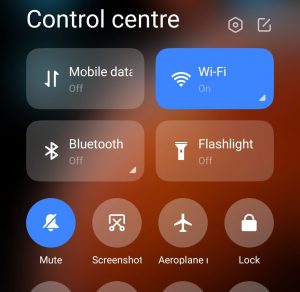
- Navigate to the screen you want to capture.
- Swipe down from the top of the screen to access the notification panel.
- Select the Screenshot toggle to take a screenshot.
While this method might look easy and straightforwards, you won’t be able to capture the notification panel while taking a screenshot using this method.
Crashes, No Sound, or Screen Glitches?
Random freezes, missing sound and display glitches usually trace back to one bad driver. Find and replace yours safely.Free scan · under a minuteWindows Errors? Fix Them Before They Spread
Repair common Windows errors and clear accumulated junk for a smoother, more stable PC - no reinstall needed.Free scan · no reinstallUsing Quick Ball
iOS users might be somewhat familiar with this as Xiaomi’s Quick Ball is familiar with Assistive Touch. Once enabled, the Quick Ball is a free-floating dock that primarily lives on your home screen and is layered on top of apps if given necessary permissions from the settings app.
Shopping ad

- USA MARKET ONLY WORK ON TMOBILE MINT TELLO OR ANY UNDER TMOBILE NETWORK PHONE NEEDS A SIM CARD ALREADY ACTIVATED ,OUTSIDE USA WORKS ANY GSM CARRIER SIM GSM FCC ID: 2AFZZRN76L
- SIM 1 + Hybrid (SIM or microSD) Dual standby , supports dual 4G : 4G: 1/2/3/4/5/7/8/12/13/17/18/19/26/28/66 4G: LTE TDD: Band 38/40/41 3G: WCDMA: Band 1/2/4/5/6/8/19 2G: GSM: Quad Band.
- 6.77" AMOLED displayResolution: 2392 × 1080Refresh rate: Up to 120HzTouch sampling rate: 240HzBrightness: 3200 nits peak brightness, 800 nits (typ)Colour depth: 12 bitContrast ratio: 8,000,000:1DCI- P3 wide color gamutSunlight displayReading mode3840Hz PWM dimming|16,000-level brightness adjustmentScreen-to-body ratio: 93%*Data obtained from Xiaomi Internal Labs. Actual results may vary.TÜV Rheinland Low Blue Light (Hardware Solution) Certified TÜV Rheinland Circadian Friendly Certified TÜV Rheinland Flicker Free Certified
- MediaTek Helio G100-Ultra6nm manufacturing process technologyCPU: Octa-core processor, up to 2.2GHzGPU: Mali-G57 MC2
- Proximity sensor | Ambient light sensor | Accelerometer | Electronic compass | IR blaster | Gyroscope / Bluetooth 5.3Wi-Fi Protocol: 802.11a/b/g/n/ac / Supports 2.4GHz Wi-Fi | 5GHz Wi-Fi Supports Wi-Fi Direct
The Quick Ball gives you five options at default settings: Home, back, recent, power off, and screenshot, but you can swap these out for custom options. To enable the Quick Ball and subsequently take a screenshot with it, follow the below steps.
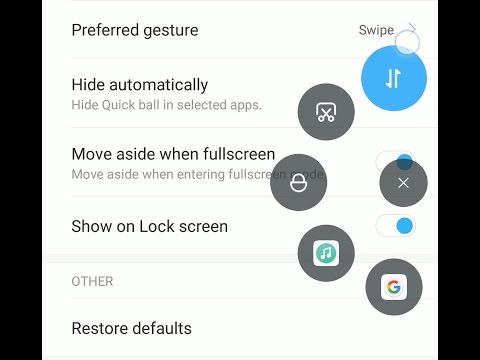
- Go to Settings.
- Navigate to Additional settings.
- Go to Quick ball.
- Toggle Turn on Quick ball.
- Once it’s enabled, tap Quick ball to access its shortcuts.
- Select the Screenshot (scissor) shortcut for taking a screenshot.
Three-finger swipe method
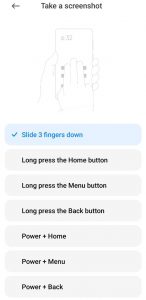
This is another intuitive method that MIUI allows for taking a screenshot. Just open the screen you want to capture and simply swipe three fingers downwards. If the gesture is registered successfully, the phone’s display should flash and the screenshot would be available in the top-right corner of the screen for a few seconds.
Long Screenshots
Now that we have covered most of the popular and easy methods to take screenshots on your Redmi phone with MIUI. One option that you might have noticed in the screenshot notification is ‘extended screenshot’. They are sometimes referred to as scrolling screenshots as well. Basically while taking a screenshot only the area that is visible on the screen at that very moment will be captured in that screenshot.
Free tools Windows power users keep installed
One-click scans. No signup required.
Shopping ad
- USA MARKET ONLY WORK ON TMOBILE MINT TELLO OR ANY UNDER TMOBILE NETWORK PHONE NEEDS A SIM CARD ALREADY ACTIVATED ,OUTSIDE USA WORKS ANY GSM CARRIER SIM GSM FCC ID: 2AFZZRN76L
- SIM 1 + Hybrid (SIM or microSD) Dual standby , supports dual 4G : 4G: 1/2/3/4/5/7/8/12/13/17/18/19/26/28/66 4G: LTE TDD: Band 38/40/41 3G: WCDMA: Band 1/2/4/5/6/8/19 2G: GSM: Quad Band.
- 6.77" AMOLED displayResolution: 2392 × 1080Refresh rate: Up to 120HzTouch sampling rate: 240HzBrightness: 3200 nits peak brightness, 800 nits (typ)Colour depth: 12 bitContrast ratio: 8,000,000:1DCI- P3 wide color gamutSunlight displayReading mode3840Hz PWM dimming|16,000-level brightness adjustmentScreen-to-body ratio: 93%*Data obtained from Xiaomi Internal Labs. Actual results may vary.TÜV Rheinland Low Blue Light (Hardware Solution) Certified TÜV Rheinland Circadian Friendly Certified TÜV Rheinland Flicker Free Certified
- MediaTek Helio G100-Ultra6nm manufacturing process technologyCPU: Octa-core processor, up to 2.2GHzGPU: Mali-G57 MC2
- Proximity sensor | Ambient light sensor | Accelerometer | Electronic compass | IR blaster | Gyroscope / Bluetooth 5.3Wi-Fi Protocol: 802.11a/b/g/n/ac / Supports 2.4GHz Wi-Fi | 5GHz Wi-Fi Supports Wi-Fi Direct
If you want to take a screenshot of let’s just say a webpage, this option comes in handy. Once the screenshot is taken, you’ll see an animation in the top right corner that shows a preview of the screenshot. Select it, and you’ll see options to edit, share, or delete the screenshot, as well as a scroll feature that lets you extend the screenshot.
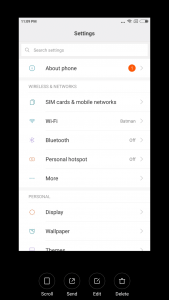
Hit the scroll button and MIUI will start taking a longer running screenshot of that window. Essentially stitching multiple screenshots together to make a single long screenshot.
Apart from these, MIUI also lets you take screenshots by long-pressing the home button, long-pressing the menu button, long-pressing the back button, and many more combinations.
Quick Recap
Product prices and availability are accurate as of the date/time indicated and are subject to change. Any price and availability information displayed on Amazon at the time of purchase will apply.
What’s actually slowing this PC down?
Pick the symptom - the matching free tool is one click away.