Quick wins for a faster PC:
Fix the driver behind crashes, sound loss and screen glitchesFind Drivers →Repair Windows errors before they cause bigger problemsFix Now →Everything Xiaomi is reader-supported. When you buy through links on our site, we may earn an affiliate commission. As an Amazon Associate I earn from qualifying purchases. Learn more
To say “I love you” with an AI-generated song, write a few personal details into a short lyric, generate a vocal song, then listen on your Xiaomi, Redmi or POCO phone and revise any line that sounds generic or is sung unclearly. Suno is a practical starting point because it generates songs with vocals and lyrics and is available on Android; the other tools below suit different parts of the process. Romantic style, language quality and specific musical controls are not established for every product, so check the vendor’s current interface before relying on them.
What Makes A Love Song Feel Personal
A useful gift song needs more than the words “I love you.” Give it details that could only belong to your relationship: a shared place, a small habit, a phrase you both use, or a moment you remember. Choose one central feeling—warm, playful, grateful, or wistful—so the lyrics and musical direction point the same way. Keep the main message easy to hear in the chorus.
As an Amazon Associate I earn from qualifying purchases.
Recommended Free Tools
For a short dedication, a simple structure works well: a verse with a concrete memory, a chorus that says what the person means to you, and an optional second verse with another detail. Avoid packing every memory into one lyric. If you want a particular instrument, tempo, language, genre, or vocal quality, name it in your prompt, but treat the result as a request rather than a guaranteed feature unless the product explicitly supports it.
Choose A Tool For The Job
| Tool | Useful For This Gift | Phone Workflow | Known Limits |
|---|---|---|---|
| Suno | Generating a complete song with vocals, lyrics and instrumentation, then editing or extending it. | Available on web, iOS and Android. | Free Plan excludes commercial rights and stem separation. Pro limits downloads to 20 songs per month. Suno Studio is limited to Premier. |
| Treblo | Generating songs with music, structure, lyrics and vocals, with editing and stem separation. | Available on web, iOS and Android. | Consumer and API offerings use different pricing models; API plans use monthly credit limits. |
| Eleven Music | Generating vocal songs and refining sections with editing tools. | Web and API access are listed; a dedicated mobile app is not established. | Free access is personal use with browse-only Marketplace access. Commercial rights vary by plan and exclude film, TV and studio games. |
| Udio | Prompt-led vocal song creation and lyric editing. | Use its web workflow; mobile app availability is not established. | Audio, video and stem downloads are disabled during the transition period. |
| LyricToMelody AI | Turning lyrics into melodies and sung vocal drafts, with exports for further production. | Web application; no desktop app. | Starter projects are retained for 7 days. Commercial rights are included on paid plans. |
These products are not interchangeable: some generate full songs, while LyricToMelody AI is especially relevant when you already have words and want a sung draft. Product details do not establish a dedicated “love song” mode or guarantee a particular genre, instrument, language, pronunciation or vocal style. Check the vendor’s site for those specifics before choosing.
Shopping ad
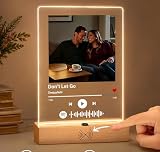
- 1. REAL MUSIC PLAYBACK — NO PHONE SCAN NEEDED Unlike ordinary Spotify code plaques, this custom music plaque features a built-in speaker and real music playback button. Simply press once to instantly hear your favorite song — no app, no scanning, no phone required. Turn memories into music you can truly feel.
- 2. PERSONALIZED PHOTO + SONG = A UNIQUE LOVE GIFT Upload your favorite photo and choose a meaningful song to create a one-of-a-kind personalized keepsake. Perfect for couples, anniversaries, birthdays, weddings, Valentine's Day, Mother's Day, or long-distance relationships.
- 3. EXCLUSIVE MOTION SENSOR NIGHT LIGHT Our plaque includes an intelligent auto-sensing LED light that automatically turns on in the dark when someone approaches. It creates a warm romantic atmosphere beside your bed, desk, or living room — a feature rarely found on Amazon.
- 4. PREMIUM ACRYLIC DISPLAY WITH MODERN DESIGN Made from crystal-clear acrylic with a minimalist wooden base, this custom music plaque blends beautifully with any room decor. Whether used as a bedside lamp, memory display, or romantic decoration, it becomes an emotional centerpiece.
- 5. MEANINGFUL GIFT THEY’LL NEVER FORGET More than just a decoration — this is a gift filled with emotion, memories, and sound. Watching someone hear “your song” instantly creates a powerful emotional reaction, making it ideal for romantic surprise gifts.
Make The Song On Your Xiaomi, Redmi Or POCO
- Pick the memory. Write down three truthful details: one shared moment, one quality you love about the person, and one small image or phrase that will make them recognize the story. For example: “rainy walk by the station,” “you make hard days lighter,” and “extra chai.” Keep private or identifying details out if you do not want to submit them to an online service.
- Draft a singable lyric. Use plain language and short lines. Put the relationship’s central message in a repeated chorus, such as “I love the life we make in little moments.” Treat that as a starting line, not a required lyric; replace it with words that sound like you. Read the lines aloud and shorten anything you stumble over.
- Choose the generation route. In Suno or Treblo, ask for a complete vocal song and provide your lyric or story direction. With Udio, use its prompt-led song creation and lyric tools. With Eleven Music, specify that you want a vocal song and use its editing options if a section needs work. In LyricToMelody AI, start with the lyrics and use its melody and sung-draft workflow. Exact controls and prompt formats can change, so follow the current product interface.
- Describe the feeling, not just the label. Add a direction such as “intimate, grateful, warm, and easy to sing along with.” If you have a sound in mind, request it clearly—for instance, “gentle piano-led dedication” or “upbeat acoustic-style love song”—but do not assume a tool supports that instrument or style until its own options confirm it. A clear, focused request gives you a better basis for judging the result than a long list of unrelated influences.
- Generate and compare versions. Listen for whether the chorus communicates the message, whether the personal details survived, and whether the vocal makes names or important words understandable. If a line is awkward, revise the lyric itself and generate or edit again where the tool allows it. Avoid adding more style instructions when the real problem is unclear wording.
- Review on the phone you will use to share it. Play the chosen version through your Xiaomi, Redmi or POCO phone speaker and headphones. Check the opening, chorus and ending; confirm that the audio is saved or shareable through the product’s available options before planning a surprise. Export formats and download availability differ, and Udio downloads are currently disabled during its transition period.
- Add your own finishing touch. Send the song with a short note explaining the memory behind one lyric, or record a spoken introduction separately if you want the gift to sound more personal. Do not present an AI-generated imitation of another person’s voice as their own recording.
Keep The Gift Respectful And Check The Rights
Use your own lyrics and details, or material you have permission to use. If you upload someone’s voice or ask for a recognizable voice imitation, get that person’s consent; check the platform’s current terms for voice uploads, generated voices, covers, samples, sharing and any commercial use. The product information here does not establish blanket permission for those uses. Suno’s free plan does not include commercial rights, Eleven Music’s commercial rights depend on plan, LyricToMelody AI includes them on paid plans, and Treblo lists commercial licenses under Creator & Pro. Check each vendor’s current terms before using a song beyond a private personal gift.
The U.S. Copyright Office says works generated entirely by AI are not copyrightable, prompts alone do not make someone the author, and only human-authored parts of a mixed work may be protected. Applicants registering a work containing more than a minimal amount of AI-generated material must disclose it and describe the human author’s contribution. Read the U.S. Copyright Office’s AI report information.
Do these 3 things before closing this tab:
1Clear out junk files and repair common Windows errors2Scan for outdated or missing drivers - takes under a minute3Repair Windows errors before they cause bigger problemsQuick Recap
Shopping ad

- 🎵 TURN YOUR FAVORITE SONG INTO A FOREVER MEMORY🎵 Create a one-of-a-kind music plaque with your favorite photo and song. Your special memory becomes a beautiful keepsake that combines love, music, and light.
- ✨ MORE THAN A PHOTO FRAME✨ During the day, it displays your precious photo like an elegant acrylic picture frame. At night, the warm LED glow creates a romantic atmosphere and turns your memory into a beautiful night light.
- ❤️ THE PERFECT ROMANTIC GIFT FOR EVERY SPECIAL MOMENT❤️ Surprise your boyfriend, girlfriend, husband, wife, or loved one with a meaningful personalized gift for anniversaries, Valentine's Day, birthdays, weddings, and other unforgettable moments.
- 🌟 PREMIUM ACRYLIC & NATURAL WOOD DESIGN🌟Made with crystal-clear acrylic and a sturdy wooden base, this personalized music plaque features smooth rounded edges, HD photo display, and warm LED lighting for an elegant desktop decoration.
- 🎁 EASY CUSTOMIZATION IN 3 SIMPLE STEPS🎁 ① Upload your favorite photo ② Enter your song title and artist name ③ Place your order and create your unique memory gift A thoughtful gift made especially for someone you love.
Shopping ad

- Personalized Spotify Plaque & Custom Photo Gifts: Create a one-of-a-kind Custom Spotify Plaque with your favorite photo, song title, artist name, and scannable Spotify code. This personalized acrylic song plaque is a meaningful custom photo gift, personalized gift, and romantic music picture frame for your boyfriend, girlfriend, husband, wife, or couples celebrating life's special moments
- Premium Materials for Durability & Elegance: Crafted from high-quality acrylic with a solid wood base, this personalized music picture frame combines elegance with durability. Designed to last for years, it is not only beautiful home decor but also a thoughtful personalized gift for anniversaries, birthdays, Valentine's Day, weddings, or any special occasion.
- Unlimited Customization – Any Song & Photo: Personalize your plaque with any Spotify song, favorite photo, song title, and artist name. We'll professionally print a scannable Spotify code that instantly plays your meaningful song through the Spotify app. A unique Spotify gift, custom music picture frame, and personalized gifts made just for you.
- Perfect Personalized Gifts for Every Occasion: Whether you're shopping for anniversary gifts, birthday gifts, Valentine's Day gifts, wedding gifts, or Christmas gifts, this custom Spotify plaque is the perfect gift for boyfriend, girlfriend, husband, wife, couples, him, or her. A heartfelt way to celebrate love, memories, and music together.
- Easy to Customize & Scan: Simply customize your plaque with your favorite photo and song information. To play your selected song, open the Spotify app, tap the camera icon, and scan the Spotify code on the plaque. Please note that this product does not play music directly—it works by scanning the code through the Spotify app. Every plaque is carefully crafted, and we're always here if you need assistance.
Shopping ad
- Amazon.com Gift Cards do not expire and carry no fees.
- Multiple gift card designs and denominations to choose from.
- Redeemable towards millions of items store-wide at Amazon.com or certain affiliated websites.
- Available for immediate delivery. Gift cards sent by email can be scheduled up to a year in advance.
- No returns and no refunds on Gift Cards.
Shopping ad
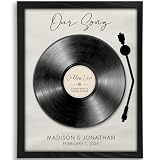
- Personalized to You: Each custom our song art print is uniquely created with your chosen song, names, and special date, turning meaningful music into a one-of-a-kind keepsake. It’s a romantic way to celebrate your love story, whether it marks your wedding song, first dance, anniversary, the day you met, or another unforgettable moment.
- Premium artwork: All art prints are printed on 270G premium matte paper with a linen embossed finish that combines crisp details with a soft, refined finish
- Unforgettable & Unique: Whether you’re celebrating a first anniversary, searching for meaningful couple gift ideas, shopping for husband gifts from wife, or looking for a romantic gift for your boyfriend, this personalized our song art print turns a special song into a lasting keepsake. It’s a beautiful way to honor your wedding song, first dance, anniversary, or any memory that deserves to be remembered forever.
- Perfect Romantic Gift: Ideal for anniversaries, weddings, Valentine’s Day, engagements, or just because, this personalized our song art print is a meaningful gift for couples that celebrates the moments and music that matter most. Thoughtful and personal, it’s a beautiful way to show how much you cherish your shared memories.
- Made in the USA: All artwork is designed and printed in North Carolina
Product prices and availability are accurate as of the date/time indicated and are subject to change. Any price and availability information displayed on Amazon at the time of purchase will apply.




