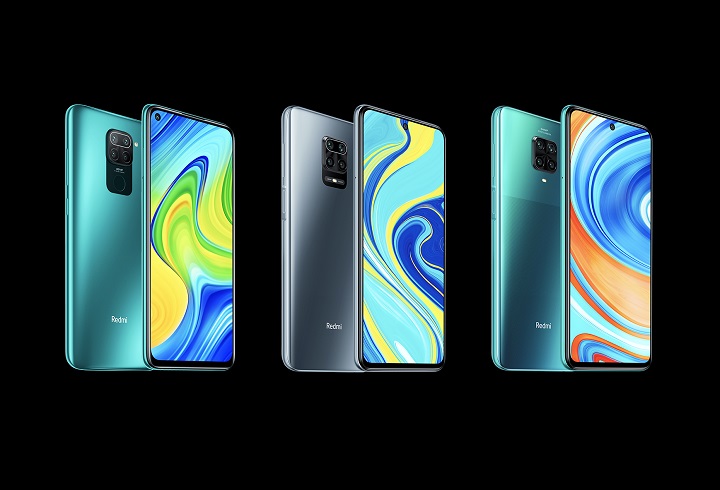
In this blog post, we are going to guide you on how to install TWRP recovery and root Redmi Note 9 Pro smartphone. Xiaomi brought the Redmi Note 8 Pro successor the Redmi Note 9 Pro in the Indian market just a few months back. On paper, this new lineup features a set of similar specs with changes done to the optics.
The Note 9 Pro received the MIUI 12 update based on Android 11 a few days back which certainly has increased the performance a bit. In this post we would guide you through the process of installing a custom recovery on your phone, followed by rooting it. For people who want some tinkering done to their phones, they should first have the Boot loaders unlocked for which we have a guide here and secondly they should have a custom recovery flashed with root access.
Before we get into the guide, let us just explore the device first. The Redmi Note 9 Pro comes powered by the Qualcomm Snapdragon 720G processor and is available in a plethora of colors in the Indian market. The phone also comes in two memory configurations. There is a quad-rear camera setup with the main sensor being 48MP which is quite common these days on Xiaomi smartphones.
Apart from this, we get the latest MIUI 12 build based on Android 11. A 5,020mAh battery to juice the phone and its massive FHD+ display upfront with a center punch-hole for the selfie camera. We get support for fast charging which is a plus considering the massive battery this phone comes with.
Shopping ad

- USA MARKET ONLY WORK ON TMOBILE MINT TELLO OR ANY UNDER TMOBILE NETWORK PHONE NEEDS A SIM CARD ALREADY ACTIVATED ,OUTSIDE USA WORKS ANY GSM CARRIER SIM GSM FCC ID: 2AFZZRA29G
- Dual SIM (nano SIM + nano SIM or nano SIM + eSIM) NO MICRO SD SLOT. 5G: n1/2/3/5/7/8/12/20/26/28/38/40/41/48/66/77/78 - 4G: LTE FDD: 1/B2/B3/B4/B5/B7/B8/B12/B13/B17/B18/B19/B20/B26/B28/B32/B66 4G: LTE TDD: B38/B40/B41/B42/B48 - 3G: WCDMA: B1/B2/B4/B5/B6/B8/B19 - 2G: GSM: B2/B3/B5/B8
- 6.83" AMOLED displayResolution: 1.5K (2772 x 1280)Refresh rate: Up to 120HzTouch sampling rate: Up to 480HzInstantaneous touch sampling rate: 2560Hz*Activated in Game Turbo modeBrightness: 3200 nits peak brightnessBrightness: HBM 1800 nitsColor depth: 12bitContrast ratio: 8000000:1DCI- P3 wide color gamut447PPICorning Gorilla Glass Victus 2Sunlight displayHDR10+ | Dolby Vision16,000-step automatic brightness adjustment3840Hz PWM dimming|TÜV Rheinland Low Blue Light (Hardware Solution) Certified | TÜV Rheinland Circadian Friendly Certified | TÜV Rheinland Flicker Free Certified
- MediaTek Dimensity 7400-Ultra4nm manufacturing process technologyCPU: Octa-core processor, up to 2.6GHzGPU: Mali-G615
- 200MP main cameraOptical Image Stabilization (OIS)0.56μm, 16in1, 2.24μmf/1.77P lens1/1.4" sensor size8MP ultra-wide cameraf/2.2Rear camera video recording4K at 30 fps1080p at 30/60 fps720p at 30 fps / Front Camera 20MP front camera1/4" sensor sizef/2.24P lensFront camera video recording1080p at 30/60 fps720p at 30 fps
READ | How To Unlock Bootloader of Redmi Note 9 and Redmi Note 9 Pro [Guide]
What is TWRP Recovery?

TWRP stands for TeamWin Recovery Project. It is an open-source and entirely GUI-based custom recovery for Android devices. The reason why it’s so popular is because of the fact that it allows Android users to enjoy fully touch-based UI and flash custom ROMs, MODs, Magisk, SuperSu, etc. There are further features like Full System backup that come in handy during these customization sessions.
Shopping ad

- USA MARKET ONLY WORK ON TMOBILE MINT TELLO OR ANY UNDER TMOBILE NETWORK PHONE NEEDS A SIM CARD ALREADY ACTIVATED ,OUTSIDE USA WORKS ANY GSM CARRIER SIM GSM FCC ID: 2AFZZRA8E
- Dual SIM (nano SIM + nano SIM or nano SIM + eSIM) (NoT MICRO SD SLOT) 5G: n1/2/3/5/7/8/20/28/38/40/41/48/66/77/78 / 4G: LTE FDD:1/2/3/4/5/7/8/12/13/17/18/19/20/26/28/32/66 -- 4G: LTE TDD:38/40/41/42/48 -- 3G: 1/2/4/5/6/8/19 -- 2G Quad Band - Bluetooth 5.4Wi-Fi: Wi-Fi 6/6E/Wi-Fi 5/Wi-Fi 4/802.11a/b/g Supports 2.4GHz Wi-Fi | 5GHz Wi-Fi Supports 2x2 MIMO,Wi-Fi Direct
- 6.83" CrystalRes AMOLED displayResolution: 1.5K (2772 x 1280)Refresh rate: Up to 120HzTouch sampling rate: Up to 480HzInstantaneous touch sampling rate: 2560Hz*Activated in Game Turbo modeBrightness: 3200 nits peak brightnessBrightness: HBM 1800 nitsColor depth: 12bitContrast ratio: 8000000:1DCI- P3 wide color gamut447PPICorning Gorilla Glass Victus 2Sunlight displayHDR10+ | Dolby Vision16,000-step automatic brightness adjustment3840Hz PWM dimming|TÜV Rheinland Low Blue Light (Hardware Solution) Certified | TÜV Rheinland Circadian Friendly Certified | TÜV Rheinland Flicker Free Certified
- Snapdragon 7s Gen 44nm manufacturing process technologyCPU: Octa-core processor, up to 2.7GHzGPU: Adreno GPU
- 200MP main cameraOptical Image Stabilization (OIS)0.56μm, 16in1, 2.24μmf/1.77P lens1/1.4" sensor size8MP ultra-wide cameraf/2.2Rear camera video recording4K at 30 fps1080p at 30/60 fps720p at 30 fps - 32MP front camera1/3.6" sensor sizef/2.24P lensFront camera video recording1080p at 30/60 fps720p at 30 fps
EverythingXiaomi.com is not responsible for any kind of damage to data or devices while performing this task. Flashing a custom recovery voids the device’s warranty and might result in full data loss. You are proceeding at your own risk.
How To Install TWRP Recovery on Redmi Note 9 Pro
Before we start with the installation process, it is advised that you stick to the guide and follow the instructions line-by-line.
What’s actually slowing this PC down?
Pick the symptom - the matching free tool is one click away.
Shopping ad

- USA MARKET ONLY WORK ON TMOBILE MINT TELLO OR ANY UNDER TMOBILE NETWORK PHONE NEEDS A SIM CARD ALREADY ACTIVATED ,OUTSIDE USA WORKS ANY GSM CARRIER SIM GSM FCC ID: 2AFZZRA29G
- Dual SIM (nano SIM + nano SIM or nano SIM + eSIM) NO MICRO SD SLOT. 5G: n1/2/3/5/7/8/12/20/26/28/38/40/41/48/66/77/78 - 4G: LTE FDD: 1/B2/B3/B4/B5/B7/B8/B12/B13/B17/B18/B19/B20/B26/B28/B32/B66 4G: LTE TDD: B38/B40/B41/B42/B48 - 3G: WCDMA: B1/B2/B4/B5/B6/B8/B19 - 2G: GSM: B2/B3/B5/B8
- 6.83" AMOLED displayResolution: 1.5K (2772 x 1280)Refresh rate: Up to 120HzTouch sampling rate: Up to 480HzInstantaneous touch sampling rate: 2560Hz*Activated in Game Turbo modeBrightness: 3200 nits peak brightnessBrightness: HBM 1800 nitsColor depth: 12bitContrast ratio: 8000000:1DCI- P3 wide color gamut447PPICorning Gorilla Glass Victus 2Sunlight displayHDR10+ | Dolby Vision16,000-step automatic brightness adjustment3840Hz PWM dimming|TÜV Rheinland Low Blue Light (Hardware Solution) Certified | TÜV Rheinland Circadian Friendly Certified | TÜV Rheinland Flicker Free Certified
- MediaTek Dimensity 7400-Ultra4nm manufacturing process technologyCPU: Octa-core processor, up to 2.6GHzGPU: Mali-G615
- 200MP main cameraOptical Image Stabilization (OIS)0.56μm, 16in1, 2.24μmf/1.77P lens1/1.4" sensor size8MP ultra-wide cameraf/2.2Rear camera video recording4K at 30 fps1080p at 30/60 fps720p at 30 fps / Front Camera 20MP front camera1/4" sensor sizef/2.24P lensFront camera video recording1080p at 30/60 fps720p at 30 fps
Pre-Requisites To Install TWRP Recovery on Xiaomi Redmi Note 9 Pro:
- Make sure the phone’s battery is charged above 60%.
- Back up your Data on any external media or perform a Nandroid backup.
- Download ADB and Fastboot Drivers on the PC/Laptop.
- Download the latest Xiaomi USB Drivers on the PC
- Download and save twrp-3.4.0-0-Curtana.img it to the Extracted folder of ADB – Fastboot drivers.
- Unlocked Bootloader on the Xiaomi Redmi Note 9 Pro
Steps To Install TWRP on Xiaomi Redmi Note 9 Pro
- You first need to have an unlocked bootloader on your Redmi Note 9 Pro, so if that’s not done, follow our guide here.
- Connect your phone to PC and look if the OEM Unlock is turned on from the developer settings.
- Extract ADB and Fastboot drivers in a folder and open the cmd or PowerShell by pressing Shift key + Right-Clicking in the same folder.
- Now type the following command [adb reboot bootloader] to reboot the Redmi Note 9 Pro into the fastboot mode (Note: You might get a USB debugging permission on your smartphone, so accept the pop-up).
- Now place the twrp-3.4.0-0.curtana.img to the same folder where you have extracted the ADB & Fastboot drivers.
- Type this [fastboot flash recovery twrp-3.4.0-0.curtana.img] command to flash the TWRP image you download.
- After the successful flashing, reboot the phone using the [fastboot reboot] command.
You have successfully installed TWRP Recovery on Xiaomi Redmi Note 9 Pro. The thing to note here is that this is an unofficial TWRP build made by individual developers and the build has not been vetted by the TWRP team.
So you can get some bugs upon installing it, so it is advised to take a full backup just in case things go sideways. Let us now flash the Magisk module to get root access on the phone.
Shopping ad

- USA MARKET ONLY WORK ON TMOBILE MINT TELLO OR ANY UNDER TMOBILE NETWORK PHONE NEEDS A SIM CARD ALREADY ACTIVATED ,OUTSIDE USA WORKS ANY GSM CARRIER SIM GSM FCC ID: 2AFZZRA8E
- Dual SIM (nano SIM + nano SIM or nano SIM + eSIM) (NoT MICRO SD SLOT) 5G: n1/2/3/5/7/8/20/28/38/40/41/48/66/77/78 / 4G: LTE FDD:1/2/3/4/5/7/8/12/13/17/18/19/20/26/28/32/66 -- 4G: LTE TDD:38/40/41/42/48 -- 3G: 1/2/4/5/6/8/19 -- 2G Quad Band - Bluetooth 5.4Wi-Fi: Wi-Fi 6/6E/Wi-Fi 5/Wi-Fi 4/802.11a/b/g Supports 2.4GHz Wi-Fi | 5GHz Wi-Fi Supports 2x2 MIMO,Wi-Fi Direct
- 6.83" CrystalRes AMOLED displayResolution: 1.5K (2772 x 1280)Refresh rate: Up to 120HzTouch sampling rate: Up to 480HzInstantaneous touch sampling rate: 2560Hz*Activated in Game Turbo modeBrightness: 3200 nits peak brightnessBrightness: HBM 1800 nitsColor depth: 12bitContrast ratio: 8000000:1DCI- P3 wide color gamut447PPICorning Gorilla Glass Victus 2Sunlight displayHDR10+ | Dolby Vision16,000-step automatic brightness adjustment3840Hz PWM dimming|TÜV Rheinland Low Blue Light (Hardware Solution) Certified | TÜV Rheinland Circadian Friendly Certified | TÜV Rheinland Flicker Free Certified
- Snapdragon 7s Gen 44nm manufacturing process technologyCPU: Octa-core processor, up to 2.7GHzGPU: Adreno GPU
- 200MP main cameraOptical Image Stabilization (OIS)0.56μm, 16in1, 2.24μmf/1.77P lens1/1.4" sensor size8MP ultra-wide cameraf/2.2Rear camera video recording4K at 30 fps1080p at 30/60 fps720p at 30 fps - 32MP front camera1/3.6" sensor sizef/2.24P lensFront camera video recording1080p at 30/60 fps720p at 30 fps
READ | How to Install Google Camera on Redmi Note 9 Pro
Independent reader supportYour contribution helps us test, update, and keep practical guides available for everyone.How To Root Redmi Note 9 Pro
Before we start this, make sure you download the latest version of Magisk from here and place the file on to the internal storage of your phone. Below are the steps on how to root Redmi Note 9 Pro smartphone.
Shopping ad

- USA MARKET ONLY WORK ON TMOBILE MINT TELLO OR ANY UNDER TMOBILE NETWORK PHONE NEEDS A SIM CARD ALREADY ACTIVATED ,OUTSIDE USA WORKS ANY GSM CARRIER SIM GSM FCC ID: 2AFZZRA8E
- Dual SIM (NoT MICRO SD SLOT) 5G: n1/2/3/5/7/8/20/28/38/40/41/48/66/77/78 / 4G: LTE FDD:1/2/3/4/5/7/8/12/13/17/18/19/20/26/28/32/66 -- 4G: LTE TDD:38/40/41/42/48 -- 3G: 1/2/4/5/6/8/19 -- 2G Quad Band - Bluetooth 5.4Wi-Fi: Wi-Fi 6/6E/Wi-Fi 5/Wi-Fi 4/802.11a/b/g Supports 2.4GHz Wi-Fi | 5GHz Wi-Fi Supports 2x2 MIMO,Wi-Fi Direct
- 6.67" CrystalRes AMOLED displayResolution: 2712 x 1220 (1.5K resolution)Refresh rate: Up to 120HzTouch sampling rate: Up to 480HzBrightness: 3000nits peak brightnessColor depth: 12bitContrast ratio: 5,000,000:1DCI-P3 wide color gamutCorning Gorilla Glass Victus 2Supports Dolby VisionReading mode1920Hz PWM dimming|20,000-level brightness adjustment|HDR10+ | TÜV Rheinland Low Blue Light (Hardware Solution) Certified | TÜV Rheinland Flicker Free Certified | TÜV Rheinland Circadian Friendly Certified
- Snapdragon 7s Gen 34nm manufacturing processCPU: Octa-core processor, up to 2.5GHzGPU: Adreno GPU
- 200MP main camera OISf/1.6516-in-1 binning into one large 2.24μm pixel1/1.4” sensor size7P lens8MP ultra-wide cameraf/2.22MP macro cameraf/2.4Dynamic shots | Motion tracking focus | Lightning Burst | filmFrame | Portraits | Document | Night mode | Dual video | Steady videoRear camera video recording4K at 24/30fps1080p at 30/60fps720p at 30fpsSlow motion: 1080p at 120fpsSlow motion: 720p at 120/240fps - - 20MP front cameraf/2.2Soft-light ring | AI beautify | Night mode | Portrait mode | Palm Shutter | Selfie timerFront camera video recording1080p at 30/60fps720p at 30fps

- It’s always recommended that you take a full backup of the phone but if you’re doing this immediately after installing TWRP recovery, there is no need to make a separate backup.
- Now reboot your phone into TWRP recovery by pressing the volume up and power at the same while the phone is being turned on.
- Now, Select “Install” from the TWRP and browse for the Magisk.zip file. Tap on it to select it.
- Now, “Swipe to confirm flash” action.
- Upon successful installation, select “Install” once again and locate “no-verity-force-encrypt.zip” file. Tap it to select it.
- Again “Swipe to confirm flash” action.
- Reboot System from TWRP Recovery.
- With the first boot, you might see a Magisk app on your phone, this is how you will be able to check the root status and download and install Magisk Modules for your Redmi Note 9 Pro.
- If everything checks out till now, you should have root access on your phone.
- Just to double-check, you could install the Root Checker app from the play store which should reflect the root status.
You have successfully flashed a custom recovery and root Redmi Note 9 Pro and if everything is done correctly this process won’t take much more than a couple of minutes.
Quick Recap
Product prices and availability are accurate as of the date/time indicated and are subject to change. Any price and availability information displayed on Amazon at the time of purchase will apply.