Everything Xiaomi is reader-supported. When you buy through links on our site, we may earn an affiliate commission. As an Amazon Associate I earn from qualifying purchases. Learn more
For a free video soundtrack on a Xiaomi, Redmi, or POCO phone, start with an instrumental generator, make a short cue that leaves room for speech, and check the download and usage terms before publishing. Soundful lists one free MP3 download per month; Soundverse AI Beat Maker lists 1,000 free signup tokens and complete instrumentals, but its supplied details do not say how many tracks those tokens make or which exports the free tier permits.
Choose A Free Starting Point
| Tool | What The Supplied Free Details Establish | What To Check Before You Commit |
|---|---|---|
| Soundful | Free plan with 25+ free styles and one MP3 download per month. It does not generate vocals. | Whether a style suits your video and what usage rights apply to a free download. |
| Soundverse AI Beat Maker | Free Tier starts with 1,000 tokens upon signup; it makes complete instrumentals. The product lists WAV, separated-stem, and MIDI exports, but the free-tier export allowance is not stated. | Token cost per generation, free-tier download access, and the license for your intended video. |
| Eleven Music | The Free plan lists 10,000 credits per month and supports instrumental tracks. Free use is personal; commercial rights vary by plan. | How many credits your cue requires and whether the plan permits the kind of video you intend to publish. The supplied details exclude film, TV, and studio games from commercial rights. |
| SOUNDRAW | It generates instrumentals by genre, mood, theme, instruments, tempo, and length, and lets you preview tracks with video. A free plan is listed, but its download allowance is not stated. | Whether the free plan lets you download a track and what its usage terms allow. |
Match The Music To The Video
Background music needs to support the picture without competing with dialogue or key sounds. For a Xiaomi, Redmi, or POCO clip, first decide whether the cue should feel calm, energetic, or cinematic, then choose a rough duration and whether you need vocals. Instrumentals are a useful starting point when narration or original phone audio needs to remain clear.

As an Amazon Associate I earn from qualifying purchases.
Do these 3 things before closing this tab:
1Clear out junk files and repair common Windows errors2Scan for outdated or missing drivers - takes under a minute3Repair Windows errors before they cause bigger problemsTry a prompt such as: “Instrumental background cue for a 30-second phone-shot travel montage, gentle and upbeat, light percussion, no vocals, with a quiet opening and a clean ending.” Treat the duration, instruments, and structure as creative instructions, not guaranteed controls: only SOUNDRAW’s supplied details specifically establish controls for genre, mood, instruments, tempo, and length. Check each generator’s own interface for options it does not establish here.
Generate And Fit A Cue To Your Clip
- Pick one free tier. Use Soundful if one MP3 download is enough for this project; try Soundverse AI Beat Maker if you want to explore complete instrumentals with its signup tokens; consider Eleven Music for instrumental generation within its monthly free credits; or use SOUNDRAW to preview music against video, then verify its free download terms.
- Describe the scene and role. Include the clip’s mood, whether speech must stay prominent, and that you want background music. Add a style or instrument only if the tool offers that control; don’t assume a prompt guarantees a particular genre or sound.
- Generate a few candidates within the free allowance. Compare how each starts and ends, whether it masks speech, and whether its energy fits the picture. Token and credit use per generation is not established for these tools, so check the on-screen cost before generating more.
- Download only after checking the allowance. Soundful specifies one free MP3 download monthly. The supplied details do not establish free download limits for the other three, so confirm the current plan screen before relying on an export.
- Bring the file into your phone’s video-editing workflow. Place the cue under the clip, shorten or reposition it to fit, and listen with dialogue and original audio enabled. Export a short review copy and check that the music does not overpower the sounds you want viewers to hear.
Check Rights Before Posting
A free generation or download does not by itself establish permission for every use. Eleven Music’s free plan is limited to personal use, and its commercial rights vary by plan. For Soundful, Soundverse AI Beat Maker, and SOUNDRAW, the supplied details do not specify the free-plan license, so check the vendor’s current terms for your platform and whether your video is personal, monetized, or made for a client.
Shopping ad

- [Powerful and Versatile 3-Axis Foldable Gimbal Stabilizer for Smartphones.]More powerful than any other smartphone gimbal, works well and compatible with iPhones and most Android phones.Smart XE phone gimbal is equipped with versatile compatibility of smartphones. Suitable for vlogging, live-streaming, selfie, hiking, and sports scenarios. One-Click video button effortlessly switchs between horizontal and vertical portrait mode for quick TikTok video or YouTube shorts.
- [Portable Foldable Design, Compact and Lightweigh]Palm-size 3-axis foldable gimbal with a net weight of only 0.78pounds, but can carry a 250-gram payload. Innovative focus wheel and zoom slide empowers you to shoot like a professional filmmaker photographer, even without complicated filmmaking skills, with adjustable focus speed and 3 brushless motors that increase power to stabilize most big-screen smartphones and create smooth and steady video shots.
- [All-day Long Video Creation] 2600mAh big-capacity battery enables up to 10 hours of continuous shooting, making it perfect for food photography, beauty live-streaming, vlogging, YouTube and TikTok video creation. One-click video button to effortlessly switch from horizontal mode to vertical portrait mode, rapidly taking your TikTok shots in just a flash. Born for filmmakers, vloggers, TikToker, IGTV, and YouTuber to shoot professional videography.
- [AI Face Track 4.0 ]Guestual Control in our Intuitive AOCHUAN APP: Easily take any kind of shooting mode, including panorama, wide-angle, cinematic and movie mode, live-streaming, time-lapse, and motion-lapse, and optimize your phone's native camera settings. Tutorial videos available on our integrated app, product videos and YouTube channel.
- [SMART 7.0 Anti-Shake Smooth ]Equipped with the enhanced powerful brushless motors and 7.0 generation anti-shake algorithm for smooth and steady video output for professional videography. Start now to be a professional videographer with AOCHUAN SMART XE gimbal stabilizer. Package and support includes AOCHUAN SMART XE gimbal (phone not included), tripod, USB-C charging cable and user manual.
If a workflow involves a recognizable voice, a cover, or a sample, use only material you have permission to use and check both the tool’s terms and the platform where you will post. The listed facts do not establish cover or sample permissions for these choices.
Quick Recap
Shopping ad
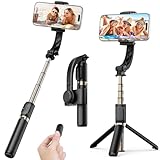
- 1-AXIS AUTO-LEVELING, NOT A 3-AXIS GIMBAL – A built-in gyroscope keeps the horizon level and auto-balances your phone while you pan, walk or hold it out, so family videos and group selfies look steadier than with a plain selfie stick. It corrects tilt only; it does not cancel up-and-down bounce like a 3-axis cinematic gimbal. Best for kids' games, trips and everyday clips, not for running shots.
- Easy & App-Free Operation – No complicated apps required! COOVOAMAE gimbal features simple one-button control to switch between horizontal and vertical shooting, saving time on manual adjustments and letting you focus on capturing the moment.
- Lightweight & Portable Selfie Stick – Weighing only 0.49 lb and folding down to 7.5 inches, this stabilizer easily fits into a bag or pocket. The extendable 31.5-inch aluminum alloy rod and 360° rotating phone holder allow you to capture selfies, wide group shots, and creative angles effortlessly.
- Stable Tripod Mode – Open the grip legs and place it on any flat surface for hands-free video calls, tutorials and group photos; the rod adjusts to the height you need. For top-down or steeply tilted shots, keep the rod short and the legs fully open so the phone's weight stays over the base.
- Wide Compatibility & Remote Control – Fits most smartphones 4.0-6.2 inches and can also connect with GoPro cameras via a 1/4" adapter. The included detachable Bluetooth remote works up to 32 ft away, making it easy to capture group photos and videos without holding the device.
Shopping ad
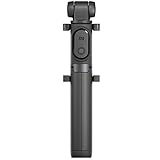
- Features Bluetooth remote control
- Consisting of a single unit that integrates a monopod and a tripod
- The phone holder rotates 360º
Shopping ad
Product prices and availability are accurate as of the date/time indicated and are subject to change. Any price and availability information displayed on Amazon at the time of purchase will apply.
The Tool Desk
Outbyte Driver Updater FREEFix the driver behind crashes, sound loss and screen glitchesFind Drivers →Outbyte PC Repair FREERepair Windows errors before they cause bigger problemsFix Now →



