Everything Xiaomi is reader-supported. When you buy through links on our site, we may earn an affiliate commission. As an Amazon Associate I earn from qualifying purchases. Learn more
To convert a voice recording into MIDI, use an audio-to-MIDI transcription tool: open it in your phone browser, upload a clean recording, export the detected notes as a MIDI file, then inspect and correct the result in a MIDI editor. The best starting options for Xiaomi, Redmi and POCO users are SoundToMIDI for adjustable conversion, Sheet Music Flow for a free browser workflow, and Songscription for a transcription tool that explicitly lists vocals among its supported instrument coverage. These tools establish audio transcription and MIDI export; they do not establish dedicated singing-to-MIDI controls or reliable lyric-to-note conversion. Treat the exported notes as a draft to edit.
What A Voice Recording Can Become In MIDI
MIDI stores note events and musical controls, not the sound of the singer. A MIDI file can represent an estimated melody as note pitches and durations, which you can play with an instrument sound in a compatible music app. It will not preserve the original voice, words, tone, or recording. If the recording contains singing with accompaniment or several voices, the tool may confuse the lead melody with other sounds; Sheet Music Flow specifically says dense mixes and voice assignment require manual correction, while Songscription says it does not support full-band or orchestral transcription.
As an Amazon Associate I earn from qualifying purchases.
For a first pass, use a short, exposed vocal line: one singer, one clear melody, little or no backing, and a steady tempo. This gives the transcriber a better chance to distinguish one note from another. A spoken voice recording is a different challenge: ordinary speech slides between pitches and does not consistently form discrete, held notes. The listed tools establish audio transcription, not speech-to-MIDI or word-to-melody conversion, so results from spoken audio may need substantial editing.
Choose A MIDI Transcription Tool
| Tool | What Its Entry Establishes | Phone Workflow Fit | Limits To Keep In Mind |
|---|---|---|---|
| SoundToMIDI | Polyphonic audio-to-MIDI conversion, local processing, adjustable detection controls, and multiple instrument profiles. | Web-only; open the site in a phone browser. | Free raw MIDI conversion and download require no account and have no daily limit. Cleaned MIDI downloads require a one-time purchase. No batch processing. |
| Sheet Music Flow | Local audio-to-MIDI analysis with polyphonic note detection and editable MIDI export. | Web platform; the entry does not list a native phone app. | Free, no account; audio must be no larger than 30 MB and no longer than five minutes. Dense mixes and voice assignment require manual correction. |
| Songscription | Browser-based transcription, MIDI export, and listed coverage for vocals, along with several instrument families. | Runs in a web browser rather than a native desktop app; phone-specific app availability is not stated. | Free transcriptions are limited to 30 seconds. Full-band or orchestral transcription is not supported, and batch processing is unavailable. |
| Klangio Transcription Studio | Single-instrument and multi-instrument transcription with MIDI export. | Web link and audio uploads are listed; phone app availability is not stated. | Free plan allows 20 seconds per transcription. Pro allows 50 full transcriptions a month and up to 15 minutes per transcription; check the vendor site for current plan terms. |
For a Xiaomi, Redmi or POCO phone, start in the browser and check that the site lets you select the recording from the phone’s file picker. The entries establish web access or browser-based use for these options, but do not establish Android app availability, exact browser compatibility, or whether a given file picker works on your device. If upload or download controls do not work in your browser, check the vendor site for supported devices and use a computer workflow if available.
Shopping ad

- [Premium] Developed by CME with 30+ years of experience and contributing board member of the MIDI Association, providing trusted, human-centric 24/7 support via cme-pro(dot)com/support, lifetime updates, and hassle-free replacement.
- [Computers] Explore future-proof tech with advanced MIDI features: filter, mapping, routing. USB MIDI cable (1-in-1-out), 16 channels. Plug & play on macOS, iOS, Windows, Android, Linux, ChromeOS - no drivers needed!
- [Instruments] Handy colored MIDI plugs. Smart LED indicators. Works with all MIDI instruments including digital drum, digital piano, portable keyboard, MIDI controller, synthesizer, EWI and groovebox.
- [Performance] Ultra-fast 32-bit processor for extreme accuracy, high-speed optocoupler for error-free transmission, close to zero latency and jitter. High quality 6.5ft (2m) cable with all technology integrated into USB connector to reduce cable clutter.
- [MIDI] Supports all MIDI channels and messages, including notes, controllers, clock, sysex, MTC & MPE. Free UxMIDI Tools software (Mac/Win) for MIDI filtering (per channel) and MIDI routing (merge/split).
Prepare A Vocal Recording That Is Easier To Transcribe
- Choose the clearest take you have. Prefer a solo melody with each note sung distinctly and held long enough to hear its pitch.
- Trim silence and unrelated conversation from the beginning and end. Keep the recording within the selected tool’s stated length and file-size limit.
- Reduce competing sound where possible. A backing track, room noise, harmony vocal, or reverb can obscure note boundaries; a busy mix also makes it harder to assign the melody correctly.
- Save an original copy before editing. If you make a trimmed or cleaned version for conversion, retain the unmodified recording so you can compare uncertain notes later.
- Use a normal audio file accepted by the service’s upload control. The available facts do not establish every service’s supported formats, so check its site if the phone recording cannot be selected or uploaded.
Convert The Recording In Your Phone Browser
- Open the chosen transcription service in your Xiaomi, Redmi or POCO browser. For the shortest tryout, the free 20-second Klangio allowance or the free 30-second Songscription limit can be enough for a brief phrase; Sheet Music Flow allows up to five minutes and 30 MB without an account.
- Choose the audio upload or transcription option and select the trimmed vocal file from your phone. If the service offers an instrument or source profile, use only a vocal option if one is actually shown. SoundToMIDI lists adjustable detection controls and instrument profiles, but its entry does not name a voice profile.
- Start transcription and wait for the result. Avoid interpreting a successful upload as proof that every note was detected correctly; the output is an estimate, particularly when the singer slides between pitches or the audio has accompaniment.
- Preview the transcription if the service provides a preview. Listen for missed notes, extra notes between syllables, and places where two sung notes have been merged.
- Choose MIDI as the export format, then download the file. MIDI export is explicitly listed for these four tools. The exact export button names and the phone’s download location can vary, so follow the current on-screen instructions.
- Open the downloaded MIDI in an app that can edit MIDI, if you have one, or move it to a compatible music editor on a computer. The tool entries do not name a particular Xiaomi-compatible MIDI editor.
Clean Up The Notes After Export
Transcription is most useful as a starting arrangement. Compare the MIDI playback against the original recording, using a simple piano or other clear instrument sound if your editor offers one. Work phrase by phrase instead of trying to fix every note at once.
- Fix pitch first. Find notes that sound noticeably higher or lower than the sung melody. Move them by semitone steps until playback follows the recording.
- Separate merged notes. If two distinct syllables or pitches became one long note, split it at the change in the vocal line.
- Remove false notes. Delete short events that appear where the singer took a breath, made a consonant, or slid into a stable pitch.
- Adjust note lengths. Shorten notes that continue through a breath or gap; extend notes that end before the singer’s held tone.
- Check the phrase as a whole. Play the MIDI alongside the audio and repeat the comparison until the note sequence and timing are close enough for your intended use.
A singer’s pitch bend, vibrato, consonants, and breath do not map neatly to ordinary fixed-pitch MIDI notes. These tools’ supplied details do not establish how each one handles vocal expression, lyrics, or pitch bends. If you need those details preserved, inspect the exported MIDI in your editor and check the vendor’s documentation for the transcription behavior it supports.
Free tools Windows power users keep installed
One-click scans. No signup required.
Shopping ad

- High-Performance MIDI Interface: One-in/one-out MIDI interface with high-performance FPT processing for low latency and tighter clock timing
- Wide Compatibility: Compatible with Mac and Windows operating systems, and now with iOS on the iPad via the Apple iPad Camera Connection Kit
- Visual Data Indicators: Data indicators for both MIDI input and output to monitor signal flow
- Integrated Cable Design: Conveniently integrated USB and MIDI cables for streamlined connectivity without additional adapters
- USB Bus-Powered Operation: No external power supply needed as the device operates via USB bus power
Which Tool Should You Start With?
- Choose SoundToMIDI if you want to try free raw MIDI conversion without an account and adjust detection controls. Its listing does not confirm voice-specific controls.
- Choose Sheet Music Flow if you want a no-account browser workflow with MIDI export and have a recording under five minutes and 30 MB.
- Choose Songscription if vocal coverage in the instrument list matters and a 30-second free transcription is enough for your first phrase.
- Choose Klangio Transcription Studio if you need a longer transcription than the free 20-second allowance and are considering its stated Pro limit. Check the vendor site for current pricing and terms.
Voice Consent And File Terms
Use a recording you are entitled to upload, especially when someone else is singing or speaking. Get the speaker’s consent where appropriate, and check the selected service’s terms for audio handling, downloads, and permitted use of the resulting MIDI. The supplied product details do not establish each service’s voice-consent process, retention policy, or licensing terms.
Quick Recap
Shopping ad

- Easy to turn your PC into a music studio. Start by connecting an electronic musical instrument to your computer with the provided USB MIDI cable. Within minutes you'll be able to play songs while they are being recorded on your PC. With appropriate software, you can overdub additional instruments, then edit, mix and even print sheet music of your final compositions.
- Easy to install adapter features MIDI in and out cables along with USB PC interface plug | Please Note: Some setups will require both MIDI plugs to be plugged in for use
- MIDI adapter cable supports up to sixteen channels in and sixteen channels out | Adapter features LED power, in and out indicator lights
- Wide Compatibility. Work with Windows XP/Vista/7/8.1/10 and Mac OS. Cable length: 2M (6.5ft). Note: Turn off the keyboard & any other musical instrument. Close the Audio software. Not support Hot-swapping.
- Package Contents: 1x USB to Midi Interface Cable, 1x Instruction Sheet. Attention: For using on iOS devices, Original authentic Camera Connection Kit is needed or it may not work.
Shopping ad
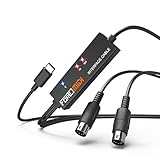
- FORE 1 MIDI in / 1 MIDI out MIDI interface, 16 MIDI input & output channels. Connecting keyboard, MIDI keyboard, synthesizer, electric drum and any device with input & output to iOS Phone/Pad, computer/laptop for recording and editing your track.
- Plug & Play, with a Built-in driver and Intelligent LED Indicator. No extra difficult driver installation. Easy set up, truly plug and play. MIDI converter shows different light indicators & status. Blue is Power, Red is signal transfer & connections.
- No delay MIDI Input and Output. High-performance FTP processing chip, stable and fast speed MIDI data transmission. GarageBand, FL studio12, FL studio20, DirectMusic, CoreMIDI, Cubase, Sonar, MIDI Connections, etc. Supported.
- Conveniently integrated USB and cables. High quality wire with multi-layer protection. Technology of resistance to electromagnetic interference, ensuring the audio transmission rapidly and safely without damage. USB bus-powered, 6.5Ft.
- Designed & Produced by FORE. Compatible with iOS & Android, Windows / Mac OS. You can use the USB A-C Adapter to connect to Type-A or Type-C port. || Attention: "USB A-C Adapter" is not included in the package. ||
Product prices and availability are accurate as of the date/time indicated and are subject to change. Any price and availability information displayed on Amazon at the time of purchase will apply.




