ZonePDF
ZonePDF is a PDF service for editing, creating, merging, splitting, compressing, and converting documents in a browser.
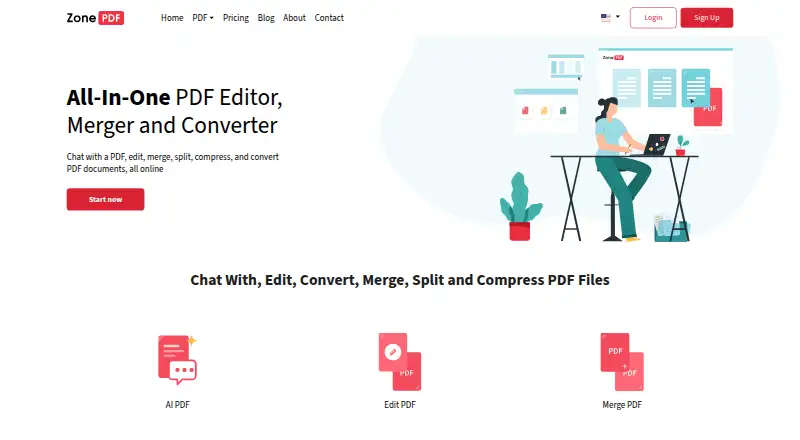
What ZonePDF is
ZonePDF is a PDF service for editing, creating, merging, splitting, compressing, and converting documents in a browser. It lists conversions between PDF and Word, Excel, PowerPoint, JPG, PNG, HTML, text, TIFF, and images, and supports batch conversion. Its AI assistant can answer questions about uploaded PDFs and handle tasks such as summarizing, merging, compressing, converting, or deleting pages through chat. A desktop application can merge, split, compress, and convert documents locally on a PC; local processing keeps documents on the device unless a server-based feature is used. ZonePDF also offers a browser extension as a shortcut to its web service. Files can be imported from and saved to Google Drive and Dropbox. The online service has a free plan, while the AI PDF page shows a free usage limit before prompting users to choose a paid plan. OCR conversion is not available. ZonePDF says uploaded and generated files are deleted from its servers within 8 hours, or sooner if manually deleted.
Good
- Edits, creates, merges, splits, compresses, and converts PDFs
- AI assistant answers questions and handles PDF tasks
- Batch conversion and multiple listed output formats
- Google Drive and Dropbox import and save
- Local desktop processing is available
Watch out
- OCR conversion is unavailable
- AI use sends text and messages to a third-party provider
- AI page has a free usage limit
Who it suits
ZonePDF suits people who need browser-based PDF tools, conversions, or AI help with PDF tasks. Its local desktop app may suit users who want to process documents on a PC without sending them to a server, unless they use a server-based feature.
Verdict
ZonePDF combines standard PDF operations, format conversion, and chat-based assistance, with a local desktop option alongside its online tools. Check the selected plan's terms before subscribing, as the listed plan amounts and paid-from price are presented differently.
Plans and prices
From ZonePDF's own pricing page, checked 20 Sep 2026.
| Plan | Price | What it gives you |
|---|---|---|
| 1-year plan | $59.88 a month | Unlimited use of every PDF tool · AI chat and PDF summaries · Priority support · Billed annually; automatic renewal can be turned off. |
| 2-year plan | $95.76 a month | Unlimited use of every PDF tool · AI chat and PDF summaries · Priority support · Billed every 2 years; automatic renewal can be turned off. |
| 3-year plan | $107.64 a month | Unlimited use of every PDF tool · AI chat and PDF summaries · Priority support · Billed every 3 years; automatic renewal can be turned off. |
| ZonePDF Pro 1-year plan | $59.88 a year | Unlimited use of every PDF tool · one person · annually |
| ZonePDF Pro 2-year plan | $95.76 a year | Unlimited use of every PDF tool · one person · every 2 years |
| ZonePDF Pro 3-year plan | $107.64 a year | Unlimited use of every PDF tool · one person · every 3 years |
The facts
Each one read from ZonePDF's own pages, with the date it was checked.
What it does
- AI assistant
- Its AI PDF assistant answers questions about uploaded PDFs and can summarize, merge, compress, convert, or delete pages through chat.checked 7 Oct 2026
- AI data handling
- When an AI feature is used, document text and user messages are sent to a third party AI provider solely to generate the requested response.checked 7 Oct 2026
- Business audience
- The Pro plan covers one person, while teams, schools, and businesses can contact ZonePDF about additional seats.checked 7 Oct 2026
- Cloud integrations
- Users can import files from and save files to Google Drive and Dropbox.checked 7 Oct 2026
- Document privacy
- ZonePDF says it does not read document contents for other purposes, use them for marketing, or use them to train AI models.checked 7 Oct 2026
- File retention
- Uploaded and generated files are permanently deleted from ZonePDF servers within 8 hours of upload, or sooner if manually deleted.checked 7 Oct 2026
- Formats
- The site lists conversions between PDF and Word, Excel, PowerPoint, JPG, and images.checked 7 Oct 2026
- Local processing
- The desktop application can process documents locally so they stay on the user's device unless a server based feature is used.checked 7 Oct 2026
- OCR
- Nochecked 20 Sep 2026
- Payments
- Paid plans are processed by Braintree, a PayPal service, and card details go directly to Braintree rather than ZonePDF servers.checked 7 Oct 2026
- PDF tools
- ZonePDF offers browser based PDF editing and creation, merging, splitting, compression, and conversion.checked 7 Oct 2026
- Security
- Online uploads travel over TLS, and ZonePDF says its servers are hosted on Amazon Web Services in the United States.checked 7 Oct 2026
- Support
- The contact page lists support by phone at +1 773-231-7779 from 9am to 5pm CT Monday through Friday.checked 7 Oct 2026
Where it runs
- Browser extension
- ZonePDF describes its browser extension as a shortcut to the web service that collects no data of its own.checked 7 Oct 2026
- Desktop app
- ZonePDF offers a desktop application for merging, splitting, compressing, and converting documents locally on a PC.checked 7 Oct 2026
The company
- Company location
- ZonePDF says its team is based in Chicago, Illinois.checked 7 Oct 2026
Money
- Free plan
- Yeschecked 20 Sep 2026
- Free usage
- The online service can be started free, and its AI PDF page shows a free usage limit before prompting users to choose a paid plan.checked 7 Oct 2026
Alternatives to ZonePDF
- 1

Convertio
Free planAndroidiOSWebAPI8.3From $6.99 a month - 2

HiPDF
Free planAndroidiOSWebAPI8.2Free plan - 3

MinerU
Free planOpen sourceWebAPILinuxmacOS8.2From $59.90 a year - 4
PDF Agile
Free planWebmacOSWindows7.8$39 one-time - 5
HTML2PDF Rocket
Free planAndroidWebAPILinux7.5From $5 a month - 6
FoxyUtils Online PDF Tools
Free planWeb7.0Free plan