
Zoiper
Zoiper is a service-independent VoIP softphone for voice and video calls, messaging, presence, and fax.
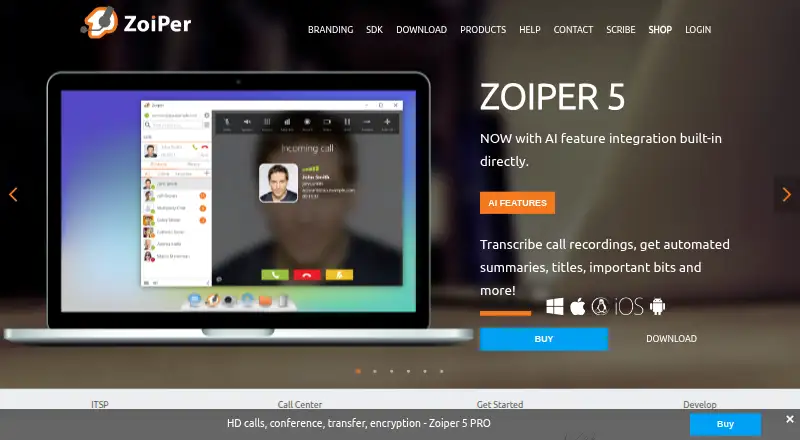
What Zoiper is
Zoiper is a service-independent VoIP softphone for voice and video calls, messaging, presence, and fax. It runs on Android and iOS, as well as Windows, Mac, and Linux desktops. To use it, a computer or smartphone, an internet connection, and a VoIP provider or PBX are required. Listed call tools include forwarding, attended and unattended transfers, auto-answer, recording, and SIP conferencing. Zoiper also lists Outlook and macOS Address Book integration, LDAP contacts, CSV import, and click-to-dial CRM connections. Its Banafo integration is described as transcribing VoIP call recordings and producing titles, summaries, classifications, and entity extraction. Zoiper 5 PRO lists TLS, SRTP, and ZRTP encryption protocols for voice, video, and chat. Zoiper 5 Free costs nothing for non-commercial use, with one account and two lines. Mobile team licensing is €2.49 a year, billed annually, through sales for teams of at least 10 users. Zoiper 5 PRO costs $59.95, paid once as a one-time payment, licensed per seat and operating system.
Good
- Runs on desktop and mobile platforms.
- Includes call forwarding, transfers, and recording.
- Lists contact imports and CRM integrations.
- PRO lists encryption protocols for voice, video, and chat.
Watch out
- Requires a VoIP provider or PBX.
- Free version is for non-commercial use.
- Free version is limited to one account and two lines.
- PRO license is per seat and operating system.
Who it suits
Zoiper suits individuals or teams who have a VoIP provider or PBX and need calling software for desktop or mobile devices. Its listed CRM connections and provisioning features may also suit call centers and VoIP service providers.
Verdict
Zoiper covers calling, messaging, and contact tools across desktop and mobile platforms, provided you have a VoIP provider or PBX. Review the free version's non-commercial restriction and the distinct PRO and team licensing terms before choosing.
Plans and prices
From Zoiper's own pricing page, checked 30 Sep 2026.
| Plan | Price | What it gives you |
|---|---|---|
| Zoiper 5 Free | Free | Free VoIP softphone for non-commercial use · 1 account · 2 lines |
| Zoiper mobile team licensing | €29.88 a year | iOS and Android · 10 users and up · team licenses arranged through sales · €29.88 per user per year (= €2.49 per user/month, billed annually) |
| Zoiper 5 PRO | $59.95, paid once | Per seat and operating system · perpetual license · Windows, Mac, Linux · one-time payment |
The facts
Each one read from Zoiper's own pages, with the date it was checked.
What it does
- AI transcription
- Zoiper describes a built-in Banafo integration for transcribing VoIP call recordings and producing titles, summaries, call classifications, and entity extraction.checked 30 Sep 2026
- Call features
- The feature list includes call forwarding, attended and unattended transfer, auto-answer, call recording, and SIP conferencing.checked 30 Sep 2026
- Contacts and CRM
- The feature list includes Outlook and macOS Address Book integration, LDAP contacts, CSV import, and click-to-dial CRM integrations including Vicidial, CallPro, Nimble, Freshdesk, and Salesforce.checked 30 Sep 2026
- Desktop
- Zoiper 5 is available for Windows, Mac, and Linux.checked 30 Sep 2026
- License limit
- Zoiper 5 PRO is licensed per seat and operating system, with one license reset allowed each week.checked 30 Sep 2026
- Mobile
- Zoiper offers mobile apps for Android and iOS.checked 30 Sep 2026
- Privacy
- Zoiper's privacy policy identifies Securax EOOD as the data controller for the Zoiper website and products and gives its registered address as Sofia, Bulgaria.checked 30 Sep 2026
- Product
- Zoiper is a service-independent VoIP softphone for making voice and video calls and using messaging, presence, and fax features.checked 30 Sep 2026
- Provisioning
- Zoiper Biz provisioning remotely automates user configuration and is described as useful for VoIP service providers and call centers.checked 30 Sep 2026
- Security
- Zoiper 5 PRO lists TLS, SRTP, and ZRTP encryption protocols for voice, video, and chat communications.checked 30 Sep 2026
- Support
- Zoiper says technical support requests usually receive service within one business day.checked 30 Sep 2026
- VoIP setup
- Zoiper requires a computer or smartphone, an internet connection, and a VoIP provider or PBX.checked 30 Sep 2026
The company
- Company history
- Zoiper's press kit says the company emerged from VoIP's popularity in 2003.checked 30 Sep 2026
- Headquarters
- Sofia, Bulgariachecked 23 Sep 2026
The full review of Zoiper
Overview
Zoiper is a VoIP softphone for voice and video calls, messaging, presence, and fax. It suits people who already have a VoIP provider or PBX and want a client across desktop and mobile devices. Its broad call-handling and contact tools are useful, but its free desktop edition is limited to non-commercial use and just one account.
Zoiper is service-independent: you bring the provider or PBX, a computer or smartphone, and an internet connection. It supports SIP, browser calling, desktop apps, and mobile apps. For more options, browse our Softphone Software list.
Key features
Call handling and communications
Call forwarding, attended and unattended transfer, auto-answer, recording, and SIP conferencing make Zoiper more capable than a basic dialer. Voice and video calling are joined by messaging, presence, and fax; business SMS is also listed. That breadth may suit mixed personal and business workflows, though the free desktop plan's non-commercial restriction rules it out for work.
Security, contacts, and CRM
Zoiper 5 PRO lists TLS, SRTP, and ZRTP encryption protocols for voice, video, and chat. Contact options include Outlook and macOS Address Book integration, LDAP contacts, and CSV import. Click-to-dial CRM integrations include Vicidial, CallPro, Nimble, Freshdesk, and Salesforce, a practical advantage for users who want calling alongside customer records.
Provisioning and transcription
Zoiper Biz provisioning remotely automates user configuration, making it relevant to VoIP providers and call centers managing deployments. A built-in Banafo integration can transcribe recorded calls and produce titles, summaries, classifications, and extracted entities. These tools broaden Zoiper's business reach, but the listed feature set does not establish which plan includes them.
Pricing
Zoiper combines a free edition with separate desktop PRO and mobile team licensing. The plans differ by use case and license model, so compare the device, seat, and commercial terms before committing.
| Plan | Price | What it includes | Best fit |
|---|---|---|---|
| Zoiper 5 Free | free | Non-commercial VoIP softphone; 1 account and 2 lines | Personal use with a single account and modest line needs |
| Zoiper mobile team licensing | €2.49 a year, billed annually | iOS and Android; 10 users and up; team licenses arranged through sales | Teams seeking mobile licenses at the minimum stated team size |
| Zoiper 5 PRO | $59.95, paid once, one-time payment | Perpetual license for Windows, Mac, or Linux; licensed per seat and operating system | Desktop users who need a commercial license or PRO features |
The free plan's one-account, two-line cap and non-commercial terms make it a personal option, not a low-cost business tier. PRO avoids a recurring desktop subscription through a one-time payment, but a license covers only one seat and operating system, and only one license reset is allowed each week. Mobile team licensing requires at least 10 users and sales arrangement, so it is not a straightforward individual mobile upgrade.
Platforms
Zoiper 5 desktop is available for Windows, Mac, and Linux; mobile apps cover Android and iOS. Browser calling is also listed. The desktop PRO license is tied to both seat and operating system, so users switching systems should account for that constraint.
Who it's for
Zoiper is a sensible choice for people with an existing VoIP provider or PBX who want call controls, contact integrations, and clients spanning major desktop and mobile platforms. Its CRM click-to-dial options and remote provisioning are especially pertinent to business calling and managed deployments. It is a poor fit for anyone seeking a standalone calling service, or for commercial desktop users expecting the free edition to cover their work.
Pros and cons
- Pros: Calls, messaging, presence, and fax sit alongside call forwarding, transfers, auto-answer, recording, and SIP conferencing, giving users substantial communications coverage in one softphone.
- Pros: CRM click-to-dial integrations and contact imports can connect calling to existing customer and address-book workflows.
- Pros: A one-time desktop PRO license is perpetual, which may suit users who prefer not to pay a recurring desktop fee.
- Cons: Zoiper depends on a separate VoIP provider or PBX and an internet connection; it is not a calling service by itself.
- Cons: The free desktop edition is non-commercial and capped at one account and two lines, limiting its usefulness for work or heavier use.
- Cons: PRO is licensed per seat and operating system, with just one reset allowed weekly, which constrains license flexibility across devices.
- Cons: Mobile team licensing starts at 10 users and is arranged through sales, making it a less direct option for a single mobile user.
Alternatives
Choose Blink if you want a free desktop SIP softphone for Linux, Mac, or Windows; its use requires a SIP account. Consider Linphone if open-source software, GNU GPLv3 project integration, or a broader set of platform options matters more. Siperb Mobile Softphone has a free Personal plan with limited storage, seven-day SIP trace and registration activity logs, community support, and no technical support, so it may suit someone prioritizing a free entry point and willing to accept those limits.
SipPulse Softphone offers a free app plan for iOS, Android, Windows, and Linux with unlimited users and installations. MicroSIP is a free GPL v2 Windows desktop SIP softphone, with a custom-branded build starting from €150, paid once. Softphone.Pro is an alternative for readers seeking a product with a free trial rather than a free plan. SessionTalk Softphone has a Teams Phone plan at $20 a month with five seats included and $3 per extra seat, which may suit teams looking for seat-based monthly pricing. Browser Phone is a free, open-source project for web or self-hosted use.
Verdict
Choose Zoiper if you already have VoIP service and want a cross-platform softphone with substantial call controls and useful contact or CRM connections. The one-time desktop PRO license is its clearest paid option for an individual desktop user. Look elsewhere if you need a provider bundled with the app, commercial use without a paid desktop license, or more flexible seat and operating-system licensing.
Alternatives to Zoiper
- 1
Siperb Mobile Softphone
Free planAndroidiOSWebAPI7.9From £2 a month - 2

Bria Solo
Free planAndroidiOSmacOSWindows7.1From $35.40 a year - 3

SessionTalk Softphone
AndroidiOSWebmacOS7.0From $20 a month - 4
Phoner
AndroidiOSWeb6.9From $9.99 a month - 5
Aria
Free planAndroidiOSAPILinux6.8Free plan - 6

Blink
Free planAndroidiOSWebLinux6.8Free plan