Siperb Mobile Softphone
Siperb Mobile Softphone puts an office phone extension on an iOS or Android device and connects it to an existing PBX or SIP system.
What Siperb Mobile Softphone is
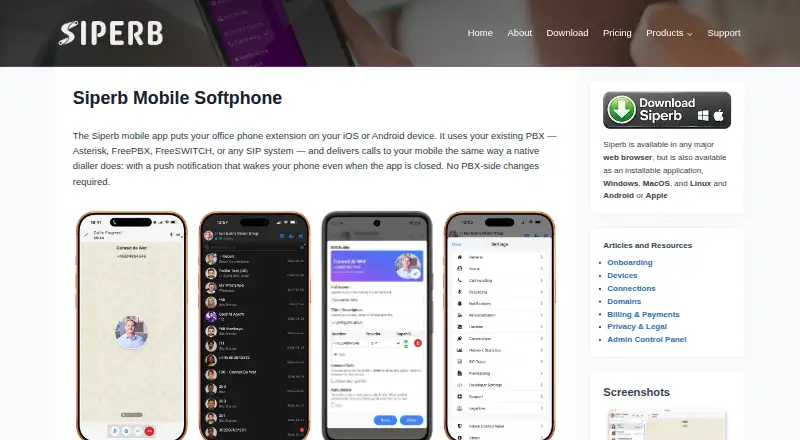
Siperb Mobile Softphone puts an office phone extension on an iOS or Android device and connects it to an existing PBX or SIP system. The mobile app supports audio and video calls, call transfers, three-way conferences, DTMF, call history, CDR, and buddy presence. Its listed encryption uses TLS and DTLS-SRTP. A proxy uses Apple APNs or Google FCM to wake the app and deliver calls when it is backgrounded, locked, or restarted. Mobile devices use Proxy Registration Mode, which is required for push notifications. The same account works on web, Windows, macOS, Linux, iOS, and Android, with shared contacts, call history, and settings. Personal is free, with limited storage, seven-day SIP trace and registration activity logs, community support, and no technical support. Business costs £2 a month per domain user; Business Pro costs £5 a month per domain user. The listed PBX compatibility includes Asterisk, FreePBX, FreeSWITCH, and SIP PBXs that can provision an extension.
Good
- Works with Asterisk, FreePBX, and FreeSWITCH
- Supports mobile audio and video calls
- Push delivery supports backgrounded or locked devices
- Same account shares contacts and history across platforms
- Mobile feature set specifies end-to-end encryption
Watch out
- Mobile registration is limited to Proxy Registration Mode
- Free Personal plan has no technical support
- Cloud-hosted components cannot be installed on customer servers
Who it suits
It suits end users who need a mobile extension connected to an existing PBX or SIP system, as well as IT administrators supporting those setups. Its cross-platform account may suit users who want shared contacts, settings, and call history across devices.
Verdict
Siperb Mobile Softphone connects a mobile device to an existing PBX or SIP system and shares account information across platforms. Check the mobile registration requirement and the support limits of the free plan.
Plans and prices
From Siperb Mobile Softphone's own pricing page, checked 15 Oct 2026.
| Plan | Price | What it gives you |
|---|---|---|
| Personal | Free | limited storage · SIP trace logs 7 days · register activity logs 7 days · community support · no API access · no technical support |
| Business | £2 a month | SIP trace logs 6 months · register activity logs 6 months · API permanent token · technical support · internal domain users £0.50/user · per month |
| Business Pro | £5 a month | SIP trace logs 12+ months · register activity logs 12+ months · API permanent token · custom web hooks · custom navigation/pages · custom co-branding · internal domain users £0.50/user · per month |
The facts
Each one read from Siperb Mobile Softphone's own pages, with the date it was checked.
Where it runs
- Android requirements
- Siperb’s download page lists Android 11 or newer and an approximately 65 MB AAB package.checked 15 Oct 2026
- Cross-platform account
- The same Siperb account works across web, Windows, macOS, Linux, iOS and Android with shared call history, contacts and settings.checked 1 Oct 2026
- iOS requirements
- Siperb’s download page lists iOS 18 or newer, iPadOS 18 or newer and visionOS 2 or newer for the mobile package.checked 15 Oct 2026
What it does
- API
- Siperb exposes a REST API at api.siperb.com, with permanent-token authentication for external backends and versioned documentation.checked 15 Oct 2026
- Audience
- Siperb positions the softphone for end users and IT administrators, while offering separate developer embedding and reseller co-branding resources.checked 1 Oct 2026
- Audio and video
- The mobile client supports audio calls and video calls.checked 15 Oct 2026
- Call records
- The mobile feature list includes call history and call-detail records.checked 15 Oct 2026
- Call transfer
- The mobile feature set includes attended and blind transfer.checked 15 Oct 2026
- Chrome extension limitation
- The Chrome listing says the phone must remain open to make or receive calls.checked 15 Oct 2026
- Conferencing
- The app supports three-way conferencing.checked 15 Oct 2026
- Connection methods
- Siperb supports outbound registration, outbound trunk and inbound registration connections to PBXs or ITSPs.checked 1 Oct 2026
- Developer SDK
- The product includes a Web Phone SDK with provisioning, embed and integration paths.checked 15 Oct 2026
- Documentation
- The knowledge base covers end-user softphone setup, PBX connections, push notifications, API usage and developer embedding.checked 15 Oct 2026
- DTMF
- DTMF is available for IVR navigation and similar tone-controlled systems.checked 15 Oct 2026
- Encryption
- Siperb states that mobile media can use TLS and DTLS-SRTP end-to-end encryption.checked 15 Oct 2026
- Messaging
- The Google Play listing states that the app supports instant messaging and file transfer.checked 15 Oct 2026
- Mobile features
- Mobile supports audio and video calls, attended and blind transfer, three-way conference, DTMF, call history, CDR, buddy presence and end-to-end encryption.checked 1 Oct 2026
- Mobile registration limit
- Proxy Registration Mode is the only registration option for mobile devices, and it is required for push notifications.checked 1 Oct 2026
- Open-source licence
- SourceForge describes the open-source client UI as AGPL-3.0 licensed.checked 15 Oct 2026
- Open-source scope
- The Browser Phone SDK and web-deployed code are open source, while the mobile apps and cloud service are proprietary.checked 15 Oct 2026
- PBX compatibility
- The mobile service is documented for Asterisk, FreePBX, FreeSWITCH and other SIP-capable systems.checked 15 Oct 2026
The company
- Company facts
- LinkedIn lists Siperb as privately held, founded in 2024, headquartered in London, with 2–10 employees.checked 15 Oct 2026
- Company identity
- The legal entity is SIPERB LTD, company number 15622824, shown as active at Companies House.checked 15 Oct 2026
- Headquarters
- Ruislip, United Kingdomchecked 28 Sep 2026
The full review of Siperb Mobile Softphone
Siperb Mobile Softphone is a way to use an existing office phone extension from an iOS or Android device. It is a strong fit for teams already running a compatible SIP PBX that want mobile calling alongside desktop and web clients. The central trade-off is clear: mobile registration must go through Siperb’s proxy.
Overview
The mobile app connects to Asterisk, FreePBX, FreeSWITCH and other SIP PBXs that can provision an extension. Siperb’s proxy uses Apple APNs or Google FCM to wake the app and deliver calls when it is backgrounded, locked or restarted. That makes it more practical for receiving calls away from a desk than an app that must remain open, but organizations that require direct mobile registration should look elsewhere.
Beyond mobile, Siperb supports outbound registration, outbound trunk and inbound registration connections to PBXs or ITSPs. Web and desktop clients can connect directly to a WebRTC-capable PBX using WebSocket Registration Mode, keeping Siperb out of that call path. The split gives mixed-device deployments options, while leaving mobile subject to the proxy requirement.
Key features
Mobile calling covers audio and video, attended and blind transfer, three-way conference, DTMF, call history, CDR and buddy presence. That is a useful range for users who need more than basic extension dialing, including common call-handling tasks. End-to-end encryption using TLS and DTLS-SRTP is part of the mobile feature set, a meaningful consideration for organizations handling calls that warrant protected signaling and media.
The same Siperb account works across web, Windows, macOS, Linux, iOS and Android, with call history, contacts and settings shared between clients. That continuity is a practical advantage for people who move between a desk and a phone. Siperb also provides a documented REST API and permanent tokens for external backend systems, which may suit administrators connecting account functions to their own systems; it is not necessary for ordinary calling.
Pricing
Siperb has a free Personal plan and paid Business and Business Pro plans. Personal costs nothing and has limited storage, seven-day SIP Trace Logs and Register Activity Logs, community support, and no technical support. It is the sensible starting point for an individual or small deployment willing to handle technical issues without paid assistance, but short log retention and the lack of technical support make it a weaker choice when troubleshooting or operational continuity matters.
Business costs £2 a month, billed per month per domain user. It extends both log types to six months and includes technical support, with an approximately 24-hour response for paid support. This is the more practical tier for teams that need support and a longer troubleshooting history. Business Pro costs £5 a month, also billed per month per domain user, and extends the logs to 12+ months while retaining technical support. It fits organizations that need longer records; the higher per-user cost is difficult to justify if six months of logs is enough.
Free support is for general questions and has an approximately 48-hour response, while paid support covers technical issues with an approximately 24-hour response. The pricing is user-based within a domain, so the paid tier cost scales with the number of domain users. No call quota or trial term is specified for these plans.
Platforms
Siperb provides mobile clients for Android and iOS, desktop clients for Windows, macOS and Linux, and a web client. Shared account history, contacts and settings make that breadth more useful than simply offering separate clients: users can switch devices without abandoning the same account context. Browser calling, desktop apps, mobile apps, SIP support and call recording are supported.
Siperb’s cloud-hosted components cannot be installed on a customer’s own servers. Organizations that require self-hosting should consider its open-source Browser Phone instead, though that is a separate product rather than a self-hosted Siperb deployment.
Who it's for
Siperb suits end users and IT administrators who already have a SIP PBX and want office extensions to reach mobile devices, with desktop and web access for the same account. Its PBX compatibility and shared cross-platform account support make it particularly relevant to organizations with mixed device fleets. It is less suitable for teams that insist on self-hosting Siperb’s cloud components or direct mobile registration. Siperb also offers separate developer embedding and reseller co-branding resources, pointing to options for businesses integrating or reselling softphone capabilities.
Pros and cons
- Broad SIP PBX compatibility: Works with Asterisk, FreePBX, FreeSWITCH and any SIP PBX that can provision an extension, so an existing system need not be replaced.
- Useful mobile call handling: Video, transfers, conferencing, DTMF and presence go beyond basic calling for users who handle calls as part of their work.
- Shared accounts across six platforms: Call history, contacts and settings carry across mobile, desktop and web clients.
- Mobile registration is constrained: Proxy Registration Mode is the only option, so deployments requiring direct mobile registration are a poor fit.
- Free support has real limits: Personal includes community support, no technical support and only seven days of logs, which may frustrate teams that need help resolving issues.
- No customer-hosted cloud components: Organizations with a self-hosting requirement need another product.
Alternatives
Softphone Software is the broader category directory for comparing options. For another free, cross-platform client that requires an existing SIP account, consider Blink; its free downloads cover Linux, Mac and Windows.
SipPulse Softphone is worth comparing for its free App SipPulse plan, which covers iOS, Android, Windows and Linux with unlimited users and installations. For an open-source option that can be integrated into projects under GNU GPLv3, consider Linphone; proprietary licensing is available for closed-source use.
Aria may suit personal, non-commercial use: its free plan includes unlimited calls, multi-account support and core softphone features. For non-commercial desktop use limited to one account and two lines, consider Zoiper. Bria Solo is another option for personal non-commercial use, with a free plan limited to one device, one SIP/VoIP account and calls per week.
MicroSIP is a free GPL v2 Windows desktop SIP softphone for readers who need a desktop-only option. PortSIP Softphone is another free alternative, with a legacy app for PortSIP PBX v16.x.
Verdict
Choose Siperb Mobile Softphone if you already operate a compatible SIP PBX and want mobile extensions with shared account continuity across phones, computers and web. Its broad PBX support and substantial mobile call-handling set are the strongest reasons to choose it. Look elsewhere if direct mobile registration or self-hosting is essential, or if the free plan’s short log retention and lack of technical support are not enough for your deployment.
Getting started
- Open the Siperb mobile information page
- Choose Android, iOS, web, Windows, macOS or Linux access
- Create a Siperb account on the free Personal plan or select a paid plan
- Connect the account to a compatible PBX or SIP system
- Use Proxy Registration Mode for mobile push notifications
Limits worth knowing
The free Personal plan has limited storage, seven-day SIP Trace Logs and seven-day Register Activity Logs, plus community support without technical support. Business costs £2 per month per domain user, while Business Pro costs £5 per month per domain user and extends the listed logs.
Questions
Is there a free plan?
Yes. The Personal plan is free and includes limited storage, seven-day SIP Trace Logs, seven-day Register Activity Logs and community support.
What do paid plans cost?
Business is £2 per month per domain user. Business Pro is £5 per month per domain user.
Which platforms are supported?
Siperb accounts work across web, Windows, macOS, Linux, iOS and Android.
Which PBX systems can it use?
The mobile app works with Asterisk, FreePBX, FreeSWITCH and any SIP PBX able to provision a SIP extension.
Can it be self-hosted?
Siperb’s cloud-hosted components cannot be installed on customer servers. Its open-source Browser Phone is the self-hosted alternative.
Is technical support included?
Free support handles general questions with an approximately 48-hour response. Paid support covers technical issues with an approximately 24-hour response.
Alternatives to Siperb Mobile Softphone
- 1

Zoiper
Free planAndroidiOSLinuxmacOS7.3From €29.88 a year - 2

Bria Solo
Free planAndroidiOSmacOSWindows7.1From $35.40 a year - 3

SessionTalk Softphone
AndroidiOSWebmacOS7.0From $20 a month - 4
Phoner
AndroidiOSWeb6.9From $9.99 a month - 5
Aria
Free planAndroidiOSAPILinux6.8Free plan - 6

Blink
Free planAndroidiOSWebLinux6.8Free plan