XStat
XStat monitors live hardware data and lets users build custom sensor panels for a desktop and other devices on the local network.
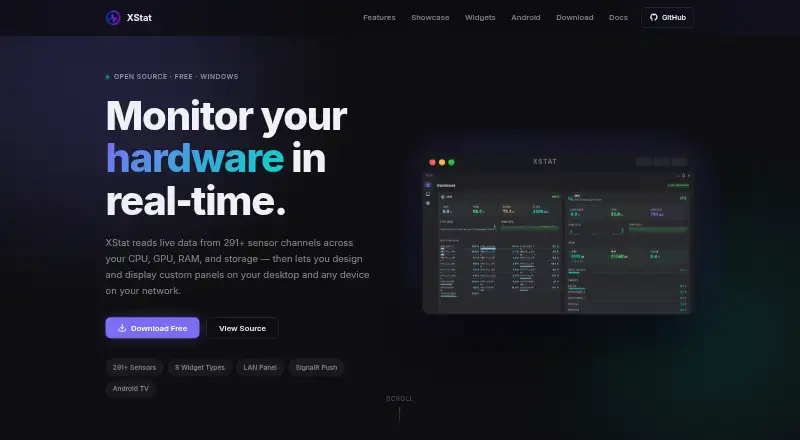
What XStat is
XStat monitors live hardware data and lets users build custom sensor panels for a desktop and other devices on the local network. It reads more than 291 sensor channels across CPU, GPU, RAM, storage, motherboard, and network data. Its dashboard groups readings by hardware category and includes history graphs and per-core load data. Users can arrange, resize, layer, and style widgets, bind them to sensors, and import or export layouts as JSON. Widget choices include sensor values, bars, sparklines, gauges, clocks, text, images, and custom HTML. A built-in Monaco editor supports custom HTML, CSS, and JavaScript widgets with live preview and sensor data via postMessage. Devices on the same network can open panels in a browser; an Android companion discovers the PC over UDP and displays the panel in a full-screen WebView. XStat is free and uses LibreHardwareMonitor for sensor data and SignalR WebSockets for updates. The maker says it has no telemetry and runs without cloud services. Its service has no authentication and should be exposed only on a trusted local network. The desktop app requires 64-bit Windows 10 or 11 and administrator privileges for sensor access.
Good
- Free to use
- Reads more than 291 sensor channels
- Supports custom widgets and JSON panel layouts
- Offers browser and Android local-network access
Watch out
- Requires Windows 10 or 11 64-bit
- Hardware sensor access requires administrator privileges
- Service has no authentication
Who it suits
XStat suits Windows users who want to monitor hardware readings or create custom panels viewable from Android and browsers on their local network. It is not suited to exposure on an untrusted network, because its service has no authentication.
Verdict
XStat offers detailed hardware monitoring and customizable panels, including local-network viewing from browsers and Android. Keep its unauthenticated service on a trusted local network.
Plans and prices
From XStat's own pricing page, checked 7 Oct 2026.
| Plan | Price | What it gives you |
|---|---|---|
| XStat | Free | Free · Windows 10/11 64-bit · administrator rights required for hardware sensor access |
The facts
Each one read from XStat's own pages, with the date it was checked.
Where it runs
- Android companion
- The Android companion discovers the PC over UDP, displays the panel in a full-screen WebView, and automatically resumes discovery if the PC goes offline.checked 7 Oct 2026
- Supported platforms
- Windows 10/11; Android companion; web browser on local networkchecked 24 Sep 2026
What it does
- Custom widgets
- A built-in Monaco editor supports custom HTML, CSS, and JavaScript widgets with live preview and sensor data via postMessage.checked 7 Oct 2026
- Dashboard
- The dashboard groups sensors by hardware category and includes real-time history graphs and per-core load data.checked 7 Oct 2026
- Data handling
- The maker says XStat runs without cloud services, and the portable build keeps data inside the app folder.checked 7 Oct 2026
- Distribution
- The maker offers a Windows installer and portable ZIP, plus a directly downloaded Android APK that requires sideloading.checked 7 Oct 2026
- Integrations
- XStat uses LibreHardwareMonitor for sensor data and SignalR WebSockets to send live updates to connected clients.checked 7 Oct 2026
- LAN access
- The hardware service serves panels as web pages that devices on the same network can open in a browser without installing an app.checked 7 Oct 2026
- License
- XStat is released under the MIT License.checked 7 Oct 2026
- Panel editor
- Users can drag, resize, layer, style, and bind widgets to sensors, and import or export panel layouts as JSON.checked 7 Oct 2026
- Purpose
- XStat monitors live hardware data and lets users create custom sensor panels for their desktop and devices on their local network.checked 7 Oct 2026
- Remote monitoring
- Yeschecked 24 Sep 2026
- Requirements
- The desktop app requires Windows 10 or 11 64-bit and administrator privileges for hardware sensor access.checked 7 Oct 2026
- Security and privacy
- The maker says XStat has no telemetry; its documentation says the service has no authentication and should only be exposed on a trusted local network.checked 7 Oct 2026
- Sensor coverage
- It reads 291+ sensor channels covering CPU, GPU, RAM, storage, motherboard, and network data.checked 7 Oct 2026
- Support
- The project page links to GitHub issues for reporting issues.checked 7 Oct 2026
- Widgets
- The eight widget types are Sensor Value, Sensor Bar, Sparkline, Gauge, Clock, Text, Image, and Custom HTML.checked 7 Oct 2026
Money
- Free plan
- Yeschecked 24 Sep 2026
Alternatives to XStat
- 1

Checkmk
Free planOpen sourceAndroidiOSWebAPI8.8From $275 a month - 2
Netdata
Free planOpen sourceAndroidiOSWebAPI8.7From $4.50 a month - 3

Centreon
Free planOpen sourceWebAPILinuxSelf-hosted8.3From €2.27 a year - 4

ManageEngine OpManager
Free planAndroidiOSWebAPI8.3From $95 a year - 5
Telegraf
Free planOpen sourceWebAPILinuxmacOS8.3From $18,000 a year - 6

Nagios XI
Free planWebAPILinuxmacOS8.1$2,595 one-time