WinX DVD Author
WinX DVD Author is a free Windows program for burning video files and URLs to DVDs and creating menus and subtitles.
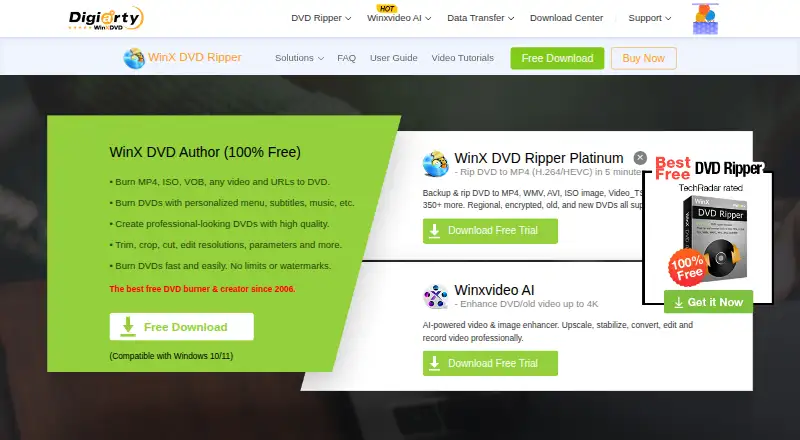
What WinX DVD Author is
WinX DVD Author is a free Windows program for burning video files and URLs to DVDs and creating menus and subtitles. It accepts formats including MP4, MKV, AVI, VOB, FLV, MOV, WMV, MPEG, and ISO, and supports DVD±R/±RW, DVD DL+R, and DVD DL±RW media. Before burning, users can trim video, adjust resolution and other parameters, and choose a 16:9 or 4:3 aspect ratio. The program can produce PAL or NTSC DVDs and create title and chapter menus using background templates or local images, with optional music and text. It supports subtitles and Dolby Digital AC-3 audio. The maker describes a built-in downloader for YouTube and other online sources. Its listed plan costs nothing, with no limits or watermarks, for Windows 10/11. Support materials include a user guide, tutorials, FAQs, and a technical support contact route. The maker says the installer does not bundle extras and the interface has no ads.
Good
- Free plan has no limits or watermarks.
- Supports a broad range of video formats.
- Creates title and chapter menus.
- Supports PAL and NTSC DVD output.
Watch out
- Windows-only software.
- Listed for Windows 10/11.
- Chapter tools are manual.
Who it suits
WinX DVD Author suits Windows 10/11 users who want to burn video files to DVD and customize menus, subtitles, and video settings. It also supports dual-layer DVD media.
Verdict
WinX DVD Author covers DVD burning, menu creation, and basic video adjustments in a free Windows program. Its platform restriction and manual chapter tools are useful to note before choosing it.
Plans and prices
From WinX DVD Author's own pricing page, checked 4 Oct 2026.
| Plan | Price | What it gives you |
|---|---|---|
| WinX DVD Author | Free | No limits or watermarks · Windows 10/11 |
The facts
Each one read from WinX DVD Author's own pages, with the date it was checked.
What it does
- Audio and quality
- The maker says the software uses deinterlacing and high quality decoder and encoder engines and supports Dolby Digital AC-3 audio.checked 4 Oct 2026
- DVD media
- It supports DVD±R/±RW, DVD DL+R, and DVD DL±RW.checked 4 Oct 2026
- Installer and ads
- The maker says the installer does not bundle extras and the interface does not display ads.checked 4 Oct 2026
- Menu editing
- Users can create title and chapter menus, choose background templates or local images, and add background music and text.checked 4 Oct 2026
- Online video
- The maker describes a built-in YouTube downloader for downloading videos from YouTube and other online sources before burning them to DVD.checked 4 Oct 2026
- Purpose
- WinX DVD Author burns video files and URLs to DVDs and lets users create personalized DVD menus and subtitles.checked 4 Oct 2026
- Support
- The maker provides a user guide, tutorials, FAQs, and a contact route for technical support.checked 4 Oct 2026
- TV formats
- It can burn DVDs in PAL or NTSC format and supports 16:9 and 4:3 aspect ratios.checked 4 Oct 2026
- Video editing
- The software includes options to trim video, set aspect ratio, and adjust resolution and other parameters before burning.checked 4 Oct 2026
- Video formats
- It accepts formats including MP4, MKV, AVI, VOB, FLV, MOV, WMV, MPEG, and ISO.checked 4 Oct 2026
The company
- Company history
- Digiarty Software says its DVD Author debuted in 2006 and that the company has developed multimedia software since that year.checked 4 Oct 2026
- Founded
- 2006checked 28 Sep 2026
- Headquarters
- Chengdu, Chinachecked 28 Sep 2026
The full review of WinX DVD Author
WinX DVD Author is a free Windows program for preparing video and burning it to DVD, with menus, subtitles and basic picture adjustments. It is best for people making personal or straightforward home-video discs who want to work with common video formats and standard or dual-layer media. Its authoring tools cover the essentials, but manual chapter controls and Windows-only support make it a focused choice rather than a cross-platform one.
Overview
The program brings video preparation and DVD creation into one workflow: import a file or online video, make basic adjustments, add menu elements and burn a disc. It accepts formats including MP4, MKV, AVI, VOB, FLV, MOV, WMV, MPEG and ISO, and supports DVD±R/±RW, DVD DL+R and DVD DL±RW. That breadth helps when source files or blank discs vary, while its Windows requirement rules it out for Mac and Linux users.
Digiarty Software says the product debuted in 2006 and that it has developed multimedia software since then. The maker also describes a built-in YouTube downloader for bringing videos from YouTube and other online sources into the DVD workflow. It says the installer bundles no extras and the interface has no ads. A user guide, tutorials, FAQs and a technical-support contact route round out the support options.
Key features
Menus and subtitles
WinX DVD Author can create title and chapter menus with a background template or local image, plus text and background music. Subtitle support adds another useful presentation option. Chapters are handled manually, so users who want control over where a personal video is divided may find the approach suitable; anyone seeking automatic chaptering should look elsewhere.
Video adjustments and output
Before burning, users can trim video, set the aspect ratio, and adjust resolution and other parameters. PAL and NTSC output, along with 16:9 and 4:3 support, makes the program more adaptable to different DVD playback needs. The maker says it uses deinterlacing and high-quality decoder and encoder engines, and supports Dolby Digital AC-3 audio. These capabilities help cover common DVD requirements, but the described adjustments remain basic rather than a full video-editing workflow.
Pricing
WinX DVD Author costs nothing. The free plan has no limits or watermarks and is for Windows 10/11, making it a straightforward fit for users who want to author DVDs without a paid tier. There are no paid plans to compare; the main trade-off is platform coverage, not a free-plan cap.
Platforms
WinX DVD Author is for Windows, with the free plan specified for Windows 10/11. It is not a choice for Mac or Linux users.
Who it's for
Choose it if you use Windows and need a no-cost way to turn supported video into a DVD with a custom menu, subtitles and basic trimming or picture adjustments. Its dual-layer support and PAL/NTSC options are useful when the disc or playback format calls for them. It is less suitable for users who need cross-platform software, automated chapter creation or a more extensive editing workflow.
Pros and cons
- Pros: The free plan has no limits or watermarks, so there is no stated usage cap to weigh against the price.
- Pros: It supports a broad range of common input formats and both standard and dual-layer DVD media, which gives users flexibility in files and discs.
- Pros: Menu customization, subtitles, trimming and output options such as PAL/NTSC and 16:9/4:3 cover the practical needs of many personal DVD projects.
- Cons: Windows-only support excludes Mac and Linux users.
- Cons: Manual chapter tools require users to place chapters themselves, which is less suitable for those who want an automated process.
Alternatives
Compare DVD authoring software if you want to consider more options by category.
- DVDStyler is a free, open-source DVD authoring application for Linux, macOS and Windows; choose it if cross-platform support matters.
- Open Burning Suite is a free, open-source disc burning application for Linux, macOS and Windows; consider it if you need those platforms.
- Q DVD-Author is free GPL-2.0 software for Linux; it is an option for Linux users.
- DVDBuilder SDK is a freemium Windows alternative.
- PyBurn Studio is a free option for Linux, macOS and Windows.
- AVS Video Editor is a freemium Windows alternative with a 1 year subscription at $49 a year; consider it if a paid subscription is acceptable.
- DeVeDe NG is a free Linux option.
- Tipard DVD Creator is a paid DVD creator for macOS and Windows with a free trial; consider it if you want to evaluate a paid option first.
Verdict
WinX DVD Author is a sensible pick for Windows users who want a free, no-limit way to make personal DVDs with custom menus, subtitles and basic adjustments. Its main advantage is that it combines those authoring essentials with support for varied video formats and dual-layer media at no cost. Look elsewhere if you use Mac or Linux, or if you do not want to manage chapter placement manually.
Alternatives to WinX DVD Author
- 1
Avidemux
Free planOpen sourceWebLinuxmacOSWindows7.3Free plan - 2
Open Burning Suite
Free planOpen sourceLinuxmacOSSelf-hostedWindows7.2Free plan - 3
DVDStyler
Free planOpen sourceLinuxmacOSWindows7.1Free plan - 4
PyBurn Studio
Free planLinuxmacOSWindows6.6Free plan - 5
Tipard DVD Creator
macOSWindows6.3From $24 a month - 6
AVS Video Editor
Windows6.1From $49 a year