DVDStyler
DVDStyler is a free, open-source application for authoring and burning video DVDs with menus designed for standalone DVD players.
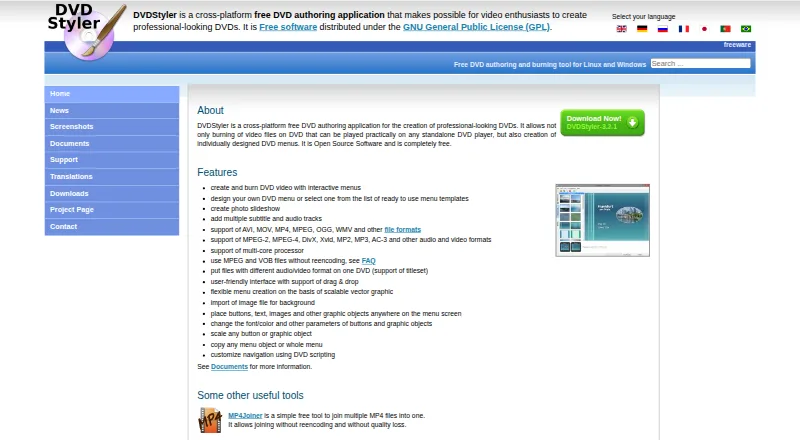
What DVDStyler is
DVDStyler is a free, open-source application for authoring and burning video DVDs with menus designed for standalone DVD players. Users can choose a menu template or create a layout by placing and adjusting buttons, text, images, and other objects. It can also create photo slideshows and include multiple subtitle and audio tracks. Listed formats include AVI, MOV, MP4, MPEG, OGG, WMV, MPEG-2, MPEG-4, DivX, Xvid, MP2, MP3, and AC-3, among others. MPEG and VOB files can be used without re-encoding, and files with different audio or video formats can go on the same DVD. The interface supports drag-and-drop, with menus based on scalable vector graphics. DVDStyler runs on Linux, macOS, and Windows and is distributed under the GNU General Public License. The listed macOS installer requires OS X 10.15 Catalina or later. Downloads include version 3.2.1 installers for Windows and macOS, source code, and a Windows 3.3b3 build. Support questions are directed to the DVDStyler forum.
Good
- Free and open-source under the GNU General Public License.
- Menu templates or custom layouts are available.
- Supports multiple subtitle and audio tracks.
- Can use MPEG and VOB files without re-encoding.
- Available for Linux, macOS, and Windows.
Watch out
- The listed macOS installer requires OS X 10.15 Catalina or later.
- Support questions are directed to the DVDStyler forum.
Who it suits
DVDStyler suits people who want to author video DVDs with customized menus, slideshows, and multiple audio or subtitle tracks. It also suits users who need to put differently formatted video files on one disc.
Verdict
DVDStyler focuses on DVD authoring, menu design, and combining media on disc. Check the listed macOS requirement if you plan to use it on a Mac.
Plans and prices
From DVDStyler's own pricing page, checked 15 Oct 2026.
| Plan | Price | What it gives you |
|---|---|---|
| DVDStyler | Free | DVD authoring and burning · interactive menus · photo slideshows · Windows, macOS and Linux · Free software |
The facts
Each one read from DVDStyler's own pages, with the date it was checked.
What it does
- Authoring options
- DVDStyler supports using MPEG and VOB files without re-encoding and putting files with different audio or video formats on one DVD.checked 29 Sep 2026
- Basic editing
- SourceForge describes basic trimming and cropping operations in addition to authoring.checked 15 Oct 2026
- Codec support
- The site lists MPEG-2, MPEG-4, DivX, Xvid, MP2, MP3 and AC-3 support.checked 15 Oct 2026
- Current downloads
- The official download page offers stable version 3.2.1 installers and source, plus a Windows 64-bit 3.3b3 beta build and source.checked 15 Oct 2026
- Developer language
- SourceForge identifies C++ as the programming language and wxWidgets as a user-interface framework.checked 15 Oct 2026
- Disc capacity guidance
- The official guide says a single-layer 4.7 GB DVD holds up to about 126 minutes at good quality, while Auto quality can reduce bitrate to fit more.checked 15 Oct 2026
- Documentation
- Official documentation links to a guide, DVD script language description, operation manual, tutorials, FAQ/wiki material and third-party guides.checked 15 Oct 2026
- Downloads
- The downloads page lists DVDStyler 3.2.1 installers for Windows and macOS, source code, and a Windows 3.3b3 build.checked 29 Sep 2026
- Drag and drop
- The interface supports dragging movies and menu objects into a project.checked 15 Oct 2026
- DVD scripting
- Navigation can be customized with DVD scripting commands.checked 15 Oct 2026
- Formats
- The site lists support for AVI, MOV, MP4, MPEG, OGG, WMV, MPEG-2, MPEG-4, DivX, Xvid, MP2, MP3, and AC-3, among other formats.checked 29 Sep 2026
- Integrations
- The maker's feature list describes importing media and image files but does not identify third-party service integrations.checked 29 Sep 2026
- Interactive DVD menus
- Users can create DVD video with interactive menus.checked 15 Oct 2026
- Interface
- The site describes a user-friendly interface with drag-and-drop support and menu creation based on scalable vector graphics.checked 29 Sep 2026
- Licence
- DVDStyler is distributed under the GNU General Public License; SourceForge identifies the project licence as GPLv2.checked 15 Oct 2026
- License
- DVDStyler is open-source software distributed under the GNU General Public License (GPL).checked 29 Sep 2026
- Limit: installer complaints
- Older independent reviews report bundled browser-toolbar or adware offers during installation and warn users to inspect installer choices carefully.checked 15 Oct 2026
- Limit: preview and chapters
- Reviewers request a stronger pre-render menu preview, report that embedded chapters from editing applications are not read, and say disc-size handling may require manual dual-layer selection.checked 15 Oct 2026
- Limit: speed and output
- Cisdem's testing rates DVDStyler's conversion as slow and reports that some burned videos can be jerky or laggy.checked 15 Oct 2026
- Limit: stability
- Recent SourceForge reviewers report crashes when dragging videos, crashes in settings, disappearing buttons and lost work related to undo behavior.checked 15 Oct 2026
- Limit: subtitles
- Cisdem reports that soft or hard subtitles may appear black on a DVD player after conversion.checked 15 Oct 2026
Where it runs
- Linux availability
- The maker describes DVDStyler as a tool for Linux and Windows and links to source code and Ubuntu downloads.checked 29 Sep 2026
- macOS requirement
- The official download page specifies macOS X 10.15 Catalina or newer for its Mac installer.checked 15 Oct 2026
The company
- Maker
- The official site copyright identifies Alex Thüring as the copyright holder and maker.checked 15 Oct 2026
The full review of DVDStyler
Overview
DVDStyler is a free DVD-authoring tool for people who want control over how a video disc looks and plays. It is strongest when a custom menu, multiple tracks, or a photo slideshow matters as much as putting video on a disc. Its open-source license and support for Linux, macOS, and Windows make it an option for users who prefer a no-cost, cross-platform workflow.
Menu design is the clearest reason to choose it: start with a template or build a layout using buttons, text, images, and other objects. That flexibility suits personal or small-scale projects where a fixed menu would feel limiting, though it also makes DVDStyler less compelling if you only need straightforward disc burning. The tool can use MPEG and VOB files without re-encoding and combine files with different audio or video formats on one DVD, useful when assembling material from varied sources.
Key features
- Designed disc menus: Create a menu from a template or arrange and customize its objects yourself. The drag-and-drop interface and scalable-vector-graphics-based menu creation support more tailored layouts than a preset-only approach.
- Slideshows and tracks: Create photo slideshows and add multiple audio and subtitle tracks. These options make a disc more useful for collections with different language or audio needs.
- Broad media support: The format list includes AVI, MOV, MP4, MPEG, OGG, WMV, MPEG-2, MPEG-4, DivX, Xvid, MP2, MP3, and AC-3, among others. MPEG and VOB files can be used without re-encoding, and files with different audio or video formats can share a DVD.
- Disc authoring controls: Manual chapter tools, dual-layer DVD support, and support for both DVD standards give users control over disc structure and output.
DVDStyler is distributed under the GNU General Public License. The maker describes importing media and image files, but does not identify third-party service integrations, so it is best understood as a standalone authoring tool.
Pricing
DVDStyler is free, with a free plan listed as free. The plan is the open-source DVD-authoring application itself, not a limited trial; there is no free-trial period to work around. That makes it a straightforward fit for users who want menu authoring without a software charge, while buyers seeking a paid product's licensing or service model should consider alternatives.
Platforms
DVDStyler supports Linux, macOS, and Windows. The macOS installer requires OS X 10.15 Catalina or later, so older Macs do not meet the stated requirement. Windows downloads include a 3.2.1 installer and a 3.3b3 build; the downloads page also offers a macOS 3.2.1 installer and source code. For Linux, the maker links to source code and Ubuntu downloads. Support questions are directed to the DVDStyler forum.
Who it's for
Choose DVDStyler if you want to author playable video DVDs with individually designed menus, combine mixed-format media, or include slideshows and multiple audio or subtitle tracks. Its free, GPL-licensed, cross-platform setup is especially suitable for users comfortable with a standalone application. It is a weaker fit for anyone whose main requirement is a paid editor or a platform outside Linux, macOS, and Windows.
Pros and cons
Pros
- Custom menu control: Templates and editable objects let users shape a menu rather than accept a fixed layout.
- Useful input flexibility: MPEG and VOB without re-encoding, plus mixed-format discs, can simplify assembling varied media.
- Broad authoring scope at no cost: Slideshows, multiple tracks, manual chapters, dual-layer support, and both DVD standards are part of the free GPL application.
- Three desktop platforms: Linux, macOS, and Windows support gives it wider reach than Windows-only options.
Cons
- DVD-focused: Its purpose is authoring and burning video DVDs, so it is not the right choice for people looking for a general-purpose video editor or broader disc workflow.
- Mac version has a floor: The installer requires Catalina or later, excluding older macOS systems.
- No identified service integrations: Users looking for a workflow built around third-party services will need another solution.
Alternatives
DVD Authoring Software is the broader category to browse if you want to compare more disc-authoring options.
- Open Burning Suite is another free, open-source disc-burning application for Linux, macOS, and Windows; choose it if general disc burning matters more than DVDStyler's menu and DVD-authoring focus.
- AVS Video Editor is a Windows freemium option with a 1 year subscription at $149 a year, billed as a 1 year subscription for 1 year access and 1 computer per license. Choose it if you want a Windows video editor rather than a free, cross-platform DVD-authoring tool.
- Q DVD-Author is a free option for Windows, macOS, and Linux; consider it as another cross-platform DVD-authoring choice.
- DVDBuilder SDK is a freemium Windows option; consider it if Windows is your target platform.
- WinX DVD Author is a free Windows option; choose it if you need a Windows-only alternative.
- DeVeDe NG is a free Linux option; it may suit a Linux-only setup.
- AnyMP4 DVD Creator is a paid macOS and Windows option, with a 1 Month License at $12.45 a month and a Lifetime License at $39.96, paid once. Choose it if you want a paid creator rather than DVDStyler's free, open-source model.
- DVDFab DVD Creator is a paid macOS and Windows option with a free trial and a lifetime plan at $59.99, paid once; consider it if you prefer a paid product and want to try before buying.
Verdict
DVDStyler is a strong choice for anyone who wants no-cost DVD authoring with real menu-design control, mixed-format input, slideshows, and multiple tracks. Its cross-platform availability broadens its appeal, but the Catalina requirement matters to Mac users and its focus stays firmly on video DVDs. Choose it for tailored disc projects; look elsewhere if DVD authoring is not your goal or your Mac cannot run Catalina or later.
Getting started
- Visit the DVDStyler website and open its downloads page.
- Choose a Windows or macOS installer, source code, or the linked Ubuntu download route.
- On macOS, use OS X 10.15 Catalina or later for the listed installer.
- Import media and image files, then create a menu from a template or arrange its objects yourself.
- Add audio or subtitle tracks as needed, then author and burn the DVD.
Questions
How much does DVDStyler cost?
DVDStyler is free and open-source software distributed under the GNU General Public License.
Which platforms does it support?
DVDStyler is available for Linux, macOS and Windows. The listed macOS installer requires OS X 10.15 Catalina or later.
Can I create my own DVD menu?
Yes. You can start with a template or design a menu by placing and customizing buttons, text, images and other objects.
Does DVDStyler support subtitles and audio tracks?
Yes. It supports adding multiple subtitle and audio tracks.
Where can I get support?
The DVDStyler contact page directs people with support questions to its forum.
Alternatives to DVDStyler
- 1
Avidemux
Free planOpen sourceWebLinuxmacOSWindows7.3Free plan - 2
Open Burning Suite
Free planOpen sourceLinuxmacOSSelf-hostedWindows7.2Free plan - 3
PyBurn Studio
Free planLinuxmacOSWindows6.6Free plan - 4
Tipard DVD Creator
macOSWindows6.3From $24 a month - 5
AVS Video Editor
Windows6.1From $49 a year - 6

Pinnacle Studio
Windows6.1