WineBar
WineBar is a free Wine prefix manager for running Windows software on Linux.
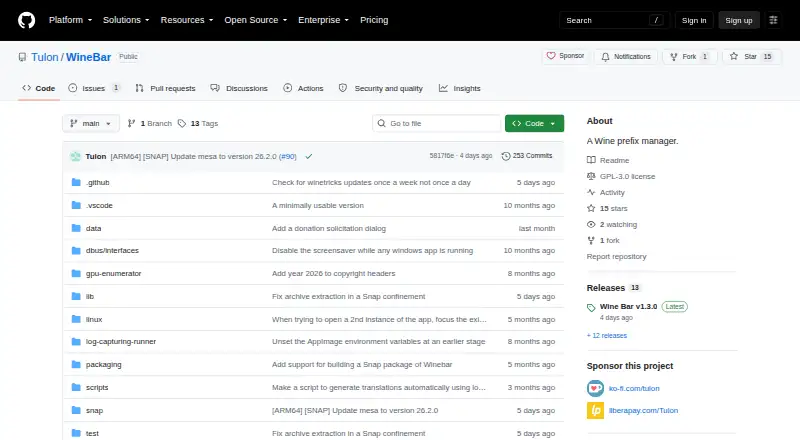
What WineBar is
WineBar is a free Wine prefix manager for running Windows software on Linux. It supports Linux on Apple silicon Macs, including Asahi Linux, as well as standard x86_64 Linux systems, which receive less testing. Users can clone prefixes, switch between DXVK and WineD3D, and choose a GPU for a pinned app. WineBar checks for Winetricks updates weekly, supports localization, and allows a locale setting for each prefix. The project recommends installing from the Snap Store or using an AppImage from its GitHub releases. Apple silicon Linux systems require muvm and fex-emu. WineBar is licensed under GPL-3.0. One limitation concerns running several apps: multiple apps in one prefix can lead to incorrect running-status reports or unreliable force-stopping. On Apple silicon, those symptoms can also occur when apps run in separate prefixes. The project describes support for non-Apple ARM64 hardware as complicated.
Good
- Supports Linux on Apple silicon Macs.
- Includes prefix cloning.
- Can switch between DXVK and WineD3D.
- Allows GPU selection for a pinned app.
- Supports localization and per-prefix locale settings.
Watch out
- Apple silicon Linux requires muvm and fex-emu.
- Standard x86_64 systems receive less testing.
- Multiple apps can cause process-management errors.
- Non-Apple ARM64 support is described as complicated.
Who it suits
WineBar suits Linux users who need to manage Wine prefixes for Windows software, including users running Linux on Apple silicon Macs. It may be less suitable for those relying on non-Apple ARM64 hardware or simultaneous apps.
Verdict
WineBar combines prefix management with graphics and localization options for Linux users. Consider its dependencies and multiple-app process limitations before relying on it for concurrent software.
Plans and prices
From WineBar's own pricing page, checked 8 Oct 2026.
| Plan | Price | What it gives you |
|---|---|---|
| WineBar | Free | Wine prefix manager · Linux |
The facts
Each one read from WineBar's own pages, with the date it was checked.
Where it runs
- Apple silicon
- The project explicitly supports Apple silicon Macs running Linux, such as Asahi Linux.checked 8 Oct 2026
- Apple silicon dependencies
- Running on Apple silicon Linux requires muvm and fex-emu dependencies.checked 8 Oct 2026
- Apple silicon limitation
- On Apple silicon Macs, the multiple-app symptoms can occur even when apps run in different Wine prefixes.checked 8 Oct 2026
- Apple silicon requirements
- On Apple silicon Macs, the README lists muvm and fex-emu as dependencies.checked 8 Oct 2026
- Concurrent apps limitation
- Running multiple apps in one Wine prefix can make Wine Bar misreport whether an app is running or stop the wrong processes; on Apple silicon, these symptoms can occur across separate prefixes too.checked 8 Oct 2026
- Multiple apps limitation
- Running multiple apps simultaneously in one Wine prefix can cause inaccurate running status and unreliable force-stopping.checked 8 Oct 2026
What it does
- ARM64 support
- The project describes support for non-Apple ARM64 hardware as complicated.checked 8 Oct 2026
- Author background
- The author says the project began as a way to run Windows software on their Linux-running MacBook Air M2 without Steam and to learn Dart and Flutter.checked 8 Oct 2026
- D3D options
- Release notes state that users can switch between DXVK and WineD3D.checked 8 Oct 2026
- Distribution
- The maker recommends installing from the Snap Store, with AppImages available from GitHub Releases as alternatives.checked 8 Oct 2026
- GPU selection
- The release notes list an option to select a particular GPU for a pinned app.checked 8 Oct 2026
- Graphics options
- The release notes list the ability to switch between DXVK and WineD3D.checked 8 Oct 2026
- Installation
- The README recommends installing from the Snap Store or using an AppImage from the GitHub releases page.checked 8 Oct 2026
- License
- The repository identifies its license as GPL-3.0.checked 8 Oct 2026
- Localization
- The release notes say Wine Bar can be localized and supports a prefix-level locale setting.checked 8 Oct 2026
- Prefix cloning
- The project release notes list prefix cloning as a feature.checked 8 Oct 2026
- Purpose
- Wine Bar is a Wine prefix manager for running Windows software on Linux.checked 8 Oct 2026
- Winetricks updates
- The release notes say Wine Bar checks for Winetricks updates once a week.checked 8 Oct 2026
- x86_64 support
- Wine Bar also works on regular x86_64 Linux systems, which receive less testing.checked 8 Oct 2026
The company
- Maker
- The repository author describes creating the project to run Windows software on Linux on an Apple silicon MacBook Air M2 and to learn Dart and Flutter.checked 8 Oct 2026
The full review of WineBar
WineBar is a free Linux utility for organizing the Wine prefixes that hold Windows applications. It suits Linux users who want explicit control over separate application environments, particularly Apple silicon Mac owners running Linux. Its graphics and cloning controls are useful, but process handling becomes unreliable when several applications run at once.
Overview
WineBar concentrates on prefix management rather than claiming to make every Windows program compatible. That focused approach is valuable when you need isolated environments for different applications or want to preserve a known-good setup while experimenting. The project originated on an M2 MacBook Air running Linux, so Apple silicon is a central use case rather than an afterthought.
It also runs on ordinary x86_64 Linux systems, although those configurations receive less testing. Non-Apple ARM64 hardware is described as complicated, so WineBar is not an equally safe recommendation across every Linux architecture. The project is licensed under GPL-3.0 and has no subscription charge.
Key features
Prefix cloning gives you a practical safety net: duplicate an environment before changing it, then keep the original available if an experiment causes trouble. WineBar also allows switching between DXVK and WineD3D. That choice can help when a particular graphics path behaves better than the other, while selecting a specific GPU for a pinned app is useful on systems with more than one graphics processor.
Localization is handled at both the interface and prefix level. You can localize WineBar itself and assign a locale to an individual prefix, which is relevant when applications require different regional settings. Weekly Winetricks update checks reduce the need to monitor that component manually, though they do not remove the need to manage Wine application compatibility yourself.
The major limitation is concurrent process management. Running multiple applications in one prefix can make WineBar report the wrong running state or force-stop the wrong process. On Apple silicon Macs, the same symptoms can appear even when applications use separate prefixes. Users who routinely run several Windows programs simultaneously should treat this as a material reliability concern.
Pricing
WineBar is free: the WineBar plan costs nothing and includes a Wine prefix manager for Linux. There are no paid tiers, seat allowances, trial periods or renewal terms to weigh. The trade-off is that you receive one free product rather than a tiered service with a separate support or capacity option.
Platforms
WineBar supports Linux, including Apple silicon Macs running Linux distributions such as Asahi Linux, and conventional x86_64 Linux machines. Apple silicon installations require muvm and fex-emu. macOS itself is not supported, so a Mac user must boot or install Linux to use it. The recommended installation route is the Snap Store; an AppImage is available from GitHub Releases.
Who it's for
Choose WineBar if you want a dedicated, open-source prefix manager and value cloning, graphics-backend selection, GPU targeting and per-prefix locale controls. It is especially well matched to Apple silicon Linux users who need a way to run Windows software without Steam. It is less suitable for non-Apple ARM64 systems, which have more complicated support, or for workflows that depend on dependable simultaneous process control.
Pros and cons
Pros
- Strong Apple silicon focus: explicit support covers Linux installations on Apple silicon Macs, including the project’s original M2 use case.
- Useful prefix isolation: cloning helps preserve a working environment before you make risky changes.
- Meaningful graphics controls: DXVK/WineD3D switching and per-app GPU selection give advanced users practical tuning options.
- Open and free: GPL-3.0 licensing and a 0.00 USD plan remove subscription and licensing costs.
- Locale flexibility: prefix-level locale settings accommodate applications with different regional requirements.
Cons
- Concurrent-app errors: status reporting and force-stopping can be wrong with multiple applications, including across separate prefixes on Apple silicon.
- Apple silicon dependencies: muvm and fex-emu are required, adding setup work before the manager is usable.
- Uneven architecture confidence: x86_64 Linux receives less testing and non-Apple ARM64 support is complicated.
- Linux-only scope: it does not provide a native macOS option.
Alternatives
For a broader starting point, browse Windows Compatibility Layers. Boxedwine is a free, GPL-licensed alternative spanning Linux, macOS, the web and Windows, making it preferable when cross-platform reach matters more than WineBar’s prefix-focused controls.
PlayOnLinux is another free option for Linux and macOS, but not all games are supported and performance can occasionally decrease. WineGUI is a free Linux alternative when you want a different Wine management interface.
Q4Wine is free open software for Linux and macOS. WineCharm is free desktop software for Linux, limited to x86_64 architecture. Crosswire is a free, GPL-3.0 open-source macOS option. GE-Proton is aimed at Linux Steam gaming and requires compatible Vulkan drivers and packages. MacWrap is the macOS choice when wrapping software matters more than Linux prefix management; its free tier includes wrapping your own software, generic compatibility and compatibility analysis, while Premium costs €7.99 a month.
Verdict
WineBar is a strong fit for Linux users, especially Apple silicon Mac owners, who want free, open-source control over Wine prefixes and graphics settings. Choose it for cloning, backend selection and localization; look elsewhere if you need native macOS support, broad ARM64 confidence or reliable simultaneous application management.