Q4Wine
Q4Wine is a free Qt interface for Wine that helps Linux users manage Wine prefixes, installed applications, and running processes.
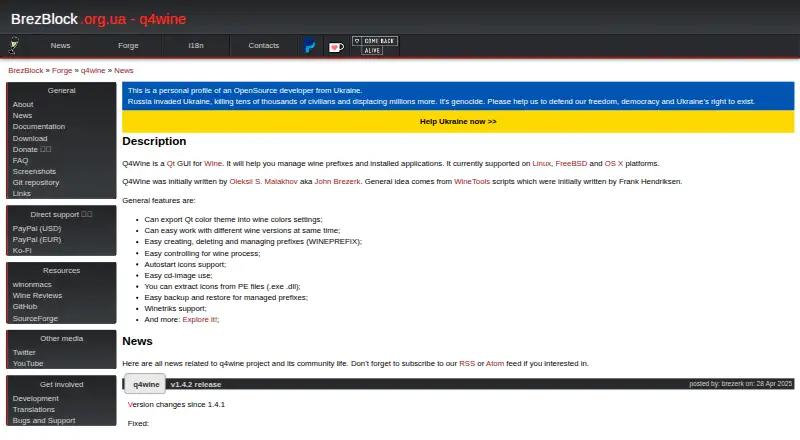
What Q4Wine is
Q4Wine is a free Qt interface for Wine that helps Linux users manage Wine prefixes, installed applications, and running processes. It can work with different Wine versions at once, and users can create, remove, back up, and restore prefixes. The Programs tab can make icons for application configurations and export them as .desktop files; the Setup tab can use the Winetricks script plugin. Q4Wine can also record output from Wine applications, though logging is off by default and saved log history may reduce performance. Its Wine AppDB browser is obsolete and disabled by default in the v1.4.0 release notes. The maker lists Linux, FreeBSD, and OS X as supported systems, but stable Mac OS X packages are not available; building from source is an option. Distribution packages generally come from community members and distribution maintainers. Q4Wine is published under GNU GPL V3 and comes with no warranty.
Good
- Manages prefixes across different Wine versions.
- Can back up and restore prefixes.
- Exports application icons as .desktop files.
- Includes a Winetricks plugin option.
- Free under GNU GPL V3.
Watch out
- Stable Mac OS X packages are unavailable.
- The AppDB browser is obsolete and disabled by default.
- Saved log history may reduce performance.
- The author does not provide support.
Who it suits
Q4Wine suits Linux users who want a graphical way to manage Wine prefixes, applications, and processes. Mac users should note that stable packages are not available, although the maker says the software can be built from source.
Verdict
Q4Wine brings prefix and process management into a Qt interface, with options for icons, Winetricks, and logging. Its obsolete AppDB browser and lack of stable Mac packages are important limits to consider.
Plans and prices
From Q4Wine's own pricing page, checked 2 Oct 2026.
| Plan | Price | What it gives you |
|---|---|---|
| Q4Wine | Free | Open software; downloadable and installable free of charge in most cases |
The facts
Each one read from Q4Wine's own pages, with the date it was checked.
Where it runs
- AppDB limitation
- The Wine AppDB browser is obsolete and disabled by default in the v1.4.0 release notes.checked 2 Oct 2026
- Application icons
- The Programs tab can create application icons for user-created prefix configurations and export them as .desktop files.checked 2 Oct 2026
- Mac package availability
- The maker says stable Q4Wine packages for Mac OS X are not yet available, though users can build from source.checked 2 Oct 2026
What it does
- Creator
- Q4Wine was initially written by Oleksii S. Malakhov, also known as John Brezerk.checked 2 Oct 2026
- Downloads
- Stable releases are linked from GitHub, while distribution packages are generally supported by community members and distribution maintainers rather than Q4Wine developers.checked 2 Oct 2026
- License and warranty
- The repository states that Q4Wine is published under GNU GPL V3 and comes with no warranty.checked 2 Oct 2026
- Logging
- Q4Wine can log Wine application output; logging is disabled by default and saved log history can reduce performance.checked 2 Oct 2026
- Prefix management
- Users can create, delete, and manage Wine prefixes and back them up or restore them.checked 2 Oct 2026
- Process management
- The Process tab manages running Wine processes.checked 2 Oct 2026
- Purpose
- Q4Wine is a Qt GUI for Wine that helps manage Wine prefixes and installed applications.checked 2 Oct 2026
- Support
- The repository says the author does not provide support or help for Q4Wine-related Wine, software installation, Linux, or Microsoft Windows issues.checked 2 Oct 2026
- Supported systems
- The maker lists Linux, FreeBSD, and OS X as supported platforms.checked 2 Oct 2026
- Winetricks
- The Setup tab can use the Winetricks script plugin.checked 2 Oct 2026
- Wine versions
- Q4Wine can work with different Wine versions at the same time.checked 2 Oct 2026
The full review of Q4Wine
Overview
Q4Wine is a free Qt application for organizing Wine prefixes and the Windows programs installed in them.
Key features
Q4Wine can use multiple Wine versions at once and lets users create, remove, back up, restore, and manage prefixes. That combination is useful when applications need separate configurations or a saved environment needs to be recovered; it is less compelling for people who want a guided, application-first setup.
The Programs tab can create icons for user-defined prefix configurations and export them as .desktop files, making those setups easier to launch from a Linux desktop. The Process tab provides control over running Wine processes, and the Setup tab can use the Winetricks script plugin. These are practical management tools, though they do not remove the need to understand Wine and prefix configuration.
Logging captures Wine application output, but starts disabled, and retaining log history can hurt performance. The AppDB browser is obsolete and disabled by default in release v1.4.0, so Q4Wine should not be chosen as a current source of application compatibility advice.
Pricing
Q4Wine costs nothing. Its free plan is open software that can generally be downloaded and installed without charge; there is no trial to consider because there is no paid tier. The repository publishes it under GNU GPL V3 and provides no warranty.
Free access does not come with author-provided help for Q4Wine-related Wine, software installation, Linux, or Microsoft Windows issues. Distribution packages are generally maintained by community members and distribution maintainers rather than Q4Wine developers, so users may need to rely on their distribution or their own troubleshooting.
Platforms
Q4Wine is presented for Linux and macOS, and its maker also identifies FreeBSD and OS X as supported systems. However, stable Mac OS X packages are not yet available; Mac users can build from source. Stable releases are linked from GitHub, while Linux package availability depends largely on community and distribution maintainers. Linux users looking for packaged installation should check their distribution's support.
Who it's for
Q4Wine suits Linux users who already work with Wine and want a graphical place to keep prefixes, Wine versions, launch icons, running processes, and Winetricks setup together.
Pros and cons
- Pro: Multiple Wine versions and full prefix backup and restore help users keep application environments separate and recoverable.
- Pro: Process controls, Winetricks access, and exportable .desktop icons add useful management functions beyond simply listing prefixes.
- Pro: The free GNU GPL V3 software has no paid tier to unlock core use.
- Con: The obsolete, disabled AppDB browser cannot serve as a reliable compatibility reference.
- Con: Stable Mac packages are unavailable, leaving source builds as the stated Mac route.
- Con: Support is not provided by the author, and saved log history can reduce performance.
Alternatives
For a broader directory of options, browse Windows Compatibility Layers. Consider Boxedwine if you want a free GPL-licensed option listed for Linux, macOS, web, and Windows. PlayOnLinux is another free Linux and macOS choice, though its plan notes that not all games are supported and performance can occasionally decrease.
Mac users considering other free options can compare Crosswire, which is open source under GPL-3.0, or PlayOnMac, which requires a supported Windows program. Porting Kit is aimed at installing Windows games and apps on macOS using Wineskin. Bourbon is free, with its 3.0 early access limited.
MacWrap is worth comparing if you want a freemium Mac option: its free tier includes wrapping your own software, generic compatibility, and compatibility analysis, while Premium costs €7.99 a month. Linux users seeking a commercial-oriented alternative can consider WINE@Etersoft: its free Local plan is for individuals on one workstation for personal, noncommercial use and has no technical support, while Enterprise uses custom pricing.
Verdict
Choose Q4Wine if you use Linux, understand Wine, and want free graphical control over multiple prefixes, processes, and launch configurations. Its strongest reason to choose is the breadth of practical management tools in one interface; look elsewhere if you need dependable compatibility browsing, author support, or a stable Mac package.