WholeClear Exchange Recovery
WholeClear Exchange Recovery repairs damaged Exchange EDB files and exports recovered mailbox content to formats such as PST, EML, MSG, HTML, RTF, and vCard.
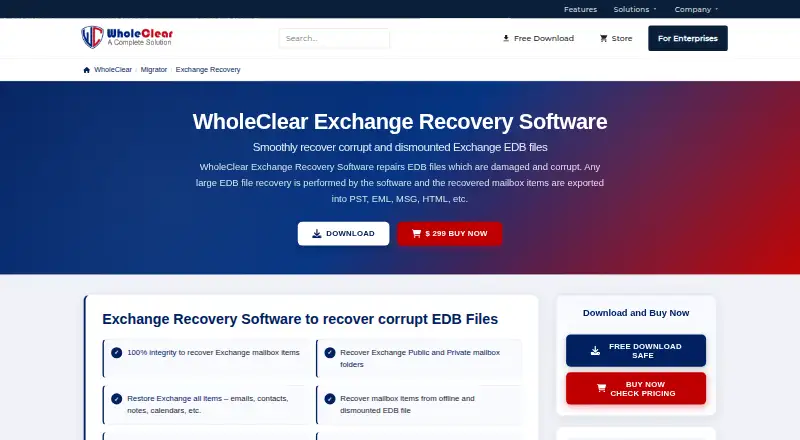
What WholeClear Exchange Recovery is
WholeClear Exchange Recovery repairs damaged Exchange EDB files and exports recovered mailbox content to formats such as PST, EML, MSG, HTML, RTF, and vCard. It can recover corrupt, deleted, damaged, offline, and dismounted mailboxes, including public and private folders, with emails, contacts, notes, calendars, and other mailbox information. Recovered mailboxes can also be exported to Office 365 or Live Exchange Server, using automatic or manual source-to-target mapping. Search and filters cover message class and date; searches can use subject, sender, recipients, and attachment type. Users can divide oversized PST files by a selected size and optionally password-protect them. The software supports Exchange Server 2007 through 2019 and other versions, and runs on Windows, macOS, and Linux. The free version processes only the first 50 items per folder. Personal costs $299 a year; Professional costs $399, paid once; Technician costs $499, paid once.
Good
- Recovers public and private mailbox folders.
- Exports to Office 365 and Live Exchange Server.
- Searches by subject, sender, recipients, or attachment type.
- Supports Windows, macOS, and Linux.
- Offers a free version with limited processing.
Watch out
- Free version processes only 50 items per folder.
- Personal license costs $299 a year.
- Does not support PST recovery.
- Does not support OST or MBOX recovery.
Who it suits
This tool suits people who need to recover Exchange EDB mailboxes and export their contents to files or Exchange services. The listed license options cover home users, professionals, and technician or corporate service providers.
Verdict
WholeClear Exchange Recovery focuses on EDB mailbox repair and offers several file and server export destinations. The free version provides limited processing, while the listed paid licenses differ by term and intended user.
Plans and prices
From WholeClear Exchange Recovery's own pricing page, checked 15 Oct 2026.
| Plan | Price | What it gives you |
|---|---|---|
| Personal | $299 a year | Personal and non-commercial use · Up to 20 systems/PC · 1 Year License |
| Professional | $399, paid once | Professional use · Up to 100 systems/PC · Lifetime License |
| Technician | $499, paid once | Technician, corporate or AMC service-provider use · Unlimited systems · Lifetime License |
The facts
Each one read from WholeClear Exchange Recovery's own pages, with the date it was checked.
What it does
- API and SDKs
- The product, download and knowledge-base pages provide no public API or SDK documentation.checked 15 Oct 2026
- Attachment handling
- Attachments can be exported together into a separate folder.checked 15 Oct 2026
- Cloud integrations
- Recovered mailboxes can be exported directly to Office 365 and Live Exchange Server.checked 15 Oct 2026
- Deleted-item recovery
- The software claims to recover deleted mailbox items from Exchange EDB files.checked 15 Oct 2026
- Demo limit
- The free version works like the licensed version but processes only the first 50 items per folder.checked 3 Oct 2026
- Documentation depth
- The official knowledge base currently lists two Exchange Online access-rights articles.checked 15 Oct 2026
- Exchange compatibility
- The product page lists compatibility with Exchange and Outlook versions including 2007, 2010, 2013, 2016 and 2019.checked 15 Oct 2026
- Exchange versions
- The page says it supports Exchange Server 2019, 2016, 2013, 2010, 2007, and other versions.checked 3 Oct 2026
- Export destinations
- Recovered mailboxes can be exported to Office 365 and Live Exchange Server, with automatic or manual source-to-target mailbox mapping.checked 3 Oct 2026
- Export formats
- Recovered data can be saved as PST, MSG, HTML, vCard, EML and RTF files.checked 15 Oct 2026
- File formats
- Supported output formats include PST, EML, MSG, HTML, RTF, and vCard.checked 3 Oct 2026
- Filtering
- Processing can be filtered by message class and item date.checked 15 Oct 2026
- Folder preservation
- The vendor says email hierarchy and folder structure remain unchanged during recovery.checked 15 Oct 2026
- Independent review assessment
- JoriPress describes the product as handling corrupt, damaged and dismounted EDB files and notes that its performance discussion is feature-based rather than an independently measured benchmark.checked 15 Oct 2026
- Licence status
- WholeClear states that its software and digital downloads are proprietary company property protected by copyright.checked 15 Oct 2026
- License benefits
- The order page lists unlimited conversion, instant delivery by email, a 30-day money-back guarantee, and no file-size limitation as special benefits.checked 3 Oct 2026
- Limit: breadth of features
- That G2 reviewer said the product was less multi-faceted than competing migration tools.checked 15 Oct 2026
- Local processing
- The download page says supported desktop workflows can process mailbox data locally without uploading it to a third-party cloud.checked 15 Oct 2026
- Mailbox content
- Recoverable items include emails, contacts, notes, calendars, and other mailbox information.checked 3 Oct 2026
The company
- Company headquarters stated by maker
- WholeClear’s own contact and about pages give an office address in New Delhi, India.checked 15 Oct 2026
- Company positioning
- LinkedIn describes WholeClear as a software-development company focused on migration, backup, conversion, recovery and data management.checked 15 Oct 2026
- Company profile
- Crunchbase lists WholeClear as a private, for-profit company with 11–50 employees and headquarters in Toronto, Ontario, Canada.checked 15 Oct 2026
- Headquarters
- New Delhi, Indiachecked 28 Sep 2026
Money
- Free demo limit
- The free edition works like the licensed edition but processes only the first 50 items in each folder.checked 15 Oct 2026
The full review of WholeClear Exchange Recovery
WholeClear Exchange Recovery is built for repairing damaged Exchange EDB databases and moving the recovered mailbox data into files or live Exchange destinations. It is most useful to Exchange administrators, migration teams, and service providers working across many systems. Its broad export and filtering tools make it capable for serious recovery work, but the annual personal license and sharply limited demo affect how you should evaluate it.
Overview
The software addresses corrupt, deleted, damaged, offline, and dismounted EDB mailboxes, covering both public and private folders. Recovery includes email, contacts, notes, calendars, and other mailbox information. Preserving the original folder hierarchy and email details is an important practical advantage when a recovered mailbox must remain intelligible to its users.
Exchange Server support includes 2007, 2010, 2013, 2016, and 2019, along with other versions. Batch recovery and preview before export are supported, so it can handle more than a one-message-at-a-time salvage job. Its scope is narrower than a general Outlook repair suite: PST, OST, and MBOX recovery are not supported.
Key features
Recovered mailboxes can be saved as PST, EML, MSG, HTML, RTF, or vCard. They can also be sent directly to Office 365 or Live Exchange Server. Automatic or manual source-to-target mailbox mapping gives administrators control over how recovered accounts are assigned during a migration, rather than forcing a single mapping workflow.
Search fields include subject, sender, recipients, and attachment type, with additional filters for message class and date. Those controls are valuable when a damaged database contains more material than the organization wants to export. PST output can be split at a chosen size and optionally password-protected, a useful safeguard for oversized archives and controlled handoff.
The free edition uses the licensed feature set but processes only the first 50 items in each folder. That is enough to inspect the interface and confirm that a mailbox opens, but it is not a meaningful test of a large recovery or a complete migration. Paid licenses advertise unlimited conversion, no file-size limitation, delivery of the license by email, and a 30-day money-back guarantee.
Pricing
| Plan | Price and term | Best fit |
|---|---|---|
| Personal | $299 a year, 1 Year License | Personal and home users; up to 20 systems/PC |
| Professional | $399, paid once, Lifetime License | Professional use; up to 100 systems/PC |
| Technician | $499, paid once, Lifetime License | Technicians, corporate users, and AMC service providers; unlimited systems |
Personal is the lowest entry price, but its yearly billing makes it less attractive for a single incident that may recur only occasionally. Professional costs more up front yet removes annual renewal and raises the installation allowance to 100 systems, making it the sensible middle tier for an internal IT team. Technician is the clear choice for consultants or service companies working on many customer machines; its unlimited-system entitlement is the main reason to pay the additional 100 USD. The 50-item-per-folder demo cap applies before purchase, while the paid benefits include unlimited conversion and no file-size limit.
Platforms
WholeClear Exchange Recovery supports Windows, macOS, and Linux. That cross-platform coverage is unusually helpful for administrators who do not want to move an EDB task to a separate Windows-only workstation, although the product’s actual recovery target remains Exchange EDB data.
Who it's for
Choose it when an Exchange administrator needs to repair one or many EDB databases, preserve folder structure, filter the recovered content, and either create standard files or migrate directly to Office 365 or Live Exchange Server. The Professional plan fits a business IT department with a defined machine count; Technician is aimed at repair shops, consultants, and AMC providers. Home users should consider Personal only if the annual term and 20-system allowance match ongoing needs.
Pros and cons
Pros
- Handles corrupt, deleted, offline, and dismounted EDB mailboxes, including public and private folders.
- Exports to six file formats and to Office 365 or Live Exchange Server, with flexible mailbox mapping.
- Search, date and message-class filters, preview, batch recovery, and PST splitting support controlled, large-scale jobs.
- Windows, macOS, and Linux support broadens deployment options.
- 24/7 support is offered through email, live chat, and tickets, with email replies promised within 24 hours.
Cons
- The free edition stops after 50 items per folder, so it cannot validate a full large-scale recovery.
- There is no PST, OST, or MBOX recovery for organizations needing broader Outlook coverage.
- The Personal license renews yearly, while the useful lifetime options cost substantially more up front.
Alternatives
Stellar Repair for Outlook is a better fit when Outlook repair is the priority and a Windows or web workflow is sufficient; its Professional plan is $99, paid once.
BitRecover Exchange Recovery suits Windows users who want a free 25-items-per-folder tier before considering its broader paid export capability.
Recovery Toolbox for Outlook is an option for buyers seeking lower-cost personal or business Outlook licensing across a wider set of platforms.
Exchange EDB Recovery Tool is another Windows EDB-focused choice with a free version capped at 25 items per folder for saving or migration.
PST Walker is aimed at viewing and exporting existing PST content rather than repairing Exchange EDB databases.
EDB 2 PST Converter is worth considering when you also need EDB conversion to NSF, EML, PDF, MBOX, or MSG, but its Personal License is $599, paid once.
DataNumen Outlook Repair is a paid Windows alternative without a free plan.
Recoveryfix Outlook PST Repair is another Windows-oriented repair option for PST-focused work.
Verdict
WholeClear Exchange Recovery is a strong match for Exchange administrators and service providers who need EDB repair plus flexible file or server migration, especially when batch processing and mailbox mapping matter. Pick Professional for a business team or Technician for recurring multi-customer work. Look elsewhere if you need PST, OST, or MBOX recovery, or if a 50-item demo cannot adequately represent the job before committing to a paid license.
Alternatives to WholeClear Exchange Recovery
- 1

Recovery Toolbox for Outlook
AndroidiOSWebmacOS7.6$10 one-time - 2
Stellar Repair for Outlook
Free planWebWindows7.4From $79 a year - 3

BitRecover Exchange Recovery
Free planWindows7.2$299 one-time - 4
Exchange EDB Recovery Tool
Free planWindows7.2$299 one-time - 5

PST Walker
Windows6.8From $32.95 a year - 6
SysInspire Exchange Recovery
Windows6.7$99 one-time