Webflow Marketplace
Webflow Marketplace is a web catalog of templates, apps, libraries, Made in Webflow sites, and Certified Partners.
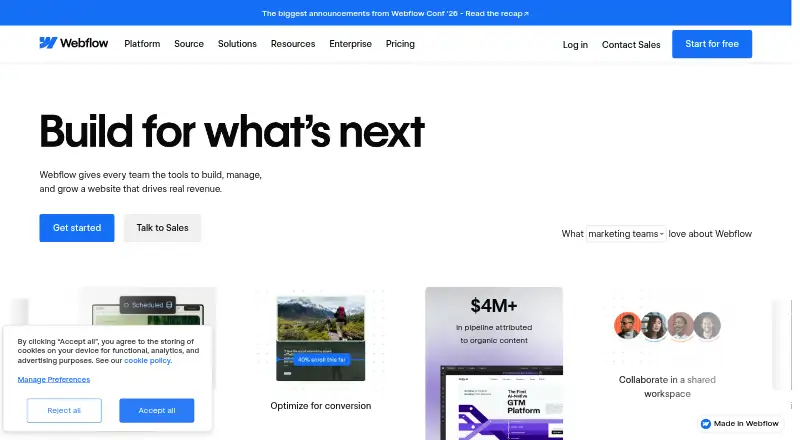
What Webflow Marketplace is
Webflow Marketplace is a web catalog of templates, apps, libraries, Made in Webflow sites, and Certified Partners. Its templates give people building websites a starting structure, with responsive layouts, prepared sections, and styled components. You can change colors, typography, images, layouts, pages, and navigation in Webflow Designer without writing code, using a free Starter workspace to explore and customize. Depending on the template, features may include CMS collections, ecommerce functionality, animations, and reusable page structures. The catalog covers portfolios, agencies, online stores, blogs, SaaS companies, and other site types. Free templates are royalty-free for personal and commercial projects, including use across multiple projects and clients. Paid templates start at $24 one-time and carry a single-use license for one end product; another project requires another license. Paid templates can be downloaded for hosting elsewhere if you have a paid Workspace plan. Marketplace purchases are final and non-refundable. Paid-template technical support comes from its designer, while Webflow support covers issues caused by built-in features.
Good
- Customize site elements in Designer without code.
- Free templates allow personal and commercial use.
- Templates may include CMS, ecommerce, and animations.
- Free Starter workspace supports exploring and customizing templates.
Watch out
- Paid templates start at $24 one-time.
- Paid template licenses cover one end product.
- Marketplace purchases are non-refundable.
- Designer handles technical support for paid templates.
Who it suits
It suits people who want to build a site from a designed starting point without writing code, including portfolios, agencies, stores, blogs, and SaaS businesses. Check the license and support arrangements before choosing a paid template.
Verdict
Webflow Marketplace offers site templates alongside apps, libraries, and other resources. Free templates can be reused across projects; paid templates have a single-use license and final, non-refundable purchases.
Plans and prices
From Webflow Marketplace's own pricing page, checked 29 Sep 2026.
| Plan | Price | What it gives you |
|---|---|---|
| Free templates | Free | Free templates available · free templates can be used for personal and commercial projects |
| Paid templates | — | Single-use license · one person, business, or project |
The facts
Each one read from Webflow Marketplace's own pages, with the date it was checked.
The company
- Founded
- 2013checked 28 Sep 2026
- Maker founding year
- Webflow’s company page gives 2013 as its founding year.checked 29 Sep 2026
Money
- Free template rights
- Free templates are royalty-free for personal and commercial projects and may be used across multiple projects and clients.checked 29 Sep 2026
- Free workspace use
- Users can explore, build, and customize templates in Designer with a free Starter workspace.checked 29 Sep 2026
What it does
- Hosting and download
- A paid template can be downloaded for hosting on another server if the purchaser has a paid Workspace plan.checked 29 Sep 2026
- Integrations
- Webflow says integrations are available in the canvas, in settings, and at the API layer, and identifies Google, HubSpot, Microsoft, and Adobe among its partner tools.checked 29 Sep 2026
- Marketplace contents
- The Webflow Marketplace offers templates, Apps, Libraries, Made in Webflow sites, and Certified Partners.checked 29 Sep 2026
- Refund limit
- Marketplace purchases are final and non-refundable under Webflow’s refund policy.checked 29 Sep 2026
- Security and compliance
- Webflow states it is independently audited for SOC 2 Type II and certified ISO 27001 compliant.checked 29 Sep 2026
- Template audiences
- The catalog includes templates for portfolios, agencies, online stores, blogs, SaaS companies, and other site types.checked 29 Sep 2026
- Template capabilities
- Depending on the template, it may include CMS collections, ecommerce functionality, animations, and reusable page structures.checked 29 Sep 2026
- Template license
- A paid template’s single-use license permits one end product for the purchaser or one client, and another project requires another license.checked 29 Sep 2026
- Template purpose
- Templates provide a professionally designed website starting point with responsive layouts, pre-built sections, and styled components.checked 29 Sep 2026
- Template support
- Technical support for paid templates is the designer’s responsibility, while Webflow support covers problems caused by its built-in features.checked 29 Sep 2026
- Visual customization
- Templates can be customized in Webflow Designer without writing code, including colors, typography, images, layouts, pages, and navigation.checked 29 Sep 2026
Where it runs
- Marketplace app review
- Webflow says every Marketplace app is reviewed, quality-assured, and maintained to platform-level standards.checked 29 Sep 2026
The full review of Webflow Marketplace
Webflow Marketplace is a catalog of website templates, apps, libraries, Made in Webflow sites, and Certified Partners. It suits people building in Webflow who want a designed starting point they can tailor without code. Its strongest case is the range of reusable free templates; paid templates trade that flexibility for a one-project license and a non-refundable purchase.
Overview
Templates provide responsive layouts, pre-built sections, and styled components, giving a site a coherent starting structure instead of a blank canvas. In Webflow Designer, users can adjust colors, typography, images, layouts, pages, and navigation without writing code. Depending on the template, the starting point may also include CMS collections, ecommerce functionality, animations, and reusable page structures.
The catalog spans portfolios, agencies, online stores, blogs, SaaS companies, and other site types. Templates can be explored and customized with a free Starter workspace, so buyers can assess and shape a design before committing to a paid template. Webflow also offers apps and libraries, and says Marketplace apps are reviewed and quality-assured to platform-level standards.
Key features
- Visual customization: Editing core design elements in Designer without code makes templates useful to site owners who want control over the result but do not want to build every page structure themselves.
- Different starting capabilities: CMS, ecommerce, animations, and reusable page structures vary by template. Buyers should choose against the needs of a specific site rather than assume every template includes these capabilities.
- Integrations: Webflow says integrations are available in the canvas, settings, and API layer, and identifies Google, HubSpot, Microsoft, and Adobe among its partner tools. That breadth may suit sites relying on those services, though integration needs will depend on the project.
- Security posture: Webflow states that it is independently audited for SOC 2 Type II and certified ISO 27001 compliant.
Pricing
The Marketplace is freemium. Free templates cost nothing, and can be used for personal and commercial projects across multiple projects and clients. That makes them the more flexible choice for freelancers or businesses reusing a design across several sites.
Paid templates start at 24 one-time. A paid template has a single-use license for one end product for the purchaser or one client; another project requires another license. The stated coverage is one site per license. Unlike free templates, paid templates cannot be reused across multiple projects under that license, and purchases are final and non-refundable.
Buyers can customize templates in a free Starter workspace, but downloading a paid template to host on another server requires a paid Workspace plan. Technical support for paid templates comes from the designer; Webflow support covers problems caused by its built-in features. This division matters when a project depends on template-specific implementation: the designer, not Webflow, is responsible for that assistance.
Platforms
Webflow Marketplace is web-based. Templates support page building, include responsive designs, and include ecommerce options in the catalog, though ecommerce functionality depends on the chosen template.
Who it's for
It is a strong fit for people building websites in Webflow who want a tailored visual foundation for a portfolio, store, agency, blog, SaaS business, or another site type. Free templates are particularly practical when the same design needs to serve multiple projects or clients. A paid template is better suited to a buyer who has settled on one design for one site and accepts the single-use license and non-refundable terms.
It is a less natural fit for buyers who need broad reuse from a paid design, want support for template-specific issues from Webflow itself, or need to download a paid template without a paid Workspace plan.
Pros and cons
- Pro: Free templates are royalty-free for commercial and personal use across multiple projects and clients, a meaningful advantage for repeat use.
- Pro: Designer customization covers visual elements and site structure without code, while templates may also provide CMS or ecommerce foundations.
- Pro: A free Starter workspace lets users explore and customize templates before buying.
- Con: Paid template licenses cover only one end product, so reuse requires another license.
- Con: Purchases are final and non-refundable, leaving little room to change course after purchase.
- Con: Paid-template technical support rests with the designer, which separates template help from Webflow's platform support.
Alternatives
Website Template Marketplaces is a category directory for comparing template marketplaces. Creative Tim Marketplace is worth considering for shoppers seeking a freemium marketplace spanning Android, iOS, and web. ThemeForest is a paid marketplace with free access as well; its individual item pricing varies by item and license, and author support may add a fee.
Colorlib Templates may suit buyers looking for a single template at $19, paid once or an all-templates option at $129 a year. Flowbase offers a free Starter plan with components, browser extension, plugins, and a single-user license, making it an option for shoppers focused on reusable design assets and extensions. Framer is a freemium alternative with a free trial and support across web and multiple desktop and mobile platforms.
TemplateMonster distinguishes personal and commercial licenses by project and site counts, which may suit buyers who want license tiers tied to broader use. ThemeWagon offers paid template plans including a one-time Falcon Standard Single Project plan at 59.00 USD, with six months of technical support and one year of free updates. BootstrapMade has a free license for personal projects with unlimited websites and domains, but it requires footer credit and excludes client work.
Verdict
Choose Webflow Marketplace if you are building in Webflow and want a customizable, responsive starting point, especially if free templates give you the reuse your projects need. Its chief advantage is the combination of visual editing and commercially reusable free designs. Look elsewhere if a paid template must cover more than one project, or if non-refundable purchases and designer-led technical support are poor fits for your workflow.
Alternatives to Webflow Marketplace
- 1

WooCommerce
Free planOpen sourceAndroidiOSWebAPI8.8From $29 a year - 2
nopCommerce
Free planOpen sourceAndroidiOSWebAPI8.6$499 one-time - 3

Framer
Free planAndroidiOSWebLinux8.2From $10 a month - 4

WordPress
Free planOpen sourceAndroidiOSWebAPI8.0Free plan - 5

BigCommerce
AndroidiOSWebAPI7.6From $29 a month - 6
OpenCart
Free planOpen sourceWebAPIExtensionLinux7.4Free plan