
Web Test Runner
Web Test Runner is a free, open-source test runner for web applications, installed as an npm development dependency.
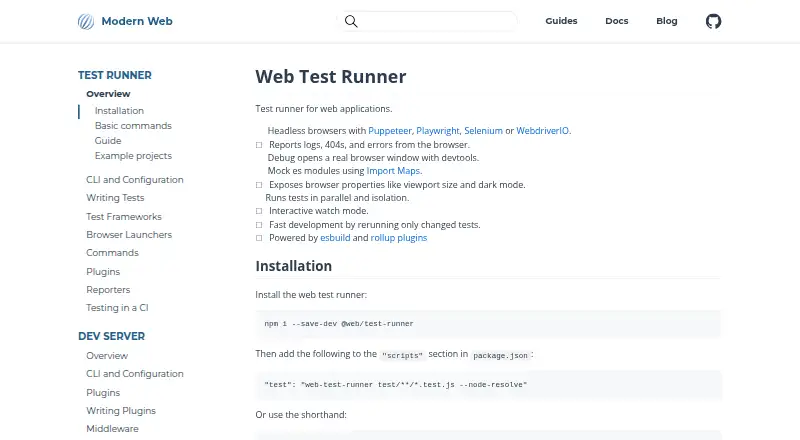
What Web Test Runner is
Web Test Runner is a free, open-source test runner for web applications, installed as an npm development dependency. It runs tests in parallel and isolation, giving each test file its own browser environment. Headless browser launchers documented by the project include Puppeteer, Playwright, Selenium, BrowserStack, and WebdriverIO. Playwright can run tests on Chromium, Firefox, and WebKit, while BrowserStack supports remote runs, including for older browser versions. For debugging, the runner can open a real browser window with developer tools and report browser logs, 404 responses, and errors. Its command line provides interactive watch mode, which reruns tests when files change, and code coverage with configurable thresholds and reports. Default coverage instrumentation uses Chromium. The runner can mock ES modules through import maps and includes Mocha integration, along with instructions for creating a custom test framework. It is powered by esbuild and Rollup plugins. The project is MIT-licensed, and GitHub is identified for help and feedback.
Good
- Runs test files in parallel and isolation.
- Playwright supports Chromium, Firefox, and WebKit.
- Watch mode reruns tests when files change.
- Coverage thresholds and reports are configurable.
- Supports ES module mocking with import maps.
Watch out
- Default coverage instrumentation uses Chromium.
- Requires installation as an npm development dependency.
Who it suits
It suits developers who want to run web application tests across browser engines, locally or through documented remote launchers. Its watch mode and coverage reporting may also help teams working on test feedback and coverage goals.
Verdict
Web Test Runner combines parallel browser testing with debugging, watch mode, and coverage reporting. Its documented launchers include local and remote options, though default coverage instrumentation is tied to Chromium.
Plans and prices
From Web Test Runner's own pricing page, checked 3 Oct 2026.
| Plan | Price | What it gives you |
|---|---|---|
| Open source | Free | MIT-licensed project · installable as an npm development dependency |
The facts
Each one read from Web Test Runner's own pages, with the date it was checked.
Where it runs
- Browser coverage
- The Playwright launcher supports bundled Chromium, Firefox, and WebKit browsers.checked 3 Oct 2026
- Browser diagnostics
- It reports browser logs, 404 responses, and errors.checked 3 Oct 2026
- Browser integrations
- Playwright can run tests on Chromium, Firefox, and WebKit; BrowserStack and Sauce Labs launchers are also documented.checked 2 Oct 2026
- Browser launchers
- Documented launchers include Puppeteer, Playwright, Selenium, BrowserStack, and WebdriverIO.checked 3 Oct 2026
- Browser testing
- It can run tests in headless browsers using Puppeteer, Playwright, Selenium, or WebdriverIO.checked 2 Oct 2026
What it does
- Build tooling
- The runner is powered by esbuild and Rollup plugins.checked 2 Oct 2026
- Code coverage
- Coverage supports configurable thresholds and reports, while the default coverage instrumentation uses Chromium.checked 3 Oct 2026
- Debugging
- Debug mode opens a real browser window with developer tools.checked 3 Oct 2026
- Execution
- Tests run in parallel and isolation, and watch mode reruns tests when files change.checked 3 Oct 2026
- Installation
- The official installation instructions use npm to add @web/test-runner as a development dependency.checked 3 Oct 2026
- Integrations
- The docs describe using the Playwright launcher with GitHub Actions via Microsoft's Playwright Action.checked 3 Oct 2026
- License
- The project's GitHub page identifies the repository license as MIT.checked 3 Oct 2026
- Module mocking
- The runner can mock ES modules using import maps.checked 3 Oct 2026
- Parallel and isolated tests
- Tests run in parallel and in isolation, with each test file in its own browser environment.checked 2 Oct 2026
- Project status
- Modern Web says its code is open source and publicly available on GitHub, with packages published under the @web npm namespace.checked 2 Oct 2026
- Purpose
- Web Test Runner is a test runner for web applications.checked 3 Oct 2026
- Remote testing
- The BrowserStack launcher runs tests remotely, and the docs say it can be useful for older browser versions.checked 3 Oct 2026
- Support
- The project links to Discord for community discussion and lists sponsorship and contributions as ways to support it.checked 3 Oct 2026
- Support and contributions
- The site directs users to GitHub for help and feedback and invites contributions to its documentation.checked 2 Oct 2026
- Test framework
- The documentation includes Mocha as a test framework and allows users to write their own framework.checked 3 Oct 2026
- Watch mode and coverage
- The command line supports interactive watch mode and code coverage profiling.checked 2 Oct 2026
The company
- Maker
- Modern Web describes its goal as providing developers with guides and tools for modern web development while working closely with the browser.checked 3 Oct 2026
- Maker focus
- Modern Web says its goal is to provide developers with guides and tools for building for the modern web while working closely with browser capabilities.checked 2 Oct 2026
The full review of Web Test Runner
Web Test Runner is a browser-focused test runner for web applications, best suited to developers who need their tests to run in real browser environments. Its strongest case is the combination of isolated parallel runs and multiple launcher options; projects that need a more all-in-one testing framework may prefer a different fit.
Overview
Each test file gets its own browser environment, and files can run in parallel. That separation helps keep tests from sharing browser state, while watch mode reruns them as files change. The runner is installed as an npm development dependency and includes a documented Mocha integration, as well as guidance for writing a custom test framework. That flexibility suits teams prepared to assemble their testing setup, but is less compelling for anyone seeking a single prescribed workflow.
Modern Web publishes the project as open source under the MIT license, with packages in the @web npm namespace. GitHub is the destination for help and feedback, and the project also welcomes documentation contributions.
Key features
Browser testing and diagnostics
Documented launchers include Puppeteer, Playwright, Selenium, BrowserStack, and WebdriverIO. Playwright can run against Chromium, Firefox, and WebKit, while BrowserStack supports remote runs, including older browser versions. This breadth helps teams match execution to their browser targets; the trade-off is that launcher choice is part of the setup rather than a single fixed browser path.
Debug mode opens a real browser window with developer tools. The runner also reports browser logs, 404 responses, and errors, which gives developers useful context when a failure involves browser behavior rather than just a test assertion.
Watch mode, coverage, and mocking
Interactive command-line watch mode reruns tests after file changes, reducing the need to restart runs during development. Coverage profiling supports reports and configurable thresholds, but default instrumentation uses Chromium. Teams measuring coverage across other browser targets should account for that limitation. ES module mocking through import maps adds a way to isolate dependencies, and the build tooling uses esbuild and Rollup plugins.
Pricing
Web Test Runner is free. Its Open source plan costs nothing and is an MIT-licensed project installable as an npm development dependency. There are no stated seat or usage caps to weigh against paid tiers; this is a direct fit for teams comfortable managing an open-source tool in their development setup.
Platforms
Web Test Runner supports Linux, macOS, Windows, web, and self-hosted use. Its documented browser runtimes include Chromium, Firefox, and WebKit through Playwright. The project also describes using the Playwright launcher with GitHub Actions via Microsoft's Playwright Action.
Who it's for
Choose Web Test Runner when browser behavior is central to the application and you want parallel, isolated test files, visible-browser debugging, or options for remote execution. It is particularly relevant to web teams that already use npm and can select and configure a launcher. Look elsewhere if your priority is a turnkey framework rather than a browser-oriented runner with integration choices.
Pros and cons
- Pros: Parallel runs with a separate browser environment per test file help limit cross-test interference.
- Pros: Playwright covers Chromium, Firefox, and WebKit, and BrowserStack enables remote testing, including older browser versions.
- Pros: Debugging exposes a real browser and developer tools, alongside logs, 404s, and errors.
- Cons: Default coverage instrumentation uses Chromium, which matters when coverage targets other browsers.
- Cons: Multiple launcher and framework paths offer flexibility but require teams to shape their own setup.
Alternatives
JavaScript Testing Frameworks is a useful next step for comparing tools in the category. Consider Karma if its broader platform list matters, but it is deprecated and receives no new features or general bug fixes. Cucumber.js is another free npm development dependency to consider. Vitest is a free and open-source option with no stated plan limits.
Intern, Mocha, Rstest, Jest, and Poku are additional alternatives for readers comparing free testing tools.
Verdict
Web Test Runner is a strong choice for web developers who want real-browser execution, parallel isolation, and launcher flexibility in a free MIT-licensed project. Its diagnostics and Playwright browser coverage make a clear case for browser-centric work. Choose another tool if you need a more prescriptive framework, or if Chromium-based default coverage instrumentation does not suit your targets.
Getting started
- Open the Modern Web Test Runner documentation
- Install @web/test-runner as an npm development dependency
- Choose a documented launcher such as Puppeteer, Playwright, Selenium, BrowserStack, or WebdriverIO
- Configure a Mocha integration or create a custom test framework
- Run tests with watch mode or coverage profiling
Limits worth knowing
The default coverage instrumentation uses Chromium. The listed platform set does not include Android or iOS.
Questions
Is Web Test Runner free?
Yes. It is listed with a free plan at 0.00 USD and has no paid plan listed.
Is Web Test Runner open source?
Yes. Modern Web says its code is publicly available on GitHub, and the repository is MIT licensed.
Which browsers can it test?
The Playwright launcher supports Chromium, Firefox, and WebKit. Other documented launchers include Puppeteer, Selenium, BrowserStack, and WebdriverIO.
Can it run tests remotely?
Yes. The BrowserStack launcher runs tests remotely and is documented for older browser versions.
How is it installed?
The project documents installation as the @web/test-runner npm development dependency.
Who makes Web Test Runner?
Modern Web makes it as part of its guides and tools for modern web development.
Alternatives to Web Test Runner
- 1

QUnit
Free planAndroidiOSWebAPI7.4Free plan - 2

Cucumber.js
Free planLinuxmacOSSelf-hostedWindows6.8Free plan - 3
Karma
Free planAndroidiOSWebLinux6.7Free plan - 4

Vitest
Free planWebLinuxmacOSWindows6.6Free plan - 5
Jasmine
Free planWebLinuxmacOSWindows6.5Free plan - 6
Pure Test
Free planWebLinuxmacOSSelf-hosted6.5Free plan