
Cucumber.js
Cucumber.js is the JavaScript implementation of Cucumber, which checks software against executable specifications and reports whether each scenario succeeds …
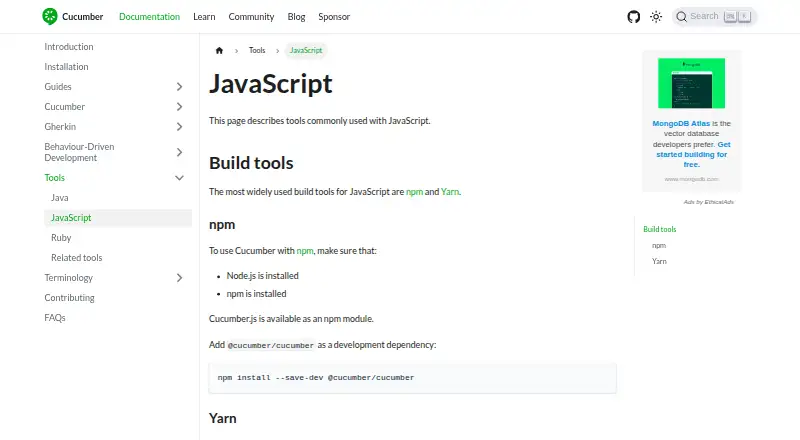
What Cucumber.js is
Cucumber.js is the JavaScript implementation of Cucumber, which checks software against executable specifications and reports whether each scenario succeeds or fails. Scenarios are written in Gherkin, a structured plain-text format typically saved in `.feature` files alongside the software in source control. Step definitions connect those written steps to code that performs the described actions. The project supports Behaviour-Driven Development, centred on discovery, collaboration, and examples. Cucumber.js runs feature files from the command line and can be used in continuous integration. Reporter plugins can produce scenario reports, and reports can be published with `--publish`; published reports are public and deleted after 24 hours. The module runs on Node.js and is installed as a development dependency with npm or Yarn. Setup requires Node.js and one of those package managers. Global installation does not work because globally installed modules cannot be imported or required in support files. Cucumber.js is free and open source, and can work with browser automation tools such as Selenium WebDriver, though it is not itself a browser automation tool.
Good
- Reports success or failure for each scenario.
- Step definitions connect Gherkin steps to code.
- Supports continuous integration.
- Reporter plugins can produce scenario reports.
- Free and open source.
Watch out
- Requires Node.js and npm or Yarn.
- Global installation does not work.
- Published reports are public for up to 24 hours.
- It is not a browser automation tool.
Who it suits
Cucumber.js suits JavaScript teams that want to define software behavior in Gherkin and check scenarios in development or continuous integration. It requires Node.js and npm or Yarn.
Verdict
Cucumber.js provides a Gherkin-based way to check software behavior through executable scenarios. It is a fit for teams comfortable with Node.js and development-dependency installation.
Plans and prices
From Cucumber.js's own pricing page, checked 4 Oct 2026.
| Plan | Price | What it gives you |
|---|---|---|
| Cucumber.js | Free | Available as an npm module · installed as a development dependency |
| Cucumber.js (@cucumber/cucumber) | Free | Available as an npm module · install as a development dependency |
The facts
Each one read from Cucumber.js's own pages, with the date it was checked.
What it does
- Audience
- The project says thousands of companies rely on Cucumber tests to validate their software.checked 4 Oct 2026
- BDD
- Cucumber supports Behaviour-Driven Development, a process built around discovery, collaboration and examples.checked 4 Oct 2026
- CI integration
- Cucumber can be run in continuous integration, and Cucumber Reports can include links to detected Git commits and CI runs.checked 4 Oct 2026
- Command line
- Cucumber.js includes an executable for running feature files from the command line.checked 4 Oct 2026
- Expressions
- Step definitions can use Cucumber Expressions or regular expressions, but the two syntaxes cannot be mixed in one expression.checked 4 Oct 2026
- Gherkin
- Cucumber scenarios use Gherkin syntax, and feature files are typically stored in source control alongside the software.checked 4 Oct 2026
- Global install limitation
- Cucumber does not work when installed globally because globally installed modules cannot be imported or required in support files.checked 4 Oct 2026
- Installation
- The documentation shows installing `@cucumber/cucumber` as a development dependency with npm or Yarn.checked 4 Oct 2026
- Integrations
- Cucumber says it is not a browser automation tool, but works with browser automation tools such as Selenium WebDriver.checked 4 Oct 2026
- JavaScript install
- Cucumber.js is available as the @cucumber/cucumber npm module and can also be installed with Yarn as a development dependency.checked 4 Oct 2026
- Language
- Cucumber.js is the JavaScript implementation of Cucumber and is available as an npm module for Node.js.checked 4 Oct 2026
- Maintainer status
- The project describes @cucumber/cucumber as the stable canonical JavaScript implementation, while @cucumber/node is pre-1.0.0 and may change.checked 4 Oct 2026
- Prerequisites
- The JavaScript setup instructions require Node.js and either npm or Yarn.checked 4 Oct 2026
- Purpose
- Cucumber reads executable specifications written in plain text and checks whether software conforms to them, reporting success or failure for each scenario.checked 4 Oct 2026
- Report data
- The Cucumber Reports service states that published report data is stored in US data centers and encrypted at rest.checked 4 Oct 2026
- Reporting
- Cucumber uses reporter plugins to produce reports showing which scenarios passed or failed, including built-in, separately installed, and custom plugins.checked 4 Oct 2026
- Report privacy
- Published reports are publicly accessible and deleted after 24 hours.checked 4 Oct 2026
- Report publishing
- Publishing to Cucumber Reports is supported by Cucumber-JS version 7.0.0 and above.checked 4 Oct 2026
- Reports
- Cucumber.js supports publishing reports with the --publish option from version 7.3.0.checked 4 Oct 2026
- Security
- The project says it has a security policy that explains how to contact maintainers about security issues.checked 4 Oct 2026
- Security guidance
- Cucumber advises users not to define environment variables containing secrets globally.checked 4 Oct 2026
- Specifications
- Cucumber scenarios are written in Gherkin, a structured plain text format stored in `.feature` files.checked 4 Oct 2026
- Step definitions
- Step definitions connect Gherkin steps to programming code that performs the described actions.checked 4 Oct 2026
The company
- Project ownership
- Cucumber says its intellectual property assets transitioned from SmartBear Software to the Open Source Collective in December 2024.checked 4 Oct 2026
The full review of Cucumber.js
Cucumber.js brings Cucumber’s executable specifications to JavaScript projects, with scenarios written in Gherkin and linked to code through step definitions. It is a strong fit for Node.js teams using Behaviour-Driven Development; the trade-off is project-level setup and the need to supply the actions that make each scenario run.
Overview
Cucumber checks software against plain-text scenarios and reports whether each one succeeds or fails. Keeping Gherkin feature files in source control alongside the software gives teams a shared set of examples to discuss and maintain. Those examples are not self-executing, however: step definitions must connect their steps to code that performs the described actions.
Cucumber.js is the stable, canonical JavaScript implementation, distributed as the @cucumber/cucumber npm module for Node.js. The project describes @cucumber/node as pre-1.0.0 and subject to change, making @cucumber/cucumber the more settled choice for JavaScript teams. Cucumber says thousands of companies rely on its tests to validate software, but that adoption does not remove the work of authoring and maintaining definitions.
Key features
Gherkin and step definitions
Scenarios live in structured plain-text .feature files. Step definitions map their Gherkin steps to programming code; they can use Cucumber Expressions or regular expressions, but cannot combine both syntaxes in a single expression. This structure supports a shared vocabulary for examples, while requiring developers to keep the prose and its code connections aligned.
Command-line and parallel runs
The package includes an executable for running feature files from the command line, and parallel execution is supported. That suits teams incorporating scenarios into development or continuous integration. Cucumber is not a browser automation tool, so browser-based checks need to work with an automation tool such as Selenium WebDriver.
Reports and publishing
Reporter plugins can produce results showing which scenarios passed or failed. Cucumber supports built-in, separately installed and custom plugins, giving teams room to choose how results are presented. Publishing reports with --publish is supported from Cucumber-JS 7.3.0; the broader publishing support applies to Cucumber-JS 7.0.0 and above. Published reports are publicly accessible and deleted after 24 hours. Cucumber Reports says report data is stored in US data centers and encrypted at rest, so teams should avoid publishing sensitive material.
Pricing
Cucumber.js is open-source software with a free plan at no cost. The @cucumber/cucumber npm module is installed as a development dependency; there is no free trial or paid tier described. The free plan suits teams able to install and maintain the package within their own Node.js project, rather than those seeking a separately priced hosted testing service.
Installation requires Node.js and npm or Yarn. Cucumber.js does not work when installed globally, because globally installed modules cannot be imported or required in support files. Installing it as a project development dependency is therefore a requirement, not just a preference.
Platforms
Cucumber.js supports Node.js and is listed for Linux, macOS, Windows and self-hosted use. Its JavaScript setup uses npm or Yarn, and the command-line executable runs feature files in the project.
Who it's for
Choose Cucumber.js if a JavaScript team wants executable examples to support discovery, collaboration and testing as part of Behaviour-Driven Development. It is less suitable for teams that want a browser automation tool in one package, or cannot take on the work of writing step definitions and keeping them connected to application behavior.
The project provides a security policy for contacting maintainers about security issues and directs community questions to Discord, GitHub Discussions and Stack Overflow. It also advises against defining environment variables containing secrets globally. Cucumber says its intellectual property assets moved from SmartBear Software to the Open Source Collective in December 2024.
Pros and cons
- Pros: Gherkin scenarios can serve as both shared examples and executable checks, with results reported for each scenario.
- Pros: Command-line execution, parallel runs, CI use and configurable reporter plugins support integration into development workflows.
- Pros: The canonical JavaScript package is free and installable as a project development dependency through npm or Yarn.
- Cons: Every scenario depends on step definitions that connect its language to code, adding work to create and maintain.
- Cons: Global installation does not work, and browser automation must come from a separate tool.
- Cons: Published reports are public, even though they are deleted after 24 hours; sensitive content requires care.
Alternatives
For other options, browse JavaScript Testing Frameworks and Test Automation Software.
- QUnit is a free, open-source JavaScript testing framework distributed via CDN, npm and Yarn; choose it when that framework approach is a better fit than Cucumber’s Gherkin scenarios.
- Karma is free and MIT-licensed, but deprecated, with no new features or general bug fixes; it is an option only if that status is acceptable.
- Web Test Runner is an alternative for readers seeking a browser-focused approach to modern web development.
- Pure Test is free, Apache-2.0 open-source software with no paid plans; consider it if that project is a better match for your testing needs.
- Vitest is free and open source, with no plan limits stated; choose it if you prefer that alternative to Gherkin-based scenarios.
- Testem is a free, MIT-licensed open-source JavaScript test runner; it is an alternative if a test runner rather than BDD scenarios is what you need.
- Intern is another free option for readers comparing testing software.
- uvu is a free, MIT-licensed test runner for Node.js and the browser; consider it if you want a test runner for those environments rather than Cucumber’s Gherkin workflow.
Verdict
Cucumber.js is a sound choice for Node.js teams that want Gherkin examples to become repeatable behavior checks and are prepared to maintain step definitions. Its free, canonical package and CI-friendly execution are compelling; look elsewhere if you need browser automation included or want tests without the extra mapping from scenarios to code.
Getting started
- Install Node.js and choose npm or Yarn.
- Add `@cucumber/cucumber` as a development dependency using npm or Yarn.
- Write scenarios in Gherkin and save them in `.feature` files.
- Add step definitions that connect Gherkin steps to code.
- Run feature files with the Cucumber.js command-line executable.
Limits worth knowing
The listed free plan costs nothing. Cucumber.js must be installed as a development dependency rather than globally; published reports are public and deleted after 24 hours.
Questions
How much does Cucumber.js cost?
The listed free plan is free, and the project describes Cucumber as open source.
Which platforms and runtime does it support?
The listed platforms are Linux, macOS, Windows, and self-hosted environments. Cucumber.js runs on Node.js.
How do I install Cucumber.js?
Install `@cucumber/cucumber` as a development dependency with npm or Yarn. The setup requires Node.js, and global installation does not work with support files.
Can it publish reports?
Yes. Cucumber.js supports publishing with `--publish`; published reports are publicly accessible and deleted after 24 hours.
Does Cucumber.js automate browsers?
No. It can work with browser automation tools such as Selenium WebDriver, but is not itself a browser automation tool.
Where can users ask questions?
The Cucumber community directs users to Discord, GitHub Discussions, and Stack Overflow.
Alternatives to Cucumber.js
- 1

QUnit
Free planAndroidiOSWebAPI7.4Free plan - 2

Web Test Runner
Free planWebLinuxmacOSSelf-hosted6.9Free plan - 3
Karma
Free planAndroidiOSWebLinux6.7Free plan - 4

Vitest
Free planWebLinuxmacOSWindows6.6Free plan - 5
Jasmine
Free planWebLinuxmacOSWindows6.5Free plan - 6
Pure Test
Free planWebLinuxmacOSSelf-hosted6.5Free plan