
WaveLab
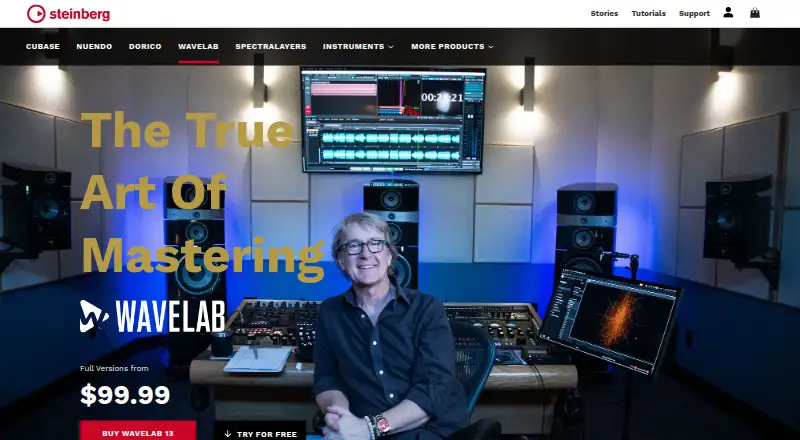
WaveLab is an audio mastering and editing suite for Windows and macOS, with audio editing, audio montage, batch processing, and spectral editing tools.
What WaveLab is
WaveLab is an audio mastering and editing suite for Windows and macOS, with audio editing, audio montage, batch processing, and spectral editing tools. It supports VST 3 plug-ins from other manufacturers, and the edition comparison lists direct podcasting integrations with SoundCloud, Spreaker, Podbean, Buzzsprout, and Castos. Pro and Elements can replace audio in video. WaveLab Pro 13 includes Dolby Atmos mastering tools for ADM file editing, loudness control, and album assembly; it supports sample rates up to 384 kHz and more than 1,000 audio tracks. WaveLab Elements 13 supports sample rates up to 96 kHz and up to eight audio tracks. The trial is for WaveLab Pro and is available after signing in or creating a Steinberg ID. WaveLab LE is listed as a free copy available with qualifying hardware and a Download Access Code. WaveLab 13 downloads are listed for Windows 10 64-bit version 22H2 or newer, Windows 11 version 24H2 or newer, and macOS 14, 15, or 26. Installing without Steinberg Download Assistant requires Steinberg Activation Manager for license management. Steinberg says technical support is available only to registered users.
Good
- Includes audio editing, montage, and batch processing.
- Supports VST 3 plug-ins from other manufacturers.
- Pro 13 includes Dolby Atmos mastering tools.
- Pro and Elements can replace audio in video.
- 60-day WaveLab Pro trial is available.
Watch out
- WaveLab Pro trial requires a Steinberg ID.
- Technical support is available only to registered users.
- WaveLab 13 lists specific supported OS versions.
- WaveLab LE requires qualifying hardware and an access code.
Who it suits
WaveLab may suit audio editors, podcasters, and home studio users working on Windows or macOS. Its editions have different track and sample-rate limits, so those needs matter when choosing.
Verdict
WaveLab offers audio editing and mastering tools across editions with different track and sample-rate limits. Review the listed operating-system requirements and trial conditions before choosing a version.
Plans and prices
From WaveLab's own pricing page, checked 15 Oct 2026.
| Plan | Price | What it gives you |
|---|---|---|
| WaveLab LE | Free | Requires included Download Access Code · fades · track editing · loudness changes · spectrum analysis · free with qualifying hardware access code |
| WaveLab Elements 13 | $99.99, paid once | Entry-level mastering and editing · reduced feature set compared with Pro · full version |
| WaveLab Pro 13 | $499.99, paid once | Dolby Atmos mastering · up to 128-channel VST3 Immersive Plug-in Hub · Audio Editor · Audio Montage · batch processing · full version |
The facts
Each one read from WaveLab's own pages, with the date it was checked.
What it does
- Account and activation
- Installation, activation, registration and some use require a Steinberg account and internet connection.checked 15 Oct 2026
- API and SDK
- The opened official product and help materials describe VST3 and ARA extensibility but do not present a public web API or WaveLab SDK.checked 15 Oct 2026
- ARA limitation
- A Steinberg forum response says WaveLab ARA in a host supplies editing functions while VST processing remains handled by the host.checked 15 Oct 2026
- Documentation
- WaveLab help is available online at steinberg.help, with platform-independent documentation covering Windows and macOS workflows, setup, audio connections and editing concepts.checked 15 Oct 2026
- Editing features
- WaveLab 13 adds marker-ruler range selection, text-path file opening or pasting, plug-in scaling, drag-out plug-in removal and improved high-DPI waveform outlines.checked 15 Oct 2026
- Elements limits
- WaveLab Elements 13 supports sample rates up to 96 kHz and up to eight audio tracks.checked 11 Oct 2026
- Immersive audio
- WaveLab Pro 13 includes Dolby Atmos mastering tools for ADM file editing, loudness control, and album assembly.checked 11 Oct 2026
- Immersive plug-ins
- The Immersive Plug-in Hub routes standard VST3 plug-ins across as many as 128 audio channels and supports bed, clip and track plug-ins.checked 15 Oct 2026
- Installation
- WaveLab 12 direct installers require Steinberg Activation Manager for license management; Steinberg Download Assistant bundles that requirement.checked 15 Oct 2026
- Integrations
- WaveLab supports third-party VST3 plug-ins, external audio editors and hardware devices, and WaveLab Pro can operate as an ARA extension in compatible applications.checked 15 Oct 2026
- Intended users
- Steinberg describes WaveLab LE as suited to hobby musicians, home studio owners, freelancers, and podcasters.checked 11 Oct 2026
- License management
- WaveLab 13 requires Steinberg Activation Manager for license management when installed without Steinberg Download Assistant.checked 11 Oct 2026
- License model
- The EULA grants a non-exclusive proprietary license and states that Steinberg and its suppliers retain intellectual-property rights.checked 15 Oct 2026
- Limit: learning curve
- MusicRadar identified a steep learning curve and an icon-heavy interface that felt messy.checked 15 Oct 2026
- Limit: older interface changes
- Tape Op reported that the Mac-era interface change in WaveLab 7 was problematic and that version 8.5 did not run as smoothly as version 6 for that reviewer.checked 15 Oct 2026
- Limit: support and licensing
- Trustpilot reviewers repeatedly described unanswered support tickets, difficult activation or licensing and installation failures affecting WaveLab or other Steinberg products.checked 15 Oct 2026
Money
- Acquisition price
- Yamaha’s 2004 acquisition announcement stated a total purchase amount of $28.5 million for Steinberg’s common stock and US sales business.checked 15 Oct 2026
- Free plan
- Nochecked 23 Sep 2026
The company
- Company founded
- Steinberg Media Technologies was founded in 1984.checked 15 Oct 2026
- Company headquarters
- Steinberg Media Technologies GmbH is headquartered in Hamburg, Germany.checked 15 Oct 2026
- Company size
- LinkedIn lists Steinberg’s company size as 201–500 employees.checked 15 Oct 2026
- Founded
- 1984checked 28 Sep 2026
- Headquarters
- Hamburg, Germanychecked 28 Sep 2026
Where it runs
- Dolby Atmos mastering
- WaveLab 13 adds Master and Album montages for importing, editing, normalizing, re-rendering and assembling ADM Dolby Atmos files.checked 15 Oct 2026
The full review of WaveLab
WaveLab is a mastering and audio-editing suite for producers, editors, and podcasters who need more than a single-purpose tool. Its broad editing workflow is the draw; the key decision is whether Elements’ eight-track ceiling is enough or Pro’s much larger capacity matters.
Overview
WaveLab combines audio editing, audio montage, batch processing, and spectral editing. Multitrack editing, noise reduction, video synchronization, and third-party VST 3 plug-in support make it useful for shaping audio as well as preparing finished material. That breadth suits users with varied projects, but can be more than needed for someone seeking only a focused mastering plug-in.
The editions differ substantially in scale. Elements 13 supports up to eight audio tracks and sample rates up to 96 kHz; Pro 13 supports more than 1,000 tracks and sample rates up to 384 kHz. Elements is the more proportionate fit for smaller sessions, while Pro leaves room for complex work and higher-rate audio.
Key features
Editing and processing
Batch processing is useful when applying the same operation to multiple files, while spectral editing provides a more targeted approach to audio work. VST 3 compatibility lets users incorporate plug-ins from other manufacturers, which is valuable for studios that already rely on particular effects. The combination makes WaveLab a broader production and editing environment than a tool limited to final-level adjustments.
Atmos, podcasts, and video
WaveLab Pro 13 includes Dolby Atmos mastering tools for editing ADM files, controlling loudness, and assembling albums. Those capabilities make Pro the edition to consider for immersive-audio work; they are not a reason to choose Elements. The editions comparison also identifies direct podcasting integrations with SoundCloud, Spreaker, Podbean, Buzzsprout, and Castos, and says Pro and Elements can replace audio in video. That gives the suite uses beyond music, though the edition matters for video replacement.
Pricing
WaveLab is paid software, with a 60-day WaveLab Pro trial available after signing in or creating a Steinberg ID. The trial is a useful way to assess Pro before committing, but its duration is finite. Elements 13 and Pro 13 are full versions with custom pricing.
WaveLab LE is free at no cost, but a free copy requires qualifying hardware and a Download Access Code. Steinberg describes LE as suited to hobby musicians, home studio owners, freelancers, and podcasters, making it a reasonable entry point for those who meet that condition. It is not a general free download for every prospective user. Support is available only to registered users.
Platforms
WaveLab 13 is available for Windows and macOS. Supported systems are Windows 10 64-bit version 22H2 or newer, Windows 11 version 24H2 or newer, and macOS 14, 15, or 26, so checking the operating system before choosing an edition is important. Installation without Steinberg Download Assistant requires Steinberg Activation Manager for license management.
Who it's for
WaveLab suits audio professionals and serious home-studio users who want editing, processing, and mastering tools in one suite. Pro is the clear fit for Dolby Atmos work or sessions that could exceed eight tracks or 96 kHz. Elements is more sensible for smaller projects within those limits, while LE offers a free route for users with qualifying hardware. Anyone needing only a narrow mastering function may prefer a more focused alternative.
Pros and cons
Pros
- Broad audio workflow: Editing, montage, batch processing, and spectral editing cover varied tasks without limiting the suite to mastering alone.
- Room to scale: Pro 13’s support for more than 1,000 tracks and up to 384 kHz suits projects well beyond Elements’ eight-track and 96 kHz limits.
- Specialized options: Pro’s Dolby Atmos tools and the podcast integrations give the suite relevance for immersive audio and publishing workflows.
- Free entry points: A 60-day Pro trial and hardware-bundled LE edition let some users explore WaveLab without first buying a full version.
Cons
- Edition choice affects capacity: Elements’ eight-track limit and 96 kHz ceiling may rule it out for larger or higher-rate sessions.
- LE has a qualification condition: The free copy depends on qualifying hardware and a Download Access Code.
- System requirements are specific: Older Windows and macOS releases are outside the stated WaveLab 13 requirements.
- Trial access requires an account: Users must sign in or create a Steinberg ID to start the 60-day Pro trial.
Alternatives
For a different approach to mastering and audio work, these options serve narrower needs or have different platform and pricing models:
- Audio Mastering Software is a useful category to compare if you want to weigh WaveLab against other mastering options.
- Game Audio Editors is the relevant category for readers whose main focus is game-audio editing.
- Audio Editing Software offers a broader category comparison for users prioritizing editing.
- IK Multimedia ReSing is a freemium Windows and macOS option centered on voices and instruments; its free plan is limited to two voices, two instruments, and one RVC import, with no model generation.
- Matchering is a free, open-source option for Linux, macOS, Windows, web, or self-hosting, with no published paid plans.
- Tunr is a free macOS and Windows alternative; its free plan allows three masters before a license key and includes 16-bit and 24-bit output.
- Voxengo SPAN is a free real-time FFT spectrum analyzer plug-in for macOS and Windows, rather than a full editing suite.
- StudioZIO Mastering Suite is a free macOS option that supports AU, VST3, AAX, and standalone formats, with no license key or account required.
- TDR Limiter 6 GE is a €60.00 one-time option for a personal or small-business license, covering one user and up to five computers.
- DSP-Quattro is a macOS alternative with a free trial and a freemium pricing model.
- Acustica Audio Erin Studio is a paid macOS and Windows option with four plug-ins: two EQs and two compressors.
Verdict
Choose WaveLab if you need a substantial editing and mastering environment, especially if Pro’s Dolby Atmos tools or high track and sample-rate limits match your work. Elements makes more sense for smaller sessions, and LE is worth considering when qualifying hardware provides access. Look elsewhere if your needs are limited to a single mastering function, or if your operating system falls outside the stated requirements.
Getting started
- Open the Steinberg WaveLab website
- Check that your computer meets the listed Windows or macOS version
- Sign in or create a Steinberg ID for the 60-day Pro trial
- Download WaveLab 13
- Install Steinberg Activation Manager if installing without Steinberg Download Assistant
- Use a qualifying hardware Download Access Code for WaveLab LE
Limits worth knowing
WaveLab Elements 13 supports up to 96 kHz and eight audio tracks. WaveLab Pro 13 supports sample rates up to 384 kHz and more than 1,000 audio tracks; the Pro trial lasts 60 days.
Questions
What platforms support WaveLab 13?
Downloads are listed for Windows 10 64-bit version 22H2 or newer, Windows 11 version 24H2 or newer, and macOS 14, 15, or 26.
Is there a free version?
WaveLab LE is available as a free copy with qualifying hardware and a Download Access Code.
How does the trial work?
A 60-day WaveLab Pro trial is available after signing in or creating a Steinberg ID.
Which podcast services integrate directly?
The edition comparison lists SoundCloud, Spreaker, Podbean, Buzzsprout, and Castos.
Does WaveLab support third-party plug-ins?
Yes. It supports VST 3 plug-ins from other manufacturers.
What are the track limits?
Elements 13 supports up to eight audio tracks, while Pro 13 supports more than 1,000.
Alternatives to WaveLab
- 1
Matchering
Free planOpen sourceWebAPILinuxmacOS7.5Free plan - 2
Sonoris DDP Creator
iOSmacOSWindows6.6€249 one-time - 3
DSP-Quattro
macOS6.5$99 one-time - 4

Acustica Audio Erin Studio
macOSWindows6.4€45 one-time - 5
LANDR Mastering Plugin
macOSWindows6.4From $15.99 a month - 6
Brainworx bx_masterdesk
macOSWindows6.2From $149.99 a year