DSP-Quattro
DSP-Quattro is a macOS application for audio editing, mastering, audio CD-ROM burning, plug-in hosting and batch processing.
What DSP-Quattro is
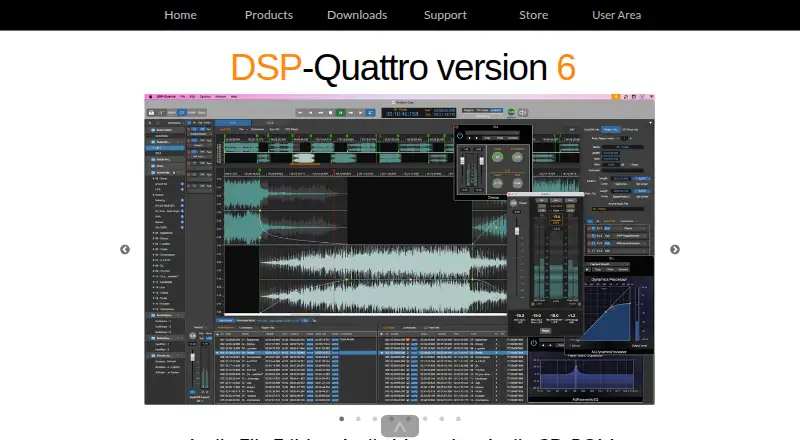
DSP-Quattro is a macOS application for audio editing, mastering, audio CD-ROM burning, plug-in hosting and batch processing. Its editor supports multiple audio formats, waveform editing, sound enhancement and real-time processing. It can host 64-bit Audio Unit effects and instruments, but does not load VST plug-ins. Version 6 requires macOS 10.14 or newer and runs natively on Intel and Apple Silicon Macs. Listed delivery formats include AIFF, WAVE, MP3, M4A, CAF, FLAC, AAC, DDP, raw binary and dual L/R mono. The demo has no time limit, but saving or exporting audio, exporting DDP and burning Audio CD-ROM are unavailable in it. The new license is listed at $99 a month; the $49 a month upgrade is for customers registered to a prior DSP-Quattro or DSP-AudioCDBuilder version. The license is for personal use and belongs to one owner, not one installation. Email support is listed, with technical support and bug fixes for the original purchaser for 12 months, subject to the EULA. Refunds may be requested within 14 days of purchase.
Good
- Supports batch processing.
- Hosts 64-bit Audio Unit effects and instruments.
- Runs natively on Intel and Apple Silicon Macs.
- Offers multiple audio delivery formats.
Watch out
- Does not load VST plug-ins.
- Demo cannot save or export audio.
- Requires macOS 10.14 or newer.
- New license listed at $99 a month.
Who it suits
DSP-Quattro suits Mac users who want audio editing and mastering alongside batch processing, plug-in hosting or audio CD-ROM burning. The demo can help explore the application, though it cannot save or export audio.
Verdict
DSP-Quattro combines editing and mastering with CD-ROM burning and batch processing for macOS. Check its Audio Unit-only plug-in support and demo restrictions before choosing it.
Plans and prices
From DSP-Quattro's own pricing page, checked 28 Sep 2026.
| Plan | Price | What it gives you |
|---|---|---|
| DSP-Quattro 6.x upgrade | $49, paid once | One upgrade license · MacOS · full package · for customers registered to a previous DSP-Quattro or DSP-AudioCDBuilder version · US$ 49.00 (*) |
| DSP-Quattro 6.x new license | $99, paid once | One license · MacOS · full package · US$ 99.00 (*) |
The facts
Each one read from DSP-Quattro's own pages, with the date it was checked.
What it does
- Audio editing
- The audio file editor supports multiple audio formats, waveform editing, sound enhancement, and real-time processing.checked 28 Sep 2026
- Batch processing
- Batch processing can apply plug-ins across audio files and is described as non-destructive.checked 28 Sep 2026
- Demo limits
- The demo is not time-limited, but cannot save or export audio files, export DDP, or burn Audio CD-ROM.checked 28 Sep 2026
- License use
- The FAQ says a license is single-owner rather than single-installation and is for personal use only.checked 28 Sep 2026
- Paid from
- 49checked 20 Sep 2026
- Plugin formats
- Audio Unit (AU) 64-bitchecked 20 Sep 2026
- Plug-in support
- DSP-Quattro hosts 64-bit Audio Unit effects and instruments; it does not load VST plug-ins.checked 28 Sep 2026
- Privacy and security
- The privacy policy says the maker uses technical, organizational, and physical safeguards but cannot guarantee personal information security.checked 28 Sep 2026
- Privacy choices
- Users can request deletion of personal information or their user-area account and can opt out of marketing emails.checked 28 Sep 2026
- Purpose
- DSP-Quattro combines audio file editing, mastering, audio CD-ROM burning, plug-in hosting, and batch processing.checked 28 Sep 2026
- Refunds
- Refunds are possible within 14 days after purchase, by contacting the support team.checked 28 Sep 2026
- Support
- The maker lists email support and says technical support and bug fixes are provided to the original purchaser for 12 months, subject to the EULA.checked 28 Sep 2026
Money
- Free plan
- Yeschecked 20 Sep 2026
The company
- Headquarters
- Rome, Italychecked 28 Sep 2026
- Maker
- The site identifies Stefano Daino as the developer and gives a Rome, Italy address.checked 28 Sep 2026
Where it runs
- Mac compatibility
- Version 6 requires macOS 10.14 or newer and runs natively on Intel and Apple Silicon Macs.checked 28 Sep 2026
The full review of DSP-Quattro
DSP-Quattro is a standalone macOS application for editing and mastering audio, sequencing albums, and preparing files for delivery. It best fits Mac users who want those jobs alongside CD-ROM burning and batch processing in one application. Its broad workflow is appealing, but the demo cannot save or export work and plug-in hosting is limited to Audio Units.
Overview
DSP-Quattro spans more than mastering: it combines waveform editing, sound enhancement, real-time processing, stereo processing, album sequencing, and batch work. That makes it a practical candidate for moving from individual file edits to a finished album sequence without changing applications. It also burns audio CD-ROMs and supports LUFS and True Peak loudness standards.
Delivery options include AIFF, WAVE, MP3, M4A, CAF, FLAC, AAC, DDP, raw binary, and dual L/R mono. The breadth is useful when projects need several output types, though users whose workflow depends on VST plug-ins should look elsewhere: DSP-Quattro hosts 64-bit Audio Unit effects and instruments only.
Key features
- Audio editing and processing: Waveform editing, sound enhancement, and real-time processing support file-level work as well as mastering.
- Album preparation: Stereo processing, album sequencing, and LUFS and True Peak support suit users preparing a sequence of tracks for delivery.
- Batch processing: Batch operations help with repetitive work across multiple files.
- CD and file delivery: Audio CD-ROM burning sits alongside export to common audio formats, DDP, raw binary, and dual L/R mono.
- Audio Unit hosting: The 64-bit AU support covers effects and instruments, but not VST plug-ins.
Pricing
The new DSP-Quattro 6.x license costs $99 a month for the full macOS package. It is the relevant option for new users who want the complete application, but the monthly term makes ongoing cost an important consideration.
The DSP-Quattro 6.x upgrade costs $49 a month for the full package and is restricted to customers already registered to an earlier DSP-Quattro or DSP-AudioCDBuilder version. It lowers the stated monthly price for eligible existing customers, but is not an entry plan for new buyers. There is no free plan. The demo has no time limit, but cannot save or export audio, export DDP, or burn Audio CD-ROMs, so it cannot validate a complete delivery workflow.
The license is for one owner and personal use, rather than being limited to one installation. Technical support and bug fixes are provided to the original purchaser for 12 months, subject to the EULA; refunds are possible within 14 days of purchase by contacting support.
Platforms
DSP-Quattro runs on macOS 10.14 or newer and supports Intel and Apple Silicon Macs natively. It is standalone software, with 64-bit Audio Unit as its supported plug-in format.
Who it's for
Choose DSP-Quattro if you work on a Mac and want editing, mastering, album sequencing, batch processing, and CD-ROM or DDP-oriented delivery in one standalone workflow. It is a weaker fit for VST-based studios, Windows users, or anyone who needs to save and export during evaluation.
Pros and cons
- Pro: Editing, mastering, sequencing, batch work, and CD-ROM burning are brought together, reducing the need to divide those tasks among separate tools.
- Pro: A wide range of delivery formats, including DDP and dual L/R mono, suits varied output requirements.
- Pro: Native support for Intel and Apple Silicon Macs broadens compatibility across Mac hardware.
- Con: No VST support rules it out for workflows built around VST plug-ins.
- Con: The demo cannot save, export, or burn discs, limiting how fully prospective buyers can assess a real project.
- Con: The new license is priced monthly, and the lower-cost upgrade is only for registered previous-version customers.
Alternatives
- StudioZIO Mastering Suite is worth considering for Mac users seeking a free option with AU, VST3, AAX, and standalone formats; it requires macOS 11 or newer.
- WaveLab is an option for readers who want a paid product available on both macOS and Windows.
- FabFilter Pro-L 2 is another paid choice for users considering a limiter across Windows, macOS, or iOS.
- HOFA CD-Burn.DDP.Master suits users focused on Red Book CDs, DDP images, and vinyl or streaming export; it costs €89.90, paid once and includes HOFA plugins.
- TDR Limiter 6 GE may suit those who want a limiter with a free plan or broad OS support; its personal or small-business license is €60, paid once for one user and up to five computers.
- Acoustica is a paid macOS and Windows alternative, with Standard and Premium plans for different channel counts.
- Softube Flow Mastering Suite is another paid option for Windows and macOS.
- FLUX:: Elixir is another paid option for Windows and macOS.
Explore more in Audio Mastering Software, Audio Editing Software, and Game Audio Editors.
Verdict
DSP-Quattro is the stronger choice for Mac users who want file editing, mastering, album sequencing, batch processing, and multiple delivery paths under one roof. Its main drawbacks are the Audio Unit-only plug-in support and a demo that cannot complete an export or disc-burning workflow. If those limits fit your setup, it offers a broad standalone toolset; if not, choose a VST-compatible or cross-platform alternative.
Alternatives to DSP-Quattro
- 1
Matchering
Free planOpen sourceWebAPILinuxmacOS7.5Free plan - 2

WaveLab
Free planmacOSWindows7.4$99.99 one-time - 3
Sonoris DDP Creator
iOSmacOSWindows6.6€249 one-time - 4

Acustica Audio Erin Studio
macOSWindows6.4€45 one-time - 5
LANDR Mastering Plugin
macOSWindows6.4From $15.99 a month - 6
Brainworx bx_masterdesk
macOSWindows6.2From $149.99 a year