
Waitwhile
Waitwhile is a platform for managing walk-ins, queues, and appointments.
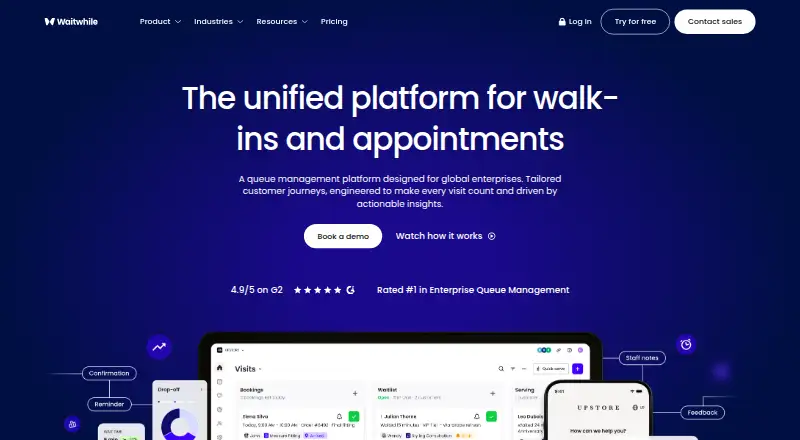
What Waitwhile is
Waitwhile is a platform for managing walk-ins, queues, and appointments. Customers can join a queue remotely or in person through QR codes, web, kiosks, NFC tags, or SMS, then receive real-time updates and AI-powered wait estimates. Appointment tools include reminders, confirmations, booking rules, and resource matching. LineSync combines scheduled appointments and walk-ins in a single queue. The platform offers a REST API, webhooks, no-code integrations, and Zapier connections to more than 3,000 tools; named integrations include Slack, Salesforce, Mailchimp, Google Sheets, Outlook, Google Calendar, Twilio, Zendesk, and Square POS. It is available on Android, iOS, web, and API. The free plan covers one location and 50 visits per month. Waitwhile lists retail, luxury retail, government, education, and healthcare among the industries it serves.
Good
- Supports remote and on-site queue joining.
- Combines walk-ins and appointments in one queue.
- Offers API, webhooks, and Zapier integrations.
- Free plan includes one location and 50 monthly visits.
- Lists SOC 2 Type II and ISO 27001.
Watch out
- Free plan is limited to 50 visits monthly.
- Starter and Business each cap at 10 locations.
- Enterprise pricing is custom.
Who it suits
Waitwhile suits businesses coordinating customer queues and appointments across physical locations. Its enterprise solution is described for businesses managing 10 to 600 service points and multiple networks.
Verdict
Waitwhile combines queue management, appointments, and multiple check-in channels, with integrations and plans ranging from a limited free tier to custom enterprise pricing. Compare the visit and location allowances with your service needs.
Plans and prices
From Waitwhile's own pricing page, checked 15 Oct 2026.
| Plan | Price | What it gives you |
|---|---|---|
| Free | Free | 1 location · 50 visits/month · 2-way customer messages · single-location statistics · basic branding · email and push team notifications |
| Starter | $31 a month | Up to 10 locations · up to 2,500 visits/month · multi-location analytics · customizable customer and team messages · starts at |
| Business | $55 a month | Up to 10 locations · up to 5,000 visits/month · custom user roles · API and webhooks · synchronized waitlist and bookings · advanced analytics · customer-data import/export · SMS team notifications · starts at |
| Enterprise | Priced on request | Custom locations and visits · report builder · training and configuration · custom integrations · SLA/invoicing/PO · SAML/SSO · dedicated success manager · white-label branding · custom pricing |
The facts
Each one read from Waitwhile's own pages, with the date it was checked.
What it does
- API
- Waitwhile exposes a REST API for account actions and supports event-driven webhooks for real-time updates.checked 15 Oct 2026
- API availability
- API access is offered on Business and Enterprise plans.checked 15 Oct 2026
- Combined bookings
- LineSync merges scheduled appointments and walk-ins into one queue.checked 30 Sep 2026
- Compliance
- The company advertises SOC 2 Type II, ISO 27001, GDPR, CCPA, HIPAA and SAML 2.0/SSO support.checked 15 Oct 2026
- Developer documentation
- The developer hub provides technical resources for creating, retrieving and updating Waitwhile data, with guides and examples.checked 15 Oct 2026
- Extensibility
- API integrations can embed booking flows, implement custom automation logic and apply custom CSS branding.checked 15 Oct 2026
- Feature: AI wait estimates
- The Business and higher tiers include WaitIQ AI-powered wait-time estimation.checked 15 Oct 2026
- Feature: analytics
- Analytics show busy periods, demand by employee or service, and exportable performance information across locations.checked 15 Oct 2026
- Feature: automation
- Automation can trigger customer and team communications based on activity and waiting status.checked 15 Oct 2026
- Feature: geo-fencing
- Geo-fencing can restrict where guests join a waitlist or make a booking.checked 15 Oct 2026
- Feature: messaging
- Waitwhile supports two-way customer messaging plus staff notifications by email, push and SMS depending on plan.checked 15 Oct 2026
- Feature: occupancy tracking
- Occupancy tracking compares visitor counts with site capacity.checked 15 Oct 2026
- Feature: resource management
- Resources such as staff can be assigned to guests with working hours and service durations.checked 15 Oct 2026
- Feature: virtual waitlists
- Customers can join a virtual queue from anywhere while staff manage customer flow digitally.checked 15 Oct 2026
Where it runs
- Appointment tools
- Appointment features include automated reminders, confirmations, booking rules, and resource matching.checked 30 Sep 2026
- Feature: appointment scheduling
- The product provides appointment calendars and can synchronize bookings with waitlists.checked 15 Oct 2026
- Feature: kiosk and displays
- It includes self-service check-in kiosks and TV monitor displays for live queue information.checked 15 Oct 2026
The company
- Company founded
- Waitwhile was founded in San Francisco in 2017 by brothers Christoffer and Jonas Klemming.checked 15 Oct 2026
- Company headquarters
- LinkedIn lists headquarters at 548 Market St, San Francisco, California 94104.checked 15 Oct 2026
- Company legal name
- Crunchbase identifies the legal entity as Waitwhile, Inc.checked 15 Oct 2026
- Company size
- LinkedIn lists Waitwhile as a privately held company with 11–50 employees.checked 15 Oct 2026
- Founded
- 2017checked 28 Sep 2026
- Funding and ownership
- Crunchbase reports $12 million raised, CRV as an investor, and acquisition by Allegion.checked 15 Oct 2026
- Headquarters
- The security page identifies San Francisco, California as the global headquarters and the company page gives its San Francisco address.checked 30 Sep 2026
The full review of Waitwhile
Overview
Waitwhile brings virtual queues and appointment management together for service businesses that need to handle scheduled visits and walk-ins in the same operation. It is best suited to organizations that need several ways for customers to check in and expect to connect queue workflows with other business tools. The free tier is useful for a small location, but its 50-visit monthly ceiling makes it a limited test of a larger operation.
Founded in 2017 and headquartered in San Francisco, Waitwhile serves industries including retail, government, education, and healthcare. Its enterprise offering is aimed at businesses managing 10 to 600 service points across multiple networks.
Key features
Customers can join a queue remotely or on-site by QR code, web, kiosk, NFC tag, or SMS. That range gives businesses flexibility in how they handle arrivals, while AI-powered wait estimates and real-time updates keep guests informed. Wait estimates use a custom format, which suits businesses that want a tailored presentation rather than a fixed one.
Appointment tools include booking rules, resource matching, confirmations, and automated reminders. LineSync combines scheduled appointments and walk-ins in one queue, a practical advantage for teams that would otherwise have to manage two arrival streams separately. Online check-in and guest notifications are supported.
Waitwhile offers a REST API, webhooks, no-code integrations, and Zapier connections to more than 3,000 tools. Named connections include Slack, Salesforce, Mailchimp, SurveyMonkey, Google Sheets, Outlook, Google Calendar, Twilio, Zendesk, and Square POS. This breadth is useful for businesses fitting queues into existing workflows; API access and webhooks, however, are reserved for Business and Enterprise plans.
Waitwhile states that data in transit and at rest is encrypted with AES at 128-bit or higher, and that third-party penetration tests take place annually. Its homepage lists SOC 2 Type II, ISO 27001, GDPR and CCPA, HIPAA, and SSO/SAML 2.0. The company states uptime of 99.9% or higher and provides a help center and [email protected] for support.
Pricing
The Free plan costs nothing and covers one location, 50 visits per month, two-way customer messages, basic branding, and email and push team notifications. It is a genuine starting point for a low-volume operation, but the visit cap and single-location limit rule it out for most growing teams.
Starter costs $31 a month, with annual billing saving 20%. It supports up to 10 locations and 2,500 visits per month, with basic multi-location analytics and customizable customer messages. This is the entry paid option for teams that need multiple locations but can stay within the lower visit allowance.
Business costs $55 a month, also with a 20% saving on annual billing. It keeps the 10-location maximum and raises the allowance to 5,000 visits per month, adding API and webhooks, custom user roles, and SMS team notifications. The higher price makes sense when those integration and administration features matter, but the visit cap remains a constraint for busier operations.
Enterprise has custom pricing and offers custom location and visit allowances, training and configuration, custom integrations, SAML/SSO, and a dedicated success manager. It is the fit for organizations whose scale or security requirements exceed the fixed-plan limits.
Platforms
Waitwhile supports Android, iOS, and web, and provides an API for integrations. That combination gives teams mobile and browser access alongside a route for connecting other software.
Who it's for
Waitwhile is a strong fit for service businesses that need to coordinate walk-ins and appointments, offer guests multiple check-in channels, and connect queue operations to their existing tools. Its sector coverage includes retail, luxury retail, government, education, and healthcare. Businesses with modest traffic can start on Free; teams with multiple locations should compare their expected monthly visits against Starter’s 2,500 and Business’s 5,000 caps before committing. Organizations managing larger networks are better matched to Enterprise.
Pros and cons
- Pro: Multiple check-in channels, including QR, web, kiosk, NFC, and SMS, accommodate different arrival patterns.
- Pro: LineSync brings appointments and walk-ins into one queue, reducing the need to manage separate flows.
- Pro: API, webhook, no-code, and Zapier options make it adaptable to varied software stacks, with API and webhook access included from Business.
- Con: Free is limited to one location and 50 monthly visits, so it offers little room for a busy or expanding service operation.
- Con: Starter and Business both cap locations at 10, and their monthly visit limits may not suit high-volume operations.
- Con: API and webhooks require Business or Enterprise, so teams needing those capabilities must pay more than the entry paid price.
Alternatives
For a restaurant-specific shortlist, see Restaurant Waitlist Software.
- Carbonara App is another freemium option with Android, iOS, and web support; its Free plan includes 50 bookings per month and all Starter features.
- NextMe offers a free plan with 100 SMS per month for one user, making it an alternative to compare if that allowance fits your needs.
- Waitlist Me has a free basic guest list and same-day reservations, but its free tier has no notifications and limited customization.
- Shokken offers a free plan with manual entry, QR self-join, browser tracking, core waitlist tools, and public menus.
- TablesReady has a free plan covering 150 messages per month and up to 100 parties.
- digiQueue offers a free-forever plan with queue management, standard and priority queues, QR code and SMS notifications, and a real-time dashboard.
- EazyQ has a free plan with a queue size of five concurrent customers, 100 customers per month, and 20 appointments per month.
- bavoli is a free web option with unlimited reservations, waitlist parties, and covers, plus texts for the first 25 parties per month.
Verdict
Choose Waitwhile if your business needs appointments and walk-ins in one queue, several guest check-in channels, and room to integrate queue management with other tools. Its strongest advantage is the breadth of that combined workflow; look elsewhere if the 50-visit Free cap or the 2,500- and 5,000-visit paid limits are too restrictive for your volume.
Alternatives to Waitwhile
- 1
NextMe
Free planAndroidiOSWebAPI8.0Free plan - 2

digiQueue
Free planAndroidiOSWeb7.8$0.01 one-time - 3

Waitlist Me
Free planAndroidiOSWeb7.4From $27.99 a month - 4

Carbonara App
Free planAndroidiOSWeb7.3From $9.99 a month - 5
TableMASH
Free planWebAPI7.3From $37 a month - 6

TablesReady
Free planAndroidiOSWeb7.2Free plan