VocalDrop
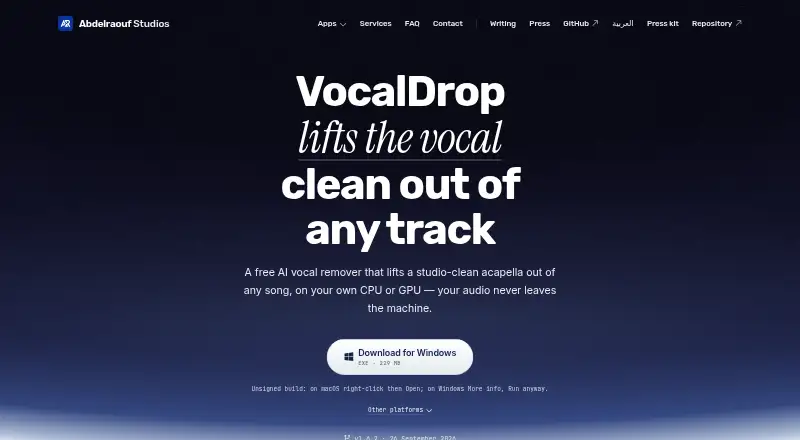
VocalDrop is a free desktop app that separates vocals from songs on a user's computer.
What VocalDrop is
VocalDrop is a free desktop app that separates vocals from songs on a user's computer. A separation can produce both a vocal stem and an instrumental, for uses such as sampling, remixing, editing, or karaoke. Fast and Max modes use RoFormer-family models, with some hardware using different models. The app can also extract audio from a video, separate it, and put a selected stem back into a synced video. Users can paste links from YouTube, SoundCloud, Vimeo, TikTok, and more than a thousand other sites for fetching. Optional tools include denoising, AI vocal restoration, silence removal, and audio-format conversion. The maker says track audio is processed locally and not uploaded. Separation can run offline after the required model download; enabling NVIDIA acceleration also requires a one-time CUDA package download. VocalDrop runs on Linux, macOS, and Windows, and includes a command-line interface with JSON output for pipelines. The maker says current builds are not code-signed or notarized, and provides SHA-256 checksums for release assets.
Good
- Produces vocal and instrumental stems
- Includes video audio extraction and synced stem muxing
- Optional denoising and vocal restoration
- Command-line interface supports JSON output
- Free, with no track limits or watermark
Watch out
- Model download is required before offline separation
- NVIDIA acceleration requires a one-time CUDA package download
- Current builds are not code-signed or notarized
Who it suits
VocalDrop suits people extracting vocals or instrumentals for editing, remixing, sampling, or karaoke. Its video, link-fetching, and command-line options may also fit users with those workflows.
Verdict
VocalDrop combines local song separation with video handling, optional audio tools, and CLI automation. Consider its model-download requirement and unsigned builds when choosing how to use it.
Plans and prices
From VocalDrop's own pricing page, checked 2 Oct 2026.
| Plan | Price | What it gives you |
|---|---|---|
| Free | Free | No track limits · no watermark · no account · no feature paywall |
The facts
Each one read from VocalDrop's own pages, with the date it was checked.
What it does
- Audio tools
- Optional post-processing includes denoising and AI vocal restoration, and the app can remove silence and convert audio formats.checked 2 Oct 2026
- Automation
- A command-line interface ships with the app and supports JSON output for pipelines.checked 2 Oct 2026
- Download security
- The maker says current builds are not code-signed or notarized, and provides SHA-256 checksums for release assets.checked 2 Oct 2026
- Intended users
- The maker describes the app as a tool for extracting vocals to sample, remix, or edit, with instrumental output also available for karaoke.checked 2 Oct 2026
- Link sources
- Users can paste links from YouTube, SoundCloud, Vimeo, TikTok, and over a thousand other sites for the app to fetch.checked 2 Oct 2026
- Local processing
- The maker says audio is processed locally and track contents are never uploaded.checked 2 Oct 2026
- Models
- It offers Fast and Max modes using RoFormer-family models, with different models available for some hardware.checked 2 Oct 2026
- Network activity
- The maker says anonymous crash and usage diagnostics may be sent, along with first-use model downloads, user-pasted URLs for fetching, and optional update checks.checked 2 Oct 2026
- Offline use
- After the required model download, separation can run offline; the maker says NVIDIA acceleration also downloads a one-time CUDA package when enabled.checked 2 Oct 2026
- Output
- Each separation can produce both an isolated vocal and an instrumental stem.checked 2 Oct 2026
- Purpose
- VocalDrop uses AI to extract vocals from songs on the user's computer.checked 2 Oct 2026
- Support
- The maker offers review copies on request and links to a contact page from the studio site.checked 2 Oct 2026
- Video
- The app can extract audio from video, separate it, and mux a chosen stem back into a synced video.checked 2 Oct 2026
The company
- Headquarters
- United Stateschecked 28 Sep 2026
Where it runs
- Platforms
- The maker lists Apple Silicon Macs, Windows 10 or 11 on x64, and Linux on x64; Intel Mac builds are not provided.checked 2 Oct 2026
The full review of VocalDrop
Overview
VocalDrop is a desktop app for separating song vocals and instrumentals, with support for video and link-based media fetching. It is a strong fit for people making samples, remixes, edits, or karaoke who want unlimited free separations on their own computer. Its broad toolkit comes with two practical caveats: models must be downloaded before use, and current builds are unsigned and unnotarized.
Key features
A separation can produce an isolated vocal and an instrumental stem, useful both for editing a song and preparing a karaoke backing track. Fast and Max modes use RoFormer-family models, with some model options varying by hardware. That gives users more than one processing path, although choosing among hardware-dependent models may take more attention than a simple single-mode tool.
For video, VocalDrop can extract its audio, separate it, then mux a chosen stem back into synchronized video. It can also fetch media from pasted URLs on YouTube, SoundCloud, Vimeo, TikTok, and over a thousand other sites. This is handy when the source is not already a local file, but the pasted URL is sent for fetching, so that part of the workflow is not entirely local.
Optional denoising and AI vocal restoration can refine a stem; silence removal and audio-format conversion cover basic cleanup. The bundled command-line interface supports JSON output, making it useful for repeatable pipeline jobs. It has no API access, so automation is through the CLI rather than a network endpoint.
The maker says audio processing is local and track contents are never uploaded. Separation can run offline after the required model download; enabling NVIDIA acceleration also requires a one-time CUDA package download. Anonymous crash and usage diagnostics may be sent, along with optional update checks. Builds are not code-signed or notarized, though SHA-256 checksums are provided for release assets. That makes verifying a download worthwhile, and may make installation less convenient for users who expect signed desktop software.
Pricing
VocalDrop is free: its Free plan costs nothing and includes no track limits, no watermark, no account requirement, and no feature paywall. There is no trial because the plan is free, and no stated quota or seat limit to weigh against heavier use. This is unusually straightforward for people who want to process many tracks without a recurring bill. The trade-off is not a restricted tier but the model download and installation considerations.
Platforms
VocalDrop runs on Linux, macOS, and Windows. It accepts audio and video, supports batch processing, and includes a command-line interface. It is a desktop workflow rather than a web service, and it does not provide API access.
Who it's for
Choose VocalDrop if you want free local separation for sampling, remixing, editing, or karaoke, especially if video handling, batch jobs, or CLI pipelines matter. It is less suitable if you need an API, want to avoid downloading models, or prefer signed and notarized builds. People whose work depends on fetching online media should also account for URLs being sent to retrieve those sources.
Pros and cons
Pros
- No track limits or paywall: the free plan supports ongoing use without an account, watermark, or feature restriction.
- Two useful stems: each separation can provide both the vocal and instrumental, serving editing and karaoke workflows.
- Broader media workflow: video remuxing, link fetching, optional cleanup tools, and batch processing cover more than basic audio separation.
- Pipeline support: the bundled CLI and JSON output suit repeatable automation without requiring a separate API.
Cons
- Installation requires care: builds are unsigned and unnotarized, even though release checksums are provided.
- First-use downloads are required: models must be downloaded before offline separation, and NVIDIA acceleration adds a one-time CUDA download.
- Not every workflow stays local: pasted URLs are sent for fetching, and anonymous usage and crash diagnostics may be transmitted.
- No API: users needing a service endpoint cannot use the CLI as a substitute for API access.
Alternatives
For a broader comparison, browse AI Voice Isolators.
- LALAL.AI is worth considering if you need broader platform coverage, including web and mobile, and can work within its free Starter queue, 10-minute allowance, and 200 MB per-file limit; full downloads are unavailable on that plan.
- AudioShake is an option for users who want a free trial and a credit-based start that includes MP3 export, files up to 10 minutes, separate stems, and lyric editing.
- Altered Real-Time Pro may suit users focused on speech enhancement and voice skins, with a free allowance of 20 processing minutes per day and four Voice Skins daily.
- AIVoiceSeparator is a web and API alternative for users who prefer browser access or a service interface, with three free songs per month when signed in and Studio-quality downloads in MP3, WAV, or FLAC.
- Denoise focuses on mobile denoising for Android and iOS; its free tier lets users hear the full before-and-after, while saving or exporting requires Pro.
- Krisp Voice Isolation is an alternative for users comparing voice isolation across desktop, mobile, web, and API platforms; its listed plans are aimed at early-stage applicants and enterprise use.
- Demixr is a web option for users comfortable with a monthly upload allowance and file cap: its free plan allows 10 minutes and 10 MB per upload, with queued processing and no WAV downloads.
- Vocly is an Android alternative with an ad-supported free plan that requires no account or sign-up and includes separation, mixer, karaoke mode, and a stem library.
Verdict
VocalDrop is an easy recommendation for desktop users who want unlimited, no-cost vocal and instrumental separation with video support and CLI automation. Its main advantage is the combination of a genuinely unrestricted free plan and a capable local workflow. Look elsewhere if you need API access, want to avoid first-use downloads, or require signed and notarized builds.
Alternatives to VocalDrop
- 1

LALAL.AI
Free planAndroidiOSWebAPI8.3From €6.75 a month - 2

AudioShake
Free planAndroidiOSWebAPI8.1From $20 a month - 3
Denoise
Free planAndroidiOS7.8From $2.99 a month - 4

ElevenLabs
Free planWebAPI7.6From $6 a month - 5
BytePlus Voice and Background Audio Separation
WebAPILinuxmacOS6.8$0.01 usage-based - 6
AIVoiceSeparator
Free planWebAPI6.7From $30 a month