
Altered Real-Time Pro
Altered Real-Time Pro is a desktop virtual microphone that routes AI-processed speech into voice and video communication apps.
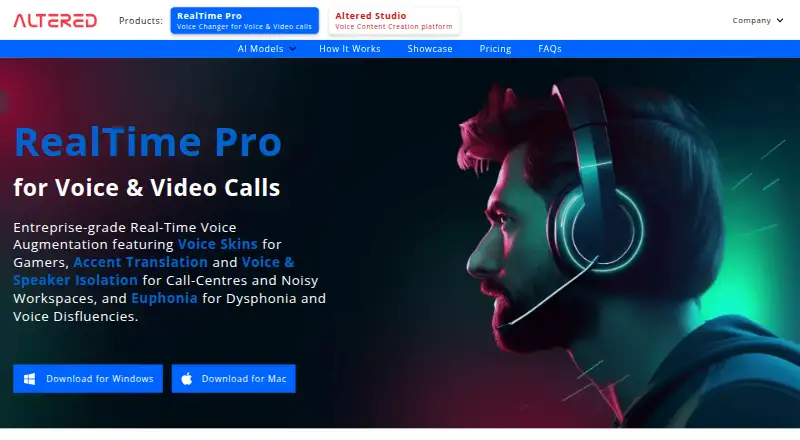
What Altered Real-Time Pro is
Altered Real-Time Pro is a desktop virtual microphone that routes AI-processed speech into voice and video communication apps. It runs on macOS and Windows and works with apps that accept microphone input, including Zoom, Google Meet, Discord, Skype, WhatsApp, games, and call-centre software. Its four feature areas address noise and competing-speaker suppression, vocal identity changes, accent translation, and voice restoration. Local compute processes audio on the user's machine, with the product page stating voice data stays on the PC; Cloud Compute can instead offload processing to servers in the US, EU, or India. Cloud Compute costs $2 per hour of daily quota per month. The free plan includes 20 minutes of processing per day, speech-enhancement Isolate models, and four daily Voice Skins. Voice Skins costs $5 a month, billed monthly excluding tax, and includes 120 daily processing minutes. Other paid plans cost 8.00 USD or $12 a month, billed monthly excluding tax, for unlimited processing with Call Center or Euphonia features. Discounted plans require consent to use anonymized voice data to improve AI models.
Good
- Virtual microphone works with apps accepting microphone input.
- Local processing keeps voice data on the PC.
- Free plan offers 20 daily processing minutes.
- Windows and macOS versions are available.
Watch out
- Free processing is limited to 20 minutes daily.
- Cloud Compute costs $2 per hour of daily quota per month.
- Discounted plans require consent to anonymized voice data use.
Who it suits
It suits people who want to process their voice in real time for communication apps, games, or call-centre software. Teams may consider Enterprise for team controls, usage analytics, and priority support.
Verdict
Altered Real-Time Pro combines voice processing with a virtual microphone for compatible apps. Its free plan provides limited daily processing, while the feature set and data terms vary across paid plans.
Plans and prices
From Altered Real-Time Pro's own pricing page, checked 4 Oct 2026.
| Plan | Price | What it gives you |
|---|---|---|
| Free | Free | 20 minutes of processing per day · Isolate models for speech enhancement · 4 Voice Skins every day · multi-seat account management |
| Voice Skins | $5 a month | 120 minutes of processing per day · all Voice Skins · all Isolate models · multi-seat account management · billed monthly (excl. tax) |
| Euphonia (discounted) | $8 a month | 33% off · unlimited processing · Euphonia models for dysphonia and voice disfluencies · all Voice Skins · all Isolate models · multi-seat account management · discounted plan consents to anonymized voice data use for AI improvement · billed monthly (excl. tax) |
| Call Center (discounted) | $8 a month | 33% off · unlimited processing · Accent Translation models · all Isolate models · all Voice Skins · multi-seat account management · discounted plan consents to anonymized voice data use for AI improvement · billed monthly (excl. tax) |
| Euphonia | $12 a month | Unlimited processing · Euphonia models for dysphonia and voice disfluencies · all Voice Skins · all Isolate models · multi-seat account management · billed monthly (excl. tax) |
| Call Center | $12 a month | Unlimited processing · Accent Translation models · all Isolate models · all Voice Skins · multi-seat account management · billed monthly (excl. tax) |
| Enterprise | Priced on request | All Accent Translation models · all Voice Skins · priority support · usage analytics · on-device or on-premise BYOC compute · Altered-hosted compute available · SLA-backed uptime · Contact Sales; pricing per seat |
The facts
Each one read from Altered Real-Time Pro's own pages, with the date it was checked.
What it does
- Cloud compute
- Cloud Compute offloads processing to nearby servers in the US, EU, or India, and is priced at $2 per hour of daily quota per month.checked 4 Oct 2026
- Compatibility
- The virtual microphone works with apps that allow microphone input, including Zoom, Google Meet, Discord, Skype, WhatsApp, games, and call-centre software.checked 4 Oct 2026
- Enterprise languages
- The Enterprise plan lists input language support for Indian-English, Filipino-English, LATAM-English, Slavic-English, and African-English.checked 4 Oct 2026
- Features
- Its four feature areas are Isolate for noise and competing-speaker suppression, Voice Skins for vocal identity changes, Accent Translation, and Euphonia voice restoration.checked 4 Oct 2026
- Latency
- The FAQ says accent-changing effects are designed around 135 ms algorithmic latency and that actual latency depends on model, CPU, audio settings, and processing cores.checked 4 Oct 2026
- Local processing
- The product page says local compute processes audio on the user's machine and that voice data stays on the PC; cloud compute can offload processing to Altered servers.checked 4 Oct 2026
- Product
- Real-Time Pro is a desktop virtual microphone that routes AI-processed speech into voice and video communication apps.checked 4 Oct 2026
- Security
- The privacy policy says the company uses commercially acceptable means to protect personal data but cannot guarantee absolute security.checked 4 Oct 2026
- Support
- The Enterprise plan includes priority support.checked 4 Oct 2026
The company
- Headquarters
- London, United Kingdomchecked 28 Sep 2026
- Team controls
- Enterprise features include team invitations, seat assignment, usage statistics and charts, billing controls, and version management.checked 4 Oct 2026
Where it runs
- Platforms
- The product page offers downloads for Windows and Mac.checked 4 Oct 2026
Money
- Privacy plans
- Standard subscriptions state that voice data never leaves the device, while discounted subscriptions require consent to use anonymized voice data to improve AI models.checked 4 Oct 2026
The full review of Altered Real-Time Pro
Altered Real-Time Pro is a desktop virtual microphone that applies AI voice processing to speech sent into communication apps. It best suits callers who want to improve speech, change vocal identity or translate accents in real time. Its tiered plans make the main trade-off clear: modest daily limits at the low end, broader features and unlimited processing at higher prices, with different privacy terms for discounted plans.
Overview
The virtual microphone routes processed audio to any app that accepts microphone input, including Zoom, Google Meet, Discord, Skype, WhatsApp, games and call-centre software. That broad compatibility makes it useful across work calls and gaming without being tied to one communication service. It runs on macOS and Windows, so it is not a fit for people seeking a mobile app.
Key features
- Isolate suppresses noise and competing speakers, a practical choice for making speech clearer in busy audio environments.
- Voice Skins change vocal identity. The free plan includes four skins each day; the $5 plan unlocks all of them.
- Accent Translation changes accents, a specialized capability included in Call Center plans rather than the entry Voice Skins tier. Its effects are designed around 135 ms of algorithmic latency, but actual delay varies with the model, CPU, audio settings and processing cores.
- Euphonia is aimed at restoring voices affected by dysphonia and voice disfluencies. It is reserved for Euphonia plans.
Local compute processes audio on the user's machine, and voice data stays on the PC. Cloud Compute can instead offload work to nearby Altered servers in the US, EU or India. That flexibility comes with an additional charge and a different processing path; Cloud Compute costs $2 per hour of daily quota per month.
Pricing
Altered Real-Time Pro is freemium. The free tier is a useful way to try speech enhancement and a small rotating selection of Voice Skins, but 20 minutes of processing per day limits sustained use. It also includes multi-seat account management.
- Voice Skins — $5 a month, billed monthly (excl. tax): 120 minutes of daily processing, all Voice Skins, all Isolate models and multi-seat account management. This is the sensible step up for regular callers who do not need Accent Translation or Euphonia.
- Call Center (discounted) — $8 a month, billed monthly (excl. tax): unlimited processing, Accent Translation models, all Isolate models, all Voice Skins and multi-seat account management. The lower price comes with consent to use anonymized voice data to improve AI models.
- Euphonia (discounted) — $8 a month, billed monthly (excl. tax): unlimited processing, Euphonia models for dysphonia and voice disfluencies, all Voice Skins, all Isolate models and multi-seat account management. It has the same discounted-plan data consent.
- Call Center — $12 a month, billed monthly (excl. tax): unlimited processing, Accent Translation models, all Isolate models, all Voice Skins and multi-seat account management. It costs more than the discounted option but does not carry that plan's stated consent term.
- Euphonia — $12 a month, billed monthly (excl. tax): unlimited processing, Euphonia models, all Voice Skins, all Isolate models and multi-seat account management, without the discounted plan's stated consent term.
- Enterprise — custom pricing, per seat: all Accent Translation models, all Voice Skins, priority support, usage analytics, SLA-backed uptime, and on-device or on-premise BYOC compute; Altered-hosted compute is also available. Enterprise input languages include Indian-English, Filipino-English, LATAM-English, Slavic-English and African-English. Team invitations, seat assignment, usage charts, billing controls and version management make this the tier for organizations that need administration and support.
Standard subscriptions state that voice data never leaves the device. Discounted subscriptions trade that term for a lower price and consent to anonymized data use for AI improvement. The privacy policy says the company uses commercially acceptable means to protect personal data but cannot guarantee absolute security.
Platforms
The app supports macOS and Windows desktop systems. Realtime processing and virtual-microphone routing suit live calls and games, but actual latency depends on the chosen model and the machine's audio and compute setup.
Who it's for
Choose it if you need voice processing across multiple microphone-enabled apps, especially noise and competing-speaker suppression, voice changes, accent translation or Euphonia restoration. The free tier suits occasional use; frequent callers who only want Isolate and Voice Skins can consider the $5 plan. Accent translation and voice restoration require higher tiers, while Enterprise is geared to managed teams. Look elsewhere if you need mobile support or do not want discounted plans' anonymized-data consent.
Pros and cons
Pros
- Works across many communication apps: microphone-input compatibility makes it useful beyond a single meeting or gaming platform.
- Distinct processing options: noise suppression, voice identity changes, Accent Translation and Euphonia address different speaking needs.
- Local processing option: standard subscriptions state voice data stays on the device, a meaningful advantage for privacy-conscious callers.
- Clear upgrade path: the $5 tier expands daily processing and skins, while $12 plans add unlimited processing and specialized models.
Cons
- Free use is tightly capped: 20 minutes per day and four Voice Skins each day can constrain regular callers.
- Specialized features cost more: Accent Translation and Euphonia are not included in the $5 plan.
- Discount pricing has a data trade-off: the $8 specialist plans require consent to anonymized voice-data use for model improvement.
- Latency is not fixed: the 135 ms design target for accent-changing effects does not guarantee the same delay across systems.
Alternatives
Browse Voice Changer Software or Game Voice Changers to compare category options. Consider Voice.ai if you want a freemium option across Android, iOS, web and desktop; its free plan provides 5k credits per month, an online voice changer, text to speech and audio tools with a five-minute conversion. Altered Studio is another freemium Altered product, with a free trial, 3 minutes per month of Voice Morphing, 10,000 AI Tokens and local voice cloning; its free license is for noncommercial use with attribution.
iMyFone MagicMic offers a free plan with five voices daily, basic sound effects and voice memes, recordings and audio files, plus a free trial. Voxal Voice Changer has a free plan for non-commercial home use on macOS and Windows. Choose Applio if open-source MIT licensing, free use and no accounts or paywalls matter more; it supports Linux, macOS, Windows, web and self-hosting. Clownfish Voice Changer is a free option for Windows, macOS and Linux. HitPaw VoicePea offers a free trial and supports macOS and Windows. W-Okada Voice Changer is a free option with API, self-hosted, desktop and Linux platform support.
Verdict
Altered Real-Time Pro is a strong fit for desktop callers who want several kinds of live speech processing routed into their existing apps, particularly when noise suppression or a specialized voice model is central to the choice. Its best argument is the combination of broad microphone compatibility and focused tools; its key drawbacks are the free daily cap and the privacy concession on discounted specialist plans. Choose a standard paid tier when on-device voice-data terms matter, and look elsewhere if you need mobile support or a broader free allowance.
Getting started
- Visit the Altered Real-Time Pro website.
- Install the desktop software on macOS or Windows.
- Choose the Free plan or a paid plan that includes the processing features you need.
- Connect the virtual microphone to a voice or video app that accepts microphone input.
- Use local processing or choose Cloud Compute to offload processing.
Limits worth knowing
The free plan provides 20 minutes of processing per day, Isolate speech-enhancement models, and four Voice Skins each day. The $5.00 USD monthly Voice Skins plan raises the daily allowance to 120 minutes, while unlimited processing is included on the listed Call Center and Euphonia plans.
Questions
How much does Altered Real-Time Pro cost?
There is a free plan.
Which platforms does it support?
It runs on macOS and Windows. Its virtual microphone works with apps that accept microphone input.
What features does it offer?
Isolate suppresses noise and competing speakers, Voice Skins change vocal identity, Accent Translation changes accents, and Euphonia restores voices.
Does voice processing stay on my device?
Local compute processes audio on the user's machine, and the product page says voice data stays on the PC. Cloud Compute instead offloads processing to nearby servers in the US, EU, or India.
What does the free plan include?
It includes 20 minutes of processing per day, Isolate models for speech enhancement, four Voice Skins each day, and multi-seat account management.
What does Enterprise include?
Enterprise lists Accent Translation models, Voice Skins, priority support, usage analytics, on-device or on-premise BYOC compute, Altered-hosted compute, and SLA-backed uptime. Pricing is per seat through Contact Sales.
Alternatives to Altered Real-Time Pro
- 1

Voice.ai
Free planAndroidiOSWebAPI8.3From $5 a month - 2
BadloVoice
Free planOpen sourceAndroidiOSWebAPI7.9Free plan - 3

FineVoice AI Voice Changer
Free planWebAPImacOSWindows7.8Free plan - 4
EaseUS VoiceWave
Free planAndroidiOSWebWindows7.6From $24.97 a year - 5
iMyFone MagicMic
Free planAndroidiOSmacOSWindows7.5From $45.99 a year - 6
FineShare VoiceTrans
Free planiOSWebmacOSWindows7.4$5.99 one-time