W-Okada Voice Changer
W-Okada Voice Changer is a free application whose VCClient uses voice-conversion AI for real-time voice changes.
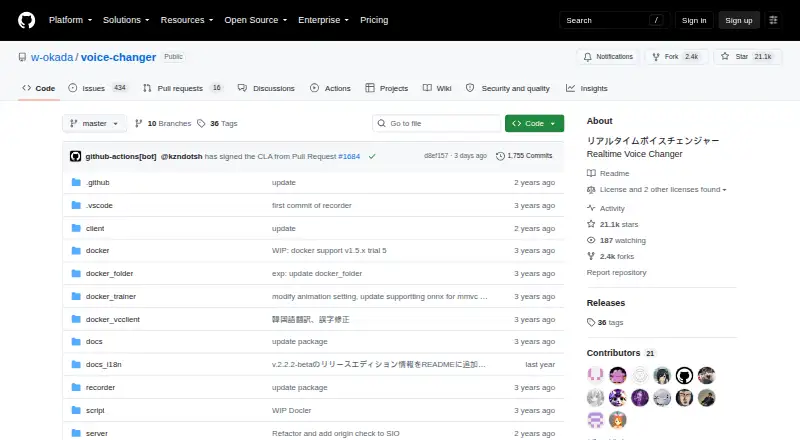
What W-Okada Voice Changer is
W-Okada Voice Changer is a free application whose VCClient uses voice-conversion AI for real-time voice changes. It supports local standalone operation and a client-server setup that moves conversion to another computer, which can reduce load on a machine running demanding applications. Version 2 lists RVC and Beatrice v2 models; version 1 lists MMVC, so-vits-svc, and DDSP-SVC. The DDSP-SVC encoder supports only hubert-soft. Windows and Mac prebuilt downloads are offered through Hugging Face, while Linux users are directed to clone the repository. On Windows, the standard version 2 build can use a capable CPU or DirectML GPU, and a separate CUDA build supports Nvidia GPUs. A REST API works with HTTP clients such as curl. Deployment can use prebuilt binaries, Docker, or Anaconda; Windows environment setup requires WSL2. The project also describes Google Colaboratory use requiring an ngrok account. The software supports recorded audio, audio export, character voices, and real-time or recorded-audio changing.
Good
- Free voice conversion with local and network modes
- Lists multiple conversion models
- Provides Windows and Mac prebuilt downloads
- Offers REST API access
- Supports recorded audio and audio export
Watch out
- Software is unsigned and used at your own risk
- Windows environment setup requires WSL2
- Linux installation requires cloning the repository
- Virtual microphone support is not available
Who it suits
It suits users who need free real-time or recorded-audio voice conversion on supported desktop systems. Developers can also use its REST API or offload processing to another computer.
Verdict
W-Okada Voice Changer offers flexible local or networked AI voice conversion with several listed models and deployment routes. Its unsigned status, setup requirements, and restrictions on some converted voice uses should be considered first.
The facts
Each one read from W-Okada Voice Changer's own pages, with the date it was checked.
What it does
- API
- The project provides a REST API that can be used from programming-language clients or HTTP tools such as curl.checked 4 Oct 2026
- Conversion models
- The README lists RVC and Beatrice v2 for version 2, and MMVC, so-vits-svc, and DDSP-SVC for version 1.checked 3 Oct 2026
- Deployment
- The README describes using prebuilt binaries or setting up an environment with Docker or Anaconda.checked 3 Oct 2026
- Downloads
- The README directs users to Hugging Face for Windows and Mac binaries and says Linux users should clone the repository.checked 4 Oct 2026
- Hardware
- The Windows standard v2 build can use a capable CPU or DirectML GPUs, while the CUDA build is available for Nvidia GPUs.checked 4 Oct 2026
- Integrations
- The README describes launching the software in Google Colaboratory and says this requires an ngrok account.checked 4 Oct 2026
- Liability
- The README disclaims liability for direct, indirect, consequential, incidental, or special damages related to use or inability to use the software.checked 4 Oct 2026
- Local and network modes
- The project supports standalone conversion on a local PC and networked use that can offload processing to another computer.checked 4 Oct 2026
- Model limits
- The repository's edition table assigns Beatrice to standard builds and lists RVC support for Windows CUDA and ONNX builds and Mac M1 ONNX.checked 4 Oct 2026
- Models
- The README lists RVC and Beatrice v2 for version 2, and MMVC, so-vits-svc, and DDSP-SVC for version 1.checked 4 Oct 2026
- Purpose
- VC Client performs real-time voice conversion using voice-conversion AI models.checked 4 Oct 2026
- Security
- The software is not signed by the developer, and the README says running it is at the user's own risk.checked 4 Oct 2026
- Security policy
- The repository security page says no security policy is detected and no security advisories are published.checked 4 Oct 2026
- Separate processing
- The client-server setup can run voice conversion on another PC to reduce the load on the computer running resource-intensive applications.checked 3 Oct 2026
- Setup
- Users can run prebuilt binaries or set up an environment with Docker or Anaconda; the README says Windows environment setup requires WSL2.checked 4 Oct 2026
- Support
- The repository links to troubleshooting instructions and provides an installation tutorial.checked 3 Oct 2026
- Use restrictions
- The README lists restrictions on uses of converted Tsukuyomi-chan voice, including attacking individuals and advocating for or against political positions, religions, or ideologies.checked 4 Oct 2026
- Voice-use restrictions
- The README prohibits certain uses of converted Tsukuyomi-chan voice, including attacking individuals, political or religious advocacy, and publicly sharing it for secondary use as materials.checked 3 Oct 2026
Where it runs
- Platforms
- The README lists Windows, Mac including Apple Silicon, Linux, and Google Colaboratory; the current edition table lists Windows, Mac M1, and Linux builds.checked 4 Oct 2026
- Windows hardware
- The Windows v2 standard build can use a reasonably high-performance CPU or DirectML GPUs, and a separate CUDA build is available for Nvidia GPUs.checked 3 Oct 2026
Alternatives to W-Okada Voice Changer
- 1

LALAL.AI
Free planAndroidiOSWebAPI8.3From €6.75 a month - 2
Voice.ai
Free planAndroidiOSWebAPI8.3From $5 a month - 3

Vidnoz AI
Free planAndroidiOSWebAPI8.2From $13.50 a month - 4
MyEdit
Free planAndroidiOSWeb8.1From $5 a month - 5

Altered Studio
Free planWebAPImacOSSelf-hosted7.9From $30 a month - 6
BadloVoice
Free planOpen sourceAndroidiOSWebAPI7.9Free plan