VitalSource Bookshelf
VitalSource Bookshelf is an app for reading and studying eTextbooks and other digital learning materials.
What VitalSource Bookshelf is
VitalSource Bookshelf is an app for reading and studying eTextbooks and other digital learning materials. It combines reading with study tools including highlights, notes, flashcards, bookmarks, citations, search, and read-aloud support. Users can download titles in the desktop or mobile app for offline study, and notes and highlights sync across registered devices. Bookshelf is available on Android, iOS, macOS, web, and Windows. It supports assistive technologies for people with visual, hearing, or mobility impairments, and integrations that can provide learning management system access, single sign-on, roster sync, and grade pass-back. The app is free to install, but eTextbook content may require a purchase or active license; pricing is also listed as available on request. It can be installed on up to two computers and two mobile devices at a time. For offline access to a lifetime-access eTextbook, the title must be downloaded within 180 days of purchase. VitalSource says assignments and library filters are being deprecated as part of its Bookshelf experience update.
Good
- Highlights, notes, flashcards, bookmarks, and citations
- Offline access through desktop and mobile apps
- Notes and highlights sync across registered devices
- Supports assistive technologies
- Tier 1 support is available around the clock
Watch out
- Content may require purchase or an active license
- Lifetime-access titles must be downloaded within 180 days
- Limited to two computers and two mobile devices
- Assignments and library filters are being deprecated
Who it suits
Bookshelf suits students and other readers who use digital learning materials and want annotation, search, and offline reading tools. Its LMS integrations may also suit institutions that need single sign-on or grade pass-back.
Verdict
Bookshelf pairs digital textbook reading with annotation, search, and offline access. Check content licensing and the device limit, especially if you need lifetime-title downloads or shared study workflows.
Plans and prices
From VitalSource Bookshelf's own pricing page, checked 15 Oct 2026.
| Plan | Price | What it gives you |
|---|---|---|
| Bookshelf app | Free | Requires VitalSource account · requires access to one or more VitalSource textbooks · iOS 17+ |
The facts
Each one read from VitalSource Bookshelf's own pages, with the date it was checked.
What it does
- Accessibility
- VitalSource states that Bookshelf supports assistive technologies and provides accessibility conformance documentation.checked 15 Oct 2026
- AI features
- The Bookshelf platform offers Bookshelf+ and CoachMe AI study tools positioned as learning-science-based assistance.checked 15 Oct 2026
- Annotations sync
- Reading position, notes, highlights, and study work synchronize across devices.checked 15 Oct 2026
- Compliance
- The trust center lists CCPA, FERPA, GDPR, PCI DSS, SOC 2 Type 2, TX-RAMP, and VPAT materials.checked 15 Oct 2026
- Documentation depth
- The developer network provides ordered workflow articles and separate endpoint-specific pages for integration tasks.checked 15 Oct 2026
- Integrations
- Bookshelf integrates with campus learning-management systems and feeds engagement activity to VitalSource Analytics dashboards.checked 15 Oct 2026
- License limit
- Offline access to a lifetime-access eTextbook requires downloading it within 180 days of purchase.checked 30 Sep 2026
- Limit: access failures
- Trustpilot reviewers repeatedly reported paid books missing from libraries, page-not-found errors, or inability to open redeemed titles.checked 15 Oct 2026
- Limit: licensing duration
- Reviewers complained that products marketed as lifetime access were understood to expire after roughly five years or less.checked 15 Oct 2026
- Limit: support quality
- Multiple Trustpilot reviewers described scripted or automated support, long delays, and cases closed without resolving access problems.checked 15 Oct 2026
- Limit: usability and performance
- Complaints included frequent logouts, slow highlighting, unstable read-aloud, restricted printing, and formatting that differs from print editions.checked 15 Oct 2026
- LTI integration
- VitalSource supports OAuth-signed LTI launches using user, role, presentation, and course context fields.checked 15 Oct 2026
- Offline access
- Users can download complete titles and study without an internet connection after initial download.checked 15 Oct 2026
- Praise: affordability and convenience
- An Apple reviewer praised lower-cost rentals, cross-device synchronization, and the convenience of carrying textbooks digitally.checked 15 Oct 2026
- Praise: selection
- A verified Trustpilot reviewer said the platform had a broad selection of recent mathematics, physics, and computer-science textbooks.checked 15 Oct 2026
The company
- Company founding
- VitalSource states that its operations began in 1994.checked 15 Oct 2026
- Company headquarters and size
- LinkedIn lists Raleigh, North Carolina headquarters and a 201–500 employee company size.checked 15 Oct 2026
- Company legal name
- Crunchbase identifies the legal entity as VitalSource Technologies LLC.checked 15 Oct 2026
- Founded
- 1994checked 28 Sep 2026
- Headquarters
- Raleigh, North Carolina, United Stateschecked 28 Sep 2026
- Ownership news
- VitalSource reported that Francisco Partners acquired the company, while the press center dates the acquisition agreement announcement February 2, 2021.checked 15 Oct 2026
Where it runs
- Device limit
- Purchased books can be downloaded to up to two computers and two mobile devices; browser reading does not count toward that limit.checked 15 Oct 2026
- Limit: device availability
- VitalSource says Bookshelf stopped new app downloads and updates in Chinese app stores from November 2024, leaving browser access as the alternative.checked 15 Oct 2026
- Platforms
- VitalSource lists Bookshelf compatibility with Mac, PC, iOS, Android, Kindle Fire, and Chromebook devices.checked 30 Sep 2026
The full review of VitalSource Bookshelf
VitalSource Bookshelf is a digital textbook reader and study app for students and institutions using course materials in electronic form. It is a strong fit for readers who want annotation and search tools alongside LMS connections. The free app is only the starting point: access to eTextbook content may require a purchase or active license.
Overview
Bookshelf puts reading, search, and study aids in one place. Readers can highlight passages, take notes, create flashcards and bookmarks, save citations, and use read aloud. Notes and highlights sync across registered devices, which helps keep coursework in step when moving between a computer and a mobile device. That convenience has a firm boundary: the app can be installed on no more than two computers and two mobile devices at a time.
Titles can be downloaded through the desktop or mobile app for offline reading and study. For a lifetime-access eTextbook, the download must happen within 180 days of purchase to preserve offline access. That window makes offline use practical for planned study, but less accommodating if you expect to set up a title long after buying it.
Key features
Study tools and accessibility
Content search, annotations, flashcards, bookmarks, citations, and read aloud support both close reading and review. VitalSource says Bookshelf supports assistive technologies for people with visual, hearing, or mobility impairments. The range of tools makes Bookshelf more capable than a reader focused only on opening a book, though assignments and library filters are being deprecated in an experience update.
Institutional connections and safeguards
Integrations support LMS access, single sign-on, roster synchronization, and grade pass-back, making Bookshelf relevant to institutions connecting digital materials with course administration. VitalSource lists SOC 2 Type 2 coverage and disaster recovery protocols at geographically separated sites. It also says it does not sell or share user or partner data and builds its technologies to function without personal information.
Tier 1 support is available around the clock, every day of the year, in English and Spanish. That gives students and institutions a clear support channel beyond standard business hours.
Pricing
The Bookshelf app is free to install at no cost. That plan includes up to two computers and two mobile devices, but eTextbook content may require a purchase or active license. Bookshelf is therefore a free reader, not a guarantee of free textbooks. VitalSource uses a mixed access model, and pricing is on request; readers should confirm content costs and licensing with their institution or seller before relying on a title.
The free app suits readers who already have access to the required books and want its study tools. It does not remove content costs or the device cap, and lifetime-title offline access depends on downloading within 180 days of purchase.
Platforms
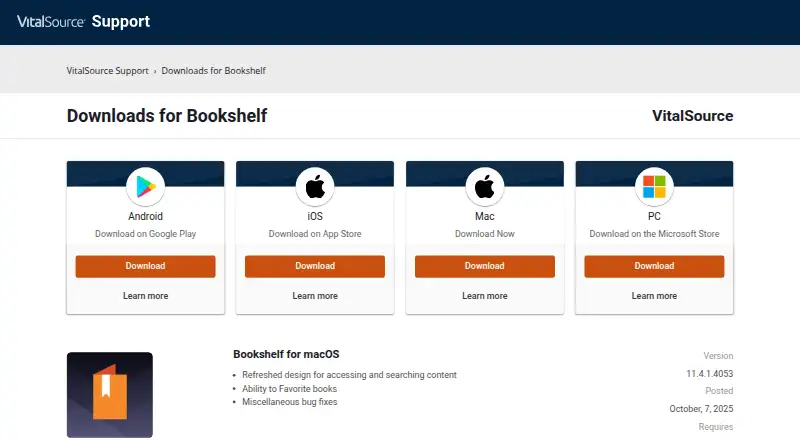
Bookshelf is available on Android, iOS, macOS, web, and Windows. Offline downloads are supported in the desktop and mobile apps, while the device allowance limits installations across those computers and mobile devices.
Who it's for
Students who read licensed eTextbooks, annotate as they study, and need offline access will get the clearest benefit. It is also a sensible institutional choice where LMS access, roster sync, single sign-on, or grade pass-back matters. Readers who need to share one installation across many devices, or who may miss the lifetime-title download window, should weigh those restrictions before committing.
Pros and cons
- Pros: Search, notes, highlights, flashcards, bookmarks, citations, and read aloud bring multiple study tasks into the reader.
- Pros: Synced notes and highlights, plus offline downloads in desktop and mobile apps, support study across supported devices and without a connection.
- Pros: LMS and administrative integrations can connect reading materials with institutional course workflows.
- Cons: Free installation does not mean free content; a book may require purchase or an active license.
- Cons: Two-computer and two-mobile-device limits can complicate device changes, and lifetime-title offline access requires a download within 180 days.
- Cons: Assignments and library filters are being deprecated, reducing the appeal for readers who depend on those parts of the experience.
Alternatives
For a broader comparison, browse Digital Textbook Platforms.
- LibreTexts is worth considering for free textbook access and instructor ADAPT access; its free core platform allows up to five custom textbooks per institution.
- DIKSHA is a free option for readers seeking an app built on Sunbird, which is described as MIT-licensed open-source technology.
- BibliU suits institutions considering a flat fee per student, per text, with charges for course sections using content.
- Kortext is another paid study platform with institutional pricing tailored to needs and budget.
- Cambridge Aspire may suit readers who want to begin with a three-month subject eTextbook Collection trial; its institutional collection is another paid route.
- KITABOO offers a paid Lite plan at $1 a month, billed per user monthly, for up to 1,000 active users, 30 titles, and 200 GB of storage.
- Opiq is a freemium alternative with a paid Päevikupakett at €1 a month per student per work, with a €15 minimum order.
- eLibro is an institutional subscription option with access quoted by a country representative.
Verdict
Choose VitalSource Bookshelf if your textbooks are licensed for it and you want study tools, offline reading, and course-system integration in one reader. Its combination of annotation and institutional connections is the main reason to choose it. Look elsewhere if you need unrestricted device use, guaranteed free textbook content, or the flexibility to postpone downloading lifetime titles beyond 180 days.
Getting started
- Open the VitalSource Bookshelf website
- Install the app on Android, iOS, macOS, or Windows, or use the web version
- Use the free-to-install Bookshelf app
- Obtain an eTextbook through purchase or an active license
- Download a lifetime-access title within 180 days for offline use
Limits worth knowing
The app is free to install, but eTextbook content can require purchase or an active license. Installations are capped at two computers and two mobile devices, and lifetime offline access requires downloading within 180 days of purchase.
Questions
Is Bookshelf free?
The Bookshelf app is free to install. eTextbook content may require a purchase or an active license, and pricing is available on request.
Which platforms does Bookshelf support?
It supports Android, iOS, macOS, Windows, and the web.
Can I read titles offline?
Yes. Desktop and mobile apps can download titles for offline reading and study. Lifetime-access titles must be downloaded within 180 days of purchase.
How many devices can I use?
The application can be installed on up to two computers and two mobile devices at one time.
Does Bookshelf support accessibility tools?
VitalSource says Bookshelf supports assistive technologies for people with visual, hearing, or mobility impairments.
What institutional integrations are available?
Integrations support LMS access, single sign-on, roster sync, and grade pass-back.
Alternatives to VitalSource Bookshelf
- 1

OpenStax
Free planAndroidiOSWebAPI7.9Free plan - 2

DIKSHA
Free planOpen sourceAndroidiOSWebAPI7.8Free plan - 3
CK-12 FlexBook 2.0
Free planAndroidiOSWebExtension7.6Free plan - 4
LibreTexts
Free planAndroidiOSWeb7.4From $1,250 a year - 5
ePathshala
Free planAndroidiOSWebWindows7.3Free plan - 6

Top Hat
AndroidiOSWeb7.2