VirtualBrowser
VirtualBrowser isolates web browsing in a remote server or virtual container and streams rendered pages to users.
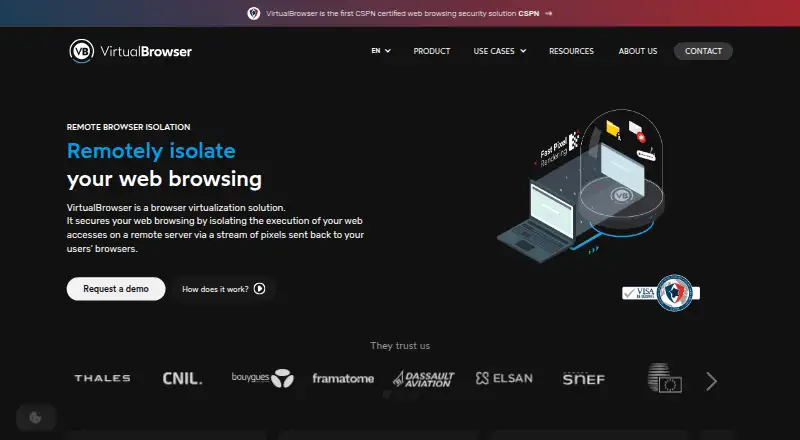
What VirtualBrowser is
VirtualBrowser isolates web browsing in a remote server or virtual container and streams rendered pages to users. The product says web code does not run on the user’s computer, and that the remote container and its data are removed when a session ends. Administrators can set site-specific rules for keyboard input, copying and pasting, uploads, downloads, printing, read-only access, and camera or microphone use. The administration console supports remote document previews and watermarks for sensitive material. VirtualBrowser says it blocks tracking cookies and includes an ad-blocking extension to limit trackers and browser fingerprinting. It supports online video meetings, including Teams, Zoom, Google Meet, and Webex, with controls for cameras, microphones, and screen sharing. Authentication options include SAML or LDAP, and isolation can be routed explicitly or transparently through an organization’s proxy. Deployment is available as SaaS hosted in Europe or on customer servers; on-premise lists ICAP content-analysis integration, while SaaS lists integrated antivirus analysis. The product is compatible with Chrome, Firefox, Safari, and Edge across operating systems. Pricing is on request; the listed plan offers SaaS or on-premise deployment and shared or dedicated server options.
Good
- Remote browsing container is removed after each session.
- Administrators can control uploads and downloads.
- Supports SAML or LDAP authentication.
- Available as Europe-hosted SaaS or on-premise.
- The maker says its solution received CSPN certification.
Watch out
- Pricing is available only by quote.
- On-premise deployment is required for listed ICAP integration.
- Technical support is provided by email.
Who it suits
VirtualBrowser suits organizations seeking remote isolated browsing with controls over site access and file transfers. Its listed use cases include risky or uncategorized sites, sensitive web apps, unmanaged devices, SOC or OSINT investigations, and browsing while mobile or in sensitive locations.
Verdict
VirtualBrowser combines remote browser isolation with configurable access policies, document protections, and options for SaaS or on-premise deployment. Organizations should compare the deployment and control options with their needs and request a quote, since no numeric price is listed.
Plans and prices
From VirtualBrowser's own pricing page, checked 9 Oct 2026.
| Plan | Price | What it gives you |
|---|---|---|
| VirtualBrowser | Priced on request | SaaS or on-premise deployment · shared or dedicated server options · contact for quote |
The facts
Each one read from VirtualBrowser's own pages, with the date it was checked.
What it does
- Access controls
- Administrators can set site access policies and control keyboard input, copying, pasting, printing, uploads, and downloads.checked 9 Oct 2026
- Authentication and proxy
- Business users can authenticate through SAML or LDAP, and browsing can use explicit isolation or transparent mode through an organization proxy.checked 9 Oct 2026
- Certification
- VirtualBrowser states that its web browsing security solution is CSPN-certified.checked 9 Oct 2026
- Compatibility
- The company says the service works with Chrome, Firefox, Safari, and Edge across operating systems.checked 9 Oct 2026
- Content scanning
- The on-premise option lists integration with a content analysis system using ICAP; the SaaS option lists integrated antivirus analysis.checked 9 Oct 2026
- Document protection
- The service supports remote document preview and optional watermarking.checked 9 Oct 2026
- Hosting
- The service offers SaaS hosted in Europe and an on-premise virtual appliance deployment.checked 9 Oct 2026
- Interaction controls
- Administrators can set site-specific policies for keyboard input, copy and paste, uploads, downloads, printing, read-only access, and camera or microphone use.checked 8 Oct 2026
- No local web execution
- The product page says no code is executed on the user's computer and that the browsing container is destroyed, with its data removed, at the end of a session.checked 8 Oct 2026
- Pricing availability
- The maker directs visitors to request a quote; no numeric product price is stated on the product page.checked 8 Oct 2026
- Privacy features
- The product says it blocks tracking cookies and includes an ad-blocking extension.checked 9 Oct 2026
- Product
- VirtualBrowser isolates web browsing in a remote server or virtual container and streams a visual representation of pages to users.checked 8 Oct 2026
- Security certification
- VirtualBrowser says its RBI solution received CSPN certification from France's ANSSI, following an independent laboratory evaluation.checked 8 Oct 2026
- Session cleanup
- The remote container is destroyed and its data removed from the server at the end of a browsing session.checked 9 Oct 2026
- Support
- The contact page lists technical support at [email protected].checked 9 Oct 2026
- Support and sales
- The contact page offers demo and quote requests and lists support at [email protected].checked 8 Oct 2026
- Tracking protection
- The product page says it blocks tracking cookies and includes an ad-blocking extension to limit trackers and browser fingerprinting.checked 8 Oct 2026
- Use cases
- The maker lists secure access to risky or uncategorized sites, sensitive web applications, unmanaged devices, SOC or OSINT investigations, and browsing while mobile or in sensitive locations.checked 8 Oct 2026
- Video conferencing
- VirtualBrowser supports access to online video conferencing and controls for camera, microphone, and screen sharing.checked 9 Oct 2026
- What it does
- VirtualBrowser isolates web browsing in a remote container and sends the user a pixel stream of the rendered content.checked 9 Oct 2026
The company
- Company
- VirtualBrowser describes itself as a French software publisher specializing in remote browser isolation, with research and development in Paris and Lyon.checked 9 Oct 2026
- Headquarters
- The contact page lists offices in Paris, Lyon, Brussels, and Vernier; it does not identify a headquarters.checked 9 Oct 2026
The full review of VirtualBrowser
VirtualBrowser is remote browser isolation software for organizations that need to contain web risk while still allowing access to selected sites and applications. It is best suited to security teams managing sensitive browsing, unmanaged devices, or investigations. Its combination of disposable remote sessions and granular controls is compelling, but deployment and custom pricing call for a considered enterprise purchase.
Overview
Pages are rendered in a remote server or virtual container, then delivered to the user as a visual stream. VirtualBrowser says no web code runs on the user’s computer, and the container is destroyed with its data removed at the end of a session. That makes it a strong fit when the goal is to reduce local exposure and avoid retaining session data on the remote host.
Rather than simply block access, administrators can set site-specific rules for keyboard input, copy and paste, uploads, downloads, printing, read-only use, and camera or microphone access. Remote document previews and watermarks add safeguards for sensitive material. The breadth is useful for organizations that need controlled access, though it also makes this a centrally managed security product rather than a personal browser.
Key features
VirtualBrowser blocks tracking cookies and includes an ad-blocking extension to limit trackers and browser fingerprinting. It also supports online meetings, with controls for cameras, microphones, and screen sharing; named services include Teams, Zoom, Google Meet, and Webex. That makes it more practical for organizations that cannot simply disable conferencing during isolated browsing.
SAML or LDAP authentication and explicit or transparent isolation through an organization’s proxy server support integration into managed environments. SaaS deployment includes integrated antivirus analysis; on-premise deployment offers ICAP integration with content analysis systems. These options give security teams room to align scanning and traffic handling with their architecture, but the choice of hosting model is part of the buying decision.
The product says it works with Chrome, Firefox, Safari, and Edge across operating systems. VirtualBrowser also states that its RBI solution received CSPN certification from France’s ANSSI following an independent laboratory evaluation, a relevant assurance for organizations assessing security products.
Pricing
VirtualBrowser is paid, with custom pricing requested from the vendor. The VirtualBrowser plan offers SaaS or on-premise deployment, shared or dedicated server options, remote isolation, malware scanning, and file transfer controls. Buyers can request a demo and quote; there is no published numeric price or a lower self-serve tier to evaluate, so cost and fit need to be established directly with sales.
Platforms
VirtualBrowser supports Android, iOS, Linux, macOS, and Windows, as well as web access and self-hosted deployment. The maker says it is compatible with Chrome, Firefox, Safari, and Edge. This range suits mixed-device organizations, while on-premise hosting is specifically an option for customers that want the service on their own servers.
Who it's for
The strongest use cases are secure access to risky or uncategorized sites, sensitive web applications, and browsing from unmanaged devices. Security operations and OSINT teams may also value isolation for investigations, while mobile staff or people browsing in sensitive locations can use the remote session model to limit local exposure. Organizations that need personal browsing or a low-cost, self-service tool should look elsewhere.
Pros and cons
- Pro: Remote rendering and session cleanup reduce local execution and remove session data when browsing ends.
- Pro: Site-level controls cover both common file actions and devices such as cameras and microphones, allowing access to be tailored instead of simply denied.
- Pro: European SaaS hosting and on-premise deployment provide distinct hosting choices; the latter includes ICAP content-analysis integration.
- Con: Custom pricing and a quote-led purchase make it harder to assess cost before engaging with sales.
- Con: The extensive policy and deployment controls are most useful in managed organizations, not for individuals seeking a straightforward browser.
Alternatives
BrowserGap is worth considering for readers who prefer a freemium option with a source-available community edition at no cost; its listed platforms include web, self-hosted, Linux, and macOS.
Netzilo Enterprise Browser may suit buyers who want a free tier or trial before choosing a paid option; its free plan is capped at five users and 100 devices, with community support only.
Kasm Workspaces offers a free community edition limited to five concurrent sessions and noncommercial use, making it a possible starting point for qualifying users; its paid Starter named-user plan is from $10 (priced on request).
Zscaler Private Access is another paid option for organizations evaluating private-access software.
Menlo Security Secure Cloud Browser is a paid secure-cloud-browser alternative with custom-quote pricing that varies by products and users.
Check Point Harmony SASE is a paid alternative with a 30-day trial before a license is required.
iboss Cloud is a paid option whose Zero Trust Core plan includes web filtering, URL categorization, basic CASB controls, HTTPS decryption, and Cloud Connector agents.
Netskope One Private Access is an enterprise product with a free trial for organizations comparing private-access options.
Verdict
VirtualBrowser is a strong candidate for organizations that need remote browsing isolation, site-specific controls, and a choice of European SaaS or on-premise hosting. Its disposable sessions and protections for files, documents, and meeting devices make it particularly relevant to security-led deployments. Look elsewhere if you need transparent, published pricing or a personal browser; the custom quote and organizational focus are central trade-offs.
Getting started
- Visit the VirtualBrowser website
- Request a demo or quote
- Choose SaaS hosted in Europe or an on-premise deployment
- Select supported access platforms and browsers
- Configure authentication, proxy routing, and site policies
- Set file, peripheral, and document-protection controls
Questions
What does VirtualBrowser isolate?
It places web browsing in a remote server or virtual container and streams a visual page representation to users.
Which deployment options are available?
VirtualBrowser is offered as SaaS hosted in Europe or as an on-premise deployment on the customer’s servers.
How is it priced?
The product is paid, with pricing available on request through a quote request.
Does it support video conferencing?
Yes. It supports Teams, Zoom, Google Meet, and Webex, with camera, microphone, and screen-sharing controls.
Which authentication methods are listed?
SAML and LDAP authentication are supported.
What security certification does it state?
VirtualBrowser states that its web browsing security solution received CSPN certification from France’s ANSSI.
Alternatives to VirtualBrowser
- 1

Kasm Workspaces
Free planOpen sourceAndroidiOSWebAPI8.6From $10 a month - 2

Netzilo Enterprise Browser
Free planAndroidiOSWebAPI8.0From $12 a month - 3
BrowserGap
Free planWebAPILinuxmacOS7.5$3.81 one-time - 4

Check Point Harmony SASE
AndroidiOSWebLinux7.3 - 5

iboss Cloud
AndroidiOSWebAPI7.1 - 6

Authentic8 Silo
WebAPIExtension6.5From $1,450 a year