VirtuaCam
VirtuaCam is a free, MIT-licensed virtual camera for Windows that presents video sources as a standard webcam to applications such as Zoom, Microsoft Teams, …
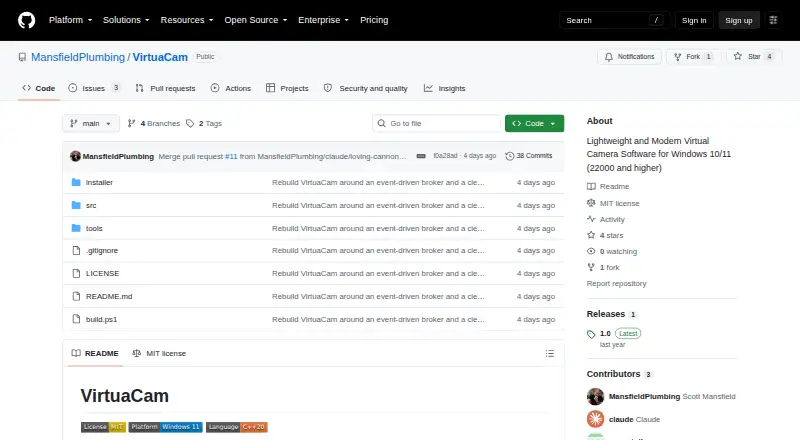
What VirtuaCam is
VirtuaCam is a free, MIT-licensed virtual camera for Windows that presents video sources as a standard webcam to applications such as Zoom, Microsoft Teams, OBS, and Discord. Built-in sources include a physical webcam, window, display, and whiteboard. Sources can be combined with picture-in-picture overlays or arranged in an automatic grid. Frames are shared and composited through D3D11 GPU resources; the README says they remain on the GPU unless a consuming application cannot accept GPU samples. Output options range from 640×360 to 3840×2160 at 15–60 frames per second, using NV12, YUY2, or RGB32. Other programs can publish frames through VirtuaCam’s shared-frame protocol and appear in its tray menu. The camera DLL requires one machine-wide registration, handled by the installer. VirtuaCam does not include a virtual display driver, but can use a display supplied by an IddCx driver. Supported platforms are Windows 10/11, and the latest listed release is version 1.0.
Good
- Free MIT-licensed software
- Combines sources with picture-in-picture
- Supports automatic grid layouts
- Offers up to 3840×2160 output
- Shares frames through D3D11 GPU resources
Watch out
- Windows-only software
- No virtual display driver included
- Machine-wide camera registration is required
- Latest listed release is version 1.0
Who it suits
VirtuaCam suits Windows users who need to combine webcams, windows, displays, or whiteboards for video applications. It also fits developers publishing frames through its shared-frame protocol.
Verdict
VirtuaCam provides a straightforward Windows virtual-camera setup with multiple sources, compositing, and broad output formats. Users needing a virtual display must supply an IddCx driver separately, and setup includes machine-wide registration.
Plans and prices
From VirtuaCam's own pricing page, checked 5 Oct 2026.
| Plan | Price | What it gives you |
|---|---|---|
| VirtuaCam | Free | MIT-licensed virtual camera for Windows |
The facts
Each one read from VirtuaCam's own pages, with the date it was checked.
What it does
- Build requirements
- Building requires Visual Studio 2022 with Desktop development with C++, CMake 3.21 or newer, and automatically fetched WIL headers.checked 5 Oct 2026
- Camera registration
- The camera DLL must be registered machine-wide once, and the installer performs this setup.checked 5 Oct 2026
- Compositing
- It can combine sources with picture-in-picture overlays or show an automatic grid.checked 5 Oct 2026
- GPU pipeline
- Frames are shared and composited using D3D11 GPU resources; the README says frames never leave the GPU except when a consuming app refuses GPU samples.checked 5 Oct 2026
- License
- The project is MIT-licensed.checked 5 Oct 2026
- Maintainer
- GitHub identifies the maintainer as Scott Mansfield and lists Jacksonville, Florida.checked 5 Oct 2026
- Output formats
- The camera offers 640×360 through 3840×2160 at 15–60 fps in NV12, YUY2, and RGB32.checked 5 Oct 2026
- Producer protocol
- Third-party programs can publish frames through VirtuaCam’s shared-frame protocol and then appear in its tray menu.checked 5 Oct 2026
- Purpose
- VirtuaCam exposes video sources as a standard virtual webcam for apps such as Zoom, Microsoft Teams, OBS, and Discord.checked 5 Oct 2026
- Release
- The GitHub releases page lists version 1.0 as the latest release.checked 5 Oct 2026
- Security details
- The README describes session-local shared resources and a DACL granting access to authenticated users; it makes no compliance certification claim.checked 5 Oct 2026
- Video sources
- The built-in sources include a physical webcam, a window, a display, and a whiteboard.checked 5 Oct 2026
- Virtual display
- VirtuaCam does not ship a virtual display driver; users can select a display created by an IddCx driver of their choice.checked 5 Oct 2026
Where it runs
- Windows support
- The repository describes VirtuaCam as Windows 11 software and gives Windows 11 as a build requirement.checked 5 Oct 2026
Alternatives to VirtuaCam
- 1
Webcamoid
Free planOpen sourceAndroidAPILinuxmacOS8.2$1.99 one-time - 2
Camo Studio
Free planAndroidiOSAPImacOS8.0From $49.99 a year - 3

FineCam
Free planAndroidiOSmacOSWindows8.0From $29.99 a year - 4
mimoLive
Free planiOSWebAPImacOS7.9From $70 a month - 5

VCam
Free planWebmacOSSelf-hostedWindows7.8Free plan - 6

PRISM Live Studio
Free planAndroidiOSmacOSWindows7.6From $79.99 a year