VideoStitch Studio
VideoStitch Studio turns video files into standard 360° video for immersive VR post-production.
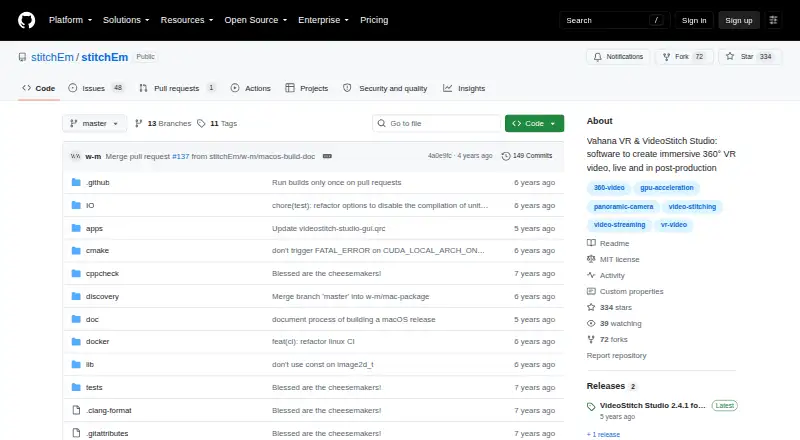
What VideoStitch Studio is
VideoStitch Studio turns video files into standard 360° video for immersive VR post-production. It can synchronize footage automatically using audio, motion, or flashes, or let users synchronize it manually. Calibration can run automatically, and templates from PTGui or Hugin can be imported. Color correction covers vignetting, camera response curves, exposure, and white balance. Stabilization and orientation controls use keyframes created automatically. Its timeline previews source footage and stitched output, supports frame selection, and lets users set a working area; a batch workflow renders multiple projects. The software supports multiple output formats, 360 editing and stitching, stabilization, VR preview, and 360 camera import. It is free, requires no license key, and the stitchEm project uses the MIT License, although third-party components have their own licenses. Windows, macOS, and Linux are build platforms, but not every feature is available everywhere. Release 2.4.1 is for macOS with OpenCL; Windows users are directed to version 2.4.0.
Good
- Automatic or manual footage synchronization
- Imports PTGui and Hugin calibration templates
- Batch workflow can render multiple projects
- Free, with no license key required
Watch out
- Features are not available on every platform
- Version 2.4.1 is macOS-only with OpenCL
- Windows users are directed to version 2.4.0
Who it suits
It suits people creating 360° video for VR who need stitching, synchronization, color correction, and stabilization tools. Check platform and release details before choosing a build.
Verdict
VideoStitch Studio combines 360° stitching with synchronization, calibration, correction, and stabilization tools. Its platform feature differences and release-specific availability are worth checking before installation.
Plans and prices
From VideoStitch Studio's own pricing page, checked 30 Sep 2026.
| Plan | Price | What it gives you |
|---|---|---|
| VideoStitch Studio | Free | No license key required · MIT-licensed open source |
The facts
Each one read from VideoStitch Studio's own pages, with the date it was checked.
What it does
- Batch stitching
- The user guide includes a batch stitcher workflow for rendering multiple projects.checked 30 Sep 2026
- Calibration
- It offers automatic calibration and can import stitching templates from PTGui or Hugin.checked 30 Sep 2026
- Color correction
- Color correction can adjust vignetting, camera response curves, exposure, and white balance.checked 30 Sep 2026
- Downloads
- The repository provides Windows and macOS builds; the 2.4.1 release is for macOS 11 Big Sur, while the 2.4.0 release includes Windows and macOS downloads.checked 30 Sep 2026
- Formats and encoders
- The product supports multiple output formats, and its release notes say unsupported NVENC output options were disabled.checked 30 Sep 2026
- Integrations
- It supports importing calibration templates from the third-party tools PTGui and Hugin.checked 30 Sep 2026
- License
- The stitchEm project is licensed under the MIT License and includes third-party components with their own licenses.checked 30 Sep 2026
- Purpose
- VideoStitch Studio stitches video files into standard 360° video files for immersive VR post-production.checked 30 Sep 2026
- Release limitation
- The 2.4.1 version is available only for macOS with OpenCL, and its release notes direct Windows users to version 2.4.0.checked 30 Sep 2026
- Stabilization
- The user guide describes stabilization and orientation controls, with keyframes created automatically.checked 30 Sep 2026
- Support
- Users can ask for help in the VideoStitch Studio Users Facebook group and report technical issues on GitHub.checked 30 Sep 2026
- Synchronization
- It supports automatic audio, motion, and flash based synchronization, as well as manual synchronization.checked 30 Sep 2026
- Timeline
- The timeline lets users preview source footage and stitched output, select frames, and set a working area.checked 30 Sep 2026
Where it runs
- Build platforms
- The software can be built on Windows, macOS, and Linux, though not all features are available on every platform.checked 30 Sep 2026
The full review of VideoStitch Studio
Overview
VideoStitch Studio is desktop software for turning video files into standard 360° footage for immersive VR post-production. It suits editors who need stitching and correction tools without a license fee. Its focused stitching workflow is the draw; platform and release differences mean users should match the download to their system.
Key features
Synchronization and calibration
Studio can align footage automatically from audio, motion or flashes, or let users synchronize manually. Automatic calibration and imported PTGui or Hugin stitching templates give editors options whether they are starting from scratch or bringing existing calibration work.
Correction and stabilization
Color controls address vignetting, camera response curves, exposure and white balance, useful for bringing multiple camera views into closer visual consistency. Stabilization and orientation controls are also part of the workflow, with keyframes created automatically. That combination makes Studio more than a stitch-and-export utility, though its stated purpose remains 360° post-production rather than general-purpose editing.
Preview and batch work
The timeline previews source footage alongside stitched output, allows frame selection and sets a working area. A batch stitcher workflow supports rendering multiple projects, a practical advantage when handling a sequence of stitching jobs. Multiple output formats are supported, though release notes say unsupported NVENC output options were disabled.
Pricing
VideoStitch Studio costs nothing, requires no license key and is MIT-licensed open source. There is no paid tier or trial to weigh against the free plan. The project includes third-party components under their own licenses, so the MIT license does not describe every component bundled with it.
Platforms
Studio lists Windows, macOS and Linux as desktop platforms, and the project can be built on all three; not every feature is available on every platform. Download availability differs by release: version 2.4.1 is for macOS 11 Big Sur with OpenCL, while Windows users are directed to version 2.4.0, which has Windows and macOS downloads. That split makes checking the release and operating system especially important before installation.
Studio supports 360 camera import, 360 editing, stitching and stabilization, as well as VR preview. Users can seek help in the VideoStitch Studio Users Facebook group and report technical issues on GitHub.
Who it's for
Choose Studio if the job is stitching video files into standard 360° output and you want synchronization, calibration, correction and stabilization in the same desktop workflow at no cost. It is less suited to anyone who needs a uniform current release across operating systems or expects every feature to be available on each platform.
Pros and cons
- Pros: Automatic and manual synchronization, automatic calibration and PTGui/Hugin template import give editors several ways to prepare source footage.
- Pros: Correction controls and stabilization complement stitching, and batch rendering can handle multiple projects.
- Pros: Free, MIT-licensed open-source software with no license key requirement.
- Cons: Feature availability varies by platform, and the 2.4.1 release is limited to macOS 11 Big Sur with OpenCL; Windows users must use 2.4.0.
- Cons: Unsupported NVENC output options were disabled, limiting those specific encoding choices.
Alternatives
For more options, browse 360 Video Software. ReShoot 360 is a freemium option on Android, iOS and macOS, with a free plan featuring filters, keyframes and transitions, AI tracking, photo-to-video and social media presets. Choose it when those mobile-friendly creation tools matter more than Studio's desktop stitching workflow.
Garmin VIRB Edit is another free Windows and Mac desktop app. PIXPRO 360 VR Suite is free on macOS and Windows. Reco is free and open source on Linux, macOS and Windows, with no public paid tier. QooCam Studio is free on macOS and Windows.
VSDC Video Editor offers free Windows video editing, including 360° editing and 4K and 8K export, and is worth considering if those broader editing and export capabilities fit your needs. Wondershare Filmora is a freemium option across desktop, mobile and web; its free plan has watermarked exports. DaVinci Resolve has a free Linux, macOS and Windows edition with 60 fps Ultra HD output, while its Studio edition costs $295, paid once.
Verdict
VideoStitch Studio is a strong fit for editors focused on 360° stitching who want synchronization, calibration, correction and stabilization without a license fee. Its main reason to choose is that concentrated post-production workflow; look elsewhere if you need consistent release availability and feature coverage across platforms.
Alternatives to VideoStitch Studio
- 1

CyberLink PowerDirector
Free planAndroidiOSmacOSWindows8.2From $59.99 a year - 2
Wondershare Filmora
Free planAndroidiOSWebmacOS7.9From $49.99 a year - 3

Adobe Premiere
AndroidiOSmacOSWindows7.8From $19.99 a month - 4
ReShoot 360
Free planAndroidiOSmacOS7.8From $19.99 a year - 5

DaVinci Resolve
Free planLinuxmacOSWindows7.6$295 one-time - 6

Reco
Free planOpen sourceAPILinuxmacOSSelf-hosted7.3Free plan