VideoHighlighter
VideoHighlighter is a local desktop app for analyzing video and producing highlight reels or individual clips.
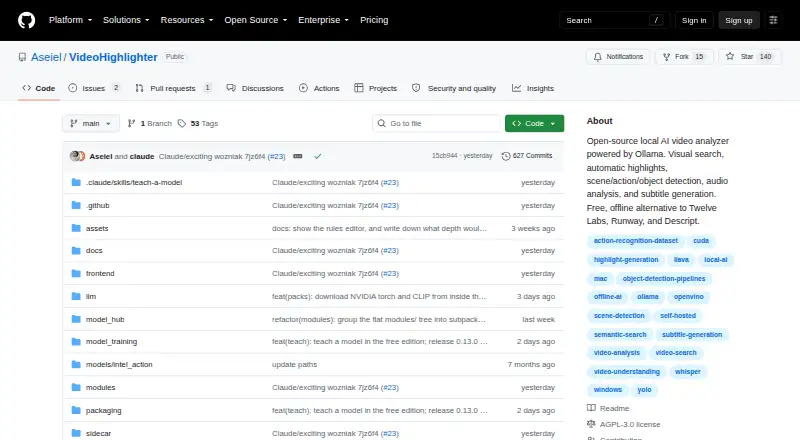
What VideoHighlighter is
VideoHighlighter is a local desktop app for analyzing video and producing highlight reels or individual clips. It scores scenes using signals such as motion, audio, objects, actions, and transcript content, then shows the reasons in a timeline and report. Videos, transcripts, detections, and local models stay on disk; analysis, search, and export do not upload footage. The basic pipeline needs no API key. The free edition includes offline analysis, live face detection, VR side-by-side playback, CLIP search, composition rules, model training, and a model hub. Pro adds live object and action overlays, point-and-teach categories, similarity search, open-vocabulary detection, and counter or scoreboard detection. A GPU is optional, and the pipeline can run on current CPUs. Prebuilt downloads are available for Windows and macOS; Linux runs from source with pip and Python. Free software is released under AGPL-3.0, with a separate commercial license available. Individual Pro costs $49, paid once and covers one editor on up to five computers.
Good
- Analysis and export do not upload footage
- Basic pipeline needs no API key
- Free edition includes offline analysis
- GPU is optional
Watch out
- Linux runs from source with pip and Python
- Pro activation requires one internet connection
- Individual Pro covers one editor
Who it suits
VideoHighlighter suits people who want to analyze local video and create clips while keeping footage on disk. It may also suit editors who want the additional detection features in Pro or a Linux setup that can run from source.
Verdict
VideoHighlighter offers local video analysis, export, and reporting, with a free edition and additional Pro detections. Check the platform installation options and license terms to see which edition fits your setup.
Plans and prices
From VideoHighlighter's own pricing page, checked 1 Oct 2026.
| Plan | Price | What it gives you |
|---|---|---|
| Free | Free | AGPL-3.0 · offline analysis · Windows, macOS, Linux |
| Individual | $49, paid once | single editor · up to 5 computers · commercial license · priority support · one-time |
| Studio | Priced on request | teams and multi-seat deployments · multiple seats · volume pricing |
The facts
Each one read from VideoHighlighter's own pages, with the date it was checked.
What it does
- Activation
- Pro activation requires an internet connection once, after which the license is checked locally and the app does not contact the vendor.checked 1 Oct 2026
- API requirement
- The basic pipeline needs no API key.checked 1 Oct 2026
- Detection
- The app scores scene, motion, audio, objects, actions and transcript signals, then displays the reasons on a timeline and report.checked 1 Oct 2026
- Explainability
- Reports provide per-signal point breakdowns, fired signals, strong moments that missed the cut and transcript claims that were not measured.checked 1 Oct 2026
- Hardware
- A GPU is optional; current CPUs run the pipeline, while Intel Arc and other GPUs can accelerate detection.checked 1 Oct 2026
- License
- The free repository is released under the GNU Affero General Public License v3.0, with a separate commercial license offered by the copyright holders.checked 1 Oct 2026
- Offline privacy
- Video files, transcripts, detections and local models stay on disk; analysis, search and export do not upload footage.checked 1 Oct 2026
- Pro capabilities
- Pro adds live object and action overlays, point-and-teach categories, find-more-like-this search, open-vocabulary detection and counter or scoreboard detection.checked 1 Oct 2026
- Purpose
- VideoHighlighter is a local desktop app that analyzes video and exports highlight reels plus individual clips.checked 1 Oct 2026
- Support
- Support is provided through Discord and email, with priority support for Pro customers and no ticket portal.checked 1 Oct 2026
- Technical stack
- The pipeline uses YOLOX with OpenVINO, YuNet and SFace face models, Whisper transcription, a composition engine, CLIP search and a PySide6 editor.checked 1 Oct 2026
- Usage limit
- An Individual Pro license is for one editor and may be used on up to five computers.checked 1 Oct 2026
Money
- Free capabilities
- The free edition includes offline analysis, live face detection, VR side-by-side playback, CLIP search, composition rules, model training and a model hub.checked 1 Oct 2026
Where it runs
- Install platforms
- Prebuilt downloads are available for Windows and macOS, while Linux runs from source with pip and Python.checked 1 Oct 2026
The full review of VideoHighlighter
VideoHighlighter is a desktop video-analysis app that turns local footage and supported VODs into scored highlight reels and individual clips. It suits editors who want to understand why moments were selected while keeping footage and analysis on their own machines. Its free edition is unusually capable; Pro is chiefly for users who need more advanced detection and search.
Overview
The app evaluates scene, motion, audio, objects, actions and transcript signals, then shows the contributing reasons on a timeline and in a report. That makes it more useful than a black-box clip generator when an editor needs to review the selection logic: reports break down points by signal, show signals that fired, surface strong moments that missed the cut, and flag transcript claims that were not measured.
Analysis, search and export run without uploading footage. Video files, transcripts, detections and local models stay on disk, and the basic pipeline needs no API key. A GPU is optional: current CPUs can run the pipeline, while Intel Arc and other GPUs can accelerate detection.
Key features
VideoHighlighter combines YOLOX with OpenVINO, face models YuNet and SFace, Whisper transcription, a composition engine, CLIP search and a PySide6 editor. The free edition includes offline analysis, live face detection, VR side-by-side playback, CLIP search, composition rules, model training and a model hub. That breadth makes the free version a substantial option for solo editors willing to work with a desktop application.
Pro adds live object and action overlays, point-and-teach categories, find-more-like-this search, open-vocabulary detection, and counter or scoreboard detection. Those additions matter most when face detection and standard search are not enough to find or inspect specific action and object types.
Inputs include local video files, YouTube VODs and Twitch VODs. The app supports video uploads, transcript output and chapter generation. YouTube support broadens its use beyond a local-footage workflow, although the core privacy benefit is that analysis and export do not upload footage.
Pricing
| Plan | Price | What it includes |
|---|---|---|
| Free | free | AGPL-3.0, offline analysis, and Windows, macOS and Linux support |
| Individual | $49, paid once | One editor, up to five computers, commercial license and priority support |
| Studio | Custom pricing | Teams and multi-seat deployments with volume pricing |
Free is the sensible starting point for personal use: it includes a wide set of detection, search and editing capabilities without an API key. Its repository is licensed under GNU Affero General Public License v3.0, while the copyright holders offer a separate commercial license. Editors who need commercial licensing can buy Individual for $49, paid once; it is for one editor, not a team, though that editor may use it on up to five computers. Pro activation requires an internet connection once; afterward the license is checked locally and the app does not contact the vendor.
Studio is the fit for multi-seat use, with custom pricing and volume pricing. Support comes through Discord and email rather than a ticket portal; Pro customers receive priority support.
Platforms
VideoHighlighter supports Linux, macOS and Windows. Prebuilt downloads are available for Windows and macOS; Linux installation runs from source with pip and Python. That source-based setup makes Linux a less direct choice for anyone who expects a ready-made installer.
Who it's for
Choose VideoHighlighter if you want local analysis, explainable highlight selection and control over exports, especially if you work with multiple signal types or need to keep source footage on disk. The free edition suits individual editors exploring that workflow; Individual is for a solo editor who needs a commercial license or Pro detections. Teams should look at Studio. It is a weaker fit for anyone who wants a turnkey Linux download or a cloud-first video summarizer.
Pros and cons
- Pros: Offline analysis, search and export keep footage and related data on disk, with no API key needed for the basic pipeline.
- Pros: The free edition includes face detection, CLIP search, model training and composition rules, giving solo editors substantial capability before upgrading.
- Pros: Signal breakdowns and missed-cut moments make highlight decisions easier to inspect than a simple generated reel.
- Cons: Linux users must install from source using pip and Python rather than use a prebuilt download.
- Cons: Individual covers only one editor, so multi-seat teams need custom-priced Studio.
- Cons: Pro activation needs an internet connection once, and support is through Discord and email rather than a ticket portal.
Alternatives
For a broader shortlist, browse AI Video Summarizers. If you mainly need summaries across mobile and web, Summarize Video to Text offers Android, iOS, web and extension access; its free tier allows two videos daily without an account or 10 credits monthly with free Google sign-in, with a one-hour video limit when signed in. For browser-based viewing and playlist search, Claras has a free allowance of three videos monthly and one SuperSearch, while Pro costs $4.39 a month and includes 50 videos daily and playlist-wide SuperSearch.
Glasp is another option for YouTube and PDF work, with a free allowance of three YouTube summaries daily, one YouTube channel, 30 PDF files, and 20 monthly PDF chat messages and AI chat credits. For transcript-focused work in a browser, SonicScribe has a free tier of three transcripts per day, 30-minute uploads, one file at a time, and AI chat and exports. Video Highlight is a web and extension option whose free tier provides about 7 hours 30 minutes of public-video processing, or about 10 videos, plus one private upload.
AI VidSummary offers extension and web access, with 10 daily summaries, YouTube and file uploads up to 50 MB, and two active sessions on its free tier. ScreenApp is web-based and its free plan is limited to 10 local backup videos. If self-hosting and choosing your own AI provider matter more than built-in local analysis, Synop is free to use with a bring-your-own API key, with usage costs depending on the provider.
Verdict
VideoHighlighter is a strong choice for solo editors who want local, inspectable video analysis without paying just to access its core workflow. Its main draw is the combination of offline processing and unusually detailed explanations for why moments made—or missed—the cut. Look elsewhere if you need a prebuilt Linux installer, cloud-first summarization, or a straightforward multi-seat plan with a published price.
Getting started
- Download the prebuilt Windows or macOS version, or prepare Linux with pip and Python
- Open a local video file or use a YouTube VOD or Twitch VOD
- Run the basic pipeline without an API key
- Review scored moments, signal explanations, and transcript details
- Export a highlight reel or individual clips
- Connect to the internet once to activate Pro if using the paid license
Limits worth knowing
The free edition omits Pro features such as live object and action overlays, point-and-teach categories, similarity search, open-vocabulary detection, and counter or scoreboard detection. Individual Pro covers one editor and up to five computers; Studio is for teams and multi-seat deployments.
Questions
Is VideoHighlighter free?
Yes. The Free plan costs nothing and is released under AGPL-3.0. Individual Pro costs $49, paid once.
What does Individual Pro include?
Pro adds live object and action overlays, point-and-teach categories, find-more-like-this search, open-vocabulary detection, and counter or scoreboard detection.
Which video sources can it use?
It accepts local video files, YouTube VODs, and Twitch VODs.
Does VideoHighlighter upload footage?
No. Video, transcripts, detections, and local models stay on disk, and analysis, search, and export do not upload footage.
What platforms are supported?
Prebuilt downloads are available for Windows and macOS. Linux runs from source with pip and Python.
How many computers does Pro cover?
An Individual Pro license is for one editor and may be used on up to five computers.
Alternatives to VideoHighlighter
- 1

Summarize Video to Text
Free planAndroidiOSWebAPI7.9From $54 a year - 2
Eightify
AndroidiOSWebExtension7.7From $59.99 a year - 3
Scribiz
Free planWebAPILinuxmacOS7.7From $84 a year - 4
yTeaser
Free planWebAPIExtension7.4From $9.90 a year - 5
Helpolos
Free planWebAPI7.3From $6 a month - 6
YouTubeSummarizer.com
Free planAndroidiOSWeb7.2From $12 a month