
Video Highlight
Video Highlight summarizes and transcribes videos, adds timestamped key points and lets users chat with video content.
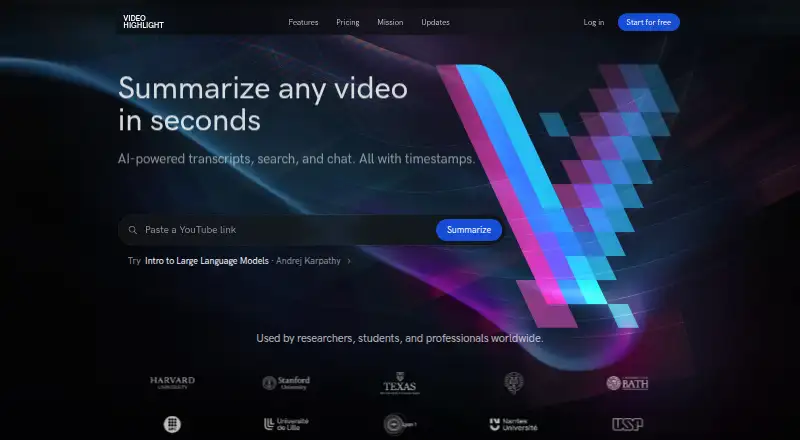
What Video Highlight is
Video Highlight summarizes and transcribes videos, adds timestamped key points and lets users chat with video content. Transcription and summaries support 37 languages. It accepts YouTube, Vimeo and Dailymotion videos, browser recordings and Google Drive imports, as well as private video uploads in MP4, MOV, AVI, MKV and FLV formats up to 1 GB. Audio files, WhatsApp voice messages and meeting recordings can also be processed. Search tools include exact transcript search, summary search, semantic chat and cross-video search within a playlist or collection. Users can import and sync YouTube playlists and channels. Summaries and key points can be sent to Notion, while highlights sync to Readwise; content can also be copied or downloaded in Word, PDF, Markdown, CSV, TXT, SRT and VTT formats. A read-only MCP connector works with Claude, ChatGPT and compatible clients, including on the Free plan. Free provides about 7 hours 30 minutes of public video processing and one private upload. The browser extension is in early access and targets Chromium browsers.
Good
- Summaries and transcripts support 37 languages.
- Supports audio, voice messages and meeting recordings.
- Search spans transcripts, summaries and video collections.
- Exports include Word, PDF, Markdown, CSV, TXT, SRT and VTT.
- Read-only MCP connector is included on every plan.
Watch out
- Free plan allows about 7 hours 30 minutes of public processing.
- Free plan includes one private upload.
- Private video uploads are limited to 1 GB.
- Browser extension is in early access.
Who it suits
It suits researchers, professionals and creators working with YouTube videos or their own recordings. The free plan may fit people processing a limited amount of public video and one private upload.
Verdict
Video Highlight combines transcripts, summaries, searchable video content and several export options. Check the free plan's processing allowance and upload limit, and note that the extension remains in early access.
Plans and prices
From Video Highlight's own pricing page, checked 3 Oct 2026.
| Plan | Price | What it gives you |
|---|---|---|
| Free | Free | about 7 hr 30 min of public video processing (about 10 videos) · one private upload |
| Business | — | Paid tier; pricing page does not expose price or specific limits in its public page text |
| Plus | — | Paid tier; pricing page does not expose price or specific limits in its public page text |
| Pro | — | Paid tier; pricing page does not expose price or specific limits in its public page text |
The facts
Each one read from Video Highlight's own pages, with the date it was checked.
What it does
- AI connectors
- The read-only MCP connector works with Claude, ChatGPT, and other compatible MCP clients, and is included on every plan, including Free.checked 3 Oct 2026
- Audience
- The maker describes the product as serving researchers, professionals, and creators using YouTube videos and their own recordings.checked 3 Oct 2026
- Audio and meetings
- Users can upload audio files, WhatsApp voice messages, and meeting recordings for transcripts, summaries, and AI chat.checked 3 Oct 2026
- Connector privacy
- The maker says MCP logs record tool name, success or failure, and duration, but not the question, video, or returned content.checked 3 Oct 2026
- Exports
- Summaries and key points can be sent to Notion, highlights sync to Readwise, and content can be copied or downloaded in formats including Word, PDF, Markdown, CSV, TXT, SRT, and VTT.checked 3 Oct 2026
- Extension availability
- The browser extension is in early access and targets Chromium browsers including Chrome, Edge, Brave, and Arc.checked 3 Oct 2026
- Languages
- The maker says transcription and summaries support 37 languages.checked 3 Oct 2026
- Playlists
- Users can import and sync YouTube playlists and channels and can add individual Vimeo and Dailymotion videos.checked 3 Oct 2026
- Privacy limitation
- The maker says Video Highlight is not currently an Anthropic Zero Data Retention partner and that AI host retention policies apply to prompts and tool data passed through those hosts.checked 3 Oct 2026
- Product
- Video Highlight summarizes and transcribes videos, provides timestamped key points, and lets users chat with video content.checked 3 Oct 2026
- Search
- Search includes exact transcript search, summary search, semantic chat, and cross-video search across a playlist or collection.checked 3 Oct 2026
- Security
- The privacy policy says the service uses commercially reasonable security measures and hosts its primary servers in AWS us-east-1.checked 3 Oct 2026
- Support
- The maker lists [email protected] for connector help and [email protected] for security reports.checked 3 Oct 2026
- Video uploads
- Private video uploads support MP4, MOV, AVI, MKV, and FLV files up to 1 GB.checked 3 Oct 2026
The full review of Video Highlight
Overview
Video Highlight turns videos and recordings into transcripts, timestamped key points and searchable material, with chat for asking about the content. It suits people who work across YouTube, personal recordings and meeting audio; the free plan’s small processing allowance makes it better for trying the workflow than relying on it for a large library.
Key features
Video Highlight brings several ways to work with video into one service: users can search exact transcript text, search summaries, ask questions through semantic chat, and search across a playlist or collection. That breadth is useful when a video library has become a reference collection rather than a queue to watch. Chapter generation and timestamped key points also make it easier to navigate long material.
For sources, users can import and sync YouTube playlists and channels, add individual Vimeo and Dailymotion videos, and import Google Drive content or browser recordings. Private uploads accept MP4, MOV, AVI, MKV and FLV files up to 1 GB. Audio files, WhatsApp voice messages and meeting recordings can also be transcribed, summarized and queried. The mix suits researchers and professionals who need a consistent way to process both public videos and their own recordings; the free allowance, however, is too limited for extensive use.
The maker says transcription and summaries support 37 languages. Summaries and key points can go to Notion, highlights can sync to Readwise, and users can copy or download content in Word, PDF, Markdown, CSV, TXT, SRT or VTT. A read-only MCP connector for Claude, ChatGPT and compatible clients is included even on Free, giving users another route to query their video content. The maker says connector logs capture tool name, success or failure, and duration, but not the question, video or returned content.
Privacy deserves a closer look before routing sensitive recordings through AI. Video Highlight says it uses commercially reasonable security measures and hosts primary servers in AWS us-east-1. It is not currently an Anthropic Zero Data Retention partner, and AI host retention policies apply to prompts and tool data passed through those hosts.
Pricing
Video Highlight is freemium. Free costs nothing and allows about 7 hr 30 min of public video processing (about 10 videos) and one private upload. That is enough to assess the service, but the one-upload cap and finite processing allowance are restrictive for anyone building a regular workflow around personal files.
Plus, Business and Pro are paid tiers with custom pricing. Their specific limits are also not public, so prospective subscribers should confirm both cost and allowance before choosing a tier. No published seat counts or renewal terms are available to state.
Platforms
The service is available on the web and as a browser extension. The extension is in early access and targets Chromium browsers, including Chrome, Edge, Brave and Arc, so users who need a mature extension should treat it as an optional extra rather than the core product.
Who it's for
Video Highlight is a strong fit for researchers, professionals and creators who need searchable transcripts and summaries across YouTube, their own recordings and meeting audio. Its cross-video search, broad export choices and MCP connector are especially relevant to people who want to reuse video material in other tools. It is a weaker fit for heavy users who need predictable paid-tier limits before committing, or for anyone unwilling to send prompts and tool data through AI hosts with their own retention policies.
Pros and cons
- Pros: Search spans transcripts, summaries and collections, making a growing video library more useful than a set of isolated summaries.
- Pros: Inputs include YouTube, Vimeo, Dailymotion, large private video uploads, audio and meeting recordings, covering more than public video alone.
- Pros: Notion, Readwise and multiple file-format options make it practical to move outputs into other workflows.
- Pros: The read-only MCP connector is included on Free, so users can try the integration without buying a paid tier.
- Cons: Free permits only about 10 public videos and one private upload, a tight ceiling for ongoing use.
- Cons: Paid tiers have custom pricing and no public specific limits, making it hard to compare the upgrade against actual needs.
- Cons: The extension is early access, and AI host retention policies apply to data sent through those hosts.
Alternatives
For another free option with mobile apps, Glasp offers Android, iOS and web access, with daily YouTube summaries plus defined PDF, chat and audio allowances. Choose it if those caps and mobile availability better match your workflow.
Summarize Video to Text adds Android and iOS apps alongside web and extension access; its free plan allows two videos a day without an account or 10 monthly credits with free Google sign-in, with videos up to an hour when signed in. Choose it if those daily limits suit you better.
SonicScribe has a free plan with three transcripts per day, 30-minute uploads, AI chat and exports, plus a 20.00 USD p…
Alternatives to Video Highlight
- 1

Summarize Video to Text
Free planAndroidiOSWebAPI7.9From $54 a year - 2
Eightify
AndroidiOSWebExtension7.7From $59.99 a year - 3
Scribiz
Free planWebAPILinuxmacOS7.7From $84 a year - 4
yTeaser
Free planWebAPIExtension7.4From $9.90 a year - 5
Helpolos
Free planWebAPI7.3From $6 a month - 6
YouTubeSummarizer.com
Free planAndroidiOSWeb7.2From $12 a month