
Summarize Video to Text
Summarize Video to Text turns video material into a workspace with a summary, transcript, timestamped chapters, mind map and Q&A.
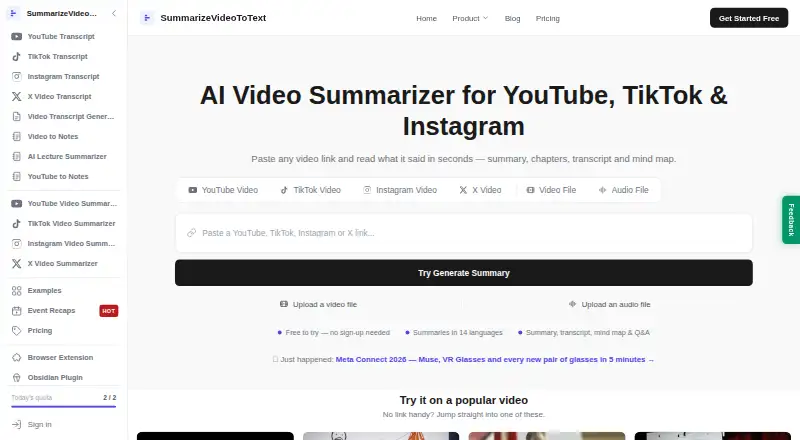
What Summarize Video to Text is
Summarize Video to Text turns video material into a workspace with a summary, transcript, timestamped chapters, mind map and Q&A. It accepts links from YouTube, TikTok, Instagram and X, along with uploaded video and audio files. The service can generate summaries in 14 output languages, separately from the video's spoken language. Users can export summaries, chapters and transcripts to Obsidian or Notion, or download the workspace as Markdown. Its Chrome and Edge extension places YouTube summaries and clickable chapters beside the video and provides chat based on the transcript. The homepage says videos without captions cannot yet be summarized; audio transcription is on the roadmap. The privacy policy says transcripts are sent to DeepSeek and/or Google Gemini for processing without account identity. For signed-in users, the service stores submitted links, fetched transcripts, generated content and watch history. The free plan allows two videos daily without an account, or 10 credits per month with free Google sign-in.
Good
- Creates summaries, transcripts, chapters, mind maps and Q&A.
- Accepts links from four named social platforms.
- Exports workspaces to Obsidian, Notion or Markdown.
- Offers 14 output languages.
Watch out
- Videos without captions cannot yet be summarized.
- Audio transcription is still on the roadmap.
- Signed-in use stores submitted links and generated content.
Who it suits
It may suit students reviewing lectures, professionals reviewing meetings and talks, creators researching content, or researchers working with interviews. Users should have captions available for videos they want summarized.
Verdict
Summarize Video to Text offers several ways to review and export video content, including a browser extension for YouTube. Its caption requirement and stated data handling are worth considering before use.
Plans and prices
From Summarize Video to Text's own pricing page, checked 29 Sep 2026.
| Plan | Price | What it gives you |
|---|---|---|
| Free | Free | 2 videos/day without account · 10 credits/month with free Google sign-in · video length up to 1 hour with account |
| Free Plan | Free | 2 summaries/day without account · up to 15 minutes/video · 10 summaries/day when signed in · up to 1 hour/video · watch history · TikTok and Instagram Reels · Q&A |
| Pro Monthly Plan | $9 a month | Free plan features · unlimited summaries subject to fair use · videos up to 6 hours · Flat rate, per month |
| Pro Yearly Plan | $54 a year | Free plan features · unlimited summaries subject to fair use · videos up to 6 hours · Flat rate, per year |
| Pro | Priced on request | Unlimited use · videos up to 6 hours |
The facts
Each one read from Summarize Video to Text's own pages, with the date it was checked.
What it does
- API and SDKs
- The product pages reviewed describe website, extension, plugin, and integration workflows but do not document a public API or SDK.checked 21 Oct 2026
- Caption dependency
- The homepage says videos without captions cannot yet be summarized and audio transcription is on its roadmap.checked 29 Sep 2026
- Credit expiry
- The homepage says monthly subscription credits expire at the end of their credit month, while trial credits and purchased top-ups do not expire.checked 21 Oct 2026
- Credit rates
- The homepage lists caption-based processing at 1 credit per minute and AI transcription at 10 credits per minute, rounded up with a 10-credit minimum per video.checked 21 Oct 2026
- Data collection
- For signed-in users, the privacy policy says the service stores submitted video links, fetched transcripts, generated content and watch history.checked 29 Sep 2026
- Data processing
- The privacy policy says transcripts are sent to DeepSeek and/or Google Gemini for processing without account identity, and Stripe handles payments.checked 29 Sep 2026
- Documentation and support
- The maker publishes setup and FAQ pages for its Obsidian plugin, browser extension, and Notion integration, and its Notion listing links to email support.checked 21 Oct 2026
- Extension privacy
- The extension reads the active video's URL and title, stores its connection token locally, and says it uses no analytics or third-party code.checked 29 Sep 2026
- Extension privacy claims
- The maker says the extension reads the active video's URL and title, has no browsing-history permission, and sends data only to its own site.checked 21 Oct 2026
- Feature: exports
- Users with a free account can export results to Notion or Obsidian and download Markdown; the site also describes plain-text transcript downloads.checked 21 Oct 2026
- Feature: language output
- The site lists 14 output languages and says the output language can differ from the video's spoken language.checked 21 Oct 2026
- Feature: mind map and Q&A
- The product offers a collapsible mind map and questions answered from the video transcript.checked 21 Oct 2026
- Feature: summaries
- The service generates a concise overview, key insights, and chapter breakdowns, with results streaming as they are produced.checked 21 Oct 2026
- Feature: timestamped chapters
- Generated chapters carry timestamps that can jump the video player to the corresponding point.checked 21 Oct 2026
- Feature: transcripts
- It can show the full transcript and, when captions are unavailable, says AI transcription may work if the public audio is accessible to its provider.checked 21 Oct 2026
- Integrations
- The maker lists Notion, Obsidian, and Markdown export options.checked 21 Oct 2026
- Intended users
- The homepage describes use by students reviewing lectures, professionals reviewing meetings and talks, creators researching content, and researchers mining interviews.checked 29 Sep 2026
- Languages
- Summaries can be generated in 14 output languages independently of the video's spoken language.checked 29 Sep 2026
- Limit: PDF export
- The homepage says PDF export is coming soon; it lists copying and plain-text transcript download as current options.checked 21 Oct 2026
Where it runs
- Browser extension
- The Chrome and Edge extension displays summaries and clickable chapters beside YouTube videos; its embedded panel is YouTube-only.checked 21 Oct 2026
- Limit: unsupported or private videos
- The maker says private, unavailable, or unsupported videos may fail, and that public-video transcription depends on whether the provider can access the audio.checked 21 Oct 2026
The company
- Company facts
- The sources checked identify an individual maker but do not state a legal company name, headquarters, or founded year.checked 21 Oct 2026
Money
- Free usage limit
- The homepage says anonymous use supports videos up to 15 minutes, a free account raises the maximum to one hour, and Pro supports videos up to six hours.checked 21 Oct 2026
- Limit: free-plan usage
- AIChief's editorial review identifies free-plan usage limits as a drawback; the maker also describes daily or credit-based caps for free use.checked 21 Oct 2026
The full review of Summarize Video to Text
Overview
Summarize Video to Text is a video-review workspace for people who want more than a short recap: it combines summaries with transcripts, timestamped chapters, a mind map and Q&A. It suits students, professionals, creators and researchers working with captioned material, but its inability to handle videos without captions is a meaningful constraint.
Its strongest case is the breadth of ways to move from a supported video to organized notes, including a YouTube browser extension and exports to note-taking tools. The free tier offers a useful starting point, though regular users may need Pro for longer videos and unlimited use.
For more options, browse AI Video Summarizers.
Key features
A workspace, not just a recap
Each result can include a summary, full transcript, timestamped chapters, mind map and Q&A. That range is useful when a reader needs to locate a particular passage or keep both a concise overview and the underlying text. The Q&A and extension chat are grounded in the transcript, making them more suited to exploring the source than to questions unrelated to it.
Broad inputs, with a caption caveat
Summarize Video to Text accepts links from YouTube, TikTok, Instagram and X, plus uploaded video and audio files. The listed maximum video duration is 360 minutes, but videos without captions cannot yet be summarized. Audio transcription is still on the roadmap, so accepting audio files should not be taken as a promise that uncaptained audio can be transcribed.
Summaries can be generated in 14 output languages independently of the language spoken in the video. This can help readers who want notes in a preferred language, although it does not remove the caption requirement.
Extension and exports
The Chrome and Edge extension places YouTube summaries and clickable chapters beside the video, with transcript-grounded chat. That is a practical fit for people who want to follow a video and consult its notes in the same browser view. Summaries, chapters and transcripts can also be exported to Obsidian or Notion, or downloaded as Markdown, which gives the resulting notes a path into an existing workflow.
Privacy and connected services
The extension reads the active video's URL and title, stores its connection token locally, and says it uses no analytics or third-party code. The Notion integration uses OAuth and can access only pages the user explicitly shares and pages it creates; its access token is encrypted at rest with AES-256-GCM, and Notion page contents are not copied to the service's servers.
For processing, the privacy policy says transcripts go to DeepSeek and/or Google Gemini without account identity. For signed-in users, the service stores submitted video links, fetched transcripts, generated content and watch history. Stripe handles payments. These practices make the integrations more bounded, but users should still consider whether they are comfortable sending transcript text to external AI providers and retaining this activity in an account.
Pricing
Summarize Video to Text is freemium. Free costs nothing: without an account, the allowance is 2 videos per day; with free Google sign-in, it is 10 credits per month, and videos can be up to 1 hour. The anonymous daily allowance may suit occasional use, while the signed-in monthly credits are a tighter fit for people who process videos regularly.
Pro offers unlimited use and supports videos up to 6 hours. Its plan price is custom pricing; the starting paid price is $12/mo. Pro is the more suitable tier for frequent users or those working with longer recordings, but readers should confirm the applicable price before committing. Free gives up both Pro's unlimited use and its higher video-length ceiling.
Platforms
The service is available on the web, Android and iOS, with a browser extension for Chrome and Edge. The extension's beside-the-video layout is specifically useful for YouTube; the web and mobile availability gives users other ways to access the service.
Who it's for
Students reviewing lectures can use chapters and transcripts to revisit sections; professionals can organize notes from meetings and talks; creators can research video content; and researchers can work through interviews. It is best for people whose source videos have captions and who value structured notes or exports. It is a poor fit for uncaptained recordings when transcription is essential.
Pros and cons
- Pros: One workspace combines summaries, transcripts, chapters, a mind map and Q&A, giving readers several useful ways to review the same source.
- Pros: YouTube chapters and transcript-grounded chat appear beside the video in Chrome and Edge, while Markdown, Obsidian and Notion exports support taking notes elsewhere.
- Pros: The free tier allows 2 videos per day without an account, or 10 credits per month with free Google sign-in.
- Cons: Videos without captions cannot yet be summarized, limiting its usefulness for uncaptained material.
- Cons: The signed-in free allowance is monthly rather than daily, and its video length cap is 1 hour versus Pro's 6 hours.
- Cons: Transcript processing uses DeepSeek and/or Google Gemini, and signed-in accounts retain submitted links, transcripts, generated content and watch history.
Alternatives
Choose VideoHighlighter if offline analysis and a desktop app for Windows, macOS or Linux matter more than a browser-based workflow; its free plan is under AGPL-3.0, while its Individual plan is a one-time $49.00 USD for one editor on up to five computers.
Claras may fit browser users who want SuperSearch across playlists and search: its free plan allows 3 videos per month and 1 SuperSearch, while Pro is $4.39 a month for 50 videos per day and broader SuperSearch.
Consider Glasp if you want YouTube summaries alongside PDF and audio workflows; its free plan includes 3 YouTube summaries per day, 30 PDF files, 20 PDF chat messages per month and 30 audio transcription minutes per month.
SonicScribe is a web alternative with a free tier offering 3 transcripts per day, uploads up to 30 minutes, one file at a time, AI chat and all exports.
Video Highlight is another extension and web option; its free tier covers about 7 hours 30 minutes of public video processing and one private upload.
AI VidSummary may suit readers who want a browser extension or web app with a free allowance of 10 summaries per day, YouTube and file upload, and a 50 MB upload cap.
NoteGPT is another web option for readers comparing video-note tools.
Distill is an iOS alternative.
Verdict
Summarize Video to Text is a strong choice for people who regularly review captioned videos and want structured notes, browser-side YouTube support and exports to their existing tools. Its free tier makes occasional use accessible, while Pro raises the video-length ceiling and removes usage limits. Look elsewhere if your recordings lack captions or you are not comfortable with its transcript processing and signed-in data retention.
Getting started
- Visit the Summarize Video to Text website.
- Submit a YouTube, TikTok, Instagram or X link, or upload a video or audio file.
- Use the free allowance without an account, or sign in with Google for 10 credits per month.
- Install the Chrome or Edge extension to view YouTube summaries and chapters beside a video.
- Export summaries, chapters and transcripts to Obsidian or Notion, or download the workspace as Markdown.
- Choose Pro for unlimited use and videos up to six hours.
Limits worth knowing
Without an account, the free plan allows two videos per day. With free Google sign-in, it allows 10 credits per month and videos up to one hour; Pro allows unlimited use and videos up to six hours.
Questions
Is there a free plan?
Yes. It allows two videos per day without an account, or 10 credits per month with free Google sign-in.
How much does the paid plan cost?
Pro is described as unlimited use with videos up to six hours.
Which platforms are supported?
The listed platforms are web, iOS, Android and a browser extension. The Chrome and Edge extension displays YouTube summaries and chapters.
What inputs can it summarize?
It accepts links from YouTube, TikTok, Instagram and X, as well as uploaded video and audio files. Videos need captions to be summarized.
Can it export to Notion?
Yes. Summaries, chapters and transcripts can be exported to Notion or Obsidian, or downloaded as Markdown.
How is submitted content processed?
The privacy policy says transcripts are sent to DeepSeek and/or Google Gemini for processing without account identity. For signed-in users, the service stores submitted links, fetched transcripts, generated content and watch history.
Alternatives to Summarize Video to Text
- 1
Eightify
AndroidiOSWebExtension7.7From $59.99 a year - 2
Scribiz
Free planWebAPILinuxmacOS7.7From $84 a year - 3
yTeaser
Free planWebAPIExtension7.4From $9.90 a year - 4
Helpolos
Free planWebAPI7.3From $6 a month - 5
YouTubeSummarizer.com
Free planAndroidiOSWeb7.2From $12 a month - 6

Mindgrasp
iOSWebExtension6.9From $5.99 a month