
Videobolt
Videobolt is a browser-based motion graphics platform for creating videos from customizable templates.
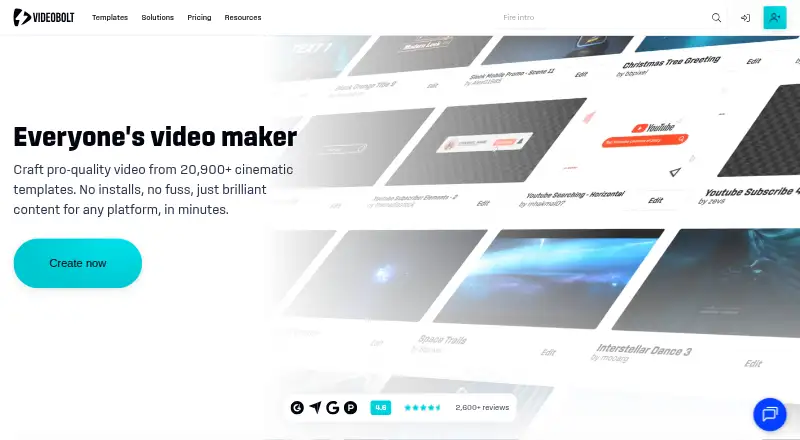
What Videobolt is
Videobolt is a browser-based motion graphics platform for creating videos from customizable templates. Its advertised library has more than 20,900 templates for intros, music visualizers, mockups, slideshows, promos, and overlays. Users customize videos in a browser and render them in the cloud. Listed exports are MP4, WEBM, and MOV, with PRORES available on the Business plan. The editor includes stock media from Unsplash, Pexels, Pixabay, and Epidemic Sound. Simple Video Tools provides 16 free utilities for tasks such as trimming, cropping, and resizing. Videobolt's Companion extension can bring exported projects into Adobe After Effects and Premiere Pro, and is available for Windows and Mac OS. Free previews have a watermark, are limited to 540p, and are not intended for commercial use. Exported projects have a lifetime commercial license, while the additional resale license is exclusive to Business.
Good
- More than 20,900 customizable video templates.
- Cloud rendering from a browser editor.
- Includes stock media from four named providers.
- Sixteen free tools cover basic editing tasks.
- Commercial license applies to exported projects.
Watch out
- Free previews are watermarked and limited to 540p.
- Free previews are not for commercial use.
- Resale license is exclusive to Business.
- PRORES export is listed for Business.
Who it suits
Videobolt is suited to creators, marketing teams, musicians and DJs, agencies, video editors, and small businesses that want to make videos from templates. Its browser editor and Adobe extension may appeal to people using those workflows.
Verdict
Videobolt brings template-based video creation, stock media, and cloud rendering into a browser workflow. Free previews have clear quality and commercial-use limits, while the listed paid plans are billed monthly on an annual basis.
Plans and prices
From Videobolt's own pricing page, checked 20 Sep 2026.
| Plan | Price | What it gives you |
|---|---|---|
| Lite Unlimited | €119.88 a year | 720p · 24fps · up to 10 minutes per video · 20GB cloud storage · 20,900+ templates · 1M+ stock photos, videos and sounds · €119.88 per year (= €9.99/month, billed annually) |
| Pro Unlimited | €24.99 | up to 4K · up to 60fps · up to 1 hour per video · 60GB cloud storage · 20,900+ templates · 1 brand kit · per month billed annually |
| Business Unlimited | €39.99 | up to 4K · up to 60fps · up to 2 hours per video · 100GB cloud storage · 20,900+ templates · unlimited brand kits · per month billed annually |
| Pro | €24.99 | up to 4K · up to 60fps · up to 1 hour per video · 60GB cloud storage · commercial license · After Effects and Premiere Pro extension · one Brand Kit · per month billed annually |
| Business | €39.99 | up to 4K · up to 60fps · up to 2 hours per video · 100GB cloud storage · resale license · ProRes export · After Effects and Premiere Pro extension · unlimited Brand Kits · per month billed annually |
| Lite | €119.88 a year | 720p · 24fps · up to 10 minutes per video · 20GB cloud storage · commercial license · no Adobe extension or Brand Kit · €119.88 per year (= €9.99/month, billed annually) |
The facts
Each one read from Videobolt's own pages, with the date it was checked.
What it does
- Adobe integration
- The Videobolt Companion extension brings exported projects into Adobe After Effects and Premiere Pro and is available for Windows and Mac OS.checked 29 Sep 2026
- Editing and rendering
- Users customize videos in a browser and render them in the cloud.checked 29 Sep 2026
- Exports
- The pricing page lists MP4, WEBM, and MOV exports, with PRORES listed for the Business plan.checked 29 Sep 2026
- Intended users
- Videobolt identifies creators, marketing teams, musicians and DJs, agencies, video editors, and small businesses among its intended users.checked 29 Sep 2026
- Licensing
- The pricing FAQ says exported projects have a lifetime commercial license, while the additional resale license is exclusive to the Business plan.checked 29 Sep 2026
- Payment and support
- Videobolt says payments are processed by BlueSnap and Paddle and offers support by live chat or email.checked 29 Sep 2026
- Product
- Videobolt is a browser-based motion graphics platform with customizable templates for making videos.checked 29 Sep 2026
- Simple Video Tools
- Simple Video Tools is described as a suite of 16 free editing tools for tasks such as trimming, cropping, and resizing.checked 29 Sep 2026
- Stock integrations
- Videobolt says its video editor includes stock media from Unsplash, Pexels, Pixabay, and Epidemic Sound.checked 29 Sep 2026
- Template library
- The site advertises more than 20,900 video templates across formats including intros, music visualizers, mockups, slideshows, promos, and overlays.checked 29 Sep 2026
Money
- Free plan
- Yeschecked 20 Sep 2026
- Free preview
- Free previews are watermarked, limited to 540p, and not intended for commercial use.checked 29 Sep 2026
- Free trial
- Videobolt says its free trial has no time limit and requires no credit card; trial videos are watermarked and rendered at up to 540p.checked 29 Sep 2026
The full review of Videobolt
Videobolt is a browser-based motion graphics platform for customizing video templates and rendering them in the cloud. It suits creators, musicians and DJs, marketing teams, and small businesses producing repeatable video formats. Its template-led workflow is the draw; people seeking a general-purpose editor or unwatermarked commercial previews should look elsewhere.
Overview
Videobolt pairs a large template catalog with browser editing, cloud rendering, and stock media. That combination can shorten the path from concept to a finished promo, visualizer, or social post, particularly when a team needs to reuse a recognizable format. The trade-off is that free previews are not deliverables, and higher output limits and licensing rights require paid plans.
Key features
The library contains more than 20,900 templates across intros, music visualizers, mockups, slideshows, promos, and overlays. That range gives musicians, DJs, and marketers options for recurring content, including material for Instagram, YouTube, Spotify Canvas, and social media. It is less suited to work that calls for a blank-canvas editing workflow.
Editing takes place in a browser and rendering in the cloud. The editor includes stock media from Unsplash, Pexels, Pixabay, and Epidemic Sound, reducing the need to source every visual and sound separately. Exports include MP4, WEBM, and MOV; ProRes is limited to Business.
Free previews are watermarked, capped at 540p, and not intended for commercial use. They let users evaluate a template, but cannot stand in for a finished client or business export. Paid exported projects carry a lifetime commercial license; the additional resale license is reserved for Business.
The Videobolt Companion extension brings exported projects into Adobe After Effects and Premiere Pro on Windows and Mac OS. It is included with Pro and Business, not Lite, so editors who need those handoffs must step above the entry tier. Simple Video Tools adds 16 free utilities for jobs such as trimming, cropping, and resizing. Payments are processed by BlueSnap and Paddle, and support is offered by live chat or email.
Pricing
Videobolt uses a freemium model, with free previews and a free trial. The paid plans below are billed per month on an annual basis; the price labels in the plan details are EUR per year, so check the billing term carefully.
| Plan | Price and limits | Best fit |
|---|---|---|
| Lite | €9.99 a year (billed per month billed annually); 720p at 24fps, videos up to 10 minutes, 20GB cloud storage, commercial license; no Adobe extension or Brand Kit. | Short, straightforward commercial videos when 720p is enough and Adobe handoff is unnecessary. |
| Pro | €24.99 a year (billed per month billed annually); up to 4K at 60fps, videos up to 1 hour, 60GB cloud storage, commercial license, After Effects and Premiere Pro extension, and one Brand Kit. | Creators and teams needing higher-resolution exports, longer videos, or a single consistent brand kit. |
| Business | €39.99 a year (billed per month billed annually); up to 4K at 60fps, videos up to 2 hours, 100GB cloud storage, resale license, ProRes export, Adobe extension, and unlimited Brand Kits. | Agencies and businesses that need resale rights, ProRes, longer projects, or multiple brand identities. |
Lite keeps storage and video duration modest and omits the extension and Brand Kit. Pro is the substantial step up for quality and editing handoff, while Business is the only tier with resale rights and ProRes. Unlimited variants of Lite, Pro, and Business are also offered at 9.99, 24.99, and €39.99 a year respectively (billed per month billed annually); they include 20,900+ templates, with 1M+ stock photos, videos, and sounds specified for Lite Unlimited. Their stated output, duration, storage, and brand-kit limits match the corresponding tiers.
Platforms
Videobolt is available on the web, with extension, macOS, and Windows also listed as supported platforms. The Companion extension is for Windows and Mac OS and connects exports with After Effects and Premiere Pro.
Who it's for
Videobolt makes most sense for creators, musicians and DJs, marketing teams, agencies, video editors, and small businesses that regularly need template-based motion graphics. Lite works for short 720p output on a budget; Pro fits users who need 4K-capable exports or Adobe workflows; Business is the clearest choice when resale licensing, ProRes, or multiple brand kits are essential. It is a weaker fit for anyone who needs a commercial-grade free export or wants unrestricted, blank-canvas editing.
Pros and cons
- Pros: More than 20,900 templates cover several common motion-graphics formats, making repeatable content easier to source.
- Pros: Browser editing, cloud rendering, and integrated stock media bring creation and asset sourcing into one workflow.
- Pros: Pro and Business add an Adobe extension, while Business also provides ProRes and resale licensing.
- Cons: Free previews are watermarked, limited to 540p, and barred from commercial use, so they are for evaluation rather than delivery.
- Cons: Lite caps output at 720p and 10 minutes and excludes the Adobe extension and Brand Kit.
- Cons: Resale rights and ProRes require the highest tier, a meaningful constraint for agencies selling finished work or handing off ProRes files.
Alternatives
For a broader browse across template categories, compare Motion Graphics Template Libraries, Video Intro Maker Software, Social Media Template Libraries, Audio Visualizer Software, and Video Editing Software.
- Motion Array is a web-based freemium option with selected free video templates, songs, sound effects, and graphics; pick it when those free assets are the priority.
- ProductionCrate offers basic libraries and five free downloads per day, with PRO at $49 a month for full library access and up to 50 downloads; choose it if daily asset downloads matter more than Videobolt's template-led rendering.
- Jitter has a free web plan limited to three workspace files, 720p, and 30fps, while Pro adds 1080p and 60fps exports; consider it when those export specifications fit your needs.
- Artlist Templates offers footage up to 8K, templates, LUTs, and three channels on each social platform in its Footage and Templates plan at $31.99 a year (billed 31.99 / month (billed annually)); choose it when that bundle better matches your footage and channel needs.
- Pixel Film Studios provides unlimited downloads and free asset updates on its free Starter plan; it is a MacOS and web alternative for those prioritizing those assets.
- MotionVFX lists 8,000+ motion design elements, 100+ template collections, mCaptionsAI, and 1,000+ trackable elements in DesignStudio; compare it when that content mix is more relevant.
- Allavio offers free sample titles and selected free templates, including items for DaVinci Resolve 19 and above; choose it when that editor-specific template route suits your workflow.
- CinePacks sells a one-time Master Bundle for 300.00 USD with 57 packs, 4,700+ assets, over 100GB, and lifetime commercial use; it is a straightforward alternative when a one-time asset purchase is preferable.
Verdict
Choose Videobolt if you need a steady supply of motion-graphics templates, browser editing, and cloud rendering, with a paid tier suited to your output and licensing needs. Its main advantage is the combination of a broad catalog and integrated stock media; its main drawback is that free previews cannot be used commercially and the rights and export capabilities that matter most require a higher paid tier. Look elsewhere if you need finished commercial exports without a subscription or a more general-purpose editor.
Alternatives to Videobolt
- 1

AUDIOVIZOR
Free planWebWindows7.3From C$4.99 a month - 2
Renderforest Music Visualizer
Free planAndroidiOSWeb7.3From $9 a month - 3
SongRender
Free planWeb7.3From $15 a month - 4

dmn Visualiser
Free planAndroidiOSWeb7.2From $1.45 a month - 5

Music Waveform
Free planAndroidiOSWeb7.2Free plan - 6

SYQEL
AndroidiOSWebmacOS7.0From $60 a year