vAmiga
vAmiga is a free, open-source macOS emulator for Commodore Amiga 500, 1000, and 2000 computers, including OCS, ECS, and AGA configurations.
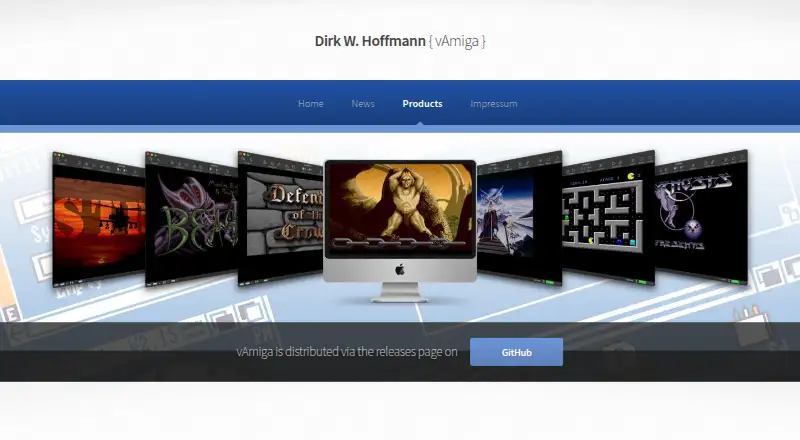
What vAmiga is
vAmiga is a free, open-source macOS emulator for Commodore Amiga 500, 1000, and 2000 computers, including OCS, ECS, and AGA configurations. Development began in January 2019, and the project aims for cycle-exact behavior by matching memory access to the original machines’ DMA cycles. A graphical interface is designed to conceal technical details, while inspector tools provide CPU debugging, breakpoints, watchpoints, DMA visualization, activity monitors, stencils, and a script-capable RetroShell console. The emulator opens ADF, Extended ADF, DMS, EXE, IMG, HDF, and folder-based media. Snapshots can freeze and restore state, but storage is not persistent and snapshots may fail between releases. Two instances can connect through an emulated null modem cable, using socket connections with port 8080 by default. Input includes keyboard-emulated joysticks, USB gamepads, and original Commodore joysticks with adapters. vAmiga requires macOS 12 Monterey or later and a Kickstart ROM; original Commodore ROMs are not supplied, while two AROS revisions are included.
Good
- Supports Amiga 500, 1000, and 2000 models
- Cycle-exact timing goal
- Broad disk-image and folder support
- Debugging and script console tools
- Free and open-source
Watch out
- Requires macOS 12 Monterey or later
- A Kickstart ROM is required
- Original Commodore ROMs are not included
- Snapshots are not persistently stored
Who it suits
vAmiga suits macOS users who want to run Amiga software or explore classic Amiga hardware behavior. It also serves users needing debugging tools, snapshots, controller support, or emulator-to-emulator connections.
Verdict
vAmiga provides a detailed, free Amiga emulation environment with multiple media formats, input methods, and diagnostic tools. Check the macOS requirement and Kickstart ROM need before setup.
The facts
Each one read from vAmiga's own pages, with the date it was checked.
What it does
- Accuracy
- The emulator aims for cycle-exact precision, performing memory accesses on the same DMA cycles as the original machine.checked 2 Oct 2026
- Configuration
- Global emulator settings and per-instance virtual machine settings are configured separately.checked 2 Oct 2026
- Controllers
- The emulator supports keyboard-emulated joysticks, compatible USB gamepads and original Commodore joysticks through RetroFun! or aJoy adapters.checked 2 Oct 2026
- Debugging
- Inspector tools provide CPU debugging, breakpoints, watchpoints, DMA visualization, activity monitors, stencils and a RetroShell console that can process scripts.checked 2 Oct 2026
- Development
- Development began in January 2019.checked 2 Oct 2026
- Disk formats
- Supported formats include ADF, Extended ADF, DMS, EXE, IMG, folders and HDF.checked 2 Oct 2026
- Hosting
- The website is hosted on GitHub Inc. servers.checked 2 Oct 2026
- Interface
- It provides a graphical interface designed to hide technical details from users.checked 2 Oct 2026
- Kickstart ROM
- A Kickstart ROM is required; original Commodore ROMs are not shipped, while two AROS ROM revisions are included as a freely redistributable alternative.checked 2 Oct 2026
- Latest release
- The project news page states that vAmiga 5.0 Beta 1 added AGA support, with no productivity-mode support and incomplete 68EC020 timing and instruction-cache emulation.checked 2 Oct 2026
- License
- vAmiga is open-source under the GNU General Public License, while its CPU core is under the MIT license.checked 2 Oct 2026
- Multiplayer
- Two emulator instances can connect through an emulated null modem cable using socket connections, with port 8080 as the default.checked 2 Oct 2026
- Privacy
- The website can be visited without registration, stores accessed pages, filenames, dates and times for statistical purposes, and says personal data is not shared without consent.checked 2 Oct 2026
- Purpose
- vAmiga emulates Commodore Amiga 500, 1000 and 2000 computers on macOS.checked 2 Oct 2026
- ROM requirement
- Running the emulator requires a Kickstart ROM; original Amiga ROMs are not shipped with it, and the manual describes AROS ROMs as an included alternative.checked 2 Oct 2026
- Snapshots
- Snapshots can freeze and restore emulator state, but snapshot storage is not persistent and snapshots may stop working between releases.checked 2 Oct 2026
- Support
- The maker welcomes bug reports on GitHub.checked 2 Oct 2026
- System requirement
- The deployment target is macOS 12 Monterey, and earlier macOS releases cannot run the app.checked 2 Oct 2026
- User interface
- vAmiga provides an easy-to-use graphical interface intended to hide technical details from users.checked 2 Oct 2026
The company
- Founded
- 2019checked 28 Sep 2026
Where it runs
- Input devices
- Input options include keyboard emulation, external USB joysticks, game controllers and the RetroFun USB adapter for original Commodore joysticks.checked 2 Oct 2026
- Supported macOS
- The documented deployment target is macOS 12 Monterey; the app is extensively tested only with the latest macOS version.checked 2 Oct 2026
Alternatives to vAmiga
- 1

Damisoft Amiga Emulator
Free planWebLinuxmacOSWindows6.8Free plan - 2
Amiga Forever
AndroidiOSLinuxmacOS6.6$19.95 one-time - 3
Meta Amiga Emulator
Free planLinuxmacOSWindows6.6Free plan - 4
UAE4ALL2 Mod
Free planAndroidiOS6.6Free plan - 5
Amiberry
Free planAndroidLinuxmacOSWindows6.4Free plan - 6
Jammy
Free planLinuxWindows6.4Free plan