
Vale
Vale is an open-source command-line linter that checks prose against style-guide rules.
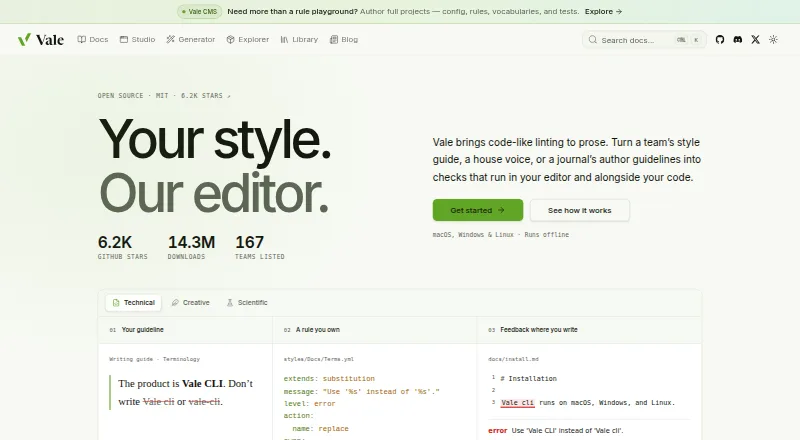
What Vale is
Vale is an open-source command-line linter that checks prose against style-guide rules. It runs offline as a single binary, without requiring an account, server, or model. It supports formats including Markdown, AsciiDoc, reStructuredText, MDX, MyST, Quarto, Typst, HTML, XML, DITA, Org, and QDoc, and can extract comments from 19 programming languages. Vale Views target selected content in sources such as OpenAPI, Jupyter notebooks, commit messages, transcripts, docstrings, JSON, YAML, and TOML. Users can write custom rules in YAML and choose which rules and styles apply to files. Ready-made style packages include Google, Microsoft, Red Hat, readability, and Harper grammar styles. Integrations span editors such as VS Code, Cursor, Neovim, Sublime Text, Zed, Emacs, JetBrains IDEs, Obsidian, and Qt Creator. Vale can run in GitHub Actions or as a pre-commit hook; its language server offers autocomplete, diagnostics, hover popups, and quick fixes. Only error-level alerts cause a non-zero exit code in CI; warnings and suggestions pass. The free plan is MIT-licensed; paid plans start at $19/user/mo.
Good
- Runs offline without an account, server, or model.
- Users can create YAML rules and select styles.
- Language server provides diagnostics and quick fixes.
- Free plan is MIT-licensed and open-source.
Watch out
- Warnings and suggestions pass in CI.
- Paid plans start at $19/user/mo.
Who it suits
Vale suits individuals and documentation teams that want style-guide checks in editors or alongside code. It can also fit teams that run checks in CI or pre-commit workflows.
Verdict
Vale combines customizable prose rules with editor and automation integrations. Its CI behavior is worth noting: only error-level alerts return a non-zero exit code.
Plans and prices
From Vale's own pricing page, checked 29 Sep 2026.
| Plan | Price | What it gives you |
|---|---|---|
| Vale | Free | Free · MIT-licensed · open-source |
The facts
Each one read from Vale's own pages, with the date it was checked.
What it does
- Alert behavior
- Only error-level alerts cause Vale to return a non-zero exit code; warnings and suggestions pass in CI.checked 29 Sep 2026
- Automation
- Vale can run in GitHub Actions, as a pre-commit hook, and through its language server in LSP-capable editors.checked 29 Sep 2026
- Code comments
- Vale can extract and check comments in 19 programming languages, including Go, Rust, Python, JavaScript, TypeScript, and Java.checked 29 Sep 2026
- Custom rules
- Users can write their own Vale rules in YAML and configure which rules and styles apply to files.checked 29 Sep 2026
- Editor integrations
- Listed editor integrations include VS Code, Cursor, Windsurf, Neovim, Sublime Text, Zed, Emacs, JetBrains IDEs, Obsidian, Oxygen XML, and Qt Creator.checked 29 Sep 2026
- Intended users
- Vale is aimed at people and teams who want style-guide checks in their editors and alongside their code, including documentation teams.checked 29 Sep 2026
- Language server
- Vale’s language server provides editor autocomplete, diagnostics, hover popups, and quick fixes.checked 29 Sep 2026
- Markup formats
- Vale supports markup including Markdown, AsciiDoc, reStructuredText, MDX, MyST, Quarto, Typst, HTML, XML, DITA, Org, and QDoc.checked 29 Sep 2026
- Offline use
- Vale runs offline as a single binary, without an account, server, or model.checked 29 Sep 2026
- Purpose
- Vale is an open-source command-line linter that checks prose against style-guide rules.checked 29 Sep 2026
- Structured content
- Vale Views can select prose in OpenAPI, Jupyter notebooks, commit messages, transcripts, docstrings, JSON, YAML, and TOML.checked 29 Sep 2026
- Style packages
- Vale offers ready-made packages including Google, Microsoft, Red Hat, readability, and Harper grammar styles.checked 29 Sep 2026
- Support
- The project directs users to GitHub issues or Discord for questions and support.checked 29 Sep 2026
Where it runs
- Documentation platforms
- Mintlify and Promptless are listed as hosted documentation platforms that run Vale.checked 29 Sep 2026
- Platforms
- Vale runs on macOS, Windows, and Linux.checked 29 Sep 2026
The company
- Founded
- 2017checked 23 Sep 2026
The full review of Vale
Overview
Vale is an open-source command-line linter for applying style-guide rules to prose. It suits writers and documentation teams who want editorial checks close to their code and editors. Its offline, rule-based approach is a strong fit for consistent standards across varied writing workflows, but not a substitute for an online writing assistant.
Key features
Checks across formats and workflows
Vale supports Markdown, AsciiDoc, reStructuredText, MDX, MyST, Quarto, Typst, HTML, XML, DITA, Org and QDoc. It can also extract comments in 19 programming languages, including Go, Rust, Python, JavaScript, TypeScript and Java. Vale Views target prose inside OpenAPI documents, Jupyter notebooks, commit messages, transcripts, docstrings, JSON, YAML and TOML. That breadth matters for teams whose editorial standards need to reach beyond standalone documents, though setting up the right selections and rules takes configuration.
Users can write custom rules in YAML and choose which rules and style packages apply to files. Ready-made packages include Google, Microsoft, Red Hat, readability and Harper grammar styles. This combination lets teams align checks to a house style, but Vale's value depends on maintaining rules that reflect the guidance they want enforced.
Editor and automation integrations
Integrations include VS Code, Cursor, Windsurf, Neovim, Sublime Text, Zed, Emacs, JetBrains IDEs, Obsidian, Oxygen XML and Qt Creator. Its language server adds autocomplete, diagnostics, hover popups and quick fixes in LSP-capable editors. Vale can also run in GitHub Actions and as a pre-commit hook, while Mintlify and Promptless are hosted documentation platforms that run it.
Vale runs offline as a single binary, without an account, server or model. That favors users who want local checks integrated into development work rather than a hosted writing service. One CI behavior deserves attention: only error-level alerts return a non-zero exit code, so warnings and suggestions do not fail a build. Teams relying on CI to block weaker severities need to account for that distinction.
Pricing
The Vale plan is free: free, MIT-licensed and open-source. It includes the rule-based approach and custom style guide, terminology and brand voice rules, with editor support and a block rule action. For individuals and teams willing to work with Vale's configuration and workflows, the free plan offers a substantial starting point without a software fee.
Paid plans start at 19 /user/mo. This is the stated entry price; the plan is not described further, so readers should not assume particular quotas or team limits. The free plan is the clear fit for users who want the open-source tool, while a reader considering paid use should confirm what the paid offering adds and how its per-user price applies to their team. Questions and support go through GitHub issues or Discord.
Platforms
Vale is available for Linux, macOS, Windows, web and self-hosted use. Its command-line and offline design is especially suited to local development environments, while editor integrations make checks accessible where writing happens.
Who it's for
Vale is best for developers, technical writers and documentation teams who need repeatable style checks in editors or alongside code, especially when their content spans markup, source comments and structured files. It is less suited to someone seeking a standalone online assistant rather than a configurable linter, or to teams expecting every warning or suggestion to block CI by default.
Pros and cons
- Pro: Broad markup, source-comment and structured-content coverage lets teams apply style rules to more than conventional prose files.
- Pro: YAML rules, selectable style packages and editor integrations support tailoring checks to a house style and writing workflow.
- Pro: Offline operation as a single binary avoids dependence on an account, server or model.
- Con: Customization means teams must configure and maintain the rules they want to enforce.
- Con: Warnings and suggestions pass in CI; only error-level alerts produce a non-zero exit code.
- Con: The free plan is clear, but the paid starting price alone does not establish what a team gets for its per-user fee.
Alternatives
For a broader comparison, see Writing Style Checkers.
StyleMCP is worth considering for API-oriented use: its free plan includes 5,000 requests per month, all API endpoints, basic rule-based rewrites and a default SaaS pack, while Pro is 9.00. Vale is the stronger fit when offline command-line linting and configurable style rules are the priority.
Claritar suits users who prefer a web-based analysis service, with its free plan capped at one client, one seat and five analyses per month; its Starter plan is $19 a month for three clients, two seats and 50 analyses. Vale instead targets checks integrated into editors and code workflows.
Sapling is an alternative for users looking for AI-detection limits and snippets, with a free plan that includes 2,000 AI detector characters per check, five files per batch and 20 snippets. Vale is oriented around configurable prose rules rather than those stated Sapling allowances.
Trinka is another freemium alternative for readers comparing writing tools.
DeepL Write is a fit for users on Android or iOS who want a writing assistant on mobile; its Write Pro add-on is €6.99 a month, billed annually with VAT included, and is available as an add-on to Individual or Team.
Revise is an alternative with API, self-hosted and web platforms for readers considering those deployment options.
ProWritingAid is an option for extension users who want report runs and rephrasing: its free plan allows 500 words per report run, two report runs per day and 10 Rephrases per day. Vale is more directly aimed at enforcing style rules in editorial and development workflows.
Markup AI may suit teams evaluating a paid service with a published annual word allowance: its Starter plan is $249 a month with annual discount, covering 12 million words checked a year, unlimited users and community support. Vale starts with a free, open-source plan for teams that favor a configurable linter.
Verdict
Choose Vale if you want offline, configurable style-guide checks embedded in editors and code workflows, particularly across documentation and structured content. Its breadth and free open-source plan are compelling; look elsewhere if you need a hosted writing assistant or expect warnings and suggestions to stop CI builds.
Getting started
- Open the Vale website or install the binary for your platform
- Choose the free MIT-licensed plan or a paid plan
- Configure YAML rules and select styles for your files
- Connect Vale with a supported editor or language-server workflow
- Add Vale to GitHub Actions or a pre-commit hook
- Run checks against supported prose and code-comment formats
Limits worth knowing
The free Vale plan is MIT-licensed and open-source. In CI, warnings and suggestions pass without a non-zero exit code; only error-level alerts cause failure.
Questions
Is Vale open source?
Yes. The free Vale plan is MIT-licensed and open-source.
Which platforms can run Vale?
Vale is listed for Linux, macOS, Windows, self-hosted environments, and the web.
Does Vale work offline?
Yes. It runs offline as a single binary without an account, server, or model.
Can I create custom style rules?
Yes. Users can write rules in YAML and choose which rules and styles apply to files.
What does paid Vale access cost?
Paid access starts at $19 per user per month.
Which editors integrate with Vale?
Listed integrations include VS Code, Cursor, Windsurf, Neovim, Sublime Text, Zed, Emacs, JetBrains IDEs, Obsidian, Oxygen XML, Qt Creator, and Vim ALE.
Alternatives to Vale
- 1

DeepL Write
Free planAndroidiOSWebAPI8.2From $8.74 a month - 2
textlint
Free planOpen sourceWebAPIExtensionLinux7.5Free plan - 3
Trinka
Free planWebAPIExtensionmacOS7.5From $300 a year - 4

WRITER
WebAPIExtensionmacOS7.5From $39 a month - 5

Sapling
Free planWebAPIExtensionSelf-hosted7.4From $144 a year - 6

Revise
Free planWebAPISelf-hosted7.3From $8 a month