Unicorn Engine
Unicorn Engine is a free, open-source framework for emulating CPU operations across multiple processor architectures and host systems.
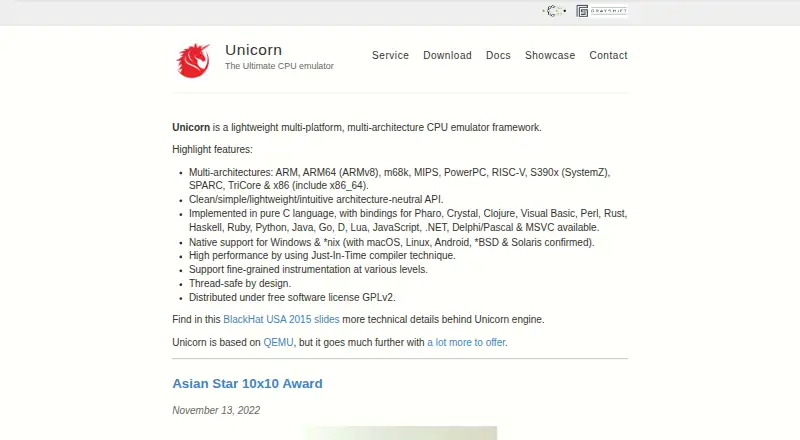
What Unicorn Engine is
Unicorn Engine is a free, open-source framework for emulating CPU operations across multiple processor architectures and host systems. Its targets include ARM, ARM64, m68k, MIPS, PowerPC, RISC-V, S390x, SPARC, TriCore, and x86, including x86_64. It focuses on CPU operations and can emulate raw binary code without needing an executable or a full system image. Implemented in C, it provides an architecture-neutral API and fine-grained instrumentation at multiple levels. The project describes it as thread-safe by design and says it uses a just-in-time compiler technique for performance. Native support is listed for Windows, macOS, Linux, Android, BSD, and Solaris. The main code supports bindings for Haskell, Ruby, Python, Java, Go, Rust, Visual Basic, Pascal, .NET, and MSVC; community bindings include Perl, Clojure, Crystal, D, Lua, Pharo, and JavaScript. The project documents installation from source, software repositories, Python pip packages, and precompiled binaries. Its download page lists version 2.0.1, released November 1, 2022. The framework is distributed under the GPLv2 free software license.
Good
- Supports a broad range of CPU architectures.
- Can emulate raw binary code without a full system image.
- Provides fine-grained instrumentation.
- Thread-safe by design, according to the project.
- Offers multiple language bindings.
Watch out
- The listed download version is 2.0.1, released November 1, 2022.
- Distributed under the GPLv2 license.
Who it suits
Unicorn Engine may suit developers working with CPU emulation, instrumentation, or raw binary code across its supported architectures. Its language bindings offer options for several programming languages.
Verdict
Unicorn Engine provides architecture-neutral CPU emulation with broad target and host coverage. Its API, instrumentation, and language bindings are relevant to developers building tools around supported architectures.
Plans and prices
From Unicorn Engine's own pricing page, checked 8 Oct 2026.
| Plan | Price | What it gives you |
|---|---|---|
| Unicorn Engine | Free | GPLv2 free software license · source code, bindings, sample programs and binaries available |
The facts
Each one read from Unicorn Engine's own pages, with the date it was checked.
What it does
- API
- The framework provides a clean, architecture-neutral API implemented in C.checked 8 Oct 2026
- API and implementation
- The framework is implemented in C and provides an architecture-neutral API.checked 8 Oct 2026
- Architectures
- It supports ARM, ARM64, m68k, MIPS, PowerPC, RISC-V, S390x, SPARC, TriCore, and x86 including x86_64.checked 8 Oct 2026
- CPU architectures
- It supports ARM, ARM64, m68k, MIPS, PowerPC, RISC-V, S390x, SPARC, TriCore and x86, including x86_64.checked 8 Oct 2026
- Download
- The download page lists version 2.0.1, released November 1, 2022, and links to source code and binaries.checked 8 Oct 2026
- Downloads
- The download page identifies version 2.0.1, released November 1, 2022, and offers source code, binaries and a Python package.checked 8 Oct 2026
- Example uses
- The showcase lists products using Unicorn for reverse engineering, debugging, shellcode analysis, fuzzing and emulation.checked 8 Oct 2026
- Installation
- The site documents installation from source, software repositories, Python pip packages, and precompiled binaries.checked 8 Oct 2026
- Instrumentation
- It supports fine-grained instrumentation at various levels.checked 8 Oct 2026
- Language bindings
- The main code supports bindings for Haskell, Ruby, Python, Java, Go, Rust, Visual Basic, Pascal, .NET, and MSVC; community bindings include Perl, Clojure, Crystal, D, Lua, Pharo, and JavaScript.checked 8 Oct 2026
- License
- Unicorn is distributed under the GPLv2 free software license.checked 8 Oct 2026
- Operating systems
- The site confirms native support for Windows, macOS, Linux, Android, *BSD, and Solaris.checked 8 Oct 2026
- Performance
- The site says Unicorn uses a just-in-time compiler technique for high performance.checked 8 Oct 2026
- Product
- Unicorn is a lightweight, multi-platform, multi-architecture CPU emulator framework.checked 8 Oct 2026
- Purpose
- Unicorn is a lightweight, multi-platform, multi-architecture CPU emulator framework.checked 8 Oct 2026
- Scope
- Unicorn focuses on CPU operations and can emulate raw binary code without requiring an executable or full system image.checked 8 Oct 2026
- Support
- The project recommends its mailing list for long conversations, Twitter for quick questions, and email for private contact.checked 8 Oct 2026
- Supported systems
- The site states native support for Windows and Unix-like systems, with macOS, Linux, Android, *BSD and Solaris confirmed.checked 8 Oct 2026
- Thread safety
- The project describes Unicorn as thread-safe by design.checked 8 Oct 2026
Where it runs
- Platform installation
- The site provides Python package installation instructions for Windows, macOS and Linux, and Homebrew instructions for macOS.checked 8 Oct 2026
The full review of Unicorn Engine
Unicorn Engine is a developer framework for running CPU code across a wide range of processor architectures. It suits people building analysis, debugging, fuzzing, or emulation tools; it is not a ready-made emulator for running a complete operating system.
Its strongest case is breadth with a focused scope: one architecture-neutral C API, instrumentation, and multiple ways to integrate it into software. That flexibility comes with the expectation of development work.
Overview
Unicorn handles CPU operations and can run raw binary code without an executable or full system image. That makes it useful for tooling that needs to control or inspect instruction execution without modelling a whole machine. The same focus is its chief limitation: choose a full-system emulator instead if your goal is to boot a guest OS or use a complete virtual device.
Key features
Supported targets include ARM, ARM64, m68k, MIPS, PowerPC, RISC-V, S390x, SPARC, TriCore, and x86, including x86_64. The architecture-neutral API is implemented in C, giving developers a shared interface across processor families rather than requiring a different framework for each target. Unicorn also supports fine-grained instrumentation, debugging tools, and snapshots with restore, useful for examining execution and returning to a saved state.
The project describes Unicorn as thread-safe by design and says it uses just-in-time compilation for performance. Those qualities suit software that needs concurrent use or responsive CPU emulation, but they do not change the framework's CPU-level scope. Bindings cover Haskell, Ruby, Python, Java, Go, Rust, Visual Basic, Pascal, .NET, and MSVC; community bindings add Perl, Clojure, Crystal, D, Lua, Pharo, and JavaScript. This is broad language reach, though using the framework still means integrating it into a developer's own tool.
Installation options include source, software repositories, Python packages, and precompiled binaries. The project showcase points to uses in reverse engineering, debugging, shellcode analysis, fuzzing, and emulation, illustrating the kinds of focused workflows it is built to support.
Pricing
Unicorn Engine costs nothing under the GPLv2 free software license. The free offering includes source code, bindings, sample programs, and binaries; there is no paid tier or trial to weigh against the free plan. The license is a material consideration for developers distributing software that incorporates Unicorn, so review GPLv2 obligations before adopting it in a product.
Platforms
Native host support covers Windows, macOS, Linux, Android, BSD, and Solaris. Python package instructions cover Windows, macOS, and Linux, with Homebrew instructions for macOS. The range is useful for tools intended to run across desktop and mobile hosts, though host support should not be confused with emulating a full operating system on those platforms.
Who it's for
Choose Unicorn if you are building developer tools that need to execute or inspect CPU code across multiple architectures, especially for debugging, reverse engineering, fuzzing, or shellcode analysis. Its API, instrumentation, snapshots, and language bindings give such projects useful building blocks. It is a poor fit for readers seeking a consumer-facing game or device emulator, or anyone who wants to install and run a complete guest system without building a tool around a framework.
Pros and cons
- Pro: Broad processor coverage behind an architecture-neutral API helps developers support several target families through one framework.
- Pro: Fine-grained instrumentation, debugging tools, and snapshot/restore support make execution easier to inspect and revisit.
- Pro: Free GPLv2 distribution includes source, bindings, sample programs, and binaries, with multiple installation routes.
- Con: CPU-only emulation omits the full-system environment needed to boot an operating system or simulate a complete device.
- Con: Its C framework and development-oriented integrations require software work; it is not a turnkey emulator for general users.
- Con: GPLv2 licensing may be a constraint for some software distribution plans.
Alternatives
Emulator Software is the broader category to browse if you are still comparing emulator types.
- Android Emulator is a better fit for Android development when you want an emulator bundled with Android Studio; it is free and specifies 16 GB RAM and 16 GB disk space.
- Azahar is a free, open-source 3DS emulator for readers whose target is 3DS software rather than CPU-level tooling.
- PPSSPP is the more relevant choice for PSP emulation, with a free plan across its supported platforms.
- VICE is another free GPL-based emulator option for readers seeking a different emulator rather than a CPU framework.
- Genymotion Desktop suits Android emulation needs where a personal-use free edition or a paid educational plan is preferable.
- MAME is worth considering for its distinct emulator focus; its free GPL-2.0-or-later plan generally does not include ROMs or copyrighted software.
- Bochs is a free alternative for users prepared to install a guest OS themselves; it has no setup wizard, and some features require compiling from source.
- Dolphin is a free GPLv2+ alternative for readers whose needs align with that emulator rather than raw CPU-code execution.
Verdict
Unicorn Engine is the right choice for developers who need a free, cross-platform CPU emulation framework with broad architecture coverage and useful execution controls. Its central advantage is combining that breadth with an architecture-neutral API; look elsewhere if you need a complete system emulator or a tool that works without integration.
Getting started
- Open the Unicorn Engine website
- Choose source, repository, Python package, or precompiled binary installation
- Select a supported host such as Windows, macOS, Linux, Android, BSD, or Solaris
- Install the framework and required language binding
- Use the API with a supported CPU architecture
Questions
What does Unicorn Engine cost?
Unicorn Engine is free and distributed under the GPLv2 free software license.
Which CPU architectures are supported?
Supported targets include ARM, ARM64, m68k, MIPS, PowerPC, RISC-V, S390x, SPARC, TriCore, and x86, including x86_64.
Which operating systems can host it?
Native support is listed for Windows, macOS, Linux, Android, BSD, and Solaris.
Can it emulate raw binary code?
Yes. Its CPU-focused scope allows raw binary code emulation without an executable or full system image.
How can it be installed?
The project documents source installation, software repositories, Python pip packages, and precompiled binaries.
Alternatives to Unicorn Engine
- 1

PPSSPP
Free planOpen sourceAndroidiOSAPILinux8.6$4.99 one-time - 2
Vita3K
Free planOpen sourceAndroidLinuxmacOSWindows7.7Free plan - 3

QEMU
Free planOpen sourceAPILinuxmacOSSelf-hosted7.6Free plan - 4
Snes9x
Free planAndroidWebLinuxmacOS7.6Free plan - 5

DOSBox-X
Free planOpen sourceLinuxmacOSSelf-hostedWindows7.4Free plan - 6

Genymotion Desktop
Free planLinuxmacOSWindows7.4From $49 a year