Ubuntu Startup Disk Creator
Ubuntu Startup Disk Creator writes an Ubuntu image to a USB stick to make bootable installation media.
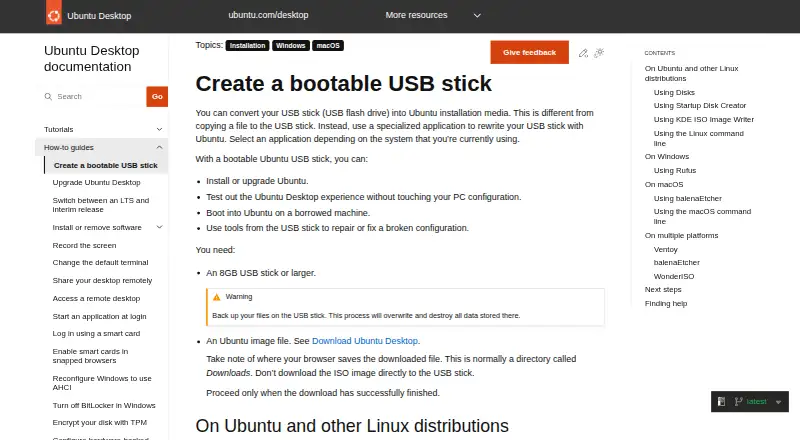
What Ubuntu Startup Disk Creator is
Ubuntu Startup Disk Creator writes an Ubuntu image to a USB stick to make bootable installation media. You can use that stick to install or upgrade Ubuntu, try Ubuntu Desktop without changing the PC configuration, start Ubuntu on a borrowed computer, or run repair tools. The app is included in the extended Ubuntu Desktop installation and is available through App Center or with `sudo apt install usb-creator-gtk`. It may find the Ubuntu image and USB device automatically; otherwise, you can locate the image and select a device from the available list. A progress bar tracks writing, and the app displays “Installation Complete” when it finishes. The guide recommends a USB stick of at least 8 GB. Writing the image erases all data on the selected USB device, so save anything you need first. The tool is intended for Ubuntu and Ubuntu-based images and may not work correctly with other Linux distributions or operating systems. It is free to use on Linux.
Good
- Free to use as part of Ubuntu Desktop.
- Can detect the image and USB device automatically.
- Supports Ubuntu installation, upgrades, trials, and repair use.
- Shows writing progress and completion status.
Watch out
- Writing the image erases the selected USB device.
- Requires a USB stick of at least 8 GB.
- May not work correctly with non-Ubuntu images.
- Available for Linux, not Windows or macOS.
Who it suits
It suits Linux users who need Ubuntu boot media for installation, trying Ubuntu, using a borrowed machine, or repair work. It is also an option for people who want to install or upgrade Ubuntu from a USB stick.
Verdict
Ubuntu Startup Disk Creator covers the core task of making a bootable Ubuntu USB, with automatic selection and progress feedback. Check the image compatibility and USB data-loss warning before writing.
Plans and prices
From Ubuntu Startup Disk Creator's own pricing page, checked 10 Oct 2026.
| Plan | Price | What it gives you |
|---|---|---|
| Free | Free | Part of the extended Ubuntu Desktop installation · writes Ubuntu and Ubuntu-based images to USB |
The facts
Each one read from Ubuntu Startup Disk Creator's own pages, with the date it was checked.
What it does
- Availability
- Startup Disk Creator is part of the extended Ubuntu Desktop installation and can be installed from App Center or with `sudo apt install usb-creator-gtk`.checked 10 Oct 2026
- Completion
- A progress bar appears during writing, and the application announces “Installation Complete” when it finishes.checked 10 Oct 2026
- Data loss
- Writing the image destroys data currently stored on the selected USB device.checked 10 Oct 2026
- Image compatibility
- The tool is intended for Ubuntu images and distributions based on Ubuntu; it might not work correctly with other Linux distributions or operating systems.checked 10 Oct 2026
- Image selection
- The app may detect the Ubuntu image and USB device automatically; otherwise, users can locate the image and select a device from the available list.checked 9 Oct 2026
- Intended users
- Ubuntu Desktop is described as suitable for home users, developers, and enterprise users.checked 10 Oct 2026
- Progress
- The app shows a progress bar while writing and announces “Installation Complete” when finished.checked 9 Oct 2026
- Purpose
- Startup Disk Creator writes an Ubuntu image to a USB stick to create bootable installation media.checked 10 Oct 2026
- Security
- Ubuntu’s platform security page says its pre-built boot binaries, except the initrd, are signed with Canonical’s UEFI certificate.checked 10 Oct 2026
- Selection
- The application can detect the Ubuntu image and USB device, or users can locate an image and choose a device from the available list.checked 10 Oct 2026
- Support
- Ubuntu’s older Startup Disk Creator tutorial points users who need help to Ubuntu Discourse, Ask Ubuntu, and IRC-based support.checked 10 Oct 2026
- USB requirement
- The guide requires a USB stick with at least 8 GB of storage.checked 10 Oct 2026
- Use cases
- A bootable Ubuntu USB can be used to install or upgrade Ubuntu, try Ubuntu Desktop without changing the PC configuration, boot Ubuntu on a borrowed machine, or run repair tools.checked 9 Oct 2026
- Uses
- A bootable USB can install or upgrade Ubuntu, try Ubuntu without changing PC configuration, boot Ubuntu on a borrowed machine, or help repair a broken configuration.checked 10 Oct 2026
Money
- Free use
- The Ubuntu project says users can download and use Ubuntu free of charge.checked 10 Oct 2026
The company
- Maker
- Canonical is the publisher of Ubuntu.checked 10 Oct 2026
Alternatives to Ubuntu Startup Disk Creator
- 1
postmarketOS
Free planAndroidLinux6.6Free plan - 2
iodéOS
Free planAndroid6.2From €9 a year - 3
Ubuntu Touch
Free planAndroidSelf-hosted6.1Free plan - 4
Linux Kodachi
Free planLinux5.8From $99 a year - 5
Qubes OS
Free planLinux5.8Free plan - 6
Whonix
Free planLinuxmacOSWindows5.5Free plan