Typeahead
Typeahead provides inline AI autocomplete while you write across apps on a Mac.
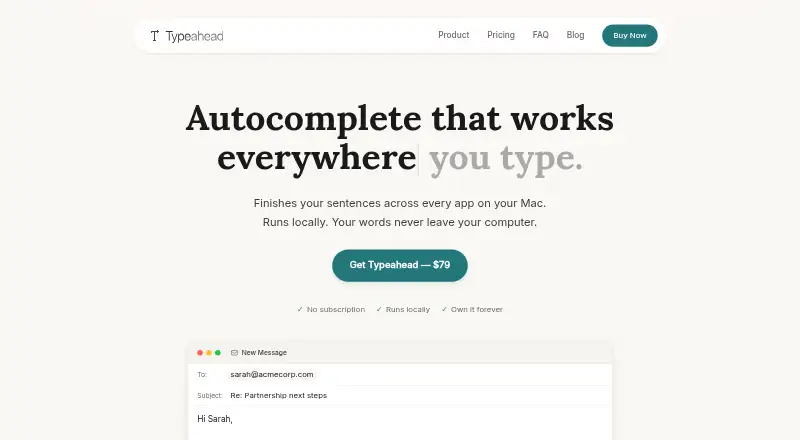
What Typeahead is
Typeahead provides inline AI autocomplete while you write across apps on a Mac. Suggestions are generated on-device with a local model, and pressing Tab accepts one. After setup, suggestions work without an internet connection. Compatibility listings cover browsers, email, documents and notes, messaging apps and developer tools, including Safari, Gmail, Slack, Notion and VS Code. It works at the system level in browsers without a browser extension. Typeahead requires macOS 14 or later, an Apple Silicon or Intel Mac, at least 8 GB of RAM and about 3 GB of free disk space for its model. macOS Accessibility permission lets it read active text fields and insert suggestions. Password managers, wallets and finance apps are suppressed unless explicitly enabled. The app does not work in virtual machines or remote desktop windows, and some apps may not expose text fields. Noats Inc. develops it. The one-time Typeahead plan costs 79.00 USD, including unlimited usage, all language models, lifetime free updates and a 30-day money-back guarantee.
Good
- On-device suggestion generation
- Works offline after setup
- System-level browser integration
- Unlimited usage with all models
- No recurring fees
Watch out
- Requires macOS 14 or later
- Needs about 3 GB disk space
- No virtual machine or remote desktop support
- Some apps may hide text fields
Who it suits
Typeahead suits Mac users who write frequently in email, messaging, documents or routine communications. It requires a compatible Mac and Accessibility permission.
Verdict
Typeahead focuses on private, local autocomplete across many Mac applications. Its one-time purchase includes ongoing updates, but compatibility depends on macOS permissions, hardware and individual apps.
Plans and prices
From Typeahead's own pricing page, checked 4 Oct 2026.
| Plan | Price | What it gives you |
|---|---|---|
| Typeahead | $79, paid once | Unlimited usage · all language models included · free updates for life · 30-day money-back guarantee · One-time purchase; no recurring fees. |
The facts
Each one read from Typeahead's own pages, with the date it was checked.
Where it runs
- Browser extension
- Typeahead says it works at the system level in browsers without a browser extension.checked 4 Oct 2026
- Protected apps
- Password managers, wallets, and finance apps are suppressed by default; changing that requires explicit opt-in.checked 4 Oct 2026
- Supported Mac
- Typeahead requires macOS 14 or later, Apple Silicon or Intel, at least 8 GB RAM, and about 3 GB of free disk space for the AI model.checked 4 Oct 2026
The company
- Company privacy policy
- The policy says the app has no telemetry, crash reporting, analytics, or usage tracking, while the website uses analytics and advertising services.checked 4 Oct 2026
- Maker
- Typeahead is developed and operated by Noats Inc.checked 4 Oct 2026
What it does
- Integrations and compatibility
- The compatibility page lists browsers, email, documents and notes, messaging apps, and developer tools; examples include Safari, Gmail, Slack, Notion, and VS Code.checked 4 Oct 2026
- Intended users
- The maker describes Typeahead as useful for high-volume writing such as email, messaging, documents, and routine communication.checked 4 Oct 2026
- License data
- At activation, the app sends its licensing server the license key, the Mac's hardware UUID, and the Mac's name, and checks the license again at startup.checked 4 Oct 2026
- Local processing
- Suggestions are generated on-device using a local model; the app says your writing is not sent to a server.checked 4 Oct 2026
- Notable limits
- Typeahead says it does not work in virtual machines or remote desktop windows, and some apps may not expose text fields through macOS Accessibility.checked 4 Oct 2026
- Offline use
- After setup, suggestions work without an internet connection.checked 4 Oct 2026
- Permissions
- Typeahead requires macOS Accessibility permission to read active text fields and insert suggestions across apps.checked 4 Oct 2026
- Support
- Support is available by email at [email protected], and the support page says replies typically arrive within 24 hours on business days.checked 4 Oct 2026
- What it does
- Typeahead shows inline AI autocomplete suggestions as you type across apps on your Mac, and Tab accepts a suggestion.checked 4 Oct 2026
Alternatives to Typeahead
- 1

RewritePal
Free planOpen sourceAndroidiOSWebExtension8.4From $34.99 a year - 2
QuillBot
Free planAndroidiOSWebExtension8.3Free plan - 3
StealthWriter
Free planAndroidiOSWeb8.1From $20 a month - 4

Sapling
Free planWebAPIExtensionSelf-hosted7.4From $144 a year - 5

Rewriter AI
WebAPILinuxmacOS7.3From $6.40 a month - 6

Paraphraser.io
AndroidiOSWebAPI6.8From $0.99 a year