
TryItOn
TryItOn uses image-processing AI to place garments and other items onto a user's photo for a virtual try-on preview.
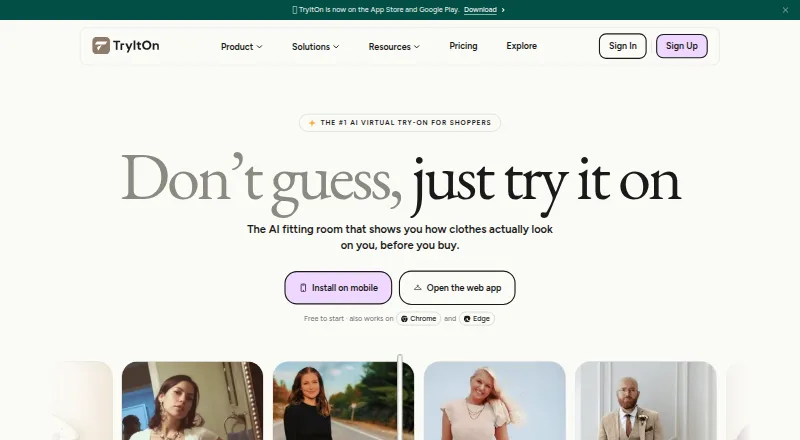
What TryItOn is
TryItOn uses image-processing AI to place garments and other items onto a user's photo for a virtual try-on preview. Users can upload their own picture and select an online item or supply an image of a garment. Listed categories include clothes, shoes, eyewear, headwear, hairstyles, jewelry, and tattoos. Saved previews go into a digital wardrobe, where users can organize items, assemble outfits, make wishlists, and compare looks. A browser extension is described as working on any storefront, with examples including Zalando, Amazon, Farfetch, Zara, Adidas, and Nike. For Shopify stores, an app can sync product catalogs and add a try-on block to product pages without theme code. Developers can use an iframe widget or REST API, with SDKs for Node.js, Python, PHP, Ruby, and Go. The free Starter plan includes three try-ons; Plus costs $5 per month billed annually and includes 50. The privacy notice says uploaded photos and garments are processed by third-party AI providers, and personal information is not sold. It also describes encryption in transit and access controls.
Good
- Try-ons cover clothing, accessories, hairstyles, and tattoos.
- Digital wardrobe supports outfits, wishlists, and comparisons.
- Browser extension is described as working on any storefront.
- Developer access includes REST API and SDKs.
Watch out
- Free Starter plan includes three try-ons.
- Uploaded photos and garments are processed by third-party AI providers.
- Plus costs $5 per month billed annually.
Who it suits
TryItOn may suit online shoppers, stylists, event planners, affiliate creators, resellers, and brands seeking virtual try-on previews. Its Shopify integration and developer tools also serve stores or developers adding try-on experiences.
Verdict
TryItOn combines photo-based previews with wardrobe organization and options for storefronts and developers. Review the try-on allowances and the stated third-party photo processing before choosing a plan.
Plans and prices
From TryItOn's own pricing page, checked 14 Oct 2026.
| Plan | Price | What it gives you |
|---|---|---|
| Starter | Free | 3 try-ons · small wardrobe · basic support |
| Plus | $5 a month | 50 try-ons · medium wardrobe · priority support · annually |
| Shopify Starter | $16 a month | 150 try-ons/month · $0.19 per extra try-on capped at $50/month · analytics · newsletter capture · 7-day free trial · annually; $199 billed yearly |
| Pro | $16 a month | 250 try-ons · unlimited wardrobe · priority support · annually |
| Shopify Growth | $41 a month | 500 try-ons/month · $0.16 per extra try-on capped at $100/month · analytics · priority support · 7-day free trial · annually; $499 billed yearly |
| Shopify Pro | $166 a month | 2,500 try-ons/month · $0.14 per extra try-on capped at $200/month · remove branding · dedicated support · 7-day free trial · annually; $1,999 billed yearly |
| Enterprise | Priced on request | SSO/SAML · GDPR · dedicated success manager |
The facts
Each one read from TryItOn's own pages, with the date it was checked.
What it does
- API access control
- Developer site keys can be restricted to an allow-list of domains.checked 29 Sep 2026
- API image inputs
- API images may be supplied as public URLs or base64 data URLs.checked 14 Oct 2026
- API models
- The API provides clothing, hairstyle and tattoo endpoints using asynchronous job submission and status polling.checked 14 Oct 2026
- Audience
- The maker describes TryItOn for online shoppers, returners, wedding and event planners, stylists, affiliate creators, resellers, and brands.checked 29 Sep 2026
- Chrome usage
- The Chrome listing shows 78 users, version 7.0.0 and an August 18, 2026 update.checked 14 Oct 2026
- Developer API
- Developers can use an iframe widget or REST API, with SDKs listed for Node.js, Python, PHP, Ruby, and Go.checked 29 Sep 2026
- Digital wardrobe
- The wardrobe stores try-ons, supports outfit mixing, restyling, comparisons and sharing.checked 14 Oct 2026
- Documentation depth
- The documentation includes setup, SDK installation, API fundamentals, endpoint references, parameters, moderation levels and quickstarts.checked 14 Oct 2026
- Garment types
- The site lists try-ons for clothes, shoes, eyewear, headwear, hairstyles, jewelry, and tattoos.checked 29 Sep 2026
- Google Play availability
- The Android app listing shows 100+ downloads and in-app purchases.checked 14 Oct 2026
- Google Play data disclosure
- The Android listing says no third-party sharing is declared, data is encrypted in transit and deletion requests are supported.checked 14 Oct 2026
- Limit: realism still developing
- An independent Reddit builder post describes realism and fit as still improving and calls the extension a work in progress.checked 14 Oct 2026
- Official SDKs
- Open-source client libraries are provided for Node.js/TypeScript, Python, PHP, Ruby and Go.checked 14 Oct 2026
- Photo input
- Users can upload a photo of themselves and select an online item or upload their own garment image.checked 29 Sep 2026
- Photo privacy
- The privacy notice says uploaded photos and garments are processed by third-party AI providers to deliver AI features and that the company does not sell personal information.checked 29 Sep 2026
- Photo workflow
- Users upload a full-body photo, select or upload an item, receive an AI rendering, and can save or share the result.checked 14 Oct 2026
- Praise: generation speed
- A Trustpilot reviewer reported outfit generation in roughly 10 seconds and rated the service 9/10.checked 14 Oct 2026
Money
- API output and billing
- Each output image costs one credit, failed jobs are not charged, and result URLs remain valid for 72 hours.checked 14 Oct 2026
- Google Play free access
- Google Play says new users receive one free AI try-on, with additional use through subscriptions or one-time purchases.checked 14 Oct 2026
Where it runs
- Browser extension
- The extension lets shoppers activate try-on on garments from online storefronts including major marketplaces.checked 14 Oct 2026
The company
- Company identity
- The About page describes TryItOn as a team of designers, AI researchers and engineers and identifies Tobias Scharl as co-founder.checked 14 Oct 2026
- Company scale claims
- The company reports more than 100,000 outfits tried, over 20 supported storefronts and a claimed 65% average reduction in returns.checked 14 Oct 2026
- Headquarters
- Bodenwöhr, Bavaria, Germanychecked 23 Sep 2026
- Maker location
- The Chrome Web Store lists developer Ramona Scharl at Max-Reger-Platz 6, Bodenwöhr, Germany.checked 14 Oct 2026
The full review of TryItOn
TryItOn is a photo-based virtual try-on app with a digital wardrobe, plus tools for Shopify stores and developers. It best suits shoppers who want to compare looks across retailers, and merchants who need a try-on option on product pages. Its free tier is tightly capped, and anyone uploading photos should weigh the stated third-party AI processing.
Overview
TryItOn uses image-processing AI to map garments onto a photo of the user. Shoppers can choose an online item or upload their own garment image; supported categories span clothes, shoes, eyewear, headwear, hairstyles, jewelry and accessories, and tattoos. That breadth makes it useful for more than assembling outfits, though the core experience depends on having a suitable photo to upload.
Previews can be saved to a digital wardrobe, where users can organize items, build outfits, create wishlists and compare looks. The wardrobe gives repeat shoppers a way to keep track of possibilities instead of treating every try-on as a one-off.
Key features
Shopping and wardrobe tools
The browser extension is described as working on any storefront, with Zalando, Amazon, Farfetch, Zara, Adidas and Nike among the examples. That broad compatibility is appealing for shoppers who browse across retailers rather than staying inside one store. It is not a substitute for checking a garment in person: TryItOn creates a photo-based preview.
Tools for stores and developers
The Shopify app syncs a store’s product catalog and adds a try-on block to product pages without theme code. Its widget can also sync newsletter sign-ups to Mailchimp, Klaviyo, Omnisend or Shopify customers. This gives merchants a relatively direct way to put previews on product pages, while the plan quotas still matter for stores with steady traffic.
Developers can embed an iframe widget or use a REST API, with SDKs for Node.js, Python, PHP, Ruby and Go. Site keys can be limited to an allow-list of domains, a useful control when an integration should only run on approved sites.
Privacy and support
The privacy notice says uploaded photos and garments are processed by third-party AI providers to deliver AI features, and that TryItOn does not sell personal information. It describes encryption in transit and access controls, and says personal information is not retained for more than 14 days after account termination when no purpose requires it. Users who are uncomfortable with third-party photo processing should look for an option that better fits their privacy expectations.
Starter includes basic support; Plus and Pro include priority support. That distinction gives higher-volume users a reason to upgrade beyond the added try-on allowance.
Pricing
TryItOn has a free plan and paid plans from $5 per month billed annually. Personal plans are priced in USD:
- Starter: free, with 3 try-ons, a small wardrobe and basic support. It is suitable for a brief introduction, but three previews leave little room for regular comparison.
- Plus: $5 a month, billed annually, with 50 try-ons, a medium wardrobe and priority support. This is the practical step up for occasional shoppers who outgrow the free cap.
- Pro: $16 a month, billed annually, with 250 try-ons, an unlimited wardrobe and priority support. Frequent shoppers or stylists who need room to save many items are the clearest fit.
Shopify plans include a 7-day free trial and monthly try-on quotas, with extra-use charges capped each month:
- Shopify Starter: $16 a month, billed annually; $199 billed yearly. It includes 150 try-ons/month, then $0.19 per extra try-on, capped at $50/mo. This suits a smaller store testing the feature at modest volume.
- Shopify Growth: $41 a month, billed annually; $499 billed yearly. It includes 500 try-ons/month, then $0.16 per extra try-on, capped at $100/mo. The larger allowance and lower overage rate better suit a store expecting more use.
- Shopify Pro: $166 a month, billed annually; $1,999 billed yearly. It includes 2,500 try-ons/month, then $0.14 per extra try-on, capped at $200/mo. It is aimed at stores that need substantially more monthly capacity.
- Enterprise: custom pricing, with SSO/SAML, GDPR and a dedicated success manager.
The Shopify plans’ annual billing and overage caps are important budget terms; the free 7-day trial is short for judging a full buying cycle. Personal plans have much smaller allowances than the Shopify tiers, so merchants should compare the store plans rather than assume the low entry price covers storefront use.
Platforms
TryItOn lists Android, iOS, macOS, Windows and web, as well as a browser extension and API access. That range accommodates personal use across devices and integrations for stores or custom products.
Who it's for
The maker describes TryItOn for online shoppers, people managing returns, wedding and event planners, stylists, affiliate creators, resellers and brands. Shoppers benefit most if they want to compare products from different storefronts and keep a wardrobe of candidate looks. Shopify merchants get catalog syncing and a no-theme-code page block; developers get an API, iframe and several SDKs. It is less compelling for someone who only wants an occasional preview, given the free cap of three, or for anyone unwilling to send uploaded images through third-party AI providers.
Pros and cons
- Pros: Try-ons cover categories beyond apparel, including hairstyles and tattoos, so the feature set can serve varied planning needs.
- Pros: The digital wardrobe supports outfit building, wishlists and comparison, giving saved previews a continuing use.
- Pros: Shopify catalog syncing, a page block without theme code, and multiple developer integration routes suit both store owners and technical teams.
- Cons: The free personal plan allows only 3 try-ons, which is too restrictive for ongoing comparison.
- Cons: Shopify overages are charged per try-on, even with monthly caps, so high usage can raise costs beyond the base plan.
- Cons: Uploaded photos and garments are processed by third-party AI providers, a meaningful drawback for privacy-conscious users.
Alternatives
Compare the Virtual Try-On Software category if you want to survey more options before settling on a tool.
- Photta is worth considering for a credit-based workflow: its free start includes 20 credits, with no credit card required, and its listed platforms are web and API.
- Voilae is another freemium web option; its free plan allows 15 try-ons per month and includes a try-on analytics dashboard.
- RealityTry may suit a Shopify merchant who wants a free starting allowance of 20 credits, one-click installation, basic analytics and standard support.
- See On Me is another web-based alternative with a free plan and free trial.
- Fittingbox Virtual Try-On is a paid option without a free plan; its Bronze tier starts at $59 a month and supports up to 10 active products.
- TryOnCloud offers a free trial plan with 10 try-ons per month and no card required, making it an option for a small trial allowance.
- WEARFITS is another option for retailers, with flexible pricing starting at €14 per product monthly.
- PICTOFiT is a paid alternative available on Android, iOS and web.
Verdict
TryItOn is a strong fit for shoppers who want a broad set of photo previews backed by a reusable wardrobe, and for Shopify stores or developers that need integration options. Its main advantage is combining consumer shopping tools with merchant and API routes; its clearest reasons to look elsewhere are the three-try-on free cap and third-party photo processing. Choose a paid personal plan for regular use, or a Shopify tier when storefront deployment is the goal.
Getting started
- Visit https://tryiton.now/ and choose the Starter, Plus, or Pro plan.
- Upload a photo of yourself.
- Select an online item or upload an image of your own garment.
- Save previews to the digital wardrobe to organize items or assemble outfits.
- For Shopify, use the app to sync a catalog and add a try-on block; for development, use the iframe widget or REST API.
Limits worth knowing
Starter includes three try-ons. Plus costs $5 per month billed annually and allows 50 try-ons; Pro costs $16 per month billed annually and allows 250. Shopify plans include seven-day free trials and monthly quotas: 150, 500, or 2,500 try-ons depending on the plan, with extra-try-on charges subject to monthly caps.
Questions
Is there a free plan?
Yes. Starter is free and includes three try-ons, a small wardrobe, and basic support.
How much do the individual plans cost?
Plus costs $5 per month billed annually and includes 50 try-ons. Pro costs $16 per month billed annually and includes 250 try-ons.
Which platforms does TryItOn support?
The listed platforms are Android, iOS, macOS, web, Windows, API, and browser extension.
What can users try on?
Listed categories include clothes, shoes, eyewear, headwear, hairstyles, jewelry, and tattoos.
Does it integrate with Shopify?
Yes. The Shopify app syncs a store catalog and adds a try-on block to product pages without theme code. Its widget can sync newsletter sign-ups to Mailchimp, Klaviyo, Omnisend, or Shopify customers.
How does TryItOn handle uploaded photos?
The privacy notice says photos and garments are processed by third-party AI providers to deliver AI features, and that the company does not sell personal information.
Alternatives to TryItOn
- 1

Photta
Free planAndroidiOSWebAPI8.0From $140 a year - 2

TryOn Virtual
Free planAndroidiOSWebAPI8.0From $15 a month - 3
Fittingbox Virtual Try-On
AndroidiOSWebAPI7.7From $59 a month - 4
WeShopAI Virtual Try-On
AndroidiOSWebAPI7.5From $9.99 a month - 5
RealityTry
Free planWeb7.3From $19.99 a month - 6
Voilae
Free planWeb7.3From $13.99 a month