
TripBuddy
TripBuddy turns a sentence about a destination into a day-by-day itinerary for a group trip.
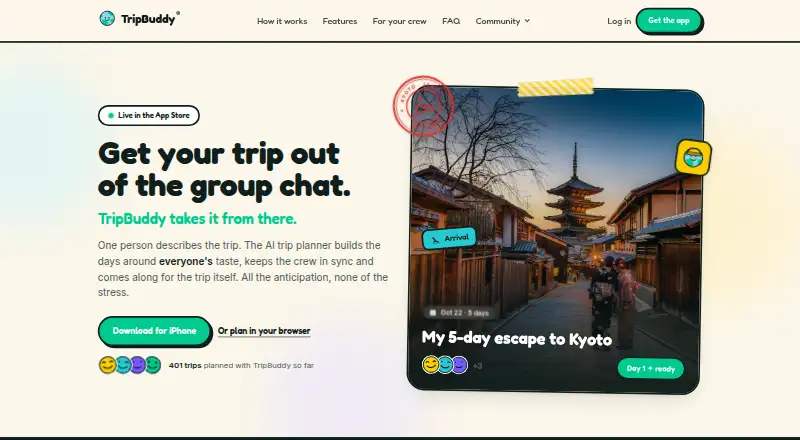
What TripBuddy is
TripBuddy turns a sentence about a destination into a day-by-day itinerary for a group trip. It checks stops, addresses, opening hours and travel times against map data, then lets people share a plan, swap stops, shift days and comment. People can view a shared plan without an account. When rain, closures or late trains disrupt plans, users can ask Buddy to rebuild the day. The service also provides map views, booking links and calendar export, plus on-trip tools such as lock-screen updates, Live Activities, widgets, spoken daily summaries, a phrasebook and currency tools. TripBuddy has Android, iOS and web versions, and its plan is free. Planning, place details, photos and the read-aloud guide require an internet connection. Support is by email, with responses promised within two business days. TripBuddy says it uses external services for AI, sign-in, place data, trip photography, maps and speech recognition. Its linked booking partners are Booking.com and GetYourGuide; it says it currently earns no commission on them.
Good
- Free plan covers every trip and crew size.
- Shared plans can be viewed without an account.
- Users can collaborate by moving or swapping stops.
- Includes calendar export and map views.
- Offers tools for replanning disrupted days.
Watch out
- Planning and place details require a connection.
- Photos and read-aloud guides require a connection.
- Support is by email, with responses within two business days.
Who it suits
TripBuddy may suit couples, friend groups, families and solo travelers who want a day-by-day itinerary and shared planning tools. Its connection-dependent planning and place details may be a consideration for travelers expecting to plan offline.
Verdict
TripBuddy combines itinerary creation, group collaboration and on-trip tools in a free service. Its offline limits matter: planning, place details, photos and the read-aloud guide all require a connection.
Plans and prices
From TripBuddy's own pricing page, checked 30 Sep 2026.
| Plan | Price | What it gives you |
|---|---|---|
| Free | Free | every trip · every day · any crew size · Free — all of it. |
The facts
Each one read from TripBuddy's own pages, with the date it was checked.
What it does
- Booking links
- Place pages can include links for stays, tables and tickets where a place accepts bookings.checked 30 Sep 2026
- Booking partners
- The privacy policy names Booking.com and GetYourGuide as linked booking partners and says TripBuddy earns no commission on them today.checked 30 Sep 2026
- Calendar export
- Yeschecked 21 Sep 2026
- External services
- TripBuddy says it uses OpenRouter and Anthropic Claude for AI, Google for sign-in and place data, Unsplash for trip photography, OpenStreetMap for web maps, and Apple for iOS maps and speech recognition.checked 30 Sep 2026
- Group collaboration
- Everyone can open the same shared plan, swap stops, shift days and comment, without an account to view it.checked 30 Sep 2026
- Intended users
- The product is presented for couples, friend groups, families and solo travelers.checked 30 Sep 2026
- Map view
- Yeschecked 21 Sep 2026
- Offline limitation
- Planning, place details, photos and the read-aloud guide require a connection.checked 30 Sep 2026
- On-trip tools
- The service provides lock-screen updates, Live Activities, widgets, spoken daily summaries, phrasebook and currency tools.checked 30 Sep 2026
- Security controls
- Traffic uses HTTPS and Cloudflare, data is stored in encrypted PostgreSQL in Frankfurt, and database row-level security restricts trip access.checked 30 Sep 2026
- Security limits
- TripBuddy says it has no SOC 2 or ISO 27001 certification, no external penetration test, no SLA, no self-hosting, no customer-managed keys and no automated database backups on its current plan.checked 30 Sep 2026
- Support
- Support is provided by email, with responses promised within two business days.checked 30 Sep 2026
- Verified itineraries
- It checks stops, addresses, opening hours and travel time against real map data.checked 30 Sep 2026
- What it does
- TripBuddy turns one sentence about a destination into a day-by-day group-trip itinerary.checked 30 Sep 2026
Money
- Collaborative planning
- Yeschecked 21 Sep 2026
- Free plan
- Yeschecked 21 Sep 2026
- Mid-trip replanning
- Users can ask Buddy to rebuild the day when rain, closures or late trains change plans.checked 30 Sep 2026
The company
- Headquarters
- Sheridan, Wyoming, United Stateschecked 28 Sep 2026
Where it runs
- Mobile app
- Yeschecked 21 Sep 2026
The full review of TripBuddy
TripBuddy turns a destination prompt into a day-by-day itinerary that a group can edit together. It is best suited to travelers who want shared planning and flexibility when the day changes. Its main trade-off is that key planning and reference tools need an internet connection.
Overview
TripBuddy builds a group-trip itinerary from one sentence, then checks stops, addresses, opening hours and travel times against map data. That grounding can make the first draft more useful than a loose list of ideas, though it does not remove the need for travelers to judge whether the schedule suits them. A shared plan can be viewed without an account, and collaborators can swap stops, move days and comment.
When rain, closures or late trains disrupt a schedule, users can ask Buddy to rebuild the day. This is a practical strength for flexible trips, while the connection requirement is a drawback for travelers who need to consult details in areas with unreliable service. Planning, place details, photos and the read-aloud guide all require a connection.
Key features
Planning and collaboration
The one-sentence starting point reduces the work of assembling an initial itinerary. Map-data checks give the suggested stops and timing a practical basis, and collaborative editing helps a group keep one current plan instead of juggling separate versions. Map view and calendar export provide additional ways to inspect or carry the itinerary.
Tools during the trip
Lock-screen updates, Live Activities and widgets keep trip information close at hand. Spoken daily summaries, a phrasebook and currency tools add useful travel-day support, but the read-aloud guide needs a connection. The same limitation applies to photos and place details, so TripBuddy is not a dependable offline reference.
Pricing
TripBuddy's Free plan costs nothing, billed Free — all of it. It includes every trip, every day and any crew size, an unusually broad allowance for people planning several trips or coordinating a large group. There is no stated trip, duration or group-size cap to weigh against the free price. Because the service is free, it is an easy fit for budget-conscious travelers who accept its online dependence.
Platforms
TripBuddy is available on Android, iOS and the web, with a mobile app, map view, booking links and calendar export. This range suits groups using different devices, while travelers should not mistake its mobile tools for offline access: planning, place details, photos and the read-aloud guide still require connectivity.
Who it's for
Couples, friend groups and families can use shared editing to coordinate a common itinerary without requiring every viewer to make an account. Solo travelers can also use the prompt-based planning and on-trip tools. It is less suitable for anyone who needs plans and reference details to remain available offline, or for organizations that require formal security assurances such as SOC 2 or ISO 27001 certification.
Pros and cons
- Pros: The free plan covers every trip and any crew size, so groups need not limit participation or itinerary count to avoid a subscription.
- Pros: Itinerary checks against map data and shared editing give groups a practical starting plan they can revise together.
- Pros: Users can ask Buddy to rebuild the day's plan when weather, closures or delays intervene.
- Cons: Planning, place details, photos and the read-aloud guide require a connection, limiting usefulness offline.
- Cons: TripBuddy has no SOC 2 or ISO 27001 certification, external penetration test, SLA, self-hosting, customer-managed keys or automated database backups on its current plan. Those gaps may rule it out for teams with stringent security or continuity requirements.
Alternatives
AI Travel Planners is the broader category to browse if TripBuddy's particular balance of group collaboration and offline limits does not fit.
- Pilot is another free option on Android, iOS and the web. Choose it if importing files and reservations, or its route and map tools, better match your planning needs.
- NxVoy Trips has a free plan capped at five chats and 50 messages per session, plus a Premium plan for full access to Shasa features. Choose it if that chat-based allowance and feature set suit you better.
- Stippl offers a free plan with unlimited trips, destinations, activities, co-planners, expenses and journal entries, plus AI generation, PDF export and calendar sync. Choose it if expense tracking and journaling matter alongside itinerary planning.
- Dereho offers an iOS Explorer plan with an itinerary generator, AI travel-guide chat, curated city guides, maps, phrasebook and daily quiz; Dereho Pro costs $4.99 a month. Choose it if you want that iOS-focused city-guide and chat approach.
- Navly offers an iOS and macOS free tier with AI planning, map and location context, and itinerary building, as well as a 2.99 USD one-time 24-hour Day Pass that does not renew automatically. Choose it if a short paid access pass suits your trip better.
- iTinyri has a free plan with 10 daily AI chats, two solo trips, two group trips and two travel documents. Choose it if those bounded allowances are enough and you want a web or iOS option.
- Mindtrip offers web and iOS plans with distinct admin, message, indexed-page and guide allowances. Choose it if those team and publishing limits align better with your needs.
- Layla is a web, iOS and Android alternative with a Premium plan offering unlimited app access.
Verdict
TripBuddy is a strong fit for couples, families and friend groups who want to build and revise a shared itinerary without paying per trip or limiting group size. Its map-grounded planning and mid-trip replanning are the clearest reasons to choose it. Look elsewhere if offline access is essential or if your organization requires formal security certifications, backups or contractual service commitments.