TinyWall
TinyWall is a free, open-source firewall for Windows, intended for private users, family PCs, and small-office or home-office computers.
What TinyWall is
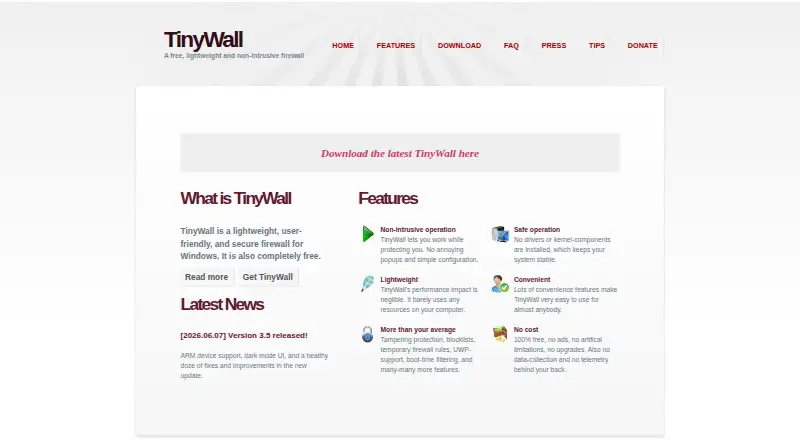
TinyWall is a free, open-source firewall for Windows, intended for private users, family PCs, and small-office or home-office computers. It avoids real-time popups for blocked actions and provides several ways to whitelist applications. Controls include whitelist learning, timed rules, quick modes, IPv6 support, and integrated port and domain blocklists. Users can view established and blocked connections as well as open ports. TinyWall also protects Windows Firewall settings from modification and includes hosts-file protection and boot-time filtering. Its maker says it installs no drivers or kernel components. After installation, it blocks most network communication until needed programs are whitelisted, and the maker advises against installing it over a remote connection. The latest version supports desktop Windows 11 and Windows 10 version 21H2 (build 19044) or newer; version 3.2.5 also supports Windows 8.1, 8, 7, and Windows Server 2019, 2016, and 2012 R2. TinyWall does not include HIPS, anti-malware, or antivirus modules.
Good
- No real-time popups for blocked actions.
- Includes whitelist learning, timed rules, and quick modes.
- Lists established and blocked connections and open ports.
- Protects Windows Firewall settings from modification.
Watch out
- Installation blocks most network communication until programs are whitelisted.
- No command-line interface, remote management, or domain-controller integration.
- Firewall only; no HIPS, anti-malware, or antivirus modules.
- Not well suited to servers or larger networks.
Who it suits
TinyWall suits private users, family PCs, and small-office or home-office computers running supported Windows versions. The maker says it is not well suited to headless machines, servers, or networks with more than five computers.
Verdict
TinyWall offers Windows firewall controls without real-time blocking popups, along with visibility into connections and ports. Its management limits and firewall-only scope make it a poor fit for some server and larger network setups.
Plans and prices
From TinyWall's own pricing page, checked 11 Oct 2026.
| Plan | Price | What it gives you |
|---|---|---|
| TinyWall | Free | 100% free · no ads · no paid upgrades |
The facts
Each one read from TinyWall's own pages, with the date it was checked.
Where it runs
- Application visibility
- TinyWall can list established and blocked connections and open ports.checked 11 Oct 2026
What it does
- Current compatibility
- The latest version runs on desktop Windows 11 and Windows 10 version 21H2 (build 19044) or newer.checked 11 Oct 2026
- Data collection
- The FAQ says TinyWall collects no personal or anonymized information, though its optional-to-disable update check sends the installed version.checked 11 Oct 2026
- Firewall controls
- Features include whitelist learning, timed rules, quick modes, IPv6 support, and integrated port and domain blocklists.checked 11 Oct 2026
- Installation behavior
- After installation TinyWall blocks most network communication until the user whitelists needed programs, and the maker warns against installing it over a remote connection.checked 11 Oct 2026
- Intended users
- TinyWall is intended for private users, small-office or home-office computers, and family PCs; the maker says it is not well suited to headless machines, servers, or networks with more than five computers.checked 11 Oct 2026
- Management limits
- The FAQ says TinyWall lacks a command-line interface, remote management, and domain-controller integration.checked 11 Oct 2026
- Older compatibility
- TinyWall 3.2.5 also supports Windows 8.1, 8, 7, and Windows Server 2019, 2016, and 2012 R2.checked 11 Oct 2026
- Open source
- The FAQ states TinyWall is open-source and links to its source repository on GitHub.checked 11 Oct 2026
- Product
- TinyWall is a lightweight, user-friendly firewall for Windows.checked 11 Oct 2026
- Security protections
- TinyWall protects Windows Firewall settings from modification and includes hosts-file protection and boot-time filtering.checked 11 Oct 2026
- Security scope
- TinyWall is a firewall only and does not include HIPS, anti-malware, or antivirus modules.checked 11 Oct 2026
- Support
- The FAQ directs users with crashes or GUI availability problems to email the maker and attach logs from C:\ProgramData\TinyWall when present.checked 11 Oct 2026
- System design
- The maker says TinyWall installs no drivers or kernel components.checked 11 Oct 2026
Money
- Free plan
- Yeschecked 21 Sep 2026
- Popup-free design
- TinyWall does not show real-time popups for blocked actions; users can whitelist applications through several methods.checked 11 Oct 2026
Alternatives to TinyWall
- 1

Comodo Internet Security
AndroidiOSExtensionWindows8.0 - 2

ManageEngine Firewall Analyzer
AndroidiOSWebAPI7.3From $395 a year - 3

WatchGuard AuthPoint
AndroidiOSWebAPI7.2 - 4

Google Cloud Firewall Policies
Free planWebAPI6.6From $0.02 a month - 5

FireMon
WebAPILinuxSelf-hosted6.5From $200 a month - 6
CacheGuard-OS
Free planWebLinuxSelf-hosted6.2Free plan