Thonny
Thonny is a free Python IDE for beginners, available for Windows, macOS, and Linux.
What Thonny is
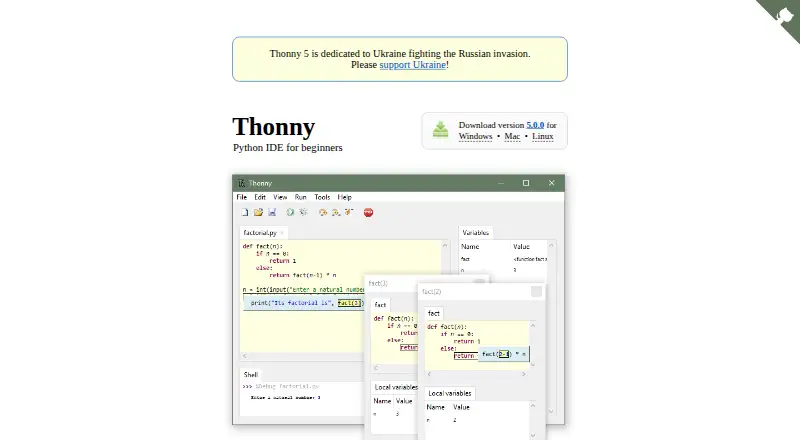
Thonny is a free Python IDE for beginners, available for Windows, macOS, and Linux. Its uncluttered initial interface leaves out features that can distract new learners, while editor cues highlight syntax errors and variable occurrences and distinguish local variables from globals. Learning tools can display variables, function call frames, and variable scopes. The integrated debugger steps through code without requiring breakpoints and can show expression evaluation. Thonny includes a graphical package manager and a system shell prepared for Python commands; bundled installers include Python 3.14. Windows installers support 64-bit Windows 10 and 11, with a separate build for Windows on Arm. macOS installers require macOS 10.15 or later. Since version 5.0, Linux installation uses system Python and creates a virtual environment rather than offering a Linux binary bundle. That release also ended publication of 32-bit Windows installers and the XXL bundle. Plug-ins are available, though their developers’ endorsements and responsibility are not provided by Thonny.
Good
- Free, with installers or instructions for three desktop platforms.
- Debugger steps through code without breakpoints.
- Learning tools show variables, scopes, and call frames.
- Includes a package manager GUI and Python-ready shell.
Watch out
- No Linux binary bundles since version 5.0.
- 32-bit Windows installers and XXL bundle are no longer published.
- macOS installers require macOS 10.15 or later.
- Developers do not endorse or take responsibility for listed plug-ins.
Who it suits
Thonny suits beginners learning Python who want an IDE with visual explanations of code, variable scopes, and step-by-step debugging. It also fits users who want a free environment across Windows, macOS, or Linux.
Verdict
Thonny provides beginner-oriented Python editing, debugging, and learning aids at no cost. Check the current platform requirements and Linux installation approach before choosing it.
The facts
Each one read from Thonny's own pages, with the date it was checked.
What it does
- Author
- The official site identifies Aivar Annamaa as Thonny's main author.checked 3 Oct 2026
- Beginner interface
- Its initial interface leaves out features that may distract beginners.checked 3 Oct 2026
- Bundled Python
- The official downloads page says Thonny comes with Python 3.14 in its bundled installers.checked 3 Oct 2026
- Debugger
- Its debugger runs programs step by step without requiring breakpoints and can show expression evaluation.checked 3 Oct 2026
- Editor
- The editor highlights syntax errors and variable occurrences, and distinguishes local variables from globals.checked 3 Oct 2026
- Extension caveat
- Thonny’s developers say they do not endorse or take responsibility for the listed plug-ins.checked 3 Oct 2026
- Extensions
- Thonny supports plug-ins, including listed extensions for Git, Black formatting, EV3 code uploads, and Flake8 warnings; its developers say they do not endorse or take responsibility for them.checked 3 Oct 2026
- Learning tools
- The IDE can display variables, function call frames, variable scopes, and syntax errors to help explain Python code.checked 3 Oct 2026
- Notable limits
- The version 5.0 release notes say 32-bit Windows installers and the XXL bundle are no longer published.checked 3 Oct 2026
- Package management
- Thonny includes a package manager GUI and a system shell prepared for Python commands.checked 3 Oct 2026
- Product
- Thonny describes itself as a Python IDE for beginners.checked 3 Oct 2026
- Security detail
- The Windows installation guide says the default installer does not request administrator privileges and installs under the current user's home folder.checked 3 Oct 2026
- Support
- The site links to installation instructions, a FAQ, a wiki, a forum or mailing list, issue tracking, and GitHub Discussions.checked 3 Oct 2026
- Support channels
- The official site links users to a forum or mailing list, issue tracker, and GitHub Discussions.checked 3 Oct 2026
- Supported systems
- The official site provides downloads or installation instructions for Windows, macOS, and Linux.checked 3 Oct 2026
Where it runs
- Linux installation
- Since version 5.0, Thonny no longer publishes Linux binary bundles; its installation script uses system Python and creates a virtual environment for Thonny and its dependencies.checked 3 Oct 2026
- macOS requirements
- The Thonny 5.0 release notes say its Intel and Apple silicon installers require macOS 10.15 or later.checked 3 Oct 2026
- Platforms
- Official downloads are listed for Windows, macOS, and Linux.checked 3 Oct 2026
- Windows requirements
- The Thonny 5.0 release notes say the main Windows installer includes Python 3.14 and supports 64-bit Windows 10 and 11; a separate installer is available for Windows on Arm.checked 3 Oct 2026
Alternatives to Thonny
- 1

Replit
Free planAndroidiOSWebLinux8.4From $18 a month - 2

PyCharm
Free planOpen sourceAPILinuxmacOSSelf-hosted8.2From $100 a year - 3

StackBlitz
Free planAndroidiOSWebAPI8.2Free plan - 4

Arduino IDE
Free planOpen sourceAndroidiOSWebAPI8.0Free plan - 5

Arm Keil MDK
Free planWebAPIExtensionLinux7.9From 82.39 CHF a month - 6

CLion
Free planExtensionLinuxmacOSSelf-hosted7.8From $10.90 a month