
Testery
Testery is a cloud platform for running existing automated tests and coordinating them with CI/CD.
What Testery is
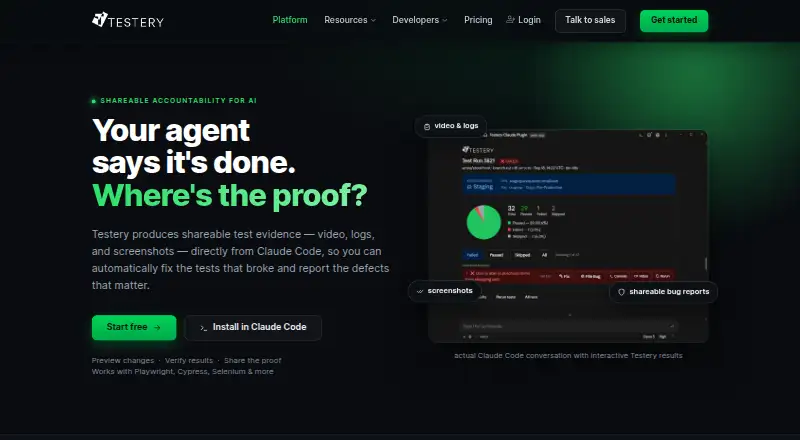
Testery is a cloud platform for running existing automated tests and coordinating them with CI/CD. It distributes tests across parallel cloud runs and offers flaky-test detection, quarantine, and automatic retries. Results can include logs, screenshots, and video, with shareable evidence for each run. Pull request status checks can gate merges or deployments until tests pass. Listed integrations include GitHub, Bitbucket, Slack, Microsoft Teams, OpsGenie, and webhooks. A Claude Code plugin and MCP server let compatible assistants trigger runs, read results, and rerun failures. Local runs execute on the user’s hardware, and users choose which results sync to the cloud. The Growth plan costs $0 per month for 10 test execution hours, then $1.20 per hour; it includes 10 parallel runners. Team is listed at $500 per month and Scaling at $950 per month. For cloud tests that need to access environments behind a firewall, users can whitelist Testery static IPs or use a tunneling tool such as ngrok. Certificate-based authentication is not currently supported.
Good
- Supports flaky-test detection, quarantine, and retries.
- Run results can include logs, screenshots, and video.
- Status checks can gate merges or deployments.
- Local runs execute on user hardware.
- Growth includes 10 parallel runners.
Watch out
- Growth costs $1.20 per hour after 10 monthly hours.
- Firewall access requires IP whitelisting or tunneling.
- Certificate-based authentication is not currently supported.
Who it suits
Testery suits teams running automated tests as part of CI/CD, particularly those who want parallel execution, run evidence, and deployment gates. Local execution is an option for teams that want to choose which results sync to the cloud.
Verdict
Testery coordinates automated test runs with CI/CD and provides controls for flaky tests, results, and deployment gates. Review the Growth hours and firewall requirements to determine whether its setup fits your testing environment.
Plans and prices
From Testery's own pricing page, checked 30 Sep 2026.
| Plan | Price | What it gives you |
|---|---|---|
| Growth | Free | 10 test execution hours · 10 parallel test runners · reporting & analytics · test artifacts · CI/CD integration · CLI · test API · Claude integration · $0 for 10 hr/mo then $1.20/hr |
| Team | $500 a month | 500 test execution hours · 30 parallel test runners · unlimited users · reporting & analytics · test artifacts · CI/CD integration · CLI · test API · $500/mo |
| Scaling | $950 a month | 1000 test execution hours · 30 parallel test runners · unlimited users · reporting & analytics · test artifacts · CI/CD integration · CLI · test API · $950/mo |
| Enterprise | Priced on request | Any number of parallel tests · custom test runners · advanced workflow capabilities · Talk to sales |
The facts
Each one read from Testery's own pages, with the date it was checked.
What it does
- AI assistants
- Testery offers a Claude Code plugin and an MCP server for compatible assistants to trigger runs, read results, and rerun failures.checked 30 Sep 2026
- Cloud firewall access
- For cloud tests accessing environments behind a firewall, the FAQ describes whitelisting Testery static IPs or using a tunneling tool such as ngrok, and says certificate-based authentication is not currently supported.checked 30 Sep 2026
- Deployment gates
- Testery can provide pull request status checks and gate merges or deployments until tests pass.checked 30 Sep 2026
- Flaky test handling
- The product offers flaky-test detection, quarantine, and automatic retries.checked 30 Sep 2026
- Integrations
- The platform page lists GitHub, Bitbucket, Slack, Microsoft Teams, OpsGenie, and webhooks, including connections to downstream tools such as Zapier.checked 30 Sep 2026
- Local execution and data
- Local runs execute on the user's hardware, and the user chooses what results sync to the cloud.checked 30 Sep 2026
- Parallel execution
- Testery distributes tests across parallel cloud runs and describes support for scaling to thousands of tests in parallel.checked 30 Sep 2026
- Purpose
- Testery is a cloud test orchestration platform designed to run existing automated tests and coordinate testing with CI/CD.checked 30 Sep 2026
- Run evidence
- Test results can include logs, screenshots, and video, with shareable evidence for each run.checked 30 Sep 2026
- Support
- The company offers help with product questions, pricing, and demos through its team, and publishes a sales email and phone number.checked 30 Sep 2026
- Test frameworks
- The site lists Playwright, Cypress, Selenium, Robot Framework, Jest, Cucumber/BDD, Postman, and JUnit/TestNG as supported frameworks.checked 30 Sep 2026
The company
- Headquarters
- The contact page lists an address at 115 Conley Rd Ste 1061, Columbia, Missouri 65201, USA.checked 30 Sep 2026
The full review of Testery
Overview
Testery is a cloud test orchestration service for teams that already have automated tests and want to connect them to CI/CD. It is best suited to engineering groups that need parallel execution, flaky-test controls, and deployment checks in one workflow. Growth starts free, but its 10-hour monthly allowance and cloud-networking requirements deserve a close look before adoption.
Testery works with a broad set of frameworks, including Playwright, Cypress, Selenium, Robot Framework, Jest, Cucumber/BDD, Postman, JUnit/TestNG, WebdriverIO, Nightwatch.js, SpecFlow, PyTest, and NUnit. It distributes tests across parallel cloud runs and describes scaling to thousands of tests in parallel, which can help teams shorten large suites without replacing their existing frameworks.
Key features
Execution and failure management
Flaky-test detection, quarantine, failure clustering, and rerun policies target a familiar source of CI friction: failures that consume time without reliably identifying a product defect. These controls are useful for teams trying to keep unstable tests from blocking every change, though they do not remove the need to diagnose and repair the underlying tests.
Run evidence can include logs, screenshots, and video, with shareable artifacts for each run. That gives developers concrete context when investigating failures rather than just a pass-or-fail result.
Delivery workflow and integrations
Pull request status checks can gate merges or deployments until tests pass. That makes Testery relevant to teams that want test outcomes to influence release decisions, while integrations with GitHub, Bitbucket, Slack, Microsoft Teams, OpsGenie, and webhooks can route events into existing workflows, including downstream tools such as Zapier.
Local runs, AI, and network access
Local execution runs on the user's hardware, and the user chooses which results sync to the cloud. Testery also offers a Claude Code plugin and an MCP server for compatible assistants to trigger runs, read results, and rerun failures. For cloud tests that need to reach systems behind a firewall, teams must whitelist Testery static IPs or use a tunneling tool such as ngrok; certificate-based authentication is not currently supported. That limitation may rule it out for environments that require certificate-based access.
Pricing
Growth is free, billed $0 for 10 hr/mo then $1.20/hr. It includes 10 test execution hours, 10 parallel test runners, reporting and analytics, test artifacts, CI/CD integration, CLI, test API, and Claude integration. This is the sensible starting point for a small workload, but the hourly charge after the monthly allowance means costs can rise as execution grows.
Team is $500 a month, billed $500/mo, for 500 test execution hours and 30 parallel runners. It adds unlimited users while retaining reporting and analytics, artifacts, CI/CD integration, CLI, and test API. It fits teams with recurring workloads that have outgrown Growth, though the plan still caps execution hours.
Scaling is $950 a month, billed $950/mo, for 1,000 test execution hours and 30 parallel runners, with unlimited users and the same core reporting, artifact, and CI/CD features. It is aimed at higher-volume teams; compared with Team, its added allowance is execution time rather than more parallel runners. Enterprise has custom pricing and offers any number of parallel tests, custom test runners, and advanced workflow capabilities, making it the tier to consider for unusual or larger-scale requirements.
Platforms
Testery supports API, Linux, macOS, self-hosted, web, and Windows environments. Its mix of cloud orchestration and local execution gives teams options, but access to firewalled cloud test targets may require network configuration.
Who it's for
Testery is a strong fit for teams with existing automated suites that need parallel cloud runs, traceable artifacts, and test-based merge or deployment gates. Growth offers a low-cost way to begin, while Team and Scaling give established workloads larger hour allowances and unlimited users. Teams that need certificate-based authentication for cloud access, or that cannot accommodate the firewall workarounds, should look elsewhere.
Pros and cons
- Pros: Broad framework support lets teams orchestrate existing suites rather than start over.
- Pros: Parallel runners, failure clustering, quarantine, and retries address both execution time and noisy failures.
- Pros: Logs, screenshots, video, and shareable run evidence help teams investigate failures and coordinate fixes.
- Pros: Status checks and deployment gates connect test outcomes directly to release decisions.
- Cons: Growth's 10 execution hours are followed by a $1.20/hr charge, so usage requires monitoring.
- Cons: Team and Scaling both provide 30 parallel runners; Scaling raises execution hours but not concurrency.
- Cons: Cloud access behind a firewall requires whitelisting static IPs or tunneling, and certificate-based authentication is unsupported.
Alternatives
For a broader comparison of this category, see Test Flakiness Management Software.
- Captain is a freemium option with a free OSS plan for file-based configuration, parallel suite partitioning, flaky-test tracking and quarantine, and retries; choose it when those core controls are enough.
- Flakiness.io is a freemium, web and self-hosted alternative with a Startup plan at $49 a month; consider it if those deployment options suit your setup.
- Trunk Flaky Tests offers a free plan capped at 5 repo committers and 5M test spans per month, plus a free trial; it may suit teams comparing a bounded free allowance.
- FlakyWatch has a free plan for one repository with classification and cost tracking, GitHub issue creation, 14-day history, and a weekly digest; choose it for that focused workflow.
- Qualflare has a free Starter tier capped at one project, one active user, 200 test cases, and 100 test reports; consider it when those limits fit.
- FlakyTest.dev offers a free OSS plan for personal projects, nonprofits, and open-source projects; it is an option for those uses.
- Flake is a free alternative for Linux, macOS, self-hosted, and Windows environments.
- HyperExecute offers a free plan with 300 testing minutes, up to two concurrent sessions, and Windows or Linux VMs; consider it for that smaller allowance.
Verdict
Choose Testery if your team wants to orchestrate existing tests, control flaky failures, and make CI results part of merge or deployment decisions. Its strongest case is the combination of parallel execution, useful run evidence, and delivery gates; its main cautions are Growth's usage-based overage and the networking work required for firewalled environments.
Alternatives to Testery
- 1

Cypress
Free planOpen sourceWebAPILinuxmacOS8.4From $67 a month - 2

Qualflare
Free planAndroidiOSWebAPI8.2From $16 a month - 3

TeamCity
Free planAndroidWebAPILinux8.2From $15 a month - 4

Captain
Free planOpen sourceWebAPILinuxmacOS8.1$10 one-time - 5
Bitbucket Pipelines
Free planWebAPILinuxmacOS8.0From $3.65 a month - 6

BuildPulse
Free planWebAPILinuxmacOS7.9Free plan