Teevity
Teevity provides cloud usage analytics for AWS, Google Cloud and Microsoft Azure.
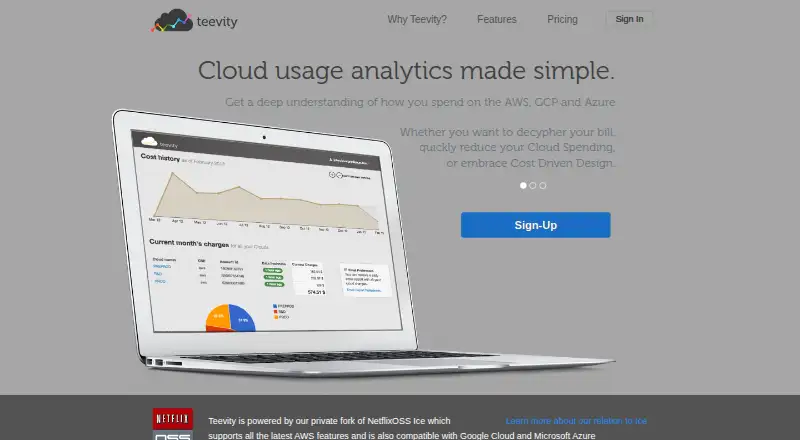
What Teevity is
Teevity provides cloud usage analytics for AWS, Google Cloud and Microsoft Azure. It brings bills from supported clouds into one dashboard and provides an end-of-month cost forecast. Its Dynamic Cost Explorer has summary, detail, comparison and reservations reports. Costs can be classified in real time and allocated to teams, projects, activity types or countries. The documentation also lists global cost monitoring, cost and usage distribution, administrative automation, and financial and technical resource optimization. Integrations include Google BigQuery, Excel, Google Spreadsheet and Dropbox. A REST API exposes web portal features using JSON. The CLI package includes scripts for macOS, Linux, Unix and Windows and requires Java 8 or later. Dynamic Cost Explorer downloads are available in CSV layouts. The free service includes high-level cost monitoring, a dashboard and daily email. Teevity is available through web, API and desktop platforms.
Good
- Brings bills from three cloud providers into one dashboard.
- Forecasts end-of-month costs.
- Allocates costs to teams, projects, activity types or countries.
- Dynamic Cost Explorer includes comparison and reservations reports.
- Free service includes dashboard and daily email.
Watch out
- Dynamic Cost Explorer downloads are limited to CSV layouts.
- The CLI requires Java 8 or later.
- Enterprise costs €999 a month.
- Pro costs €99,599 a month.
Who it suits
Teevity may suit organizations monitoring spend across AWS, Google Cloud or Azure, especially those needing cost allocation or forecasting. Teams planning integrations can consider its REST API and listed finance integrations.
Verdict
Teevity combines multi-cloud cost visibility with reporting, allocation and forecasting features. Check the export format and listed plan costs before deciding whether it fits your cloud-management needs.
Plans and prices
From Teevity's own pricing page, checked 15 Oct 2026.
| Plan | Price | What it gives you |
|---|---|---|
| Free services | Free | high-level cost monitoring · consolidated cloud-spending dashboard · daily email · free forever |
| MSP/cloud reseller | €99 a month | white-label Teevity pricing for MSPs, resellers and system integrators · starts at |
| MSP, cloud reseller and system integrator | €99 a month | White-label version available · Starts at 99€/month |
| Enterprise Support | €399 a month | single point of contact · custom deals for large deployments · separately from Basic, Pro or Enterprise |
| Enterprise | €999 a month | all Pro features · enforced cost visibility · role-based spend perimeters · custom chargeback · asset billing · reserved-capacity management · mass dashboard creation · fixed monthly price |
| Pro | €99,599 a month | all Basic features · multi-user dashboards · advanced cost allocation · buying recommendations · resource-usage analytics · reports · API access · spreadsheet integrations · fixed tiered pricing |
| Basic | — | cost forecast computation · detailed AWS/GCP/Azure monitoring · tag breakdowns · cost-deviation identification · custom resource groups · monthly maximum limit · pay by the minute through your AWS account |
The facts
Each one read from Teevity's own pages, with the date it was checked.
What it does
- API
- Teevity exposes the features available in its web portal through a REST API using JSON.checked 1 Oct 2026
- API authentication
- API calls authenticate with an access key supplied either as an accessKey query parameter or an x-teevity-accessKey header.checked 15 Oct 2026
- AWS connection security
- The recommended AWS connection uses an IAM cross-account trust relationship and an external ID generated for the Teevity account.checked 1 Oct 2026
- Buying strategies
- Teevity provides recommendations for cloud-provider purchasing options such as reserved capacity.checked 15 Oct 2026
- CLI
- The CLI distribution contains a JAR, a macOS/Linux/Unix shell script and a Windows DOS script.checked 15 Oct 2026
- CLI requirement
- Running the CLI requires Java Runtime 8 or later; the documentation says it was tested with Java 11.checked 15 Oct 2026
- Daily email
- Teevity sends a daily cloud-spending email that includes an end-of-month forecast and recent spend chart.checked 15 Oct 2026
- Data export
- Dynamic Cost Explorer downloads currently support CSV format with Time As Columns, Time As Lines or Budget layouts.checked 1 Oct 2026
- Deviation detection
- Users can define a baseline and see deviations from expected cost and usage patterns.checked 15 Oct 2026
- Documentation scope
- The documentation covers dashboards, Dynamic Cost Explorer, tags, cost partitions, business metrics, reserved-instance optimization, resource-usage analysis, budgets and account configuration.checked 15 Oct 2026
- FinOps capabilities
- The documentation lists global cost monitoring, enterprise cost and usage distribution, administrative automation, financial optimization and technical resource optimization.checked 1 Oct 2026
- Headcount record
- Pappers reports 0 employees in its 2026 data record, while LinkedIn shows a 2-10 employee range.checked 15 Oct 2026
- Integrations
- The finance workflow integrates with Google BigQuery, Microsoft Excel, Google Sheets and Dropbox.checked 15 Oct 2026
- Legal entity
- Pappers identifies Teevity as an active French EURL registered in Toulouse under SIREN 510 423 924.checked 15 Oct 2026
Where it runs
- CLI platforms
- The CLI package includes a JAR, a shell script for macOS/Linux/Unix and a DOS script for Microsoft Windows, and requires Java 8 or later.checked 1 Oct 2026
The company
- Company founding
- LinkedIn lists Teevity as founded in 2009.checked 15 Oct 2026
- Company location
- Teevity says it is located in Europe, France, in the Toulouse area, and is a French EURL.checked 1 Oct 2026
- Company size
- LinkedIn lists Teevity as a 2-10 employee software-development company.checked 15 Oct 2026
Money
- Cost allocation
- Finance users can classify costs and allocate them to cost centers such as teams, projects, activities or countries.checked 15 Oct 2026
- Cost dashboard
- The service consolidates cloud accounts into one dashboard with historical charts and an end-of-month spending forecast.checked 15 Oct 2026
- Cost monitoring
- The service puts all cloud bills in one dashboard with a smart end-of-month forecast.checked 1 Oct 2026
- Cost sharing
- Dashboards and daily emails can be shared with colleagues to distribute cost and usage information.checked 15 Oct 2026
- Derived business costs
- Business metrics can be combined with cloud costs to calculate measures such as cost per tenant or cost per transaction.checked 15 Oct 2026
- Dynamic Cost Explorer
- The Dynamic Cost Explorer supports summary, detail, comparison and reservations reports.checked 1 Oct 2026
The full review of Teevity
Overview
Teevity brings AWS, Google Cloud and Microsoft Azure usage into a cloud-cost management service. It is best suited to organizations that need to distribute costs across internal owners as well as track spending. Its reporting and allocation capabilities reach well beyond the high-level view in the free plan.
Key features
A shared dashboard combines cloud bills and adds an end-of-month spending forecast, helping teams see where costs are heading before the billing period closes. Dynamic Cost Explorer offers summary, detail, comparison and reservations reports, giving analysts several ways to examine spend and commitments.
Real-time classification can assign costs to teams, projects, activity types or countries. That can support internal accountability and chargeback, especially in larger organizations with several services or business units. Teevity also documents capabilities for cost and usage distribution, administrative automation, financial and technical optimization. Rightsizing guidance and commitment management extend its scope beyond bill reporting.
Finance integrations include Google BigQuery, Excel, Google Spreadsheet and Dropbox. A JSON REST API exposes the features of the web portal, which may suit teams connecting cloud-cost work to other systems. Cost Explorer exports are CSV-only, with Time As Columns, Time As Lines and Budget layouts; teams that require another export format may find that restrictive.
The CLI package includes a JAR, macOS/Linux/Unix shell script and Windows DOS script, and requires Java 8 or later. For AWS, the recommended connection uses an IAM cross-account trust relationship and an external ID generated for the Teevity account. That provides a defined connection approach, though teams will need to account for the setup in their AWS environment.
Pricing
The Free services plan costs nothing and provides high-level cost monitoring, a dashboard and daily email, with all cloud spending in one place. It is a useful entry point for basic visibility, but its high-level scope makes it a poor fit for organizations needing deeper analysis or allocation controls.
The Basic plan is pay per use, charged by the minute through the AWS account, and covers AWS, GCP and Azure monitoring with a configurable monthly maximum. It may suit teams that want usage-based billing and a spending ceiling; the cost will depend on use.
The MSP, cloud reseller and system integrator plan starts at €99 a month and offers a white-label version. That makes it the plan aimed at service providers presenting cost monitoring to their own customers. Enterprise Support costs €399 a month, is sold separately, and is available with Basic, Pro and Enterprise; its single point of contact is relevant to organizations that want a dedicated support channel.
Enterprise costs €999 a month at a fixed monthly price, with no additional percentage charge. It includes visibility controls, custom chargeback, reserved capacity management and mass user dashboards, making it the clearest fit for organizations needing broad access and allocation features. Pro is shown at €99,599 a month with fixed tiered pricing; it includes multi-user dashboards, advanced cost breakdowns, optimization reports and API access. The substantial difference between those displayed prices makes it important to compare the plan scope and cost against actual requirements before choosing.
Platforms
Teevity supports API, Linux, macOS, web and Windows. Its Java-based CLI package covers Unix-like systems and Windows, while web access and the REST API offer alternatives to command-line use.
Who it's for
Teevity is strongest for finance, FinOps and engineering teams sharing responsibility for cloud spend across AWS, GCP and Azure. Real-time cost allocation and forecasting are particularly useful when teams need to connect usage with internal owners and budgets. A user seeking only basic visibility can start with the free plan; organizations requiring tailored chargeback, reserved-capacity management or wider dashboards should consider Enterprise. The per-minute Basic model may appeal to teams preferring usage-based billing, while service providers have a dedicated white-label option.
Pros and cons
- Pros: Combines three major cloud providers in one dashboard, with end-of-month forecasting and cost allocation by organizational dimensions.
- Pros: Offers multiple report types, commitment management, optimization capabilities, integrations and API access for teams with broader FinOps workflows.
- Cons: Cost Explorer exports are limited to CSV, which may not meet workflows that depend on other file formats.
- Cons: The free plan is limited to high-level monitoring, while several advanced controls sit in paid tiers.
- Cons: Pro is shown at €99,599 a month, a price that merits close scrutiny against the included features and alternatives.
Alternatives
Cloud Cost Management Software is the broader category to explore when comparing services.
Choose Infracost if infrastructure-as-code cost estimation and CI/CD run quotas better match the task; its Infracost CI/CD plan includes 1,000 free runs per month, and it offers API, extension, desktop and web platforms.
AWS Billing and Cost Management is a free alternative for AWS-focused users, though some features have usage-based charges and Cost Explorer API requests and hourly granularity are charged separately.
Google Cloud Cost Management is the natural alternative for Google Cloud customers seeking its no-additional-charge cost-management tools; charges may still apply for services used, including BigQuery and Pub/Sub.
Economize may suit a smaller initial footprint: its free plan covers one cloud provider, one account and one organization, up to $100k monthly cloud spend.
Flexera One IT Asset Management is another paid option for readers comparing IT asset management products.
CloudZero is worth considering when unlimited cost sources, users, dimensions and dashboards are the priority; its subscription price is custom pricing.
CoreStack FinOps is a paid alternative offered individually, in a bundle or with unlimited CoreStack Assessments, with pricing by quote.
Vantage may suit teams comparing a free tier with a lower-cost paid option: its Starter plan includes $2,500 cloud spend, three users and six months of data retention, while Pro costs $30 a month and includes $7,500 cloud spend and five users.
Verdict
Choose Teevity if your organization needs a shared AWS, GCP and Azure cost view with forecasting, real-time allocation and room for more advanced FinOps work. Its strongest case is bringing reporting and cost ownership together across clouds. Look elsewhere if CSV-only exports are a blocker, or if the paid-tier costs and feature boundaries do not fit your scale.
Getting started
- Visit https://www.teevity.com/.
- Choose the free service or review the listed paid plans.
- Connect cloud spending for AWS, Google Cloud, or Microsoft Azure.
- For AWS, use the recommended IAM cross-account trust relationship and Teevity-generated external ID.
- Use the web portal, or install the CLI package with Java 8 or later on a supported platform.
Limits worth knowing
The free service provides high-level cost monitoring, a dashboard, and daily email. Basic is pay per use through an AWS account and has a configurable monthly maximum; the listed plan features otherwise vary by tier.
Questions
Is there a free plan?
Yes. The Free services plan is free and includes high-level cost monitoring, a dashboard, and daily email.
What clouds does Teevity support?
It supports AWS, Google Cloud, and Microsoft Azure.
What does Teevity cost?
The MSP, cloud reseller, and system integrator plan is €99 a month; Enterprise Support is €399 a month; Enterprise is €999 a month; and Pro is €99,599 a month. Basic is pay per use through an AWS account, and no price is listed for it.
Can I use an API or command-line interface?
A REST API exposes web portal features using JSON. The CLI package includes macOS/Linux/Unix shell and Windows DOS scripts and requires Java 8 or later.
Which integrations are named?
Teevity lists Google BigQuery, Excel, Google Spreadsheet, and Dropbox integrations.
Alternatives to Teevity
- 1

Infracost
Free planOpen sourceWebAPIExtensionLinux8.1From $250 a month - 2

CloudFix
Free planWebAPISelf-hosted7.3From $149 a month - 3

AWS Billing and Cost Management
Free planWebAPI6.6From $0.01 a month - 4

Flexera One IT Asset Management
WebSelf-hosted6.4 - 5
CloudBolt
Free planWebAPISelf-hosted6.2Free plan - 6

OpenCost
Free planWebAPILinuxSelf-hosted6.2Free plan